


Introduction:
What if the single source of truth for your entire infrastructure lived in the wrong cloud?
For years, our Terraform state lived in an AWS S3 bucket while our infrastructure increasingly ran on Google Cloud Platform. That split created cross-cloud dependencies, IAM complexity, and a growing mismatch between where we managed infrastructure and where we stored its state.
Terraform state is the record of what Terraform believes exists in the real world. Move it incorrectly, and the next Terraform apply can propose destructive changes against production.
This post covers how we migrated hundreds of Terraform projects from AWS S3 to Google Cloud Storage (GCS), how we verified each migration, and the challenges we solved along the way.
Why this matters:
Operational alignment — State storage should live in the same cloud as the resources being managed.
Org structure — We operate multiple organizational tiers, each with its own GCS state bucket.
Safety at scale — With 100+ CI-managed Terraform projects, ad-hoc terraform state mv commands were not an option.
What you’ll learn in this article:
Our migration architecture and phased approach
Step-by-step instructions for copying state and switching backends
How we automated validation across multiple repos
Challenges we faced: path mismatches, stale datasources, and state drift and how we solved them
Understanding Our Starting Point:
Before (S3):
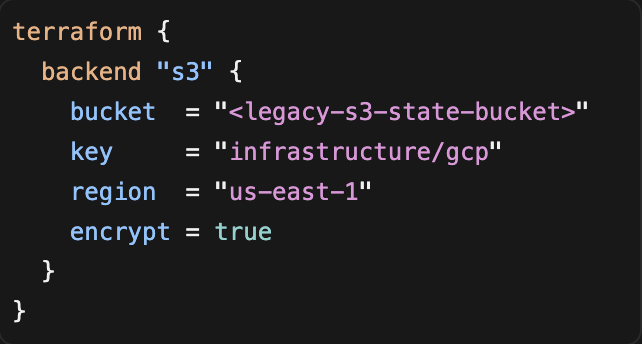
S3 backend config
After (GCS):
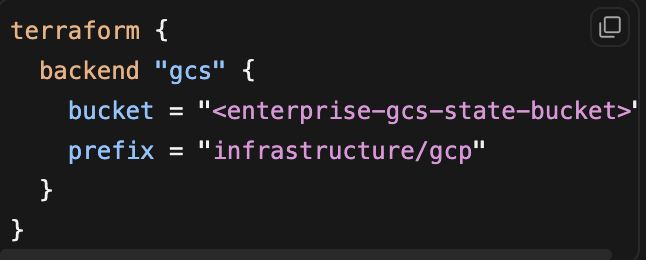
GCS backend config
Key convention: the S3 key maps verbatim to the GCS prefix.
Migration Targets:
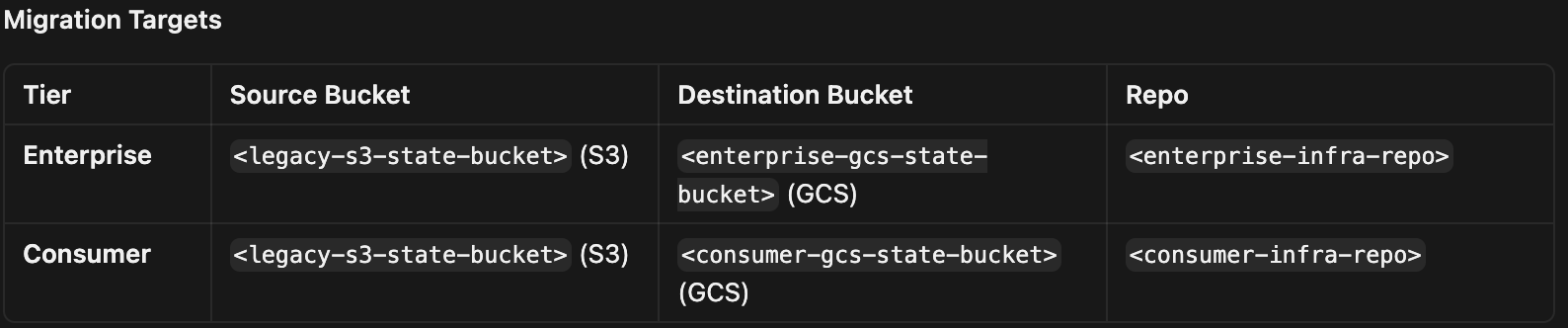
Some consumer projects that had already landed in the enterprise bucket were later moved to the consumer bucket via a separate GCS-to-GCS migration driver.
Migration Architecture: Four Phases

We treated state migration as a pipeline, not a one-shot operation. Each Terraform project progresses through four distinct phases: Each phase is independently verifiable, which was critical when migrating at scale via pull-request-driven CI (e.g., Atlantis).
Phase 0: Inventory and Classification
Before touching state, we built validate_state_migration.py to scan both repos and label every Terraform directory:
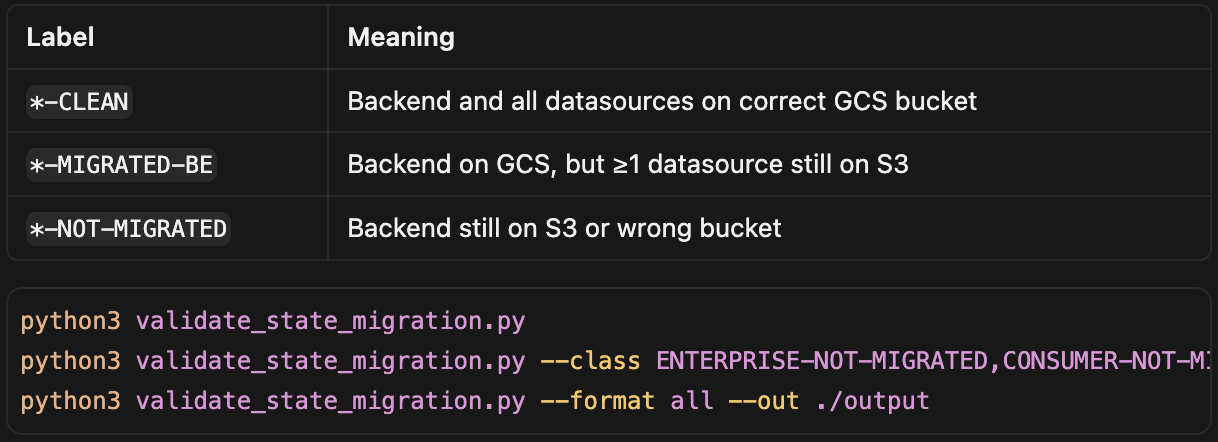
validate state migration
This became our living migration dashboard and primary completion gate.
Phase 1: Copy State Files (S3 → GCS)
Instead of per-project gsutil cp, we built Terraform migration drivers:
state-migration/main.tf — v1 (frozen, lookup-only)
state-migration-v2/main.tf — v2 (new paths added here)
gcs-state-migration/main.tf — GCS-to-GCS (enterprise → consumer)
Core pattern:
data “aws_s3_object” “s3_to_gcs_migration” {
for_each = toset(local.migration_paths)
bucket = local.source_bucket
key = each.value
}
resource “google_storage_bucket_object” “s3_to_gcs_migration” {
for_each = toset(local.migration_paths)
bucket = local.destination_bucket
name = “${each.value}/default.tfstate”
content = data.aws_s3_object.s3_to_gcs_migration[each.value].body
deletion_policy = “ABANDON”
lifecycle { ignore_changes = [content, crc32c, generation, md5hash] }
}
Design choices:
deletion_policy = “ABANDON” — destroying the driver never deletes production state.
ignore_changes — driver doesn’t fight live state updates after initial copy.
One-time copy, not continuous sync.
Steps: add S3 key to migration_paths → PR → CI apply → verify with gsutil ls.
Important: State changes between copy and backend switch cause drift. Delete the stale GCS object and re-run migration if needed.
Phase 2: Switch Backend
Update backend “s3” to backend “gcs” in the project’s main.tf. Open a PR — CI runs terraform init -reconfigure and terraform plan. Zero unexpected changes is the validation gate. We kept the old S3 backend commented out for easy rollback.
Phase 3: Migrate Datasources
Many projects read upstream state via terraform_remote_state — those also pointed at S3. We automated rewrites with a script that:
Changes backend = “s3” → “gcs”, maps bucket, converts key → prefix, drops region
Follows relative module sources into shared implementation/ dirs
Safety gate: skips datasources whose upstream state isn’t copied yet
A two-phase MR workflow (whitespace baseline commit, then actual rewrite) ensured CI plans showed datasource-only diffs with no resource changes.
Phase 4: GCS-to-GCS (Org Split)
Projects that landed in the enterprise bucket but belonged to the consumer tier used the same driver pattern reading from one GCS bucket and writing to another.
How to Verify Migration:
| Level | Check | Past Criteria |
|---|---|---|
| Object | gsutil stat | State file at {prefix}/default.tfstate |
| Plan | terraform plan | 0 creates, 0 destroys, 0 changes |
| Inventory | Validator | The label is *-CLEAN (not MIGRATED-BE) |
A plan showing creates or destroys means a stale state or wrong prefix—stop and investigate.
Challenges We Faced:
1. Legacy path mismatches
Not every S3 key matched its GCS prefix. We maintained explicit key-mapping tables (e.g., infrastructure/db/app/development → infrastructure/db/development). Blind copying by directory name silently copies wrong or empty state.
2. State drift
Applies between copy and backend switch stale the GCS copy.
Fix: delete the stale object, re-copy, and immediately merge the backend PR.
Prevention: freeze applies during the copy-to-switch window.
3. Stale datasources
Projects stuck at MIGRATED-BE had split-brain dependencies. The migration script’s safety gate ensures upstream state exists in GCS before rewriting references.
4. Shared implementation modules
development/, staging/, production/ dirs often only contain a backend and module { source = “../implementation” }. Datasource reads live in the shared module; the script follows relative sources recursively.
5. Transition limbo
Treat MIGRATED-BE as blocking. Migration isn’t done until the label reads CLEAN.
6. Scale
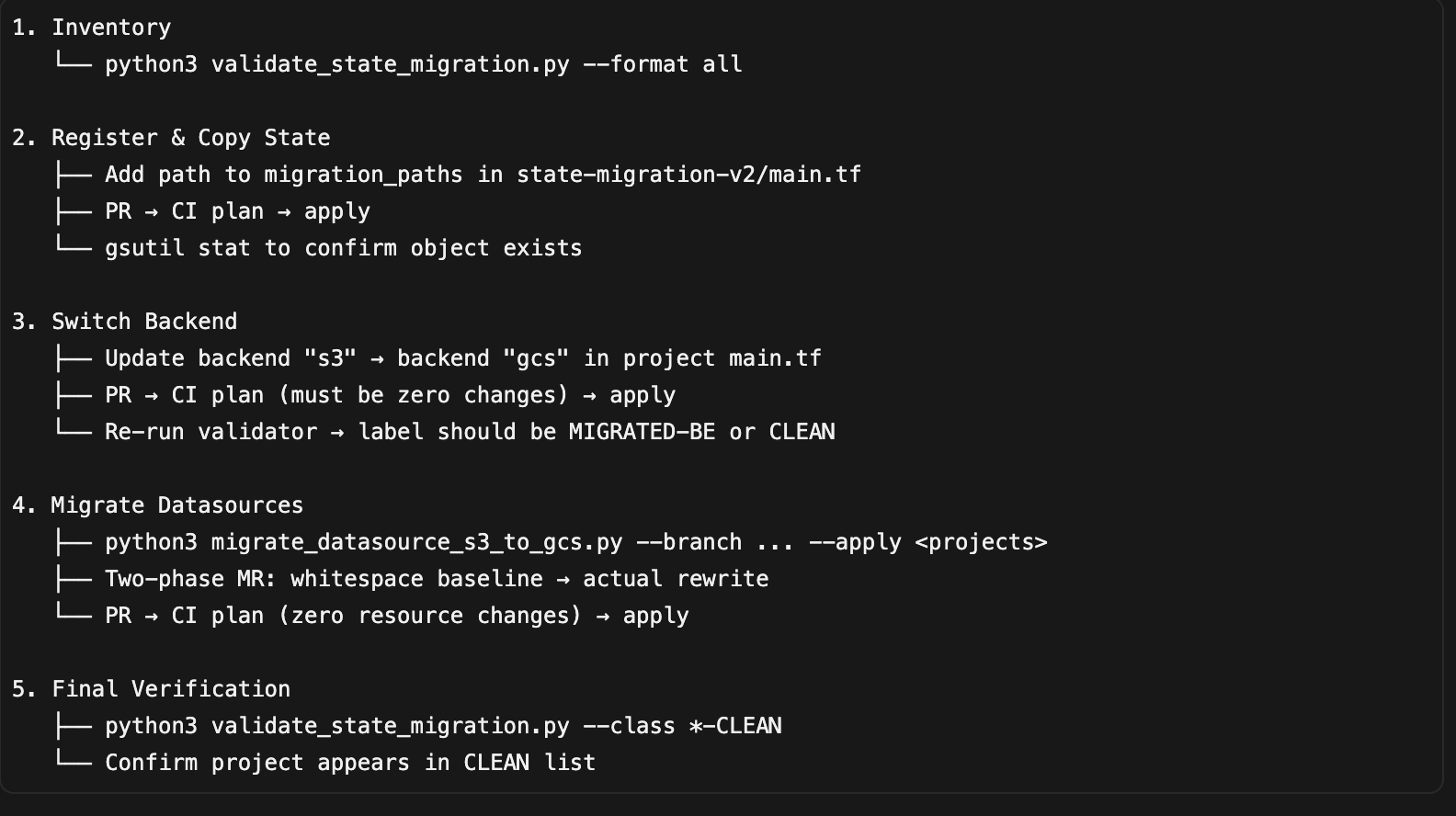
Hundreds of directories across two repos migrated in team-owned batches: register paths → copy → switch backend → migrate datasources → verify CLEAN.
7. Premigration state surgery
Some projects needed moved/removed blocks before switching backends (security boundary changes, phantom addresses to avoid destruction on removal).
End-to-End Migration Flow (Summary):
Conclusion:
Migrating Terraform state at scale is about building a repeatable, verifiable pipeline — not running a single command. Terraform-driven bulk copy, phased backend switching, automated data source migration, and inventory-based validation let us migrate hundreds of projects safely through CI with zero state-corruption incidents.
Key takeaways:
Map S3 key to GCS prefix verbatim; override legacy mismatches explicitly.
Never switch a backend without a clean plan.
Migrate in phases, each independently gateable.
Automate inventory with labels (CLEAN, MIGRATED-BE, NOT-MIGRATED).
Protect the state with deletion_policy = “ABANDON” and ignore changes.
Start with inventory, migrate in small batches, and treat every terraform plan as your safety net.
Have you migrated Terraform state across cloud providers? Share your experience in the comments — we’d love to compare notes.