


Introduction
Azure AI Foundry (formerly Azure AI Studio) is Microsoft’s unified platform for building, deploying, and governing AI applications on Azure. It brings the model catalog, prompt orchestration, agent tooling, and evaluation/monitoring under one workspace structure instead of stitching together separate Azure OpenAI, Azure AI Search, and Machine Learning resources by hand.
It matters because most AI project failures aren’t model failures. They’re operational ones: no network isolation, no identity strategy, no visibility into why the model gave a bad answer at 2 a.m. Foundry gives you the plumbing to avoid all of that, but only if you configure it deliberately.
This post walks through a production-ready Foundry setup end to end: the hub/project architecture, provisioning via CLI, model deployment, security hardening, monitoring, and the debugging issues you’ll actually run into.
Hub and project: get the architecture right first
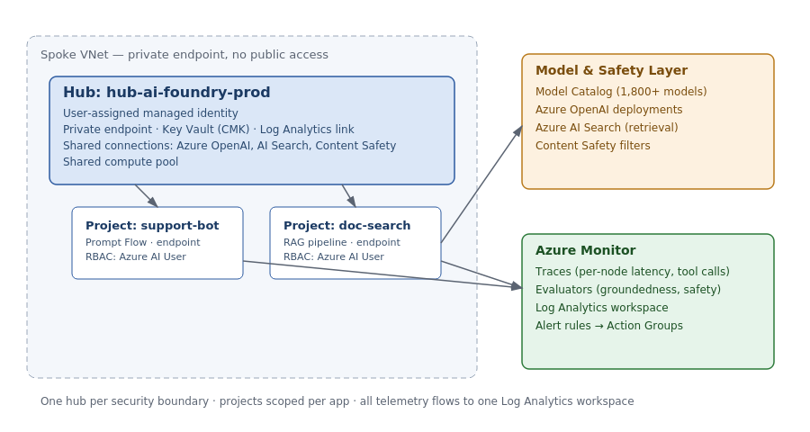
- Hub — the governance layer. Owns compute, network configuration, managed identity, and shared connections to Azure OpenAI, Azure AI Search, and Content Safety. Provision one hub per security boundary, not one per application.
- Project — the workspace where development happens. Each project inherits the hub’s connections and compute, but keeps its own prompt flows, deployments, and evaluation runs isolated from other projects.
The diagram below shows how this maps onto a typical Azure network layout: one hub in a locked-down spoke VNet, multiple projects underneath it, shared model and safety services on one side, and everything feeding telemetry into Azure Monitor on the other.
Provisioning the hub and project
Use the CLI or a Bicep pipeline instead of the portal wizard for anything beyond a demo. It’s the only way to get the network and identity configuration into a pull request someone actually reviews.
# Hub — network-locked, no public access
az ml workspace create \
  --kind hub \
  --resource-group rg-ai-foundry-prod \
  --name hub-ai-foundry-prod \
  --location eastus2 \
  --public-network-access Disabled

# Project inside the hub
az ml workspace create \
  --kind project \
  --resource-group rg-ai-foundry-prod \
  --name proj-customer-support-bot \
  --hub-id /subscriptions/<sub-id>/resourceGroups/rg-ai-foundry-prod/providers/Microsoft.MachineLearningServices/workspaces/hub-ai-foundry-prod
Non-negotiables on every hub:
public-network-access Disabledwith a private endpoint into the workload’s spoke VNet- User-assigned managed identity, not system-assigned, so its lifecycle isn’t tied to the workspace
- Customer-managed keys through Key Vault for regulated environments
- Diagnostic settings pointed at a central Log Analytics workspace before the first deployment, not after the first incident
Deploying a model
az ml online-endpoint create --name ep-support-bot --resource-group rg-ai-foundry-prod

az ml online-deployment create \
  --name gpt4o-deployment \
  --endpoint ep-support-bot \
  --model azureml://registries/azure-openai/models/gpt-4o/versions/latest \
  --instance-type Standard_DS3_v2 \
  --instance-count 2
Use the Playground to sanity-check a system prompt or compare two models before committing a deployment cycle. For anything beyond a single call, build it in Prompt Flow — a DAG where each node is an LLM call, a Python function, a retrieval step, or a conditional branch — with built-in versioning and evaluation hooks.
Locking down security
- Replace API keys with managed identity. Assign
Cognitive Services OpenAI Userto the identity, notContributor. - Keep Content Safety on. If it’s off because it blocked a demo once, tune the severity thresholds instead of disabling it.
- Split hubs by environment. Don’t let dev, staging, and prod share one network boundary — a compromised dev identity shouldn’t have a path to production.
- Scope RAG retrieval to the caller’s identity. Otherwise one authenticated user can prompt the model into surfacing another department’s documents.
Monitoring and alerting
- Tracing on every agent or flow call, so you can see which node fired, how long it took, and what retrieval returned before the model saw it.
- Groundedness evaluator on RAG pipelines, which separates “the model ignored good context” from “retrieval didn’t surface relevant context” — two very different fixes.
- Continuous evaluation against sampled live traffic. This requires the project’s managed identity to hold the
Azure AI Userrole, or the job fails silently. - Alert rules for P95 latency, error rate, token consumption spikes, and groundedness dropping below your agreed floor:
az monitor metrics alert create \
  --name alert-groundedness-floor \
  --resource-group rg-ai-foundry-prod \
  --scopes /subscriptions/<sub-id>/resourceGroups/rg-ai-foundry-prod/providers/Microsoft.MachineLearningServices/workspaces/proj-customer-support-bot \
  --condition "avg GroundednessScore < 3" \
  --window-size 15m \
  --evaluation-frequency 5m \
  --action ag-oncall-ai
Rolling back a bad deployment
Deployments are versioned endpoints, so rollback is a traffic-split change, not a redeploy:
az ml online-endpoint update \
  --name ep-support-bot \
  --traffic "gpt4o-deployment=0 gpt4o-deployment-v1=100"
Keep the previous deployment warm for at least one release cycle before deleting it.
Common issues you’ll run into
- Continuous evaluation job fails with no visible error. Almost always a missing RBAC assignment — check the
Azure AI Userrole on the project’s managed identity before assuming the evaluator config is wrong. - Groundedness score looks bad but the response reads fine. Check the retrieval trace first. It’s often a stale or irrelevant search index result, not the model misusing good context.
- Endpoint calls time out after a successful deployment. Usually a private DNS resolution issue — confirm the
privatelink.api.azureml.mszone is linked to the calling VNet. - Cost spikes with no traffic increase. Check token consumption per project before assuming a pricing change — a runaway prompt loop or unbounded conversation history is the more common culprit.
Conclusion
Get the hub-to-project mapping right before provisioning anything, put managed identity and private networking in from the first deployment, and treat monitoring as part of the initial build rather than a phase-two task. Azure AI Foundry gives you all of this out of the box — the failure mode is almost never the platform, it’s teams shipping model deployments fast and planning to “add governance later.”
If you’re setting up your own Foundry environment, start with the hub/project split and the security checklist above before you deploy your first model. Have a different approach, or run into an issue not covered here? Drop a comment below, share this with your team before your next AI project kicks off, or browse the rest of the blog for more hands-on Azure guides.