


Introduction
Most enterprise teams today work across a mix of systems — order management platforms, support ticketing tools, internal communication channels, databases, and third-party APIs. Each system works fine on its own. The difficulty shows up when a single customer request needs data from three of them before anyone can respond.
In practice, a large share of operational time goes into coordination rather than decision-making: switching between applications, copying identifiers across tools, waiting on approvals, and making sure the right team gets involved. Workflow automation was meant to reduce this load, but many implementations still stop at basic, linear flows.
n8n offers a different path and it can function as an orchestration layer — coordinating multiple systems, routing requests based on intent, and running specialized sub-workflows for each downstream integration. This article documents how we approached that design across five implementation stages, what broke along the way, and what held up in production.
Understanding Orchestration vs. Linear Automation
What is an Orchestration Layer?
Linear automation follows a fixed path: a trigger fires, a predefined sequence runs, and an output is produced. That works well for repetitive, predictable tasks.
An orchestration layer adds a decision step in between. It receives a request, determines which systems are relevant, delegates work to focused sub-workflows, and combines the results into a single response. The caller sees one interaction; behind it, several services may be involved.
Why n8n for Multi-Workflow Orchestration?
Cross-system workflows introduce real engineering problems: conditional routing, parallel API calls, failure recovery, and long-running steps that need to pause and resume. Our first attempt was a single workflow with dozens of conditional branches. It worked initially, but maintenance became painful — a field rename in one external API meant tracing logic through a large, tightly coupled canvas.
n8n addresses this through modularity. The Execute Workflow node, webhook-based resume, Code nodes for custom logic, and self-hosted deployment gave us enough flexibility to split the design into a central orchestrator and smaller, system-specific sub-workflows. That separation mirrors how backend services are typically structured: one component decides what to do; others handle how each integration is executed.
High-Level Architecture
The support orchestration system follows a hub-and-spoke model. Incoming requests pass through input validation, then an intent classification step, before being routed to the appropriate sub-workflow. Each sub-workflow owns one integration and returns a structured result to the orchestrator.
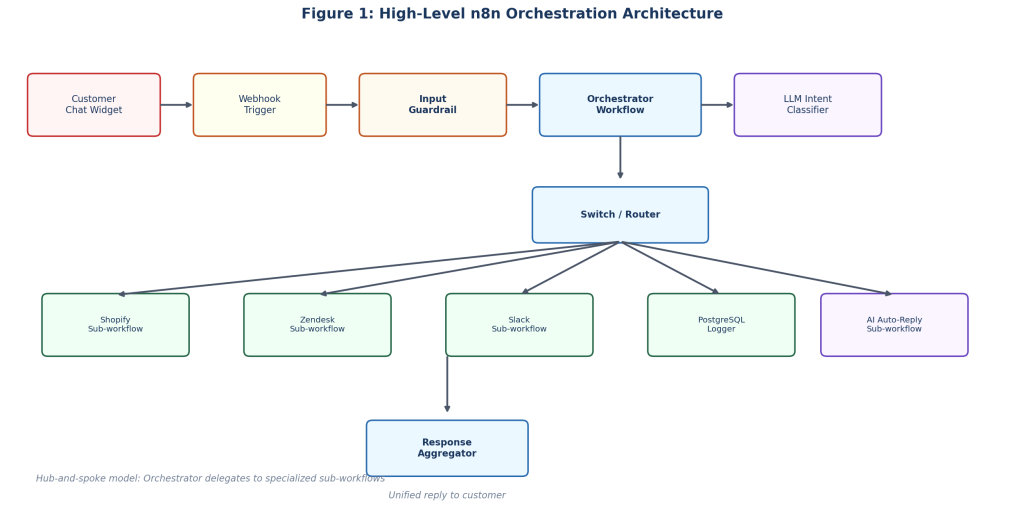
Figure 1: High-level n8n orchestration architecture
The 5-Stage Engineering Journey
Stage 1: Intent Classification and Input Guardrails
The Challenge
Customer messages arrive as an unstructured text with varied intent — refund requests plus order status inquiries, product questions and most importantly complaints. A long chain of conditional nodes cannot cover the range of phrasing users employ. Some inputs are also out of scope or attempt to manipulate the model through prompt injection.
The Solution
We implemented a two-layer input pipeline before any sub-workflow executes:
Input Guardrail: Deterministic checks — regex patterns and keyword blocklists — filter out-of-scope queries and known injection attempts before any model call.
Intent Classifier: A language model returns structured output — intent, confidence score, and extracted identifiers. The model classifies and extracts; it does not execute business actions directly.
Stage 2: Context Enrichment and Parallel Data Fetching
The Challenge
A classified intent for example “refund request” has limited value without supporting context. Fetching order data and then checking interaction history as well as validating identifiers sequentially added three to four seconds of latency per request which is a noticeable time in a real-time chat interface.
The Solution
A context enrichment sub-workflow runs parallel requests which is dedicated particularly for:
Order Management API — competition status and refund eligibility window
Relational Database — prior history for interaction management and repeat-request flags
Merge step — combining a single context object for the router
Stage 3: Multi-Route Execution and Sub-Workflow Delegation
The Challenge
Different intentions do require different execution paths. For example a refund may involve ticketing, internal notifications, and database logging. A status inquiry needs a template response with live data. A complaint requires immediate human assignment. Combining all of this in one workflow made debugging and updates unnecessarily difficult.
The Solution
We refactored to a hub-and-spoke design using n8n’s Execute Workflow node:
The orchestrator receives the classified intent and enriched context.
A routing node always directs execution to the appropriate sub-workflow.
Each sub-workflow runs independently and returns a structured result passed on to the next stage.
The orchestrator aggregates the output and delivers the final response.
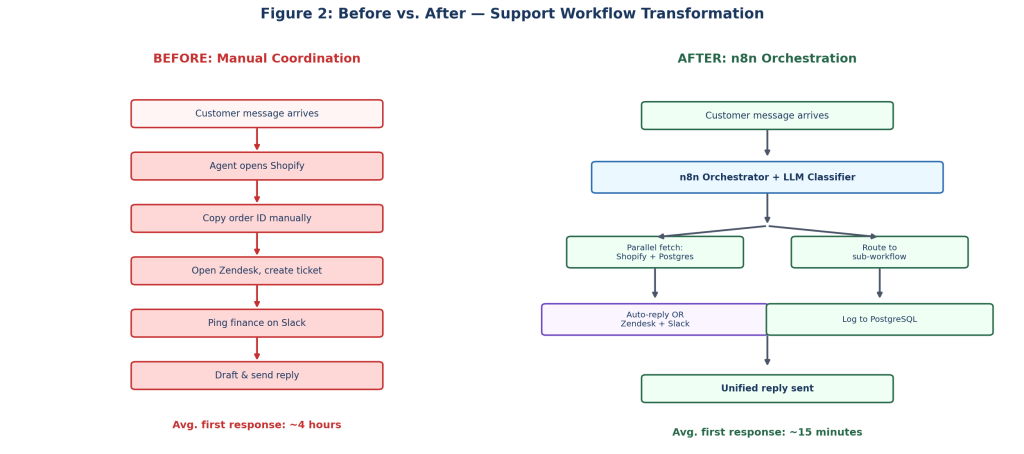
Figure 2: Manual coordination vs. orchestrated workflow
Stage 4: Asynchronous Handoffs and Long-Running Flows
The Challenge
Not every step will ever complete immediately. Finance approvals require human confirmation on every step. External webhooks can respond minutes later. There can’t be a purely synchronous, it mostly flow either to time out or lose state between steps.
The Solution
n8n’s Wait node capability and webhook resume capabilities handle pause-and-continue flows:
There is a pause in the creation of a support ticket and sending of an approval request.
A Wait node is responsible for listening for a callback from the internal communication platform.
On approval the flow resumes automatically, updates the ticket, and notification is sent to the customer.
On timeout (24 hours), the request will be escalated to a manager queue automatically.
Business and Technical Impact
Refund processing moved from a fully manual average of two days to a semi-automated flow with human approval averaging around six hours. For our current volume, n8n’s built-in wait and resume was sufficient without introducing a separate state store.
Stage 5: Production Hardening — Logging, Recovery, and Evaluation
The Challenge
Once the workflows were live, we needed a way to trace misrouted requests, handle API failures gracefully, and test routing changes without relying on manual checks every time.
The Solution
Each orchestrator run is logged to the database with the input, detected intent, confidence score, routing path, sub-workflows executed, result, and execution time. Sub-workflows include basic error handling — rate limits trigger a wait-and-retry, and ticketing failures return a generic acknowledgment with an internal alert. We also maintain a lightweight evaluation workflow that runs 25 labeled test messages through the classifier using cached responses, with no API cost.
n8n in Data Engineering
Beyond support orchestration, n8n is also used for lighter data pipeline workloads. The pattern differs from the support use case, but the same platform applies.
A representative pipeline currently in production:
- Scheduled data collection via Cron trigger
- Raw storage in a document database
- Transformation and sentiment analysis in a Code node
- Load into a relational database for reporting
- Alert to an internal channel when thresholds are exceeded
Key Benefits and Impact
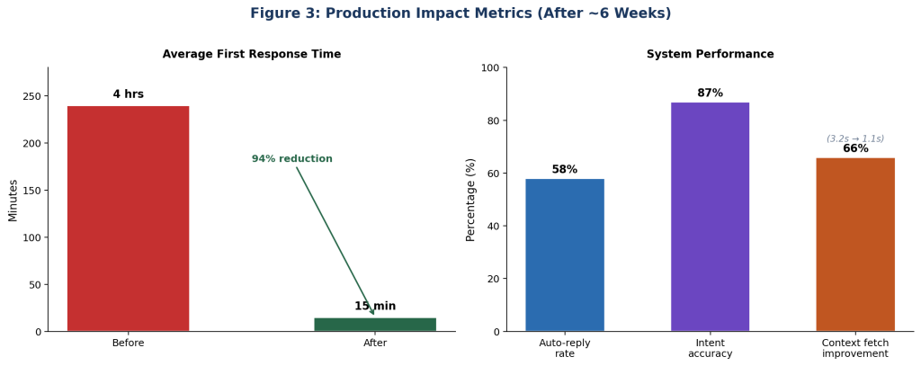
Figure 3: Measured improvements after approximately six weeks in production
The sub-workflow architecture produced measurable gains over the previous manual process:
Separation of Concerns: Each integration has an isolated sub-workflow. An API change will affect only the relevant module.
Maintainability: The offline evaluation supports safe upgrades and prompt changes without regression risk.
Response Time: Average first response time decreased drastically from approximately four hours to fifteen minutes during peak periods.
Example: End-to-End Request Handling
A customer submits a message through the chat interface:
“I want a refund for order ORD-4821. I placed it last week.”
Step 1 — Input passes through the guardrail
Before any model call runs, the message is checked against basic validation rules. Out-of-scope queries and obvious injection attempts are blocked at this stage.

Guardrail Code node
Step 2 — Intent is classified and structured
For valid input, the LLM node returns structured output instead of a free-text reply. This is an important design choice: the model interprets the message, but does not execute business actions.

Intent classification
The orchestrator reads this object and decides what happens next. At this point, no refund has been initiated.
Step 3 — Context is fetched and routing is applied
The orchestrator calls the context enrichment sub-workflow, which fetches order details and prior interaction history in parallel. Once that data is available, a Code node applies deterministic routing rules.

Routing Code node
This is where the boundary between AI and business logic becomes clear. The model identifies intent. The code enforces rules.
What happens next
For this example, the order is found and marked as refund-eligible. The orchestrator delegates to three sub-workflows:
Support ticketing — creates a ticket with full context
Internal notification — sends an approval request to the finance team
Database logging — records the full execution trail for auditing
Conclusion
The shift from basic automation to something production ready is less about n8n itself and it is more about how you use it. Once multiple systems are involved, you need to think of n8n as a coordination layer where decisions get made before anything is handed off downstream.
In our case, that meant a main orchestrator with smaller sub-workflows, guardrails before classification, parallel context fetching, and a small offline test set for regressions. That cut manual back-and-forth between tools, while keeping sensitive actions like refunds, escalations, approvals like under clear, rule based control instead of leaving them to the model.