


Introduction
.NET 8 has been the go-to platform for building and running modern business applications. It offers strong performance, long-term support, a mature ecosystem, and excellent capabilities for web, cloud, and enterprise workloads. But with .NET 10 now available as the next Long-Term Support (LTS) release, organizations running on .NET 8 have an important decision to make.
Should you upgrade now? Or is it better to continue running your existing .NET 8 applications? The answer isn’t simply about getting the latest features.
For businesses, an upgrade needs to be evaluated from multiple perspectives:
- Performance
- Security
- Support lifecycle
- Application stability
- Development productivity
- Compatibility
- Migration effort
- Infrastructure costs
- Long-term maintainability
In this blog we will explore what .NET 10 brings to the table and, more importantly, what those changes actually mean for businesses still running .NET 8.
.NET 8 vs .NET 10 at a Glance
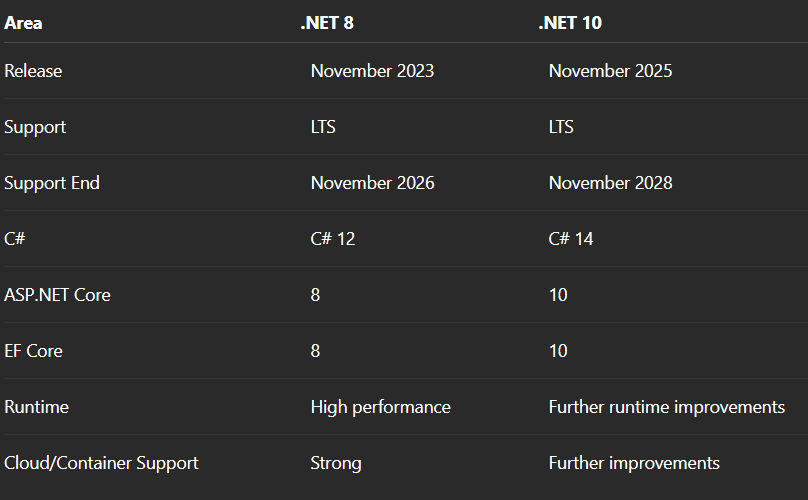
.net10 vs .net8 high level
The support timeline is one of the most important differences for any businesses. .NET 8 reaches the end of its support lifecycle in November 2026, while .NET 10 extends the LTS window through November 2028. This gives organizations running .NET 8 a reason to start thinking about their next platform strategy.
What’s New in .NET 10?
.NET 10 brings improvements across the platform not just focusing on a single major feature. Below are some of them.
1. Performance Improvements
The .NET runtime continues to receive improvements to areas like:
- JIT compilation
- Memory management
- Garbage collection
- Application startup
- CPU efficiency
- Native AOT
For businesses, better runtime efficiency can potentially mean improved application throughput, better scalability, and more efficient infrastructure usage. However, the actual impact depends on the workload. A high-traffic API may benefit more than a small internal application. That is why benchmarking your own application is more valuable than assuming a framework upgrade will automatically deliver a specific performance gain.
2. Modern Development Capabilities
.NET 10 also brings newer versions of C#, ASP.NET Core, and Entity Framework Core. Developers can take advantage of new language capabilities, web-development improvements, API enhancements, and data-access features. For new applications, these capabilities provide a modern starting point.
For existing applications, businesses do not need to rewrite working code simply to use every new feature. The value comes from the overall platform improvements and long-term maintainability.
What Does .NET 10 Mean for Your Business?
The biggest benefits of an upgrade are not always necessarily technical features. They can have a direct impact on how an organization manages and uses its applications.
1. Longer Support Lifecycle
With .NET 8 approaching end of support, moving to .NET 10 provides another LTS cycle. This can simplify long-term planning around:
- Security updates
- Maintenance
- Compliance
- Infrastructure
- Application support
2. Potential Performance Benefits
Runtime improvements may help applications use resources more efficiently. For organizations operating large-scale applications, even small improvements in CPU or memory usage can become meaningful when multiplied across many servers or cloud instances.
3. Developer Productivity
New C# and .NET capabilities can improve the developer experience and make it easier for teams to build and maintain modern applications.
4. Future Readiness
Staying current can reduce the risk of falling too far behind the platform ecosystem. Regular, smaller upgrades are often easier to manage than waiting several years and then dealing with a much larger migration.
Should You Upgrade from .NET 8?
There isn’t a single answer for every business or organization in this reagard.
- If you are starting a New Application then choose .NET 10. For a new long-term application, starting with the latest LTS release provides a longer support window and access to the latest platform capabilities.
- If you are running a Stable .NET 8 Application then start planning rather than rushing. If your application is stable and business-critical, there may be no reason to immediately move it into production. However, with .NET 8 support ending in November 2026, now is a good time to evaluate dependencies, testing requirements, and migration effort.
- If you are running a Large Enterprise Application then take a phased approach. Large applications often have multiple dependencies, integrations, services, and infrastructure components. A gradual migration can reduce risk and make it easier to identify issues before they affect the entire system.
- If you are running a Legacy Application then consider modernization alongside the upgrade. If an application has significant technical debt, outdated dependencies, or limited test coverage, simply changing the target framework may not be enough. The upgrade can be an opportunity to address broader modernization needs.
What About Migration Risk?
A .NET upgrade may look very simple on paper:
<TargetFramework>net8.0</TargetFramework>
becomes:
<TargetFramework>net10.0</TargetFramework>
But production applications are rarely that simple. Before upgrading, businesses should review:
- NuGet packages
- Third-party libraries
- Database providers
- Authentication components
- External integrations
- Docker and container configurations
- CI/CD pipelines
- Hosting environments
Testing is equally very important. At a minimum, organizations should perform unit, integration, API, database, and performance testing before moving the upgraded application into production.
A Practical Migration Approach
A controlled migration can be broken down into a few key steps:
1. Assess: Understand the current application, dependencies, infrastructure, and technical debt.
2. Check Compatibility: Verify that important packages, libraries, and integrations support .NET 10.
3. Upgrade in Development: Move the application to .NET 10 and resolve compatibility or breaking-change issues.
4. Test Thoroughly: Run automated tests and validate critical business workflows.
5. Benchmark: Compare performance, memory, CPU usage, and response times against the .NET 8 version.
6. Roll Out Gradually: Deploy to staging first and use a controlled production rollout where appropriate.
This approach gives businesses the opportunity to identify problems before they become production issues.
Is .NET 10 Worth the Upgrade?
For businesses already running .NET 8, the answer depends on the application. If the application is simple, well-tested, and has limited dependencies, the migration may be relatively straightforward. For complex enterprise systems, the migration may require considerably more planning. The important point is that performance alone shouldn’t determine the decision.
A better way to evaluate the upgrade is to consider:
Support lifecycle + Security + Performance + Maintainability + Developer productivity + Migration effort
Together, these factors provide a much clearer picture of the business value.
Final Verdict
.NET 10 is more than just the next version of .NET. It provides businesses with a new LTS platform, continued runtime improvements, modern development capabilities, and a longer support runway. For new applications, .NET 10 is the natural choice. For existing .NET 8 applications, an immediate migration may not always be necessary, but migration planning should begin before .NET 8 reaches end of support. The goal isn’t to upgrade simply because a newer version exists. The goal is to make sure your applications remain supported, secure, maintainable, scalable, and aligned with your business needs.
So, if you’re still on .NET 8, the question isn’t necessarily:
“Do we need to upgrade today?”
It is:
“What should our .NET strategy look like for the next few years?”
For many organizations, .NET 10 may be the next logical step—but the right migration timeline will depend on the application, the business, and the value the upgrade can deliver.