


Most React Native teams treat in-app purchase as a single API call: show a plan, call requestPurchase, celebrate when the store returns success. That celebration is premature.
A successful App Store or Google Play transaction only proves the user paid the store. It does not prove your backend should unlock content. Until you validate store evidence server-side, refresh entitlements, and drive the UI from that entitlement model, you have a payment—not a product.
This guide walks through a production-style React Native IAP architecture using react-native-iap (v12.x) with StoreKit 2 on iOS and Google Play Billing on Android—catalog load → purchase → validation → unlock → restore—and what each layer owns.
What you will build
- Apple / Google own products and money movement
- Your subscription backend validates store evidence and grants entitlements
- Redux holds the entitlement projection the UI trusts
Backend catalog maps business SKUs to platform product IDs. Native pricing comes from the store. Access comes from the backend.
The mental model: three sources of truth
| Term | Meaning |
|---|---|
| **Store SKU / product ID** | Native ID (`product.productId`), usually from backend `appChannels[0].appId` |
| **Business SKU** | Backend `skuCode` for catalog, upgrades, entitlements |
| **Receipt / token validation** | StoreKit 2 result or Play token posted to entitlements API |
| **Premium / VIP** | From backend current plan (e.g. not freemium)—not a local `isPremium` flag |
If the store says “purchased” but Redux still shows freemium, keep UI locked until entitlements refresh.
Architecture overview
Ownership:
- App root: StoreKit 2
setup,withIAPContext, global purchase listeners - Splash / boot:
initConnection+ cold-start entitlement fetch - Plan screen: catalog merge + purchase initiation
- Profile: Restore Purchase
- Auth services / reducer: entitlement APIs + normalized plans
Step 1: Project setup
// package.json
{ "dependencies": { "react-native-iap": "12.15.7", "uuid": "^9.0.0" } }
// App.tsx — before the React tree
import { setup } from 'react-native-iap';
setup({ storekitMode: 'STOREKIT2_MODE' });Connect on splash — pending-aware, not `clearTransactionIOS()`
Do not call clearTransactionIOS() indiscriminately on startup in v12+. That can drop unverified purchases before your server finishes.
import {
  initConnection,
  getPendingPurchasesIOS,
  finishTransaction,
} from 'react-native-iap';
import { Platform } from 'react-native';

async function bootstrapBilling(validateAndUnlock) {
  const ok = await initConnection();
  if (!ok) return;

  if (Platform.OS !== 'ios') return;

  const pending = await getPendingPurchasesIOS();
  for (const purchase of pending || []) {
    // Same pipeline as a live purchase: server validate first
    const accepted = await validateAndUnlock(purchase);
    if (accepted) {
      await finishTransaction({ purchase, isConsumable: false });
    }
  }
}
Android — you need these three things:
- Billing permission in
AndroidManifest.xml:com.android.vending.BILLINGso the app can use Google Play Billing. - Play store flavor in
android/app/build.gradle:missingDimensionStrategy "store", "play"soreact-native-iapresolves the Google Play module (not Amazon). - One Billing Client only — do not add a second
com.android.billingclientdependency;react-native-iapalready brings Play Billing. Two copies cause build/runtime conflicts.
Global purchase listeners (app root)
Mount listeners at the root so Ask-to-Buy, deferred Play payments, and renewals are handled when the paywall is unmounted.
// src/iap/IapPurchaseHost.js
import React, { useEffect, useRef } from 'react';
import { Platform } from 'react-native';
import {
  useIAP,
  withIAPContext,
  finishTransaction,
} from 'react-native-iap';
import { useDispatch, useSelector } from 'react-redux';
import { addSubscriptionMobile, getActiveSubscription } from '/* your auth actions */';

function IapPurchaseHost({ children }) {
  const dispatch = useDispatch();
  const accessToken = useSelector((s) => s.auth?.signInResponse?.data?.accessToken);
  const {
    currentPurchase,
    currentPurchaseError,
  } = useIAP();
  const lastTxId = useRef(null);

  useEffect(() => {
    const txId = currentPurchase?.transactionId;
    if (!currentPurchase || !txId) return;
    if (String(lastTxId.current) === String(txId)) return;
    lastTxId.current = txId;

    (async () => {
      const accepted = await validatePurchaseOnServer({
        purchase: currentPurchase,
        accessToken,
        dispatch,
      });
      if (accepted && Platform.OS === 'ios') {
        await finishTransaction({
          purchase: currentPurchase,
          isConsumable: false,
        });
      }
      await dispatch(
        getActiveSubscription({ returnLiveEvents: true, cache: false }, accessToken)
      );
    })();
  }, [currentPurchase?.transactionId]);

  useEffect(() => {
    if (!currentPurchaseError?.message) return;
    const ignore = ['E_USER_CANCELLED', 'E_ALREADY_OWNED'];
    if (ignore.includes(currentPurchaseError.code)) return;
    // show purchase-failed UI
  }, [currentPurchaseError]);

  return children;
}

export default withIAPContext(IapPurchaseHost);
Wrap your navigator with IapPurchaseHost. The plan screen only calls requestPurchase / requestSubscription.
Cold-start entitlement hydration
// After session restore on splash (token available)
if (accessToken) {
  dispatch(
    getActiveSubscription(
      { returnLiveEvents: true, cache: false },
      accessToken
    )
  );
}
Do this on every cold boot. Do not wait for a store event to know VIP state.
Step 2: Load a hybrid product catalog
const platform = Platform.OS === 'ios' ? 'App Store Billing' : 'Google Wallet';

dispatch(getStoreFrontProducts('', onStorefront));
dispatch(
  getProductsList(
    {
      getAppChannels: true,
      appChannels: { mobileAppPaymentChannel: platform },
    },
    false,
    onProducts,
    onError
  )
);

// After both responses:
const storeSku = backendProduct.appChannels[0].appId;
await getSubscriptions({ skus: subscriptionIds });
// join: storeProduct.productId === backendProduct.appChannels[0].appId
Refresh entitlements again on the plan screen before upgrade/downgrade decisions.
Step 3: Start the purchase
Gate on auth + eligibility (initial / PPV / upgrade / downgrade / duplicate / grace / other platform).
UUID v4 for `appAccountToken` (required on StoreKit 2)
import { v4 as uuidv4, validate as uuidValidate, version as uuidVersion } from 'uuid';

/** Stable UUID v4 for StoreKit 2 — never pass raw DB ids */
export function resolveAppAccountToken(customerId, cachedMap) {
  if (cachedMap?.[customerId] && uuidValidate(cachedMap[customerId]) && uuidVersion(cachedMap[customerId]) === 4) {
    return cachedMap[customerId];
  }
  // Prefer server-issued UUID mapped to customerId; client fallback:
  const token = uuidv4();
  // persist mapping server-side
  return token;
}

function assertUuidV4(token) {
  if (!uuidValidate(token) || uuidVersion(token) !== 4) {
    throw new Error('appAccountToken must be UUID v4');
  }
}
const appAccountToken = resolveAppAccountToken(customerId, uuidCache);
assertUuidV4(appAccountToken);
// One-time
await requestPurchase(
Platform.OS === 'android'
? { skus: [productId] }
: {
sku: productId,
andDangerouslyFinishTransactionAutomaticallyIOS: false,
appAccountToken,
}
);
// Subscription (iOS)
await requestSubscription({ sku: productId, appAccountToken });
// Subscription (Android) — upgrades / downgrades
const purchases = await getAvailablePurchases();
const current = purchases?.find((p) => p.productId === currentActiveProductId);
await requestSubscription({
sku: productId,
subscriptionOffers: [{ sku: productId, ...offerDetails[0] }],
obfuscatedAccountIdAndroid: customerId,
...(isUpgrade && {
purchaseTokenAndroid: current?.purchaseToken,
replacementModeAndroid: ReplacementModesAndroid.CHARGE_PRORATED_PRICE,
}),
...(isDowngrade && {
purchaseTokenAndroid: current?.purchaseToken,
replacementModeAndroid: ReplacementModesAndroid.DEFERRED,
}),
});Step 4: Validate, then unlock
Shared helper used by the root listener and restore:
async function validatePurchaseOnServer({ purchase, productId, accessToken, dispatch, customerId }) {
  const isSK2 =
    Platform.OS === 'ios' &&
    !purchase.transactionReceipt &&
    !!purchase.verificationResultIOS;

  const params = {
    mobileAppPaymentChannelAppId: productId,
    serviceType: 'PRODUCT',
    paymentMethodInfo: {
      label: Platform.OS === 'ios' ? 'App Store Billing' : 'Google Wallet',
      transactionReferenceMsg: {
        transactionId:
          Platform.OS === 'ios'
            ? purchase.verificationResultIOS
            : Base64.btoa(
                JSON.stringify({
                  orderId: purchase.transactionId,
                  purchaseToken: purchase.purchaseToken,
                })
              ),
        ...(isSK2 && { appVersion: 'V2' }),
      },
    },
  };

  const verifierData = ['verify', productId, customerId];
  const res = await dispatch(
    addSubscriptionMobile(params, accessToken, verifierData)
  );
  return !!(res?.status && res?.data);
}
Finish iOS only after backend acceptance (see root host above). Then refresh entitlements into Redux and derive VIP from !currentPlan.isFreemium.
Step 5: Restore purchases
await getAvailablePurchases();
// in effect on availablePurchases:
const newest = [...availablePurchases].sort(
  (a, b) => b.transactionDate - a.transactionDate
)[0];
if (!newest) {
  // no purchase history
  return;
}
await validatePurchaseOnServer({ purchase: newest, /* ... */ });
await dispatch(getActiveSubscription({ returnLiveEvents: true, cache: false }, accessToken));
How the pieces talk
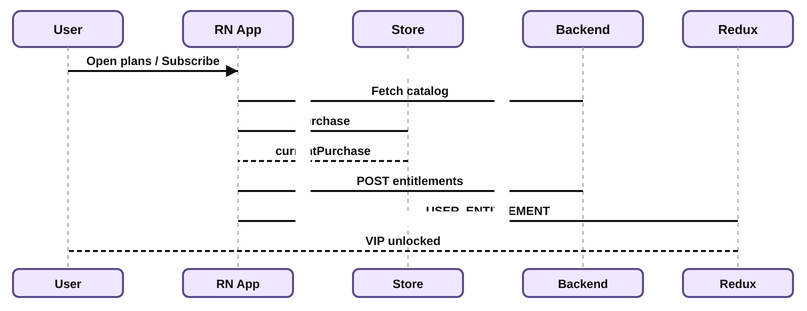
User, App, Store, Backend, and Redux during IAP
App boot
  |-- initConnection
  |-- getPendingPurchasesIOS → validate → finish (if accepted)
  |-- GET active-entitlements ----------> Backend
  |-- hydrate Redux
User taps Subscribe
  |-- request* (appAccountToken = UUID v4) -> Store
  |-- currentPurchase (ROOT listener)
  |-- POST entitlements ----------------> Backend
  |-- finishTransaction (iOS)
  |-- refresh entitlements → Redux → VIP UI
Errors and checklist
Handle cancel/benign codes, initConnectionError, empty catalogs, cross-platform locks, grace/pending, validation timeouts. Analytics must not grant access.
setup({ storekitMode: 'STOREKIT2_MODE' })before UIinitConnection; pending viagetPendingPurchasesIOS— no splashclearTransactionIOS()IapPurchaseHostat app root (withIAPContext)- Cold-start
getActiveSubscriptioninto Redux - Android Play flavor + BILLING permission
- Catalog merge by
appChannels[0].appId appAccountTokenis UUID v4 (uuidValidate+ version 4)- Auth + eligibility before
requestPurchase/requestSubscription - Android
CHARGE_PRORATED_PRICE/DEFERREDset intentionally - Dedupe by
transactionId - Server validate before unlock; iOS
finishTransactionafter success - Restore: newest
getAvailablePurchases→ same entitlements API
Conclusion
Treat the store as payment, the backend as entitlement authority, and the client as orchestration—including root listeners, pending-aware iOS startup, UUID v4 account tokens, and cold-start Redux hydration. That is what makes the flow implementable for the next engineer.
Call to action
Don’t just read about mobile subscriptions—build production-ready React Native commerce with a team that has shipped it. Schedule a call with TO THE NEW and tell us what you are building.
Still wrestling with restores, upgrades, or StoreKit 2 payloads? Leave a comment below, or explore our other mobile engineering posts for related patterns.