


As your data grows and your user base expands, your Amazon Redshift cluster faces increasing demands from concurrent queries. Without proper management, this can lead to performance bottlenecks, longer query times, and frustrated users. Fortunately, Amazon Redshift offers a feature called Concurrency Scaling to address exactly this problem. This post covers what it is, how it works under the hood, and how to configure and operate it well.
What Is Amazon Redshift Concurrency Scaling?
Concurrency Scaling handles sudden spikes in query traffic by automatically adding additional cluster capacity. When your primary cluster is overwhelmed with concurrent queries, Redshift seamlessly routes excess queries to temporary, dynamically provisioned clusters called Concurrency Scaling clusters. These are fully managed by AWS and process queries in parallel, keeping performance consistent during peak loads.
Once the workload subsides, the Concurrency Scaling clusters are automatically terminated, and you only pay for the resources used during the scaling period — making it a cost-effective way to absorb unpredictable query traffic without permanently over-provisioning your primary cluster.
How It Works
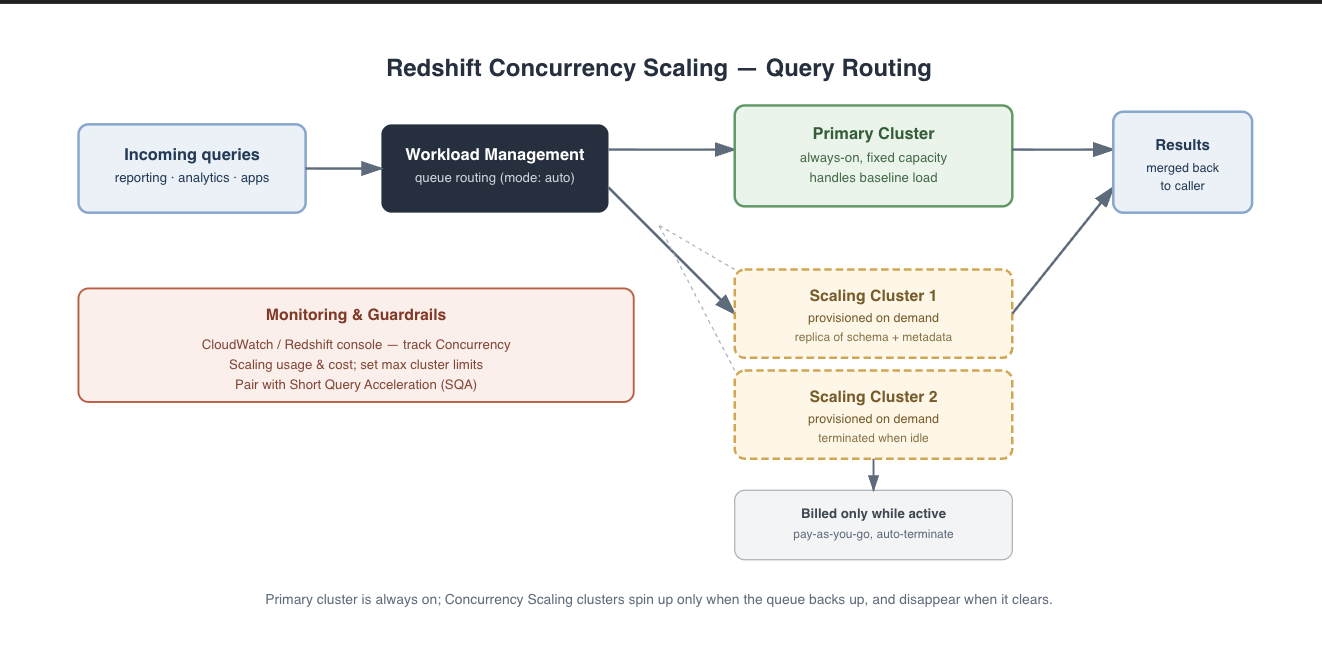
Redshift Concurrency Scaling
Query routing — when concurrent queries exceed the primary cluster’s capacity, Redshift automatically routes the excess to Concurrency Scaling clusters.
Dynamic provisioning — AWS provisions additional clusters in the background, as exact replicas of your primary cluster’s schema and metadata.
Parallel execution — queries run in parallel across the primary and Concurrency Scaling clusters, keeping response times fast and consistent.
Automatic termination — once the workload drops back down, the Concurrency Scaling clusters are terminated and billing for them stops.
Benefits
Improved query performance — distributing queries across multiple clusters keeps response times fast even during peak usage.
Cost-effectiveness — you pay for additional clusters only while they’re in use; during quiet periods you’re billed only for the primary cluster.
Seamless integration — no manual intervention required; it works automatically on top of your existing Redshift setup.
Scalability — handles both sudden spikes and gradual volume increases without a manual resize.
When to Use It
Concurrency Scaling earns its keep in a few recurring scenarios:
Peak workloads — predictable spikes, like business-hours traffic or scheduled reporting windows.
Unpredictable workloads — variable query patterns where you can’t forecast when demand will increase.
High-concurrency environments — many users or applications querying the same warehouse simultaneously.
How to Enable It
Concurrency Scaling is managed through Redshift’s Workload Management (WLM) feature, on a per-queue basis.
Configure WLM — enable Concurrency Scaling for specific query queues.
Set the Concurrency Scaling mode per queue:auto — Redshift automatically decides when to use Concurrency Scaling based on workload.
off — disables it for that queue.
on — always uses Concurrency Scaling for that queue.
Monitor usage — track Concurrency Scaling activity and cost via the Redshift console or CloudWatch.
Example WLM configuration:
{

{

"wlm": [

{

"query_concurrency_scaling_mode": "auto",

"query_queue": [

{

"queue_name": "reporting_queue",

"query_groups": ["reporting"]

}

]

}

]

}
Best Practices
Monitor costs — Concurrency Scaling is cost-effective, but usage should still be tracked via the Redshift console or Cost Explorer to avoid surprises.
Optimize query queues — assign queries to WLM queues based on priority and resource needs, so critical queries get the resources they’re entitled to.
Pair with Short Query Acceleration (SQA) — SQA prioritizes short-running queries, complementing Concurrency Scaling’s handling of overall concurrency.
Set limits — cap the maximum number of Concurrency Scaling clusters to control cost and prevent over-provisioning.
Real-World Example
Picture an e-commerce company during a holiday sale. Marketing, sales, and analytics teams are all running complex reporting queries at the same time, right when the business needs those insights fastest. Without Concurrency Scaling, the primary cluster would buckle under the combined load, and every team’s dashboards would slow down together — at the worst possible moment.
With Concurrency Scaling enabled, the excess load is automatically routed to additional clusters, so every team gets real-time access without any of them competing for the same fixed capacity. Once the sale ends and query volume drops, the extra clusters terminate on their own, and the company only pays for the capacity it actually used during the surge.
Conclusion
Amazon Redshift Concurrency Scaling turns unpredictable or high-concurrency query load from a capacity-planning problem into a pay-as-you-go one. By automatically provisioning additional clusters during peak times and tearing them down afterward, it keeps performance consistent without forcing you to size your primary cluster for the worst day of the year.
If you haven’t already, enabling Concurrency Scaling on the right WLM queues — paired with cost monitoring and SQA — is a low-effort way to make sure your warehouse stays responsive exactly when demand is highest, without paying for that headroom the rest of the time.