


1. Introduction
If your team uses Google Analytics (GA) to track user behavior but needs to run custom SQL queries — like Daily Active Users (DAU) or session funnels — there’s a fundamental problem: GA data lives in Google Cloud Storage (GCS), and Amazon Athena (your SQL engine) only reads from Amazon S3.
Manually downloading and re-uploading files every day isn’t sustainable. The answer is AWS DataSync — a fully managed service that copies data from GCS to S3 automatically on a daily schedule, with checksum verification and zero infrastructure to manage.
Pipeline: GA exports to GCS → DataSync copies to S3 daily → Athena runs SQL queries → Analytics team gets answers.
2. How It Works — Architecture Overview
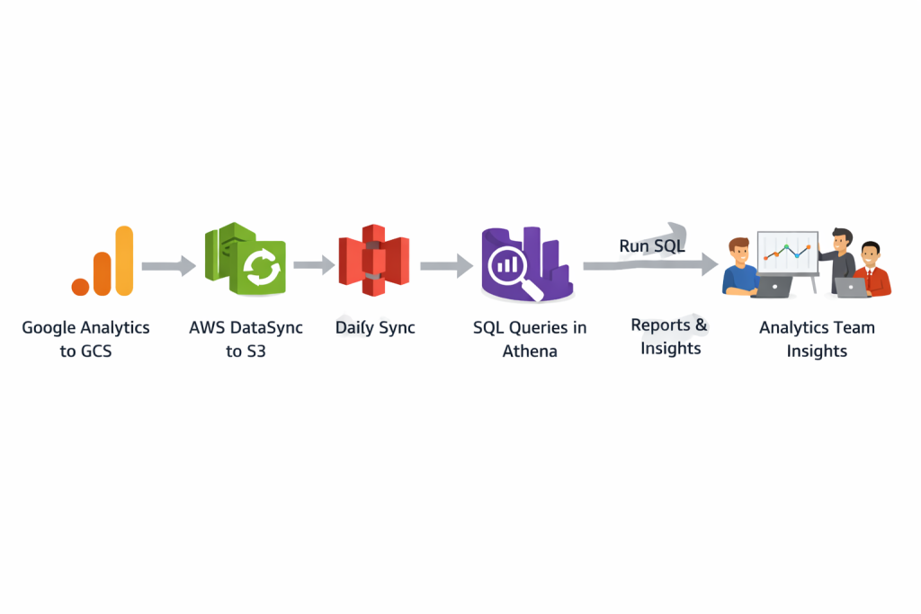
- Google Analytics 4 exports raw event data daily to a GCS bucket (e.g. gs://afs-prd-ga-reports/events/).
- AWS DataSync connects to GCS using an Object Storage location — no agent or VM required. It authenticates using GCS Interoperability keys.
- A scheduled DataSync Task runs at 04:10 UTC every day, transferring only new or changed files (incremental) to the S3 destination.
- Amazon S3 stores the files in a structured path. AWS Glue Crawler auto-detects the schema and Amazon Athena runs SQL queries on top.
Services Involved
| Service | Role in Pipeline |
Key Capability |
| Google Analytics | Source of user behavior data | Tracks DAU, sessions, engagement |
| AWS DataSync | Orchestrates scheduled transfers | Reliable, encrypted data movement |
| Amazon S3 | Amazon S3 | Scalable, durable object storage |
| Amazon Athena | Analytics query engine | Serverless SQL on S3 data |
| Google Cloud Storage | Staging area for GA exports | Stores CSV/Parquet exports |
Google Analytics
Google Analytics tracks website/app traffic and user behavior. GA4 allows exporting raw event data (sessions, events, page views, demographics) to BigQuery or GCS for advanced analytics.
Google Cloud Storage (GCS)
GCS is Google’s object storage where GA exports data as structured files. It supports secure access via IAM and service accounts, enabling external tools (like DataSync) to read data.
AWS DataSync
A fully managed service to transfer data between cloud platforms (including GCP → AWS).
Key features:
- Secure transfer (TLS encryption)
- Data validation (checksums)
- Scheduling support
- Bandwidth control
- CloudWatch logging
- No infra management
Amazon S3
AWS scalable object storage used as the central data lake. Integrates easily with analytics services like Athena and Glue.
Amazon Athena
Serverless query service to run SQL directly on S3 data. Uses AWS Glue Data Catalog for schema and charges per query (no infra required).
3. Implementation (4 Steps)
No agents, no VMs, no custom code. Everything is configured inside the AWS Console.
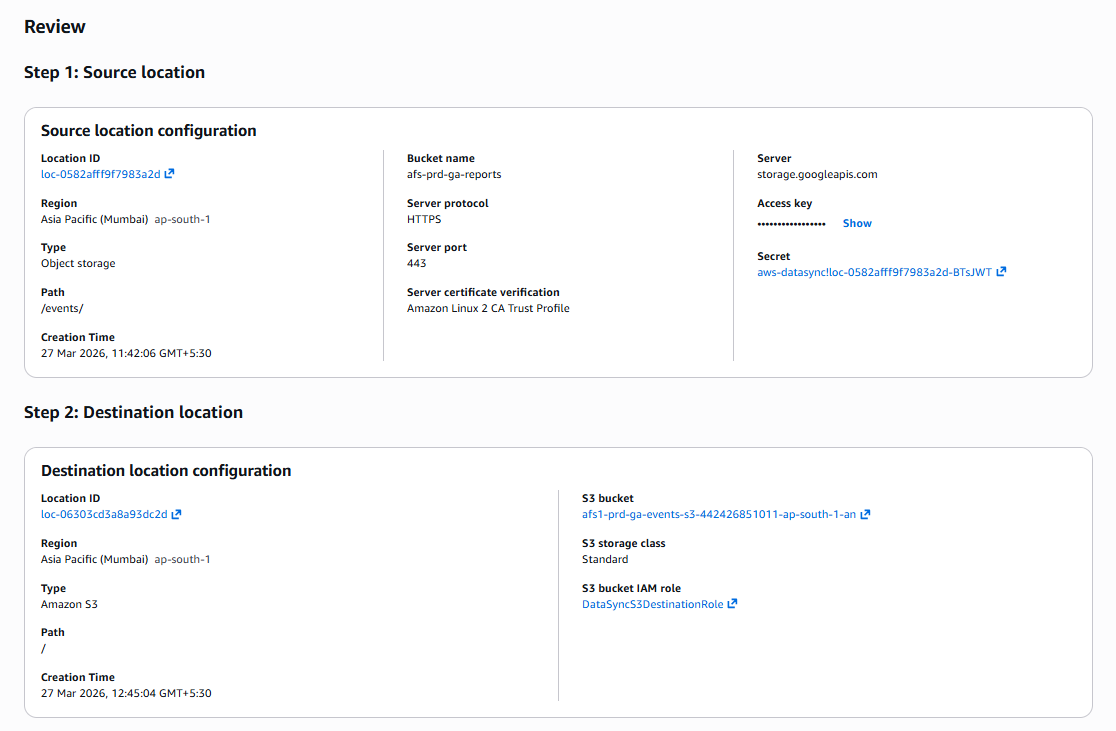
1. Create the Source Location — GCS
AWS DataSync → Locations → Create location → select Object storage. Set Server: storage.googleapis.com, Bucket: afs-prd-ga-reports, Folder: /events/, Protocol: HTTPS, Port: 443. Under Authentication, enter the GCS Interoperability Access Key and Secret Key (generated from GCP Console → Cloud Storage → Settings → Interoperability). Click Create location.
2. Create the Destination Location — Amazon S3
AWS DataSync → Locations → Create location → select Amazon S3. Set S3 bucket: afs1-prd-ga-events-s3-442426851011-ap-south-1-an, Storage class: Standard, IAM role: DataSyncS3AccessRole (needs s3:PutObject, s3:GetBucketLocation, s3:ListBucket). Click Create location.
3. Create the DataSync Task
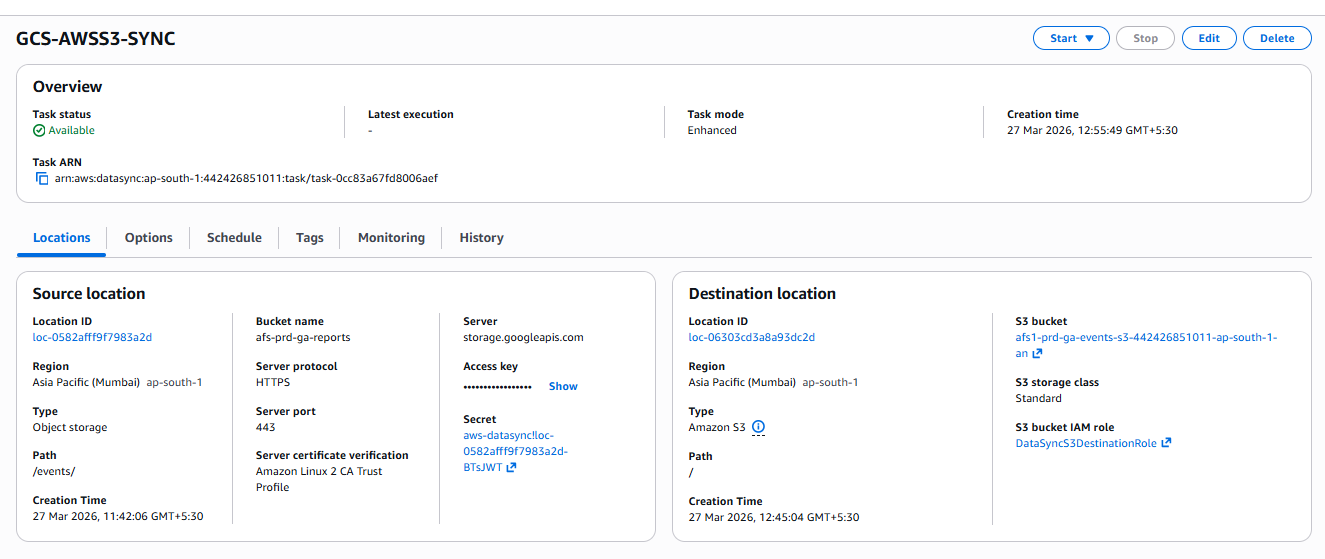
AWS DataSync → Tasks → Create task. Select the GCS location as source and S3 location as destination. Task name: GCS-AWSS3-SYNC. Set Task mode: Enhanced, Transfer mode: Transfer only data that has changed, Verification: Enabled, Logging: CloudWatch log group /aws/datasync. Click Next.
4. Set the Daily Schedule & Run
In the Schedule section, enable scheduling and enter the cron expression below. Click Create task. The first execution will appear in the History tab — Status should show Success within a few minutes of the scheduled time.

t
Verify: Check DataSync → Tasks → GCS-AWSS3-SYNC → History (Status: Success). Confirm files appear at s3://afs1-prd-ga-events-s3-…/events/ in the S3 console.
4. Querying the Data in Athena
Once data is in S3, use AWS Glue Crawler to auto-detect the schema (especially important since GA exports nested JSON), then query in Athena.
Step A — Run AWS Glue Crawler
- AWS Glue → Crawlers → Create crawler → set data source to the S3 path above.
- Assign an IAM role with S3 read + Glue write permissions. Set output database: ga_database.
- Run the crawler. It creates a table (e.g. events) in the Glue Data Catalog automatically.
Why not manually write CREATE TABLE? GA exports often have nested JSON like { “user”: { “id”: “123” } }. A flat schema silently drops nested fields. The Glue Crawler handles this correctly.
Step B — Run SQL in Athena
Daily Active Users (DAU):
SELECT event_date,
COUNT(DISTINCT user_id) AS daily_active_users
FROM ga_database.events
WHERE event_date = DATE_FORMAT(CURRENT_DATE – INTERVAL ‘1’ DAY, ‘%Y%m%d’)
GROUP BY event_date;

Top pages by sessions:
SELECT page_location,
COUNT(DISTINCT session_id) AS sessions
FROM ga_database.events
WHERE event_name = ‘page_view’
GROUP BY page_location ORDER BY sessions DESC LIMIT 20;

5. Monitoring & Alerts
Set up CloudWatch Alarms on these three metrics and route to an SNS topic so failures are caught before the analytics team notices missing data.
| Metric | What It Detects | Alert When |
| BytesWritten | Data successfully landed in S3 | Value = 0 after scheduled run |
| FilesTransferred | Files moved from GCS to S3 | Zero files transferred |
| TaskExecutionsFailed | Failed DataSync executions | Count > 0 (page on-call team) |
Route all alarms → SNS topic (datasync-alerts) → email. Set the evaluation period to 1 day to match the daily schedule.
6. Best Practices
- Use Parquet + partitioning → faster queries & lower cost
- Secure & manage data → Secrets Manager + Lifecycle (Glacier)
- Maintain reliability → Glue Crawler (daily) + S3 Versioning
Conclusion
AWS DataSync removes the complexity of cross-cloud data movement. With four straightforward steps — two locations, one task, one schedule — your Google Analytics data flows from GCS to S3 every single day without any manual work.
Pair it with AWS Glue and Athena and you have a fully serverless analytics pipeline — from raw GA events to SQL-ready insights — that scales automatically and costs nothing to maintain.