


Introduction:
Imagine receiving a critical production alert at 2 AM. Instead of manually checking logs, metrics, dashboards, and deployment history, what if an AI assistant could instantly analyze the issue, identify the probable root cause, and suggest the next troubleshooting steps?
Modern DevOps teams manage increasingly complex cloud environments, making incident investigation both time-consuming and challenging. This is where the AWS DevOps Agent (Preview) comes in.
AWS DevOps Agent is an AI-powered assistant designed to help engineering and operations teams investigate incidents faster, reduce Mean Time to Resolution (MTTR), and improve application reliability. By leveraging AWS operational data and generative AI, the agent provides contextual insights, summarizes issues, and recommends possible resolutions.
In this blog, we’ll explore:
What AWS DevOps Agent is
Why it is important for DevOps teams
Its key features and capabilities
How it improves incident response
Common use cases
Benefits and current limitations (Preview)
What is AWS DevOps Agent?
AWS DevOps Agent is a generative AI-powered operational assistant that helps developers, DevOps engineers, and Site Reliability Engineers (SREs) investigate operational issues across AWS environments.
Instead of manually collecting information from multiple AWS services, the DevOps Agent gathers relevant operational context and presents meaningful insights in a conversational format.
It assists teams by:
Investigating incidents
Analyzing operational data
Identifying probable root causes
Recommending troubleshooting steps
Reducing investigation time
Note: AWS DevOps Agent is currently available in Preview, meaning features may evolve before general availability.
Why is AWS DevOps Agent Important?
Modern cloud applications generate massive amounts of operational data:
CloudWatch metrics
Application logs
Deployment events
Infrastructure changes
Alarms and notifications
During an incident, engineers often spend significant time switching between multiple dashboards before identifying the root cause.
AWS DevOps Agent simplifies this process by:
Centralizing operational insights
Reducing manual investigation
Accelerating root cause analysis
Improving system reliability
Helping teams restore services faster
How AWS DevOps Agent Works:
The DevOps Agent uses generative AI to understand operational events and answer natural language questions.
A typical workflow looks like this:
An operational alert is triggered.
The DevOps Agent collects relevant operational data.
It analyzes logs, metrics, alarms, and recent changes.
It summarizes the incident.
It suggests possible root causes.
It recommends next troubleshooting steps.
Example Workflow:
Application Alert
│
▼
AWS DevOps Agent
│
▼
Collect Metrics + Logs + Events
│
▼
AI Analysis
│
▼
Root Cause Summary
│
▼
Recommended Actions:
Key Features
1. AI-Powered Incident Investigation
Instead of manually searching through logs and dashboards, engineers can ask questions like:
Why did my application fail?
What changed before the incident?
Which service is affected?
What is causing increased latency?
The DevOps Agent analyzes available operational data and provides contextual answers.
2. Faster Root Cause Analysis
One of the biggest challenges during incidents is identifying the actual cause.
The DevOps Agent helps by:
Correlating logs
Reviewing metrics
Analyzing alarms
Checking deployment history
Highlighting unusual operational events
This significantly reduces investigation time.
3. Natural Language Interaction
Engineers don’t need to write complex queries.
Example prompts include:
Why is my Lambda function failing?
Show recent deployment changes.
What caused CPU utilization to spike?
Why is my application experiencing high latency?
The DevOps Agent interprets these questions and provides easy-to-understand responses.
4. Operational Context
Instead of viewing isolated metrics, the DevOps Agent connects multiple pieces of information, including the following:
Logs
Metrics
Events
Configuration changes
Alarms
Recent deployments
This provides a complete operational picture.
5. Recommended Next Steps:
Beyond identifying issues, the DevOps Agent suggests actions such as the following:
Review recent deployments
Check Lambda execution logs
Investigate increased error rates
Validate IAM permissions
Examine database connections
These recommendations help engineers resolve incidents more efficiently.
Benefits of AWS DevOps Agent:
Organizations can gain several advantages:
Reduced Mean Time to Resolution (MTTR)
Faster investigations help restore services more quickly.
Improved Reliability
Quick issue identification minimizes downtime.
Increased Productivity
Engineers spend less time searching across multiple AWS consoles.
Better Operational Visibility
The agent correlates information from various operational sources.
Easier Troubleshooting
Natural language interactions make operational investigations more accessible.
Example Incident Investigation
Scenario
An e-commerce application suddenly starts returning HTTP 500 errors after a deployment.
Traditional Investigation
An engineer would manually:
Open CloudWatch Logs
Review CloudWatch Metrics
Check deployment history
Inspect application logs
Analyze alarms
Review infrastructure changes
This process may take considerable time.
Using AWS DevOps Agent
An engineer simply asks:
“Why are users receiving HTTP 500 errors?”
The DevOps Agent may summarize:
Recent deployment introduced increased application errors.
Database connection failures started immediately after deployment.
Error rate increased by 45%.
API latency also increased.
Recommend reviewing the latest deployment and database connection configuration.
This significantly accelerates troubleshooting.
Common Use Cases: –
AWS DevOps Agent can assist with various operational scenarios:
Application Performance Issues
High latency
Slow API responses
Increased response times
Infrastructure Monitoring
CPU spikes
Memory exhaustion
Network issues
Deployment Troubleshooting
Failed deployments
Configuration errors
Rollback analysis
Application Errors
HTTP 500 errors
Lambda failures
ECS task failures
EKS application issues
Operational Reviews
Service health analysis
Incident summaries
Recent operational changes
Configuring AWS DevOps Agent for Incident Response and System Reliability:
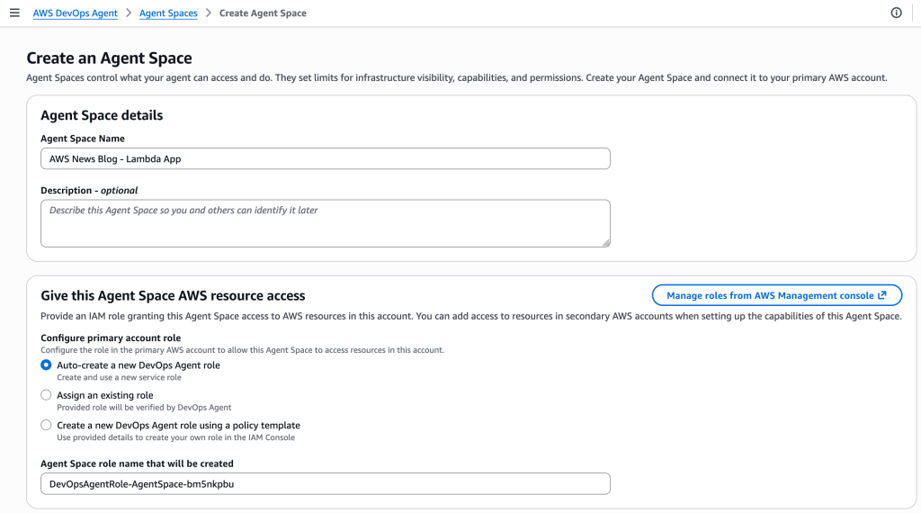
AWS DevOps Agent is an AI-powered operational assistant that helps DevOps and Site Reliability Engineering (SRE) teams investigate incidents, identify root causes, and improve application reliability. The setup process is straightforward and begins in the AWS Management Console by creating an Agent Space, which defines the resources, permissions, and integrations that the agent can access during investigations. This provides a secure foundation for the agent to analyze incidents across AWS environments.
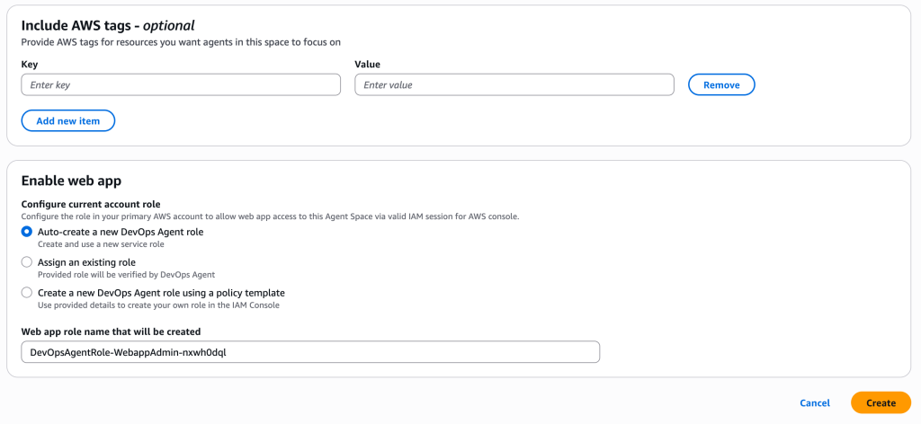
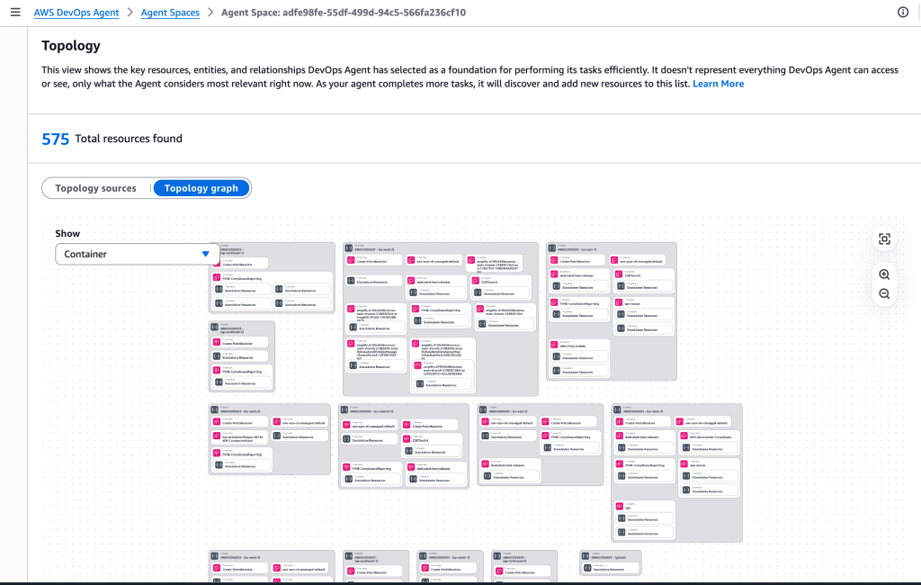
After creating the Agent Space, the next step is to connect the required AWS accounts and resources. The agent discovers cloud resources and builds an application topology, enabling it to understand relationships between services such as AWS Lambda, Amazon CloudWatch, and other AWS resources. This topology allows the agent to correlate metrics, logs, and deployment history when investigating incidents.
The configuration continues by integrating observability and development tools. AWS DevOps Agent supports Amazon CloudWatch, Datadog, Splunk, Dynatrace, New Relic, GitHub, GitLab, and other platforms through built-in integrations or Model Context Protocol (MCP) servers. These integrations enable the agent to collect logs, metrics, traces, and deployment information from multiple sources, providing a complete operational view.
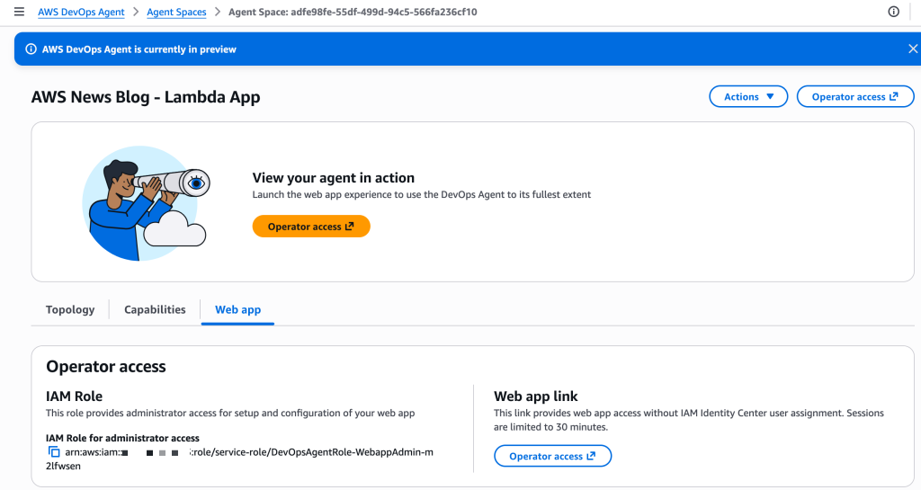
Once the integrations are complete, incident management can be configured. The agent can receive alerts from CloudWatch alarms or external systems such as ServiceNow and PagerDuty. During an active incident, it automatically investigates the issue, identifies possible root causes, recommends mitigation steps, and posts updates to collaboration tools such as Slack.
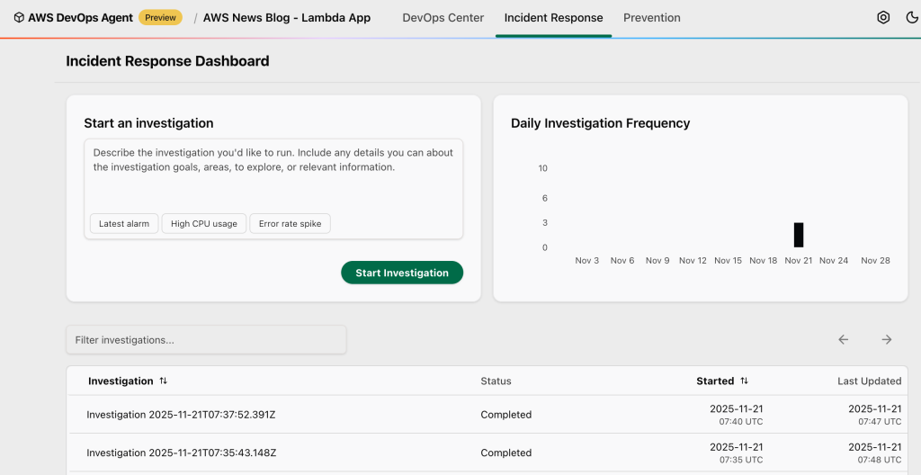
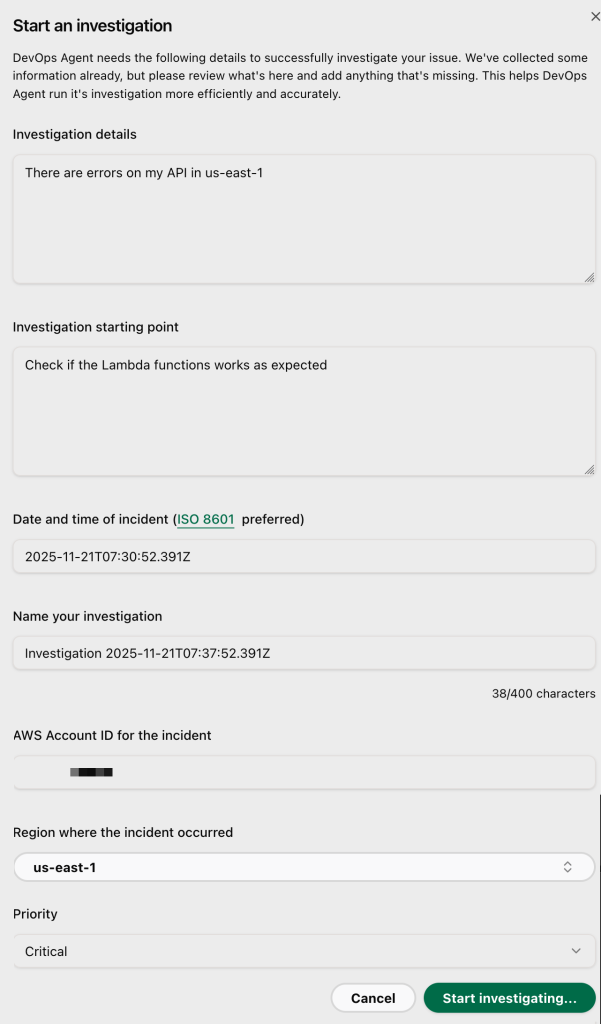
Finally, the investigation results are presented through an interactive dashboard showing the incident timeline, probable root cause, affected resources, and recommended actions. Engineers can review the findings, validate the recommendations, and implement corrective measures to reduce future incidents. By automating much of the investigation process, AWS DevOps Agent significantly reduces manual effort and helps improve Mean Time to Resolution (MTTR).
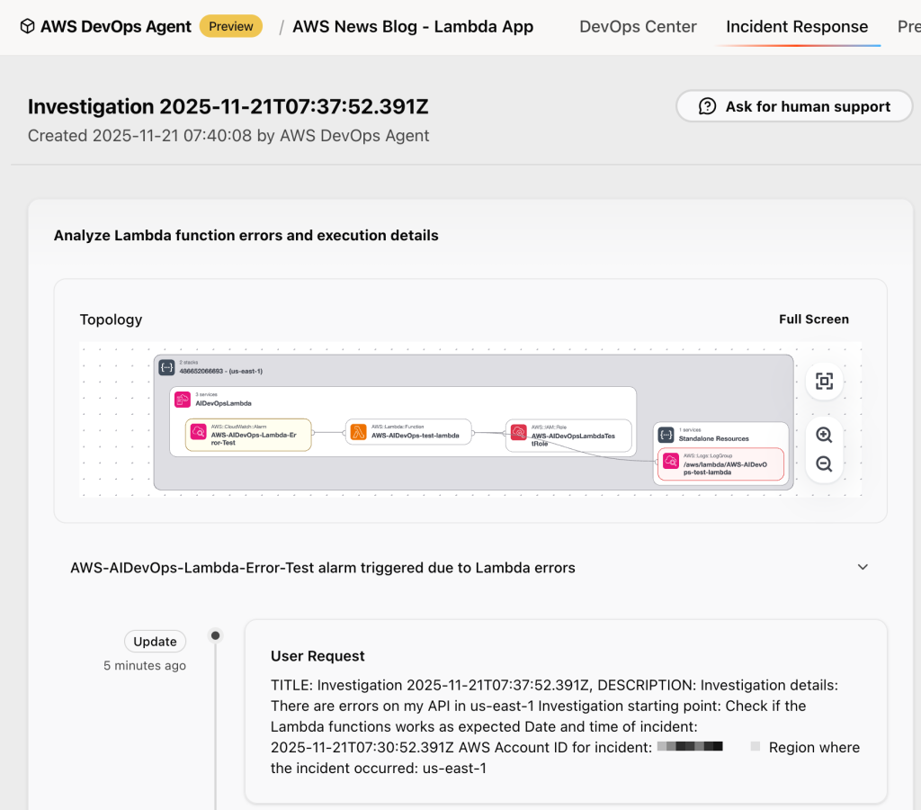
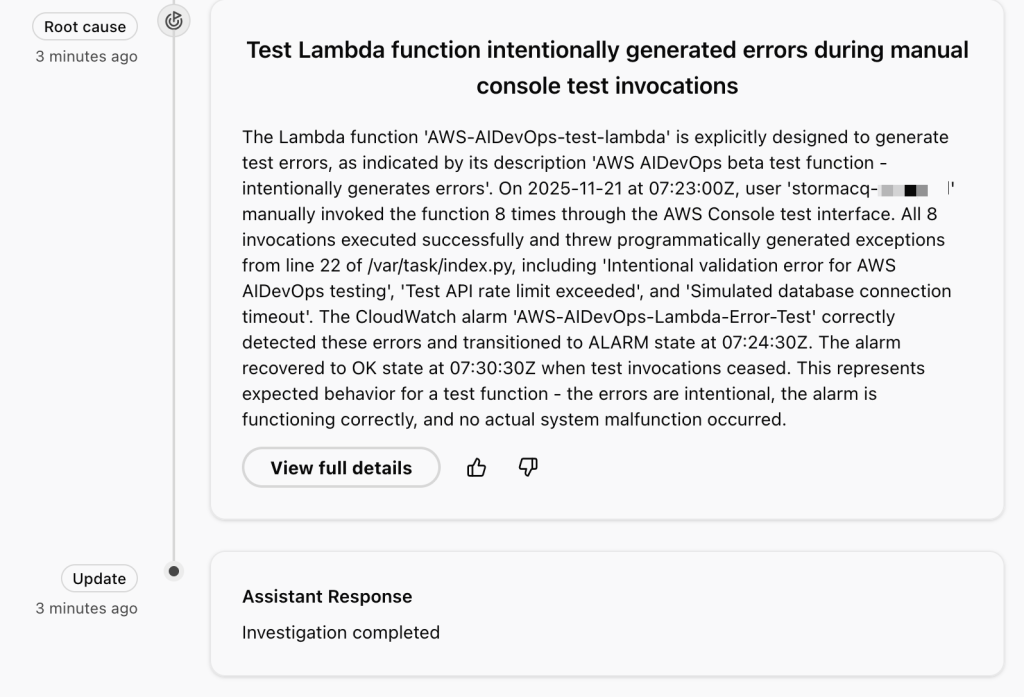
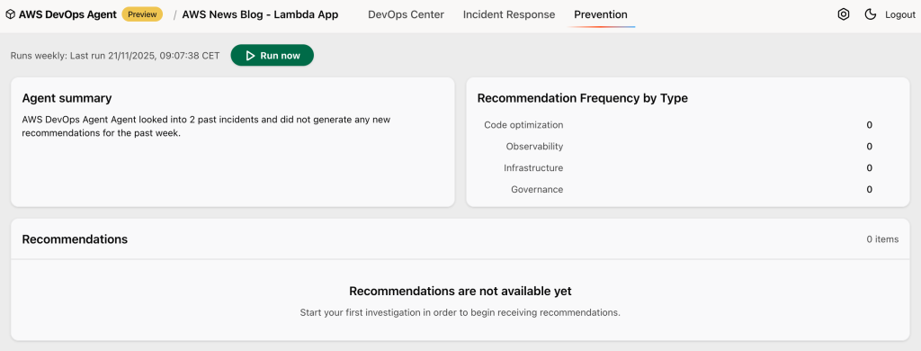
In summary, configuring AWS DevOps Agent involves creating an Agent Space, discovering resources, integrating monitoring and CI/CD tools, enabling incident management, and reviewing AI-generated investigation results. This end-to-end workflow enables organizations to accelerate incident response while continuously improving the reliability of their cloud applications
Best Practices
To maximize the value of AWS DevOps Agent:
Enable comprehensive monitoring with Amazon CloudWatch.
Configure meaningful alarms for critical resources.
Maintain detailed application logs.
Use descriptive deployment metadata.
Regularly review operational recommendations.
Follow AWS Well-Architected Framework operational best practices.
Why AWS DevOps Agent Matters
As cloud environments become more complex, traditional incident response methods become slower and more difficult.
AWS DevOps Agent brings generative AI directly into operational workflows, helping engineers:
Investigate incidents faster
Understand system behavior
Reduce downtime
Improve service reliability
Increase operational efficiency
Rather than replacing engineers, it acts as an intelligent assistant that accelerates troubleshooting and enables teams to focus on solving problems instead of gathering information.
Conclusion
AWS DevOps Agent (Preview) is an exciting addition to the AWS DevOps ecosystem, combining generative AI with operational intelligence to simplify incident investigations and improve system reliability. By analyzing logs, metrics, alarms, and deployment history, it helps engineering teams quickly identify potential root causes and take informed corrective actions.
Although still in Preview, the service demonstrates how AI can transform modern cloud operations by reducing investigation time and improving overall operational efficiency. As AWS continues to enhance the service, it has the potential to become an essential tool for DevOps engineers, SREs, and cloud operations teams.