


AWS re:Invent-style announcements come and go, but every so often one lands directly on the desk of the people who get paged at 2 AM. AWS DevOps Agent is one of those. It’s an AI-powered, always-on agent built to sit across two halves of the software delivery lifecycle that usually live in separate tools and separate teams: release management (is this change safe to ship?) and production operations (something broke — why, and how do we fix it?).
This post breaks down what the service actually does, how it’s architected, and where it realistically slots into an existing AWS-heavy DevOps stack.
The core idea: one agent, two jobs
Most orgs already have tooling for “is this PR safe” (linters, policy-as-code, manual review) and separate tooling for “why is prod on fire” (CloudWatch, Datadog, PagerDuty). AWS DevOps Agent’s pitch is that these are really the same problem — understanding blast radius — just observed at two different points in time. Before merge, blast radius is a prediction. After deploy, it’s a fact you’re trying to reconstruct.
To do that, the agent continuously builds a model of your environment:
- Learning your resources and how they relate to each other
- Plugging into your existing observability tools, code repos, and CI/CD pipelines
- Correlating telemetry, code changes, and deployment history to infer cause and effect
- Working across AWS, other clouds, and on-prem systems — not just a single account or region
- That last point matters for anyone running a multi-account AWS Organization: the agent isn’t scoped to “one AWS account, one app.” It’s explicitly designed to reason about topology that spans accounts and even providers.
Production operations: the always-on incident responder
This is the more mature half of the product (release management is still in preview). The production-ops feature set reads like a checklist of what a strong on-call SRE would do, minus the human latency:
- Automated incident investigation starts the moment an alert or support ticket fires, correlating telemetry, code, and deployment data to converge on a root cause — instead of waiting for a human to open five dashboards.
- Actionable mitigation plans don’t just say “something’s wrong with the ECS service” — they give specific remediation steps, a way to validate the fix worked, and a rollback path. Notably, plans can also be handed off as agent-ready instructions for another coding agent (AWS calls out Kiro specifically) to implement the fix directly.
- Proactive incident prevention mines historical incident patterns to recommend improvements to observability coverage, infrastructure sizing, pipeline gates, and application resilience — the goal being that the same incident class doesn’t recur.
- Automated incident coordination routes findings into the channels teams already use — Slack, ServiceNow, PagerDuty — rather than requiring anyone to log into a new console mid-incident.
- On-demand SRE tasks via natural language let you ask about resource health, deployment history, or incident patterns conversationally, using the agent’s existing topology knowledge instead of console-hopping.
- AWS Support integration lets you open a Support case directly from an investigation, with full context already attached.If you’ve ever built a runbook automation layer on top of CloudWatch alarms, Lambda, and a Slack webhook, this is that pattern productized and given a reasoning layer.
Release management (preview): shifting the safety check left
The preview capabilities target the pre-merge side:
- Release readiness review evaluates code changes as they’re generated — checking policy compliance, dependency impact, and access-control implications. It maps cross-repository dependencies to catch breaking changes before merge, and uses deterministic proofs to verify that infrastructure changes don’t expand permissions beyond what the application actually needs. This is a meaningfully different approach from a static IAM linter — it’s reasoning about the system, not just the diff.
- Autonomous release testing generates and runs test plans targeted at the specific risk areas the readiness review flagged, rather than running a fixed regression suite — for web and API-based apps, in environments you provision.
- Built into the developer workflow — results surface through pull requests, IDE coding agents, and CI/CD pipelines, so the feedback loop stays where developers already are instead of forcing a context switch.
- For teams enforcing permission-boundary and SCP-based guardrails across an AWS Organization, the “deterministic proof that permissions aren’t expanded” piece is worth watching closely — it’s a different guarantee than a policy simulator or an SCP denying at runtime, since it’s evaluated at review time against the actual topology.
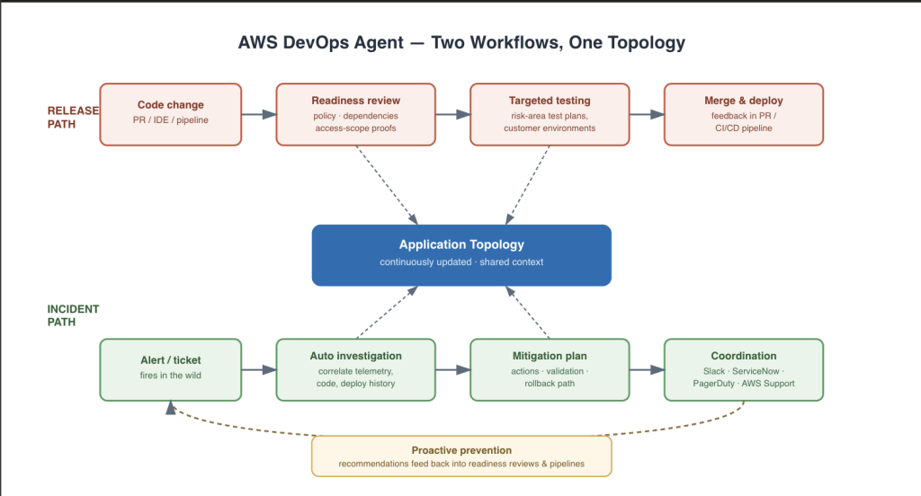
AWS DevOps Agent: Two Workflows, One Topology
Environment intelligence: the layer that makes all of this possible
None of the above works without a live, accurate model of your environment, and AWS is explicit that this is a continuously maintained asset, not a one-time scan:
- Application resource mapping auto-discovers applications, their component services, and composing resources, and maps the relationships into a dynamic topology that updates continuously.
- Continuous learning — reviews, investigations, and recommendations get sharper over time as the agent accumulates more context about your specific environment.
- Agent skills let you encode your own runbooks, architectural standards, and operational practices as reusable, modular units — this is the extension point for org-specific conventions (naming standards, deployment gates, escalation policies) rather than relying purely on generic best practices.
- Built-in and custom integrations cover Amazon CloudWatch, Datadog, Dynatrace, New Relic, Splunk, Grafana, GitHub, GitLab, Azure DevOps, ServiceNow, PagerDuty, and Slack, with private/remote MCP server support for anything proprietary.
- Access from anywhere — the agent runs as a remote server, invokable by other applications or agents via MCP, ACP, or A2A protocols, so release checks or health queries can be triggered programmatically rather than only through a UI.
Architecture: Agent Spaces and dual consoles
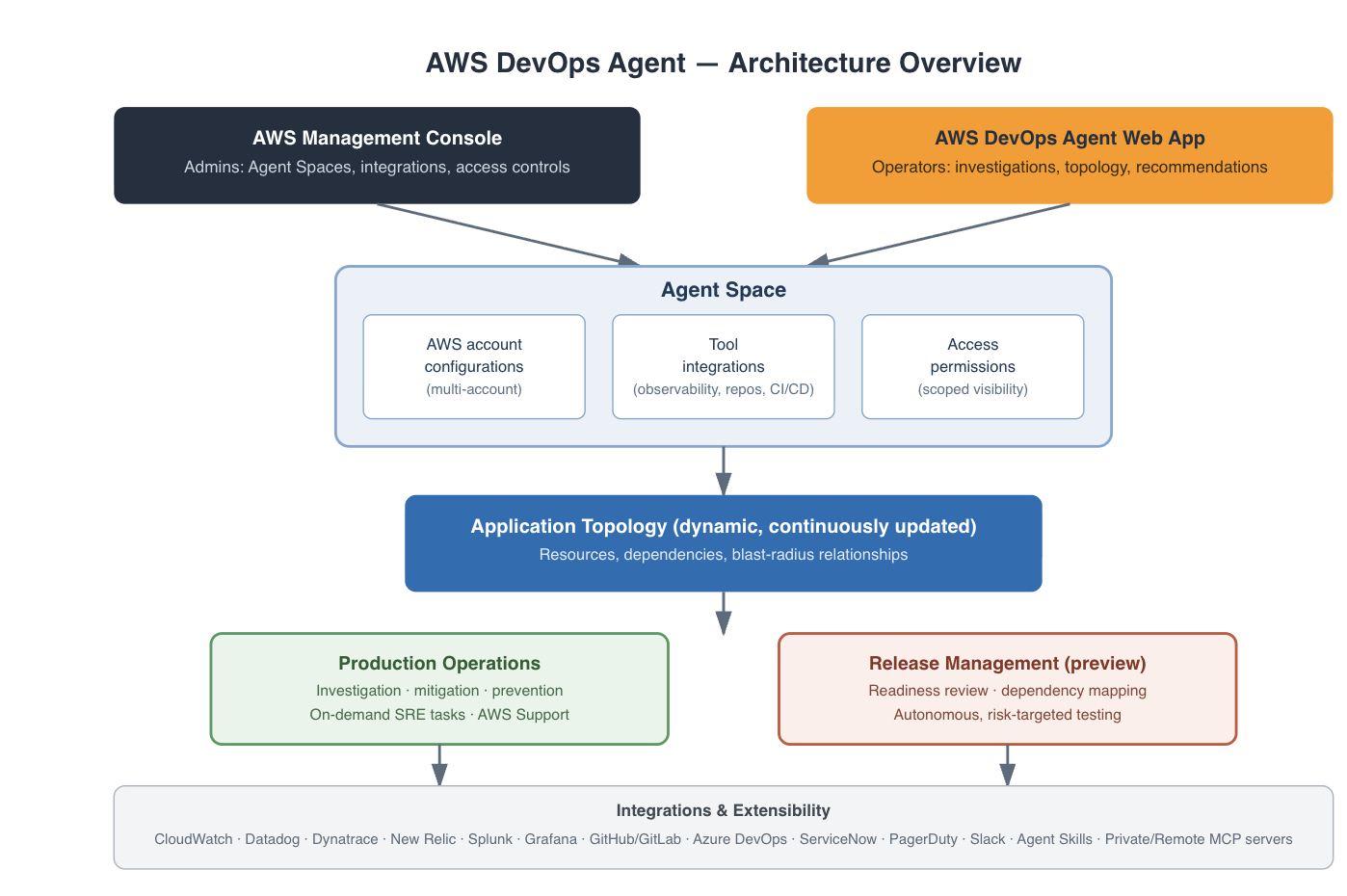
AWS DevOps Agent: Architecture overview
Structurally, AWS DevOps Agent is organized around two concepts:
- Agent Spaces — logical containers defining what the agent can access and investigate. Each space bundles the AWS account configurations, third-party integrations, and access permissions relevant to a given scope (think: a boundary similar in spirit to an OU or an application boundary in a multi-account org, but for agent visibility rather than IAM).
- Application topology — the automatically built, continuously updated map of resources and their relationships that underlies every investigation and review.Access is split across two surfaces:
The AWS Management Console, used by administrators to create and manage Agent Spaces, configure integrations, and set access controls.
The AWS DevOps Agent web app, used by operators day-to-day for incident response — browsing cross-account topology, reviewing investigations, and acting on preventative recommendations.
That split is a familiar pattern: platform/admin teams own the guardrails and connectivity, operations teams live in the workflow surface.
Where this fits if you’re already running a mature AWS DevOps stack
A few practical takeaways if you’re evaluating this against an existing setup:
- It’s additive to your observability stack, not a replacement. It explicitly integrates with CloudWatch, Datadog, Dynatrace, New Relic, Splunk, and Grafana rather than requiring migration off any of them.
- Multi-account and multicloud awareness is a first-class design goal, not an afterthought — relevant if your organization spans multiple AWS accounts under AWS Organizations, or a mix of AWS and other providers.
- The release-management side is still preview. Production operations is the more established feature set today; treat readiness reviews and autonomous testing as something to pilot on lower-risk repos first.
- Agent skills are the customization lever. If you have existing runbooks or architectural standards, encoding them as skills is how you get investigations and reviews to reflect your conventions rather than generic ones.
- MCP/ACP/A2A support means it can be a callable dependency, not just a destination UI — worth considering if you’re building your own internal tooling or agent workflows on top of it.
Bottom line
AWS DevOps Agent is AWS’s attempt to unify “will this change break something” and “what broke and why” under a single, continuously learning model of your application topology — surfaced through your existing tools rather than a new dashboard you have to remember to check. The production-operations capabilities look ready for real incident response workloads today; the release-management side is the one to watch as it moves out of preview.