


Introduction
Apache Kafka is the default substrate for event-driven systems. Amazon MSK takes the operational floor out from under most of it (provisioning, patching, storage), but partitions, consumer groups, and replication are still yours to operate.
This is a working reference: routines you’ll actually run, what a rolling upgrade really does, the concepts worth internalizing, and the metrics that separate “the cluster is up” from genuinely competent operation.
In this blog, you can expect to read about pragmatic methods for achieving competency in Kafka:
- Daily Operations with Kafka
- Upgrading MSK
- Deepen your Understanding of Kafka Partitions, Topics, Producers, Consumers
- Monitoring Key Metrics
1. Routine Kafka Operations
Running Kafka clusters involves a blend of everyday responsibilities and incident response-associated readiness. Some of the main categories include:
a) Topic Administration
Partition count and replication factor are far cheaper to get right on day one — partitions can be added but never removed. Settle on a naming convention (appname-env-eventtype) before the tenth team invents its own.
kafka-topics.sh –bootstrap-server $BROKERS –command-config client.properties –create –topic user-events –partitions 6 –replication-factor 3
Size for the consumer you’ll have — partition count caps read parallelism.- Replicate across every AZ the cluster spans — RF 2 on a three-AZ cluster still risks losing both copies to one AZ event.
- Grow partitions, never shrink them — increasing is live; decreasing isn’t supported.
b) Consumer Group Monitoring
Consumer lag is the single most useful number in Kafka ops — a consumer falling behind before anyone notices downstream. CloudWatch covers the alarm; kafka-consumer-groups.sh shows which partitions are behind.
kafka-consumer-groups.sh --bootstrap-server <broker>

--describe --group user-event-processor
- An even partition-to-member ratio — one member starved is usually a hot key, not capacity.
- Lag that climbs steadily vs. spikes and recovers — “too slow” vs. “a blip.”
- Rebalance frequency — rebalancing every few minutes is a real availability tax.
c) ACLs and Security
MSK supports both SASL/SCRAM and IAM access control, and they solve slightly different problems. IAM access control maps naturally onto infrastructure that already lives in IAM — a Lambda function or an ECS task role gets Kafka access the same way it gets S3 access, with no separate credential to rotate. SASL/SCRAM earns its keep for external or non-AWS clients that have no IAM identity to assume. Either way, the ACL itself should be scoped to an operation, not a blanket grant:
- READ — consume from a specific topic or group, never cluster-wide.
- WRITE — produce to a named topic; pair with a quota so one misbehaving producer can’t saturate broker throughput for everyone else.
- DESCRIBE — metadata visibility, commonly granted more liberally since it exposes shape, not data.
d) Retention and Archival
Per-topic retention should reflect how the data is actually used, not a single cluster-wide default — a clickstream topic feeding a real-time model might only need 24 hours, while an audit-relevant event topic might need 30 days or more. Two mechanisms extend that beyond what’s practical to keep on broker disk: MSK’s Tiered Storage moves older segments to a low-cost tier while they’re still addressable through the normal Kafka consumer API, and a Kafka Connect S3 sink instead exports data out of Kafka entirely for long-term, queryable archival. They’re not competing options — Tiered Storage keeps Kafka the interface, the S3 sink hands the data to something else.
2. MSK Upgrades
Amazon MSK simplifies upgrades by providing broker patching and managing rolling upgrades so that engineers can make intelligent decisions.
a) Plan before you roll
Treat every upgrade as a compatibility check first, an operational event second. Kafka guarantees client/broker compatibility in both directions across supported versions, but that guarantee doesn’t extend to your own tooling — Kafka Connect connectors and Kafka Streams applications have their own version constraints, and a deprecated config silently ignored is worse than one that fails loudly.
- Run the target version in a QA or staging cluster first — long enough to catch anything version-specific in your own producer/consumer code, not just a smoke test.
- Read the release notes for breaking protocol changes, deprecated configs, and default-value changes — not just the headline features.
- Check Kafka Connect and Kafka Streams compatibility against the target version before scheduling anything in production.
b) What actually happens during the rolling upgrade
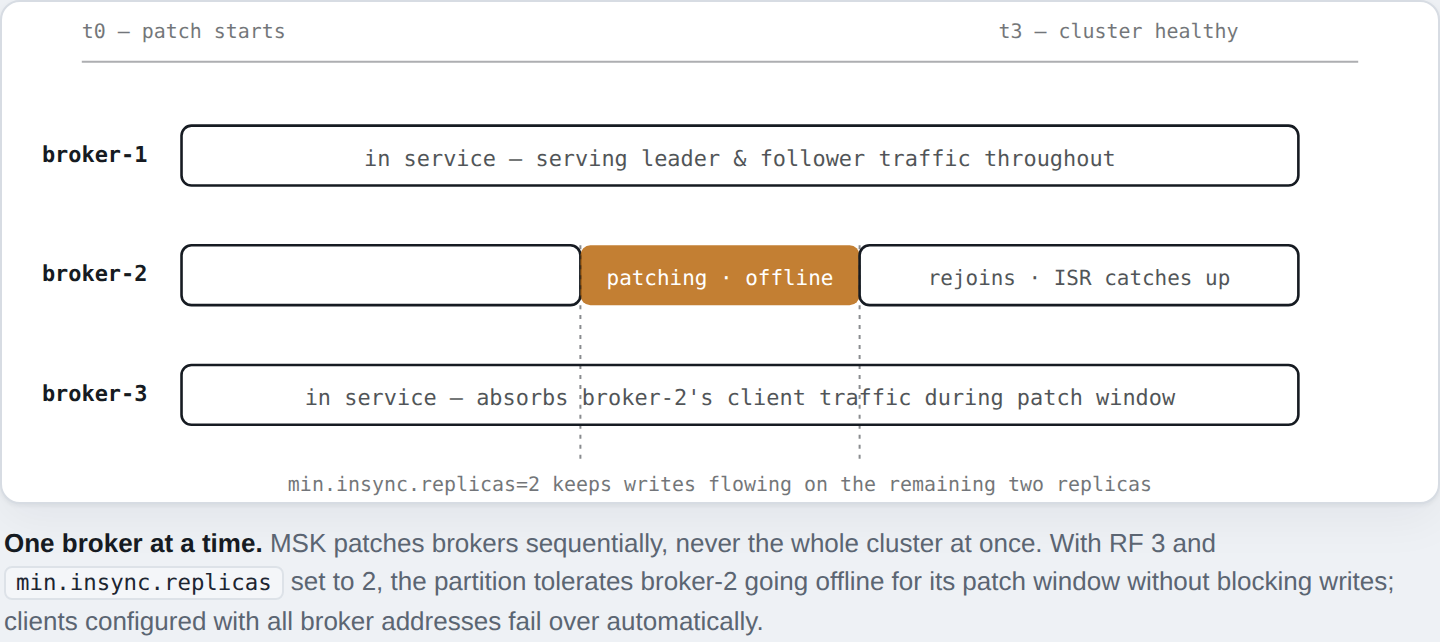
MSK upgrades a cluster broker by broker, never all at once. Each broker briefly leaves service for its own patch window while the rest of the cluster keeps serving reads and writes — there’s no cluster-wide downtime, but there is a moment where one broker’s partitions are down to their remaining in-sync replicas. Two settings decide whether your clients notice: replication factor and min.insync.replicas. On a three-AZ cluster, run RF 3 with min.insync.replicas set to 2 — that tolerates exactly one broker being mid-patch without blocking writes. RF 2 doesn’t have that slack; losing one replica during patching can push a partition to zero in-sync replicas and take writes offline for it.
Where this actually bitesThe failure mode isn’t the upgrade itself — it’s a topic someone created months ago with the default replication factor, on a cluster that’s since grown to three AZs. Audit RF and minISR before you schedule the upgrade, not after a partition goes offline mid-patch.
On the client side, configure every producer and consumer with the full list of broker addresses, not just one. A client that only knows about the broker currently being patched has nothing to fail over to; a client that knows the whole cluster reconnects to a different broker automatically and keeps going.
3. After the upgrade: rebalancing
Whether you scaled the cluster or just rolled the version, partitions can end up unevenly distributed across brokers. How you fix that depends on the broker type: Express brokers handle this automatically through Intelligent Rebalancing, which redistributes partitions after a scaling event with no configuration and no third-party tooling. Standard brokers need it done explicitly, either with the open-source kafka-reassign-partitions.sh tool or with Cruise Control, which automates the same reassignment based on live load rather than a manual plan.
4. The four concepts everything else rests on
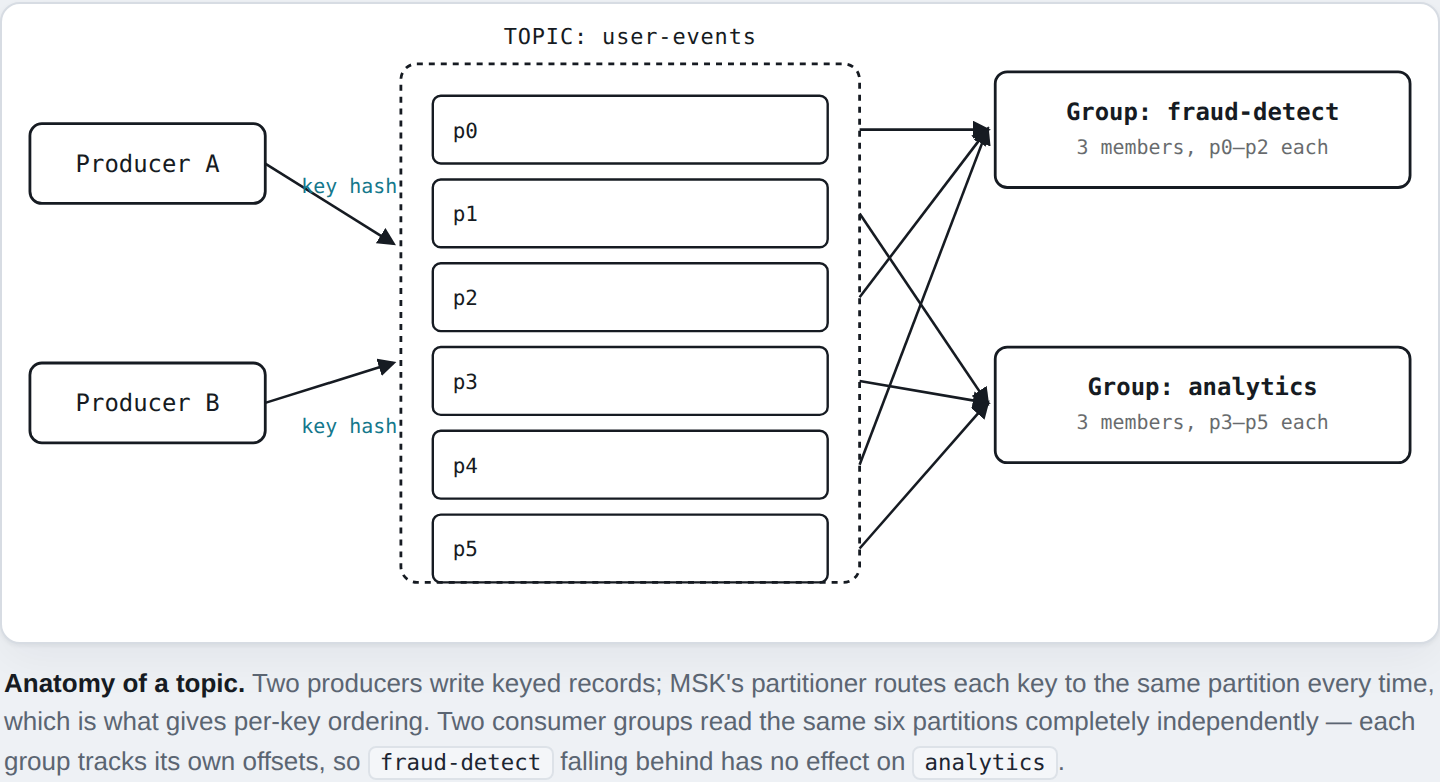
- Topics are named logical streams. No ordering guarantee on their own — ordering exists only within a partition.
- Partitions are the unit of parallelism and ordering — an append-only log, strictly ordered within itself, unordered across partitions.
- Producers pick the partition a record lands in, by key hash (default — gives per-key ordering), round-robin, or a custom partitioner.
- Consumers read partitions in groups; a partition is read by at most one member at a time.
b) Worked Example
Topic user-activity, six partitions, keyed by user ID — every event for a user lands in order in the same partition. fraud-detect reads it at three members (two partitions each); analytics at six (one each, for throughput).
c) Sizing partitions in practice
Too few caps parallelism for every group that will read the topic. Too many costs file handles, replication traffic, and slower leader elections on failure. Start at 2–3x expected peak parallelism, then grow — never shrink.
5. Watching the right metrics
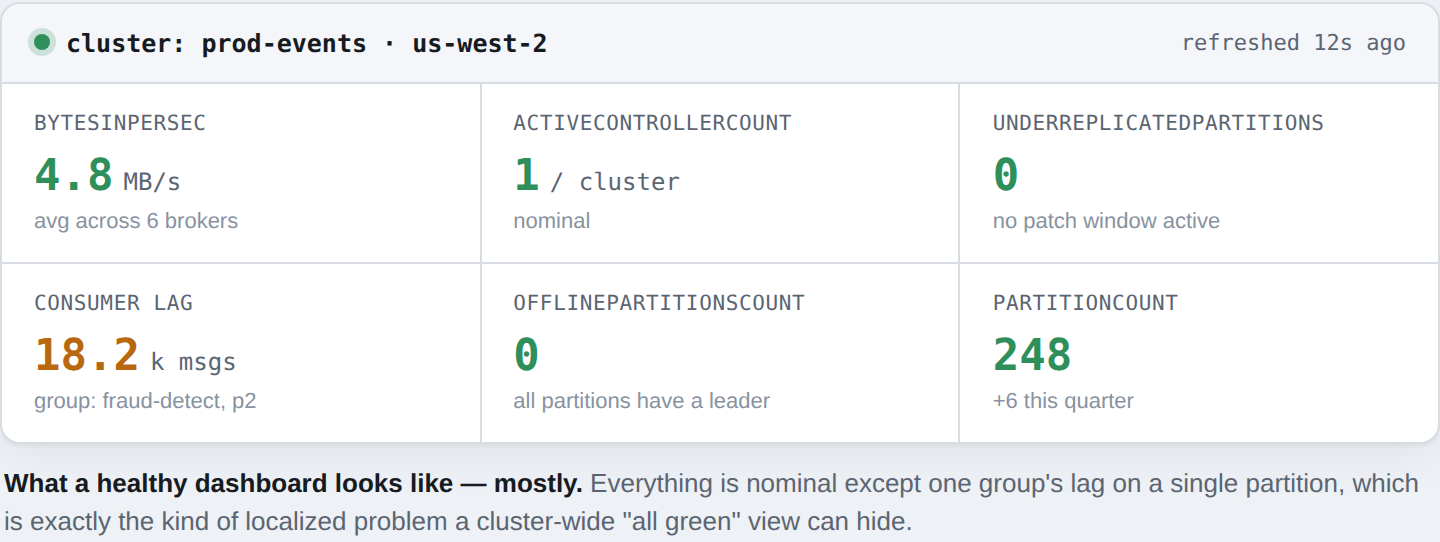
A cluster that looks healthy in the console can still be quietly failing one consumer or one partition. These metrics catch that gap.
- Broker-level metrics
- BytesInPerSec / BytesOutPerSec — throughput per broker; a sustained skew usually means uneven leader distribution.
- UnderReplicatedPartitions — zero outside a patch window; persistent nonzero is worth paging on.
- ActiveControllerCount — always exactly 1. Zero or more than 1 both signal trouble.
- Topic and partition metrics
- Consumer lag — a partition’s latest offset minus a group’s committed one; the best leading indicator of trouble.
- PartitionCount — tracked over time for capacity planning.
- OfflinePartitionsCount — always zero, or a partition has no leader.
6. Choosing a CloudWatch monitoring level
MSK’s CloudWatch monitoring is tiered — DEFAULT covers cluster and broker metrics; PER_TOPIC_PER_BROKER and PER_TOPIC_PER_PARTITION go finer, at real added cost. Reserve those for topics you alarm on individually, and let automation handle the routine responses — a lag alarm triggering a Lambda beats a page for something a script could fix.
7. Building real competence
- Run fire drills. Kill a broker in staging and watch leadership, ISR, and clients react — the first rebalance you see shouldn’t be a real incident.
- Manage topics and ACLs as code, so the config that’s running is the config in version control.
- Let alarms trigger real remediation — a Lambda reacting to a lag alarm resolves pages before a human sees them.
- Rehearse every upgrade in QA first, where a Connect plugin’s incompatibility should surface before production.
Conclusion
Running Kafka well on MSK comes down to a few things: size topics right the first time, understand what a rolling upgrade does to replication, watch metrics that reveal a localized problem instead of a green light, and practice failure before production forces you to learn it live.
- Get naming, partition count, and RF right before the first producer writes to a topic.
- min.insync.replicas and full broker-address client configs are upgrade prerequisites.
- Alarm on consumer lag and under-replication — a healthy-looking cluster can still be failing one group.
- Rehearse failure in staging so the first broker outage you see isn’t in production.