


Introduction
Artificial Intelligence is rapidly becoming a key component of modern enterprise applications, enabling businesses to automate workflows, understand documents, perform intelligent searches, and deliver personalized user experiences. However, building production-ready AI solutions involves much more than integrating an AI model—it requires seamless integration with existing .NET architectures while ensuring security, scalability, reliability, and governance. Microsoft Foundry addresses these challenges by providing a unified platform that combines AI models, enterprise search, document intelligence, AI agents, and built-in governance, empowering .NET developers to build secure, scalable, and intelligent enterprise applications.
Why a direct model call is not enough
A basic AI integration may look like this :
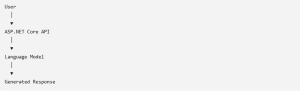
Basic AI Integration
This approach works for demonstrations and general-purpose content generation. However, the model usually does not know:
-
- Your latest business data
- Internal policies and documents
- User-specific information
- Application authorization rules
- Whether its response is factually correct
- A production-ready application normally needs retrieval, validation, security, monitoring, and business-service integration around the model.
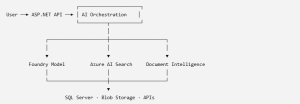
Advanced AI Integration
The model is therefore one part of the application rather than the complete application.
Why a direct model call is not enough
The following simplified example uses the OpenAI-compatible client with Microsoft Entra authentication. For new Azure OpenAI applications, Microsoft recommends considering the Responses API instead of starting with the older Chat Completions API.
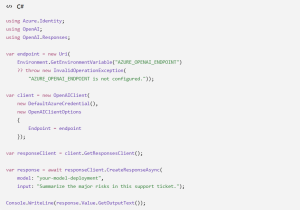
OpenAI Client Code
In a real application, this code should be placed behind an application service rather than directly inside a controller.

OpenAI Client Code Placement
This abstraction makes it easier to:
-
- Replace or upgrade models
- Add retries and timeouts
- Record token consumption
- Apply content filtering
- Test business logic without calling the model
Retrieval-Augmented Generation
One of the most useful patterns for enterprise AI is Retrieval-Augmented Generation, commonly known as RAG.
Instead of asking a model to answer from its general training knowledge, the application first retrieves relevant information from an approved knowledge source.
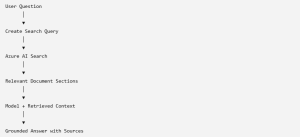
Retrieval-Augmented Generation
Azure AI Search supports full-text, vector, hybrid, and multimodal retrieval. A vector index stores numerical representations of content so that semantically similar information can be found even when the words are different.
For example, these requests express a similar intent:

Example Request
A keyword-only search may treat them differently. Vector search can identify their semantic similarity.
A practical enterprise workflow
Consider an invoice-processing application built with ASP.NET Core.
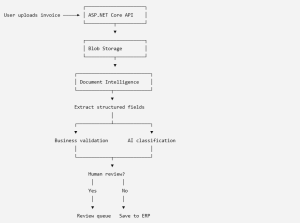
Enterprise Workflow
The AI component performs extraction and classification, while deterministic .NET services continue to enforce business rules. This separation is important because probabilistic AI output should not directly replace critical validation logic.
Simplified vector-search example
Assume that an embedding has already been generated for the user’s question:
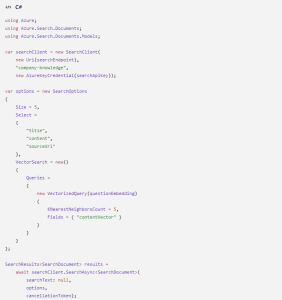
Simplified vector-search example
For production workloads, hybrid search is often preferable because it combines keyword matching and vector similarity rather than relying entirely on one retrieval method. Azure AI Search supports both precomputed embeddings and integrated vectorization during indexing.
A practical enterprise workflow
Consider an invoice-processing application built with ASP.NET Core.
Enterprise Workflow
The AI component performs extraction and classification, while deterministic .NET services continue to enforce business rules. This separation is important because probabilistic AI output should not directly replace critical validation logic.
Where AI agents fit
Agents are useful when a workflow requires the model to choose tools, retrieve information, and complete multiple connected steps.
For example, a support agent might:
-
- Classify a customer request.
- Search the knowledge base.
- Retrieve account information.
- Check an internal policy.
- Draft a response.
- Escalate when confidence is low.
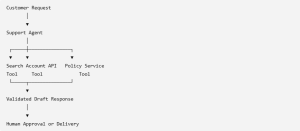
AI agents fit
Agents should not be introduced merely because they are currently popular. A normal service workflow is often more predictable, faster, and cheaper. Agents provide value when the sequence of actions cannot be fully determined in advance.
Recommended .NET architecture
A maintainable solution could use the following separation:
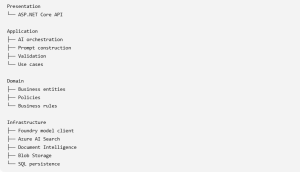
Recommended .NET architecture
This prevents Azure SDK types and prompt-specific logic from spreading across controllers and domain services.
Conclusion
Microsoft Foundry enables .NET teams to build applications that can generate content, understand documents, retrieve enterprise knowledge, and coordinate intelligent workflows.
The real value does not come from adding a chat window to an existing application. It comes from combining AI capabilities with sound software architecture:
-
- Use models for reasoning and language tasks.
- Use Azure AI Search to ground answers in trusted data.
- Use Document Intelligence for structured document extraction.
- Keep business validation deterministic.
- Add agents only when dynamic tool orchestration is genuinely required.
- Build security, observability, and human review into the solution from the beginning.