


Cursor AI for .NET Developers: Coding Smarter, Not Harder
Introduction
Modern .NET development involves more than writing business logic. Developers regularly spend time creating boilerplate code, understanding unfamiliar codebases, debugging issues, writing tests, and switching between documentation and multiple tools.
Cursor AI helps reduce that overhead by bringing AI-assisted code generation, code understanding, refactoring, debugging, and testing directly into the development environment.
In this blog, I’ll focus on practical ways .NET developers can use Cursor AI effectively, with examples from ASP.NET Core, Entity Framework Core, debugging, and unit testing.
What is Cursor AI?
Cursor AI is an AI-powered code editor built on top of Visual Studio Code. It allows developers to interact with their codebase using natural language while taking the surrounding project context into account.
Instead of using AI only for autocomplete, developers can ask questions such as:
- Explain this service and its dependencies.
- Create an ASP.NET Core endpoint with validation.
- Refactor this method using LINQ.
- Generate unit tests for this service.
- Find the possible cause of this exception.
The main advantage is not simply faster code generation. It is reduced context switching and faster understanding of existing code.
How Cursor AI Fits into the Development Workflow
A useful way to think about Cursor AI is as a four-step workflow:
1. Ask
Describe the requirement in clear, specific language.
2. Understand
Cursor AI uses the surrounding files and project context to understand the requirement.
3. Generate
It suggests code, explanations, refactoring options, tests, or fixes.
4. Review
The developer validates the output against project architecture, security requirements, coding standards, and business rules.
Key point : AI-generated code should be treated as a starting point, not automatically as production-ready code.
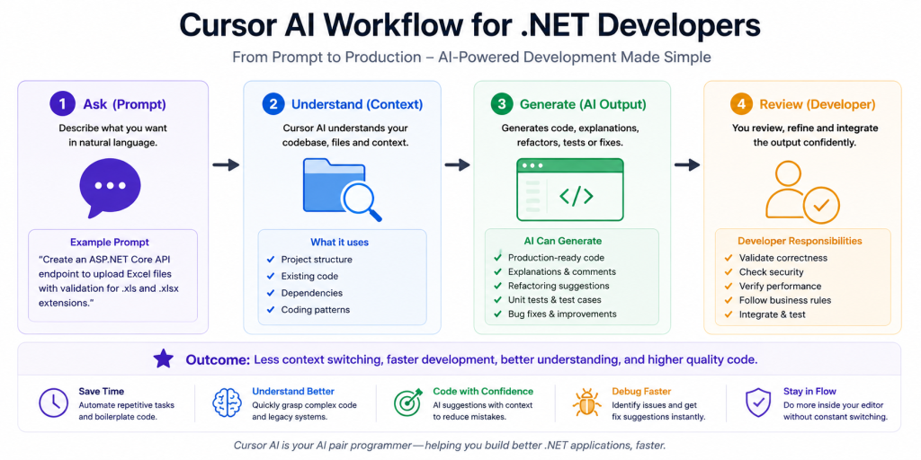
Cursor AI Workflow for .NET Developers1. Building ASP.NET Core APIs Faster
Creating an API often involves repetitive work such as controllers, DTOs, validation, service calls, response models, and error handling.
Instead of starting from an empty file, I can provide a detailed prompt.
Example Prompt
Create an ASP.NET Core API endpoint to upload Excel files. Validate .xls and .xlsx extensions, return appropriate error responses, and keep the business logic inside a service layer.
A more detailed prompt usually produces a better result than something generic such as:
Create upload API.
Cursor AI can generate a starting implementation containing:
- Controller endpoint
- File validation
- Service method
- Error handling
- Response model
Example
[HttpPost(“upload-excel”)]
public async Task<IActionResult> UploadExcel(IFormFile file)
{
if (file == null || file.Length == 0)
return BadRequest(“Please upload a valid file.”);
var extensions = new[] { “.xls”, “.xlsx” };
var extension = Path.GetExtension(file.FileName);
if (!extensions.Contains(extension, StringComparer.OrdinalIgnoreCase))
return BadRequest(“Only Excel files are allowed.”);
await _excelService.ProcessAsync(file);
return Ok(new { message = “File uploaded successfully.” });
}
This saves time on boilerplate while leaving the developer responsible for validating architecture and business requirements.
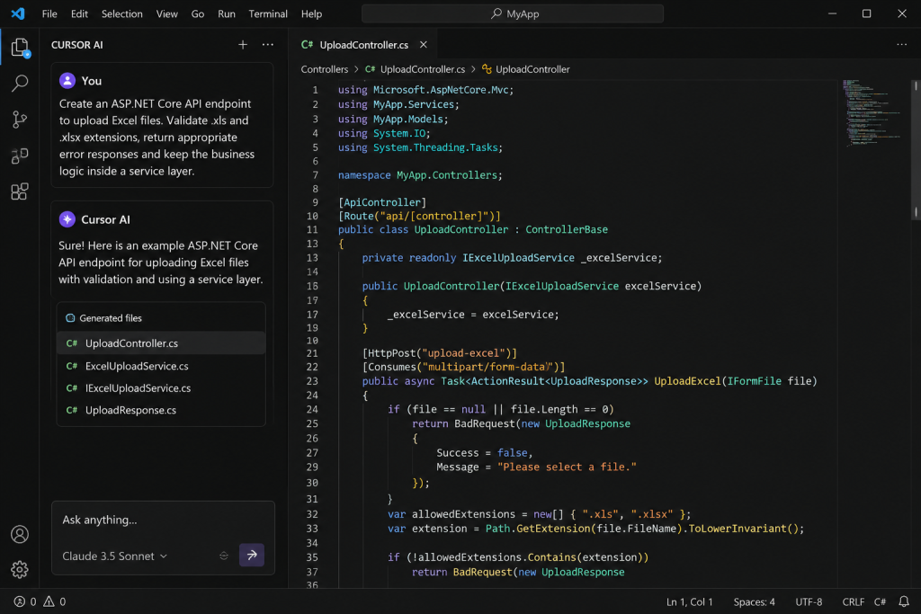
Cursor prompt & generated API code
2. Working with Entity Framework Core
Cursor AI is also useful when creating or reviewing LINQ queries.
Example Prompt
Generate an Entity Framework Core query to retrieve active students grouped by school, including the school name and number of active students.
A possible starting point is:
var studentsBySchool = await _context.Students
.Where(s => s.IsActive)
.GroupBy(s => new { s.SchoolId, s.School.Name })
.Select(g => new
{
SchoolId = g.Key.SchoolId,
SchoolName = g.Key.Name,
StudentCount = g.Count()
})
.ToListAsync();
The important part is not copying the output blindly. Review the generated query for:
- Database performance
- Required indexes
- Unnecessary navigation loading
- Correct filtering
- Project-specific repository patterns
Practical lesson : use AI to accelerate query creation, but use developer judgment to validate the final SQL behavior and performance.
3. Understanding Existing Codebases
Understanding an unfamiliar codebase can take longer than writing new code.
Cursor AI can reduce that time by answering context-aware questions such as:
- Explain what this service does and list its main dependencies.
- How does this controller reach the database?
- Explain this LINQ query step by step.
- Which classes use this repository?
This can be especially useful when working with legacy applications or modules written by another team.
However, AI explanations should still be verified against the actual implementation, especially when business rules span multiple services or external systems.
4. Debugging More Efficiently
Consider this exception:
NullReferenceException:
Object reference not set to an instance of an object.
Instead of searching the error message without context, I can ask Cursor AI:
Analyze this method and identify the most likely reason for the NullReferenceException. Suggest a safe fix without changing the business behavior.
Cursor AI can inspect the nearby code and point to likely null values, missing dependency initialization, or unsafe property access.
This does not replace debugging tools or logs, but it can shorten the investigation process by providing likely starting points.
5. Generating Unit Tests
Unit test creation is another area where AI can reduce repetitive work.
Example Prompt
Generate xUnit tests for this service method. Include success, validation failure, null input, and repository exception scenarios. Use mocks for dependencies.
Cursor AI can generate:
- Test structure
- Mock setup
- Arrange/Act/Assert blocks
- Validation scenarios
- Edge cases
The generated tests should still be reviewed to ensure they test business behavior, not just implementation details.
Better Prompts Produce Better Results
One of the most important lessons when using Cursor AI is that prompt quality directly affects output quality.
Weak Prompt
Create API.
Better Prompt
Create an ASP.NET Core API for student registration using DTOs, dependency injection, validation, centralized exception handling, and async service methods.
The second prompt provides technical constraints and makes the expected implementation much clearer.
A useful prompt structure is:
Task + Technology + Constraints + Expected Output
For example:
Refactor this C# service method using LINQ, preserve existing behavior, improve readability, and explain each change.
Best Practices
To use Cursor AI effectively in professional development:
- Write clear and specific prompts.
- Review every generated code change.
- Validate security and performance implications.
- Check business rules carefully.
- Follow existing project architecture and coding standards.
- Never include production credentials, API keys, or sensitive customer data.
- Use AI as an engineering assistant, not as a replacement for technical judgment.
Limitations
Cursor AI is useful, but it is not always correct.
Generated code may:
- Miss business-specific requirements
- Use patterns that do not match your architecture
- Introduce inefficient queries
- Produce incomplete test coverage
- Suggest technically valid but inappropriate solutions
- For this reason, every AI-generated change should pass the same review standards as manually written code.
Conclusion
Cursor AI can significantly improve a .NET developer’s workflow by reducing repetitive coding, accelerating code understanding, assisting with debugging, and generating useful starting points for tests and implementations.
Its real value is not that it writes code automatically. Its value is that it helps developers move faster while staying focused inside the development environment.
Used responsibly, Cursor AI becomes a practical engineering assistant—one that helps developers spend less time on repetitive tasks and more time solving the technical and business problems that actually require human judgment.