


My experience with AI-assisted coding, debugging, and unit testing.
AI is becoming a regular part of software development, and like many developers, I’ve been exploring how it can help in my day-to-day work.
As a .NET developer working with C#, ASP.NET MVC, JavaScript, and Azure, I spend a good amount of time understanding existing code, fixing issues, writing unit tests, and implementing new features.
Recently, I started using Cursor, and what I found interesting wasn’t just how quickly it could generate code, but how it could help me approach development tasks differently.
Understanding Code Before Changing It
One of the biggest challenges in working on an existing application is understanding how everything is connected.
Sometimes a small requirement involves multiple controllers, services, repositories, and business rules. Earlier, I would manually navigate through these files to understand the complete flow.
With Cursor, I can provide the relevant context and ask it to explain the existing implementation, identify dependencies, or suggest where a change might be required.
For example, while working on user management functionality, understanding the relationships between accounts, licenses, permissions, and existing users is important before making changes.
Cursor helps speed up that initial investigation. Of course, I still verify its suggestions against the actual code because AI doesn’t always understand every business rule correctly.
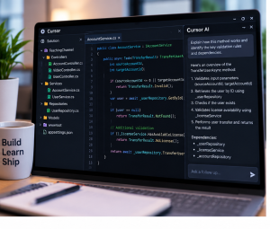
Development with cursor
Making Unit Testing Easier
Unit testing is another area where I’ve found AI assistance useful.
Writing tests for existing repository and service methods often requires setting up mock data, understanding different conditions, and covering edge cases.
With Cursor, I can ask it to review a method and suggest relevant test cases.
One thing I’ve learned is to provide clear instructions. For example, I explicitly tell Cursor not to modify existing repository methods and to generate tests based on the current implementation.
This helps keep the changes focused.
But generating tests is only part of the job. Running them, investigating failures, and verifying the expected behavior are still essential.

Unit Test with cursor
Debugging and Accessibility Improvements
Apart from coding and testing, I’ve also been exploring Cursor for debugging and accessibility-related work.
In web applications, issues can come from JavaScript, CSS, Razor views, browser behavior, or backend logic. Cursor can help analyze the relevant code and suggest possible causes, giving me a useful starting point for investigation.
Similarly, while working on accessibility improvements involving NVDA, keyboard navigation, and semantic HTML, AI can help identify potential issues and suggest better implementations.
However, actual browser and screen reader testing remains necessary. A suggested fix is not necessarily a verified fix.
What I’ve Learned About Using AI Effectively
- One thing I’ve realized is that the way we communicate with AI matters a lot.
- A generic instruction like “fix this issue” may produce a solution, but it might also introduce unnecessary changes.
- Providing context, explaining the expected behavior, and setting clear boundaries generally leads to more useful suggestions.
- I’ve also started preferring a simple approach: understand the problem first, ask Cursor to suggest a plan, and then review the implementation.
- This gives me more control over the changes instead of blindly accepting generated code.
Looking Beyond Developer Productivity
What excites me most about AI is that its potential goes beyond helping developers write code.
Working in the EdTech space, I can see opportunities for AI-powered video recommendations, smarter content search, and personalized learning experiences.
For example, imagine an educator searching for classroom management strategies using a natural-language question and receiving relevant learning videos without having to match exact keywords.
These are the kinds of improvements that could make educational platforms more useful for their users.
And as developers, I believe we should be thinking about both sides of AI: how it can improve our development process and how it can improve the products we build.
Final Thoughts
I’m still exploring Cursor and learning how to use it more effectively.
It doesn’t always provide the right solution, and sometimes its suggestions need significant correction. But when used with the right context and proper validation, it can be a helpful addition to the development workflow.
For me, AI-assisted development isn’t about writing less code or letting AI make every decision.
It’s about spending less time on repetitive investigation and more time understanding problems, making better technical decisions, and building useful features.
And I think that’s where AI can make a real difference in software development.