


INTRODUCTION
Have you ever woken up to a dozen AWS health notifications, each one technical, urgent, and demanding your immediate attention?
Imagine it’s 2 a.m. and AWS sends a health notification: an EC2 instance is being retired in 48 hours. Ten minutes later, a second email arrives about a mandatory RDS upgrade. By morning, there are eleven unread notifications, each dense and technical. Someone still has to open every one, judge its urgency, and decide what to do before anything gets missed.
This is the reality for many DevOps and cloud engineering teams. AWS sends critical health notifications, but they arrive as raw, unstructured emails that require manual triage. Important alerts get buried, and the window to act can be dangerously short.
So we built the Health Email Intelligence Engine a serverless pipeline that reads every AWS Health notification as it arrives, uses an AI model to triage it, and delivers one consolidated briefing: plain-language key points in the email body, and a severity-ranked PDF attached.
This article walks through the implementation using AWS SES, SQS, Lambda, and Amazon Bedrock, explains why it’s built to never lose a notification even when the AI is unavailable, and breaks down what it costs to run.
WHAT IS THE HEALTH EMAIL BOT?
The engine turns raw AWS Health emails into one prioritized briefing per cycle:
1. Receives the AWS Health email via Amazon SES and stores it in S3
2. Buffers it in an SQS queue until the next cycle
3. On a schedule, a Lambda function drains the queue, parses each email, and has Amazon Bedrock (Nova 2 Lite) score severity, priority, impact, and next steps
4. Renders one combined PDF covering every issue
5. Sends a single digest email with key points in the body and the PDF attached
The full batch completes in seconds, and the schedule repeats every 5 minutes.
ARCHITECTURE OVERVIEW
Five core building blocks power this solution:
– Amazon SES (receive) accepts the email, hands it to S3
– Amazon S3 mail drop under incoming/; auto-expires after 90 days
– Amazon SQS buffers a burst of notifications so they’re processed together
– AWS Lambda drains the queue, parses, calls Bedrock, renders the PDF, sends
– Amazon Bedrock (Nova 2 Lite) returns severity, priority, impact, and next steps in plain language
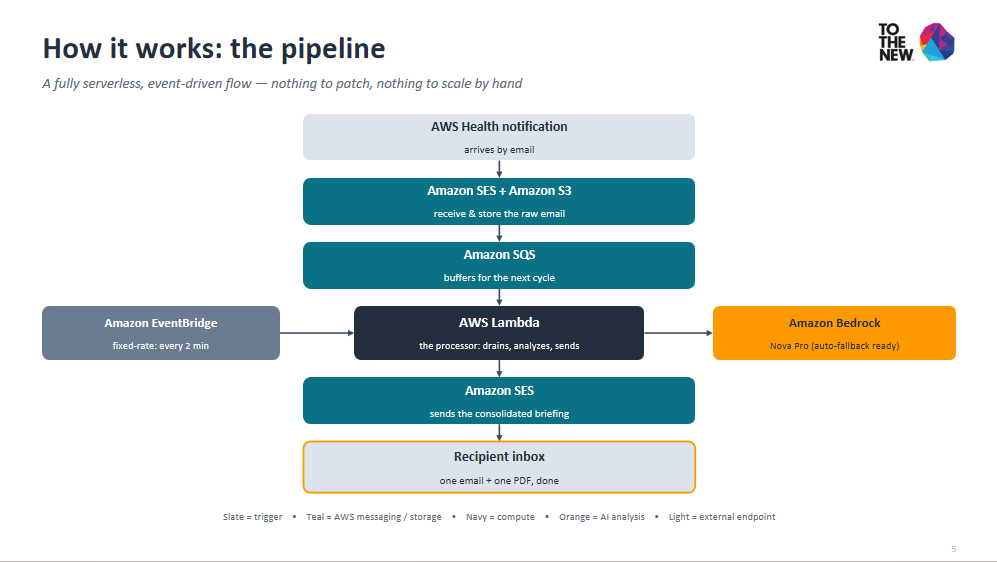
Overview of process
Figure 1: Health Email Intelligence Engine architecture SES, S3, SQS, Lambda, Bedrock, and SES
Pro Tip: This architecture is fully serverless. There are no servers to manage, and it scales automatically with your notification volume.
WHY THE FALLBACK ANALYZER MATTERS
Most AI pipelines have one critical point of failure: if the model call errors, throttles, or loses access, the whole process goes silent and for an alerting tool, silence looks like “all clear,” which is the worst possible outcome.
Our solution: The AI is optional, not load-bearing.
Two Execution Paths:
1. Normal Path: Lambda sends the notification to Bedrock (Nova 2 Lite), which returns severity, priority, and next steps in a structured JSON format.
2. Fallback Path: If Bedrock errors for any reason (throttling, service outage, permission issues), a deterministic keyword analyzer runs instead. It’s less nuanced than AI, but it always produces a briefing.
Why This Matters:
Scenario Without Fallback With Fallback
————————– ———————— —————————-
Bedrock service outage No report generated Report with fallback tag
Rate limiting Pipeline fails Report with fallback tag
Model unavailable Silent failure Report with fallback tag
Confidence level 85-95% 30-50% (clearly tagged)
Every issue is tagged analysis_mode: bedrock or fallback, so nothing is presented with more confidence than it deserves. The PDF and email clearly indicate when the fallback was used, so your team knows to verify critical details manually.
Delivery Reliability:
Delivery follows the same “never lose a notification” principle:
– An SQS message is only acknowledged after the digest actually sends
– A failed send retries the next cycle
– A message failing five times moves to a dead-letter queue instead of vanishing so you can investigate what went wrong
STEP-BY-STEP SETUP
Prerequisites:
1. An AWS account with a domain verified in Amazon SES
2. AWS CLI configured with CloudFormation deploy permissions
3. Model access enabled for Amazon Nova 2 Lite in Bedrock
Step 1: Configure the One Required Value
Create a config.env file with the only configuration needed:
# config.env
REPORT_EMAIL=ops-team@yourdomain.com
That’s it. One address configured anywhere in the project it becomes the sender, recipient, and verified identity.
Step 2: Deploy the Stack
./scripts/deploy.sh
This single command:
– Packages the Lambda
– Deploys the SES receipt rule
– Creates the S3 bucket with SSE-S3 encryption
– Sets up the SQS queue + DLQ
– Configures the EventBridge schedule
– Creates a least-privilege IAM role
Step 3: Verify the Sending Address
Click the SES verification link sent to the configured address.
Step 4: Smoke-Test the Pipeline
aws s3 cp samples/sample_email.eml s3://<mail-bucket>/incoming/
Step 5: Check Your Inbox
Within one 5-minute cycle, the configured address receives one digest email with the PDF attached.
TESTING THE PIPELINE
Let’s walk through a real example. Imagine a digest after an EC2 retirement and an RDS upgrade land in the same cycle.
Email Subject:
AWS Health issues EC2 instance retirement action needed by 2026-07-30; RDS MySQL minor version upgrade scheduled in ap-south-1
Email Body (Excerpt):
1. EC2 instance retirement Priority: P1 Severity: CRITICAL
Next step: Migrate the workload before the retirement date.
2. RDS minor version upgrade Priority: P3 Severity: LOW
Next step: Confirm the maintenance window.
Full impact analysis and reasoning for every issue is in the attached PDF.
PDF Report:
The attached PDF includes:
– Cover Page: Severity-color-coded header
– Issues-at-a-Glance: All issues summarized in a table
– Detailed Analysis: Per-issue sections with:
– Executive summary
– Key facts and impact
– Numbered recommendations
– Confidence score
– Analysis mode (Bedrock or Fallback)
Figure 2: Sample AWS Health digest email and PDF cover showing priority, severity, and next steps
WHAT IT COSTS
Lambda, SQS, S3, and EventBridge stay well within the AWS Free Tier for typical workloads. The one variable cost is Bedrock, billed per token.
Using Nova 2 Lite’s published on-demand rate (~$0.06/1M input tokens, ~$0.24/1M output tokens) as a reference:
Notifications/Month Estimated Bedrock Cost Estimated Total
——————- ———————- —————
50 ~$0.004 ~$0.01
500 ~$0.04 ~$0.06
5,000 ~$0.40 ~$0.55
50,000 ~$4.00 ~$5.20
Even at 50,000 notifications a month, total cost stays under six dollars. At realistic volumes, it rounds to a few cents per month.
KEY BENEFITS
Before After
———————————— ————————————
Manual reading of technical emails Automated AI analysis
Inconsistent summaries Always the same format
Missed critical alerts Never loses a notification
No history or tracking Every report is logged
Time-consuming to share insights One email to the whole team
Single point of failure Fallback keeps it running
CONCLUSION
The Health Email Intelligence Engine replaces a manual, easy-to-drop triage process with a briefing that arrives automatically consistent severity calls, plain-language next steps, and it keeps working even when the AI call fails.
What We Learned:
1. Serverless is cost-effective Even at 50,000 notifications/month, total cost stays under $6
2. AI is powerful but not perfect A fallback analyzer ensures you never miss a notification
3. Configuration over code Adding recipients or extending retention is just changing config
4. One pipeline closes the gap Detect, Investigate, Explain, Deliver
Extending This Pattern:
The same architecture parse, analyze with an AI model that has a deterministic fallback, render, deliver extends to any structured notification source. Need to monitor:
– Cost anomalies? Use the same pipeline with Cost Explorer data
– Security alerts? Add a prompt template for GuardDuty findings
– Custom application alerts? Just add a new prompt
NEXT STEPS
Don’t just read about serverless AI build with it. Deploy this solution in your AWS environment today and eliminate notification fatigue forever.
Follow us on social media for more updates on serverless architectures, AI/ML on AWS, and cloud cost optimization strategies.
About the Author: Parikshit Kudalkat is a Cloud Engineer at TO THE NEW, specializing in serverless architectures, AI/ML implementations on AWS, and cloud cost optimization. With a passion for simplifying complex cloud operations, Saksham helps enterprises build resilient, intelligent automation solutions.
REFERENCES
– Amazon SES Documentation: https://docs.aws.amazon.com/ses/latest/dg/Welcome.html
– Amazon SQS Developer Guide: https://docs.aws.amazon.com/AWSSimpleQueueService/latest/SQSDeveloperGuide/welcome.html
– AWS Lambda Developer Guide: https://docs.aws.amazon.com/lambda/latest/dg/welcome.html
– Amazon Bedrock User Guide: https://docs.aws.amazon.com/bedrock/latest/userguide/what-is-bedrock.html
– AWS Health API Reference: https://docs.aws.amazon.com/health/latest/ug/what-is-aws-health.html