


This guide explains what LangChain and LangGraph each do, how they fit together, and how to choose between them. It also covers Deep Agents — an agent harness for long autonomous tasks — so the full picture is clear before making a choice.
TL;DR — The rule of thumb that decides everything
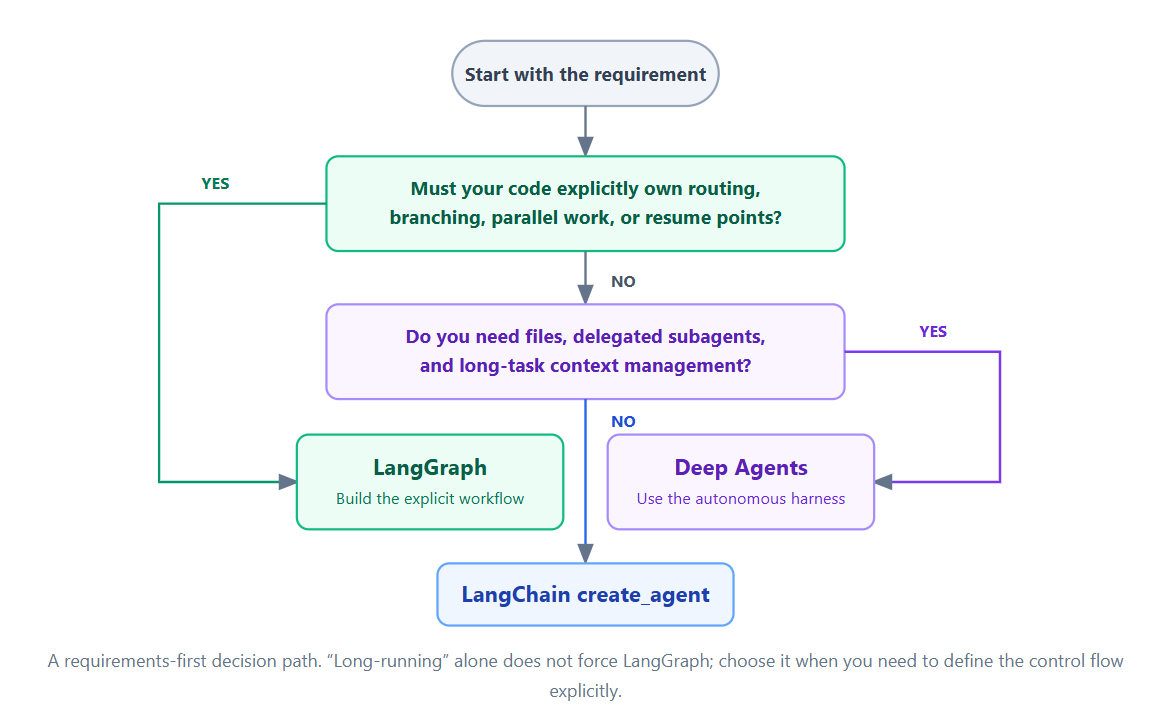
As a rule of thumb: if the standard agent loop is enough, start with LangChain. If your application needs explicit control over workflow state and orchestration, use LangGraph.
- LangChain — the agent framework: start here for chatbots, tool-calling agents, and RAG with
create_agent. Middleware can influence execution, including human interrupts and approval flows. - LangGraph — a low-level orchestration and runtime layer for explicit workflow control: use when the application must own routing, persistence, and interrupts.
- Deep Agents — an agent harness for long autonomous tasks with files and subagents. Most conventional chatbots and support agents do not need it.
- They are different abstraction levels in the same ecosystem, not necessarily tools you must use together.
create_agentalready runs on LangGraph under the hood.
LangChain vs LangGraph vs Deep Agents at a Glance
Both LangChain and LangGraph come from the same team and power many AI apps — chatbots, document Q&A, and agents that call external APIs. Think of them like automatic and manual gearboxes: same engine, different control. LangChain is the agent framework; LangGraph is the low-level orchestration/runtime layer when the application must own every step, branch, and pause.
In the current Python stack, create_agent already runs on LangGraph. The choice is how much control flow your code must define — not which ecosystem to pick. Deep Agents is an agent harness for long autonomous tasks — planning, filesystem tools, subagents, and context management — covered below.
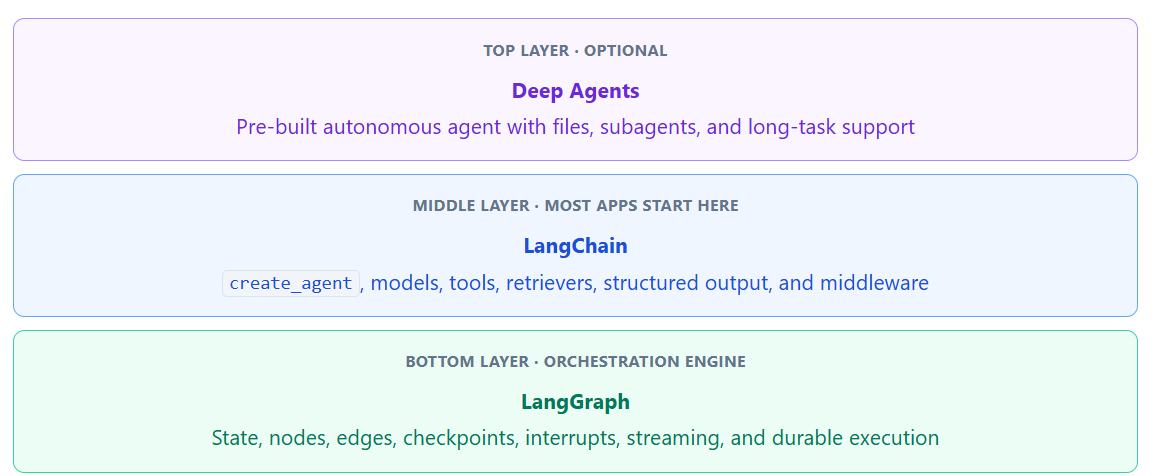
Deep Agents — Agent harness: a ready-made setup for complex, multi-step work (research, coding, long reports). Not a separate framework; it is built with LangChain and runs on LangGraph.
LangChain — Application framework: the usual starting point for tool-calling agents, RAG, and middleware.
LangGraph — Low-level orchestration/runtime: explicit nodes, edges, routing, persistence, and interrupts — used directly or as the execution layer behind LangChain agents.
What Is LangChain? Start Here for Most Apps
Choose this layer if:
- The model should call tools, read the results, and keep going until it can answer.
- You want chatbots, tool-calling agents, or RAG (retrieval-augmented generation — search your documents, then answer from them).
- You do not need to draw every step in the workflow yourself.
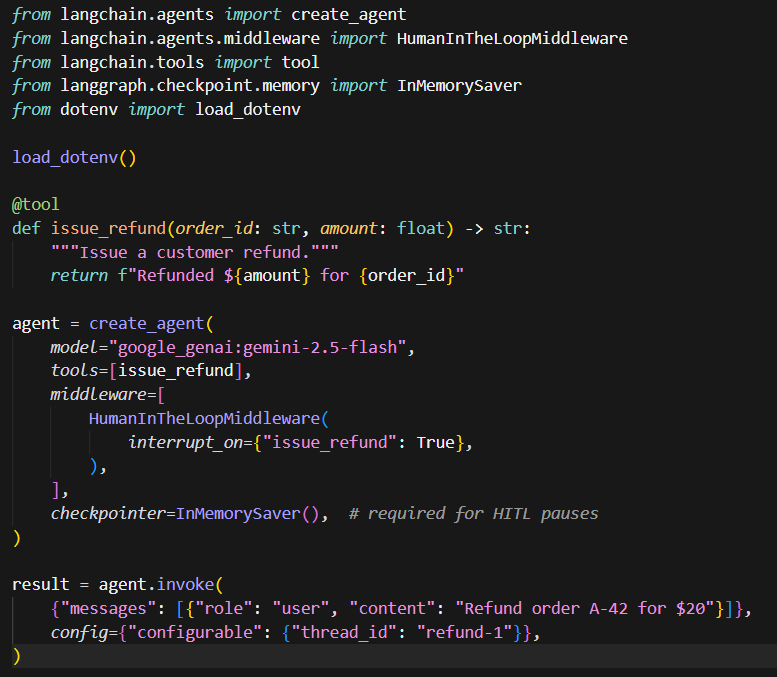
LangChain is the agent framework — models, tools, retrieval, middleware, structured output, and more. LangChain provides abstractions for building RAG; RAG itself does not require LangChain. create_agent is its high-level agent abstraction with a built-in model-and-tool loop, extendable via middleware, structured output, custom state, streaming, and other runtime behaviors. Need a human to approve a refund? Add human-in-the-loop middleware — or call interrupt() directly. For straightforward approval flows, you don’t need to manually construct a LangGraph workflow. Interrupt and resume rely on persisted graph execution state — that is why a checkpointer and stable thread_id are required.
Execution flow

Example: customer refund with human approval
When the model proposes a sensitive refund tool, middleware pauses for a reviewer — no need to manually construct a LangGraph workflow.
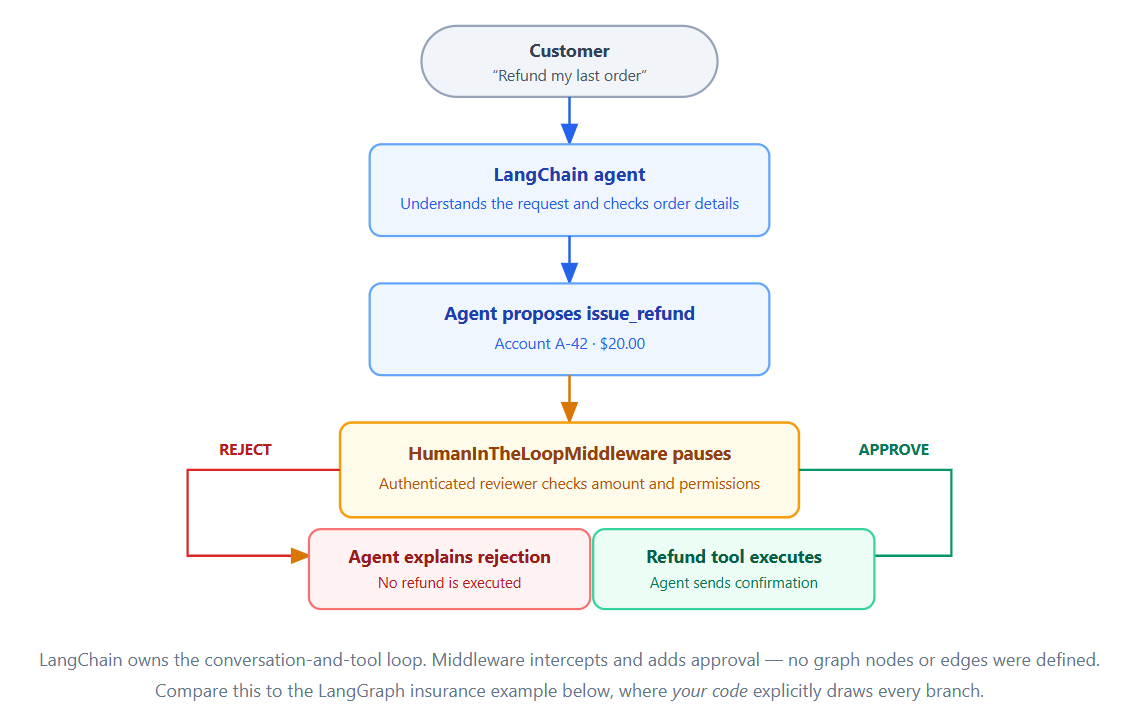
On interrupt, inspect the pending tool call, then resume with Command(resume=...) using the same thread_id. See the human-in-the-loop docs for approve / edit / reject patterns. Use a durable checkpointer (for example Postgres) in production.
What Is LangGraph? Use It When Your Code Owns the Route
Choose this layer if:
- Your application — not just the model — must decide which step runs next (application-defined routing and stages).
- You need branching, loops, or multi-step workflows with explicit control.
- You need persistence, interrupts, or stateful execution across steps.
LangGraph is a low-level orchestration/runtime framework where application state flows through nodes (model calls, tools, or rules) and edges, giving developers explicit control over execution, routing, persistence, and interrupts. LangGraph does not mean every decision must be hard-coded — a node can still call an LLM. Your application explicitly controls workflow structure and state transitions, whether routing is deterministic or model-driven inside nodes.
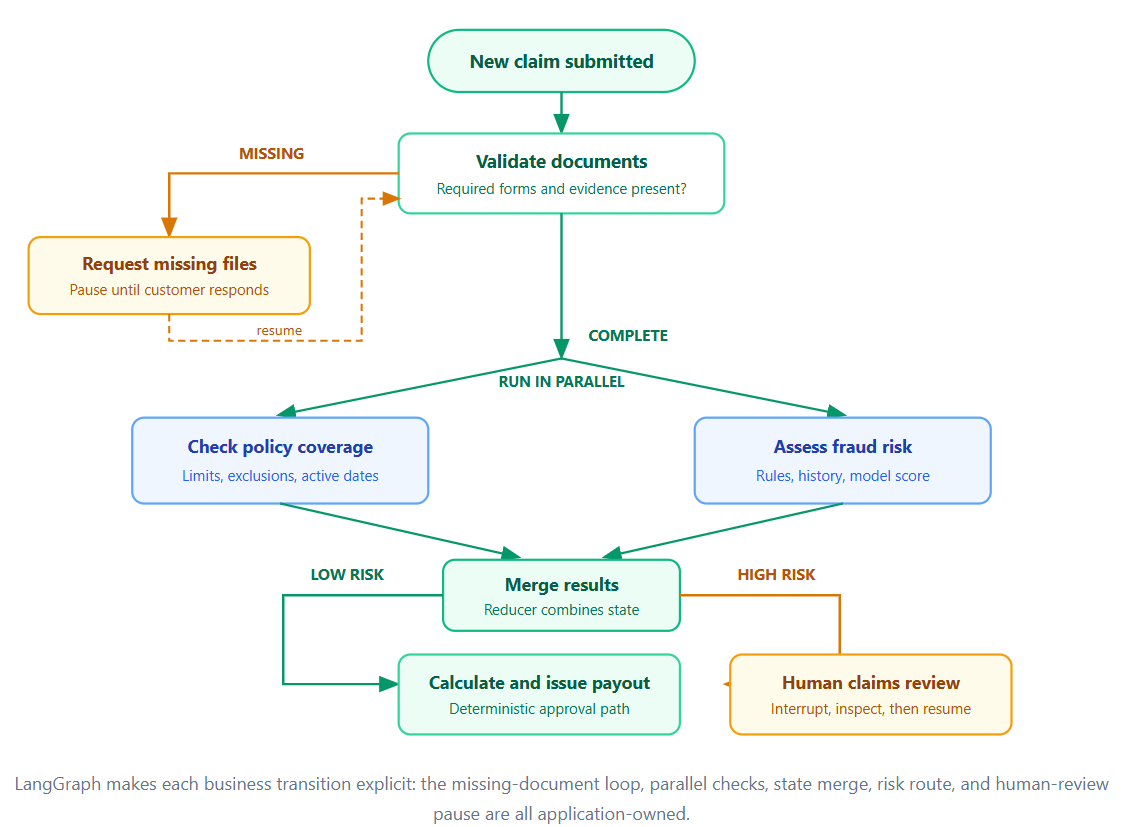
Reach for LangGraph when control flow is part of the product: missing-document loops, parallel policy checks, risk-based routing, or stage-specific human review. Use a durable checkpointer (such as PostgreSQL) in production.
Execution flow
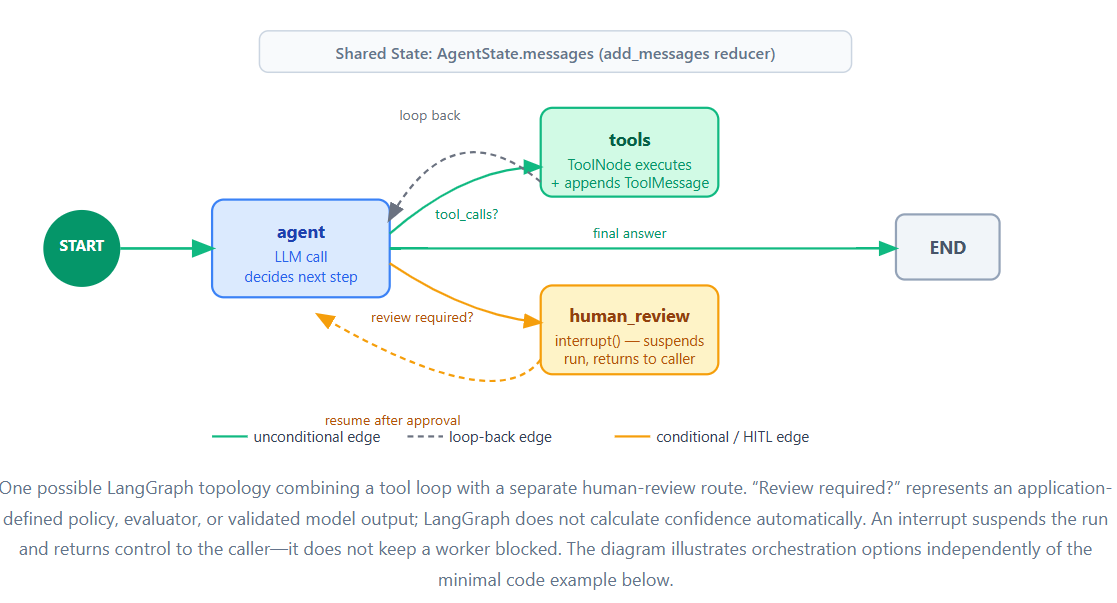
Syntax at a glance
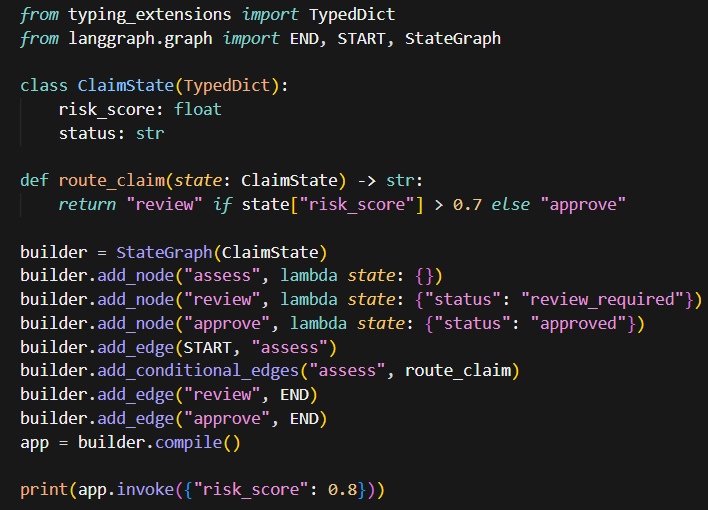
Each node returns a partial state update. Your routing function decides the next step — that is the core LangGraph idea.
Example: insurance claim orchestration
An insurance claim is not just a chat. Documents may be requested in a loop, checks can run in parallel, and high-risk claims must pause for a human — LangGraph makes each transition explicit and testable.
Same Problem: LangChain vs LangGraph
Same requirement: customer asks for refund → check eligibility → approve refund → notify customer.
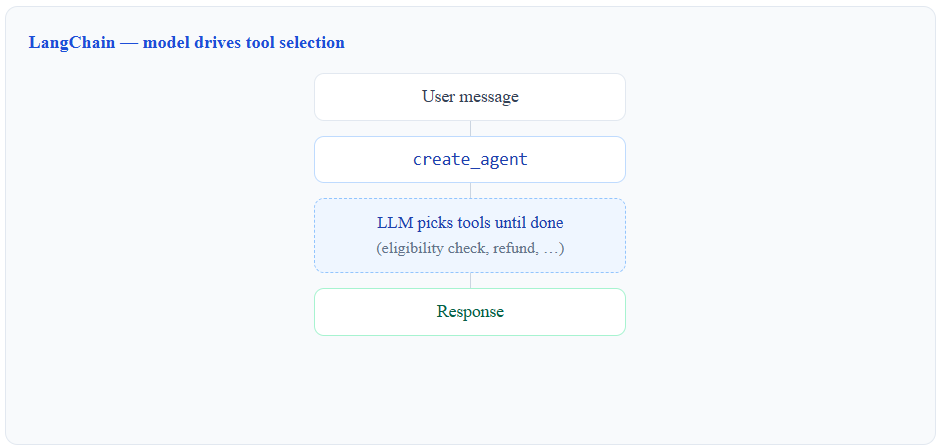
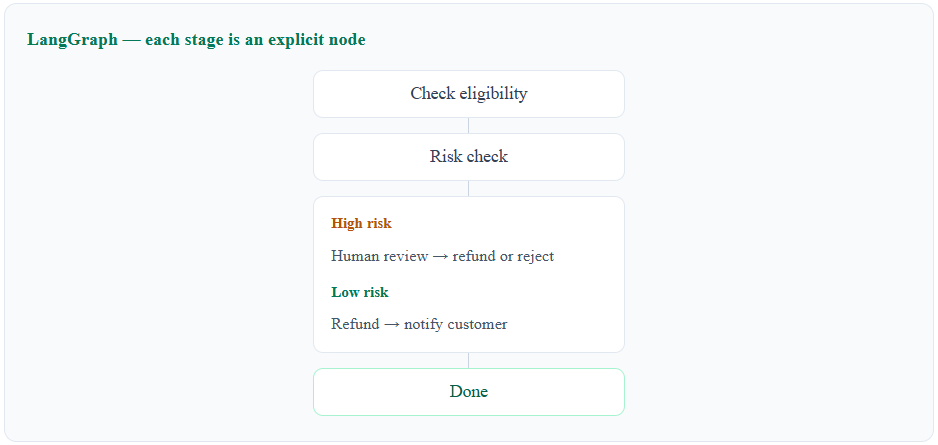
LangChain lets the model drive tool selection; LangGraph makes eligibility, risk routing, human review, and notification explicit, testable stages.
The Real Difference: Abstraction vs Orchestration
The split is abstraction level, not capability. LangChain is the higher-level agent framework — the model picks tools until it can answer, configured through prompts, tools, and middleware. LangGraph is a low-level orchestration/runtime framework — your code defines nodes, edges, and routing while the application owns structure, persistence, and interrupts.
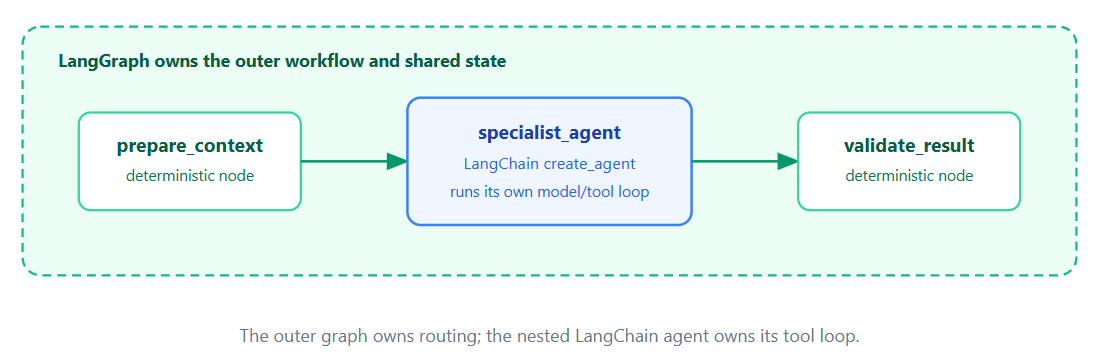
Many teams embed create_agent as one node inside a larger LangGraph workflow when only part of the system needs a free-form tool loop.
When NOT to Use LangGraph
Don’t reach for LangGraph just because:
- You have an LLM.
- You have multiple tools.
- You have RAG.
- You need a chatbot.
- You need a simple retry.
- You need basic human approval.
Use LangGraph when orchestration itself has become part of your application’s business logic.
Where Deep Agents Fits
Deep Agents is an agent harness built on LangGraph, providing higher-level capabilities such as planning, filesystem tools, subagents, and context management. The pattern is: plan → delegate to parallel subagents → collect evidence → synthesise output. Most conventional chatbots and support agents do not need it; stick with create_agent until the task looks like handing a multi-hour project to a colleague. See the Deep Agents overview when you get there.
Can You Combine Them?
You can place a LangChain agent inside a larger LangGraph workflow — for example, a billing specialist node inside a case-management graph that routes between fraud review and finance approval.
Decision Table
| Requirement | Start with | Reason |
|---|---|---|
| Chatbot or support agent that calls tools |
LangChain create_agent |
The standard model-and-tool loop is built in. |
| Approval before a refund or other sensitive action |
LangChain middleware + checkpointer |
Pause specific tools without manually constructing a LangGraph workflow. |
| Standard RAG with LangChain abstractions |
LangChain | Retrieval helpers keep code small; RAG alone does not require LangChain. |
| Business stages, branches, or parallel steps you must own |
LangGraph | Orchestration topology becomes explicit application logic. |
| Complex retrieval orchestration — custom retry or routing rules |
LangGraph | When retrieval itself becomes a multi-stage workflow with explicit routing, retries, or conditional branches. |
| Long research or coding job with files and subagents |
Deep Agents | A ready-made harness for autonomous multi-step work. |
Conclusion: Where to Start
For most apps, start with create_agent and middleware. Move to LangGraph when orchestration becomes application logic. Consider Deep Agents only for long autonomous work with planning, files, and subagents — these are different paths, not mandatory steps.
Next steps: follow the LangChain quickstart, then skim the LangGraph overview when requirements grow. Use the highest abstraction level that still gives you the control you need.
Sources
- LangChain product architecture
- LangChain agents
- Human-in-the-loop middleware
- LangGraph Graph API
- LangGraph persistence
- LangGraph checkpointers
- LangGraph stores
- LangGraph interrupts
- Deep Agents overview
Examples intentionally omit provider credentials and some production error handling. Examples were verified against langchain==1.3.15, langgraph==1.2.11, deepagents==0.7.7, and langchain-google-genai==4.3.4 (August 2026). Pin compatible versions and run with your configured provider before deployment.