


Introduction
Most automation tools force a choice: a no-code builder that runs out of road the moment logic gets specific, or a script you own end to end but maintain alone. n8n sits between the two — a visual, node-based workflow engine that connects hundreds of services out of the box, and drops into JavaScript the instant a drag-and-drop node can’t express what you need.
What follows is what it actually is, why teams pick it over the hosted alternatives, where it shows up in ordinary automation work, and what changes when a workflow stops just moving data and starts deciding what to do with it.
What is n8n?
Fair-code, not quite open source
n8n’s source is public and self-hosting is free, but it ships under the Sustainable Use License rather than an OSI-approved one — “fair-code,” in the project’s own term. In practice that means a company can run it internally, including for commercial work, at no cost. What it can’t do is take n8n and resell it as a competing hosted service. That line is what funds ongoing development without walling the source off.
A very large integration surface
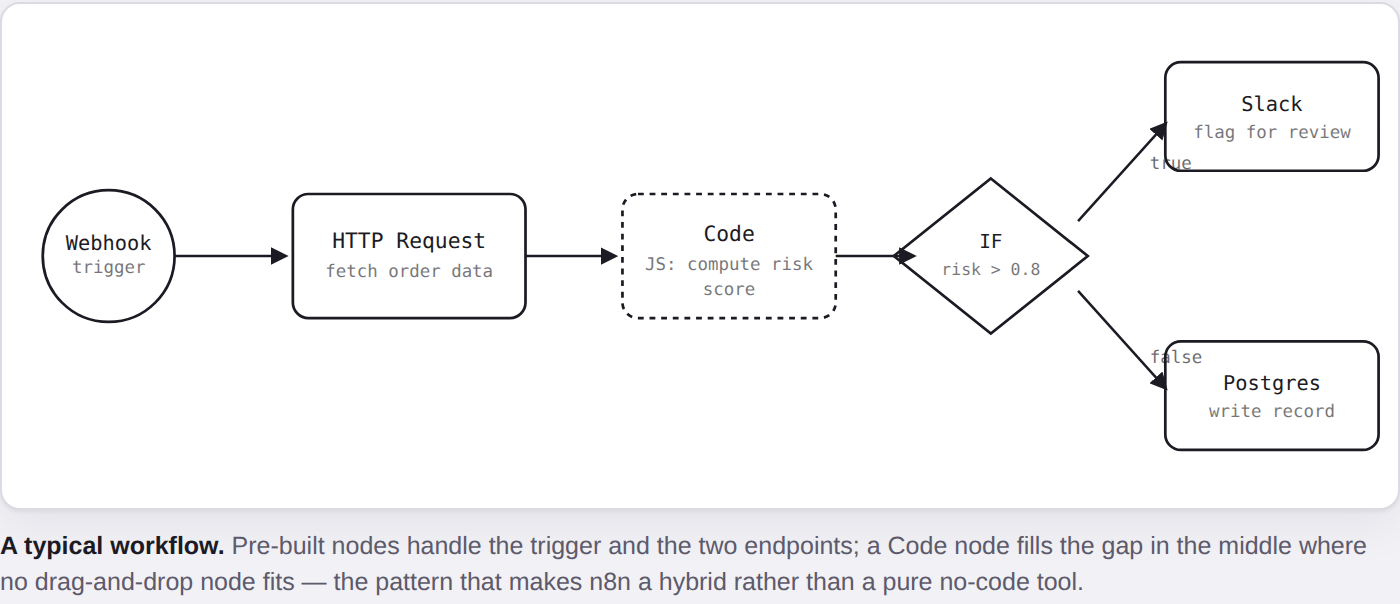
Upward of 400 pre-built nodes cover the usual categories — databases, cloud infrastructure, SaaS productivity tools, generic REST and GraphQL APIs. Anything missing is rarely a dead end: a Function node runs arbitrary JavaScript, and an HTTP Request node reaches anything with an API, so “no native node” tends to mean an extra ten minutes, not a blocked workflow.
Why is n8n Powerful?
1. A Very Large Number of Integrations
N8n supports more than 400 pre-built nodes across several categories of services (database, cloud, productivity, API, etc). If your service is not pre-built, you can also create a custom node.
2. Code + No-Code Flexibility
While most no-code platforms are solely no-code, n8n gives you the ability to directly inject your JavaScript code into your workflows. This means you can build your custom logic when you need it, plus the benefit of drag-and-drop nodes.
3. Self-Hosted + Data Ownership
N8n is self-hosted, open-source software. This means you aren’t confined to a third party SaaS provider. You can run n8n through Docker, on Kubernetes, or even on a simple VPS. You will save money, maintain your security and privacy, and ensure compliance.
4. Scalability & Workflows
N8n supports everything from a basic two step automated workflow, to a sophisticated multi-branched multi-service workflow. N8n can be used by all, from small startups to large corporations, and can basically do anything, including conditional logic and loops, error handling and event based triggers.
Examples of real-world use
- DevOps automation — deploy or roll back a service the moment a specific branch gets a push.
- Data pipelines — move records from an API or webhook into Postgres, MySQL, or MongoDB on a schedule or a trigger.
- Notifications — turn a log line, a metric threshold, or a form submission into a Slack message or an email, without a bespoke integration for each.
4. User Management
- Self-hosted n8n supports a single user by default.
- For team collaboration and advanced RBAC, n8n.cloud or Enterprise Edition is recommended.
n8n Workflow Examples
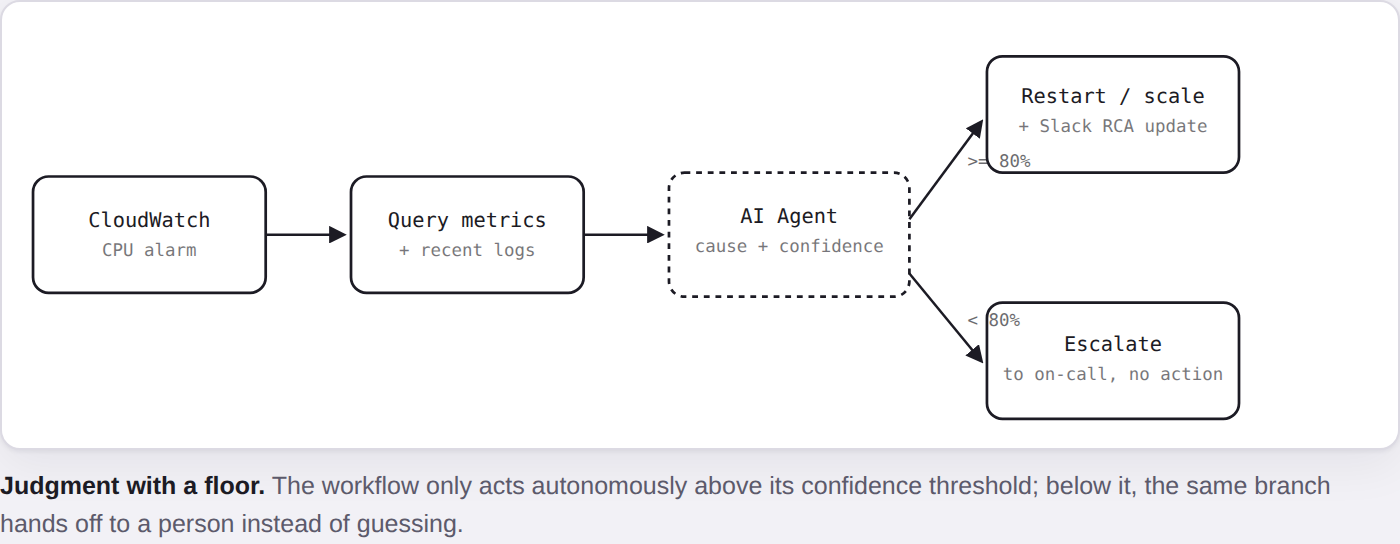
1. Self-Healing Infra
- Trigger Event: ECS task CPU threshold in CloudWatchn8n Workflow:
- Query metrics/logs.
- AI determine – This service stopped functioning due to a memory leak.
- If AI is 80%+ confident, n8n will auto-restart the ECS Task, feed it new input data or scale up n number of additional instances when one (or all) tasks are failed.
- n8n will update the RCA and actioned items to Slack.
- Outcome: Autonomous actuation with no human involvement in the redeeming cycle.
2. GitOps + AI Review of the Workflow
- Trigger Event: Developer performs a push on a workflow change in GitHub (workflow.json).
- Call the latest version of the workflow JSON from GitHub.
- AI reviews the workflow for best practice remediation i.e. error handling and infinite loop risks etc.
- If it is all systems go, → Automatically deploy change to n8n.
- Outcome: A guarantee that all workflows are best practice optimized and auto-synced with git.
3. Security Compliance
- Trigger Event: CloudTrail logs when a new IAM Role has been created.
- Get IAM Role Policy change
- AI performs a security compliance review of the IAM role.
Conclusion
n8n’s range is the point: the same engine that syncs two apps on a schedule can also watch infrastructure, review its own changes before they ship, and check a new IAM role against your own compliance bar — all without leaving the visual canvas or losing the option to drop into code for the one step that needs it.
- It’s fair-code, not OSI open source — free to self-host and run internally, not to resell as a hosted service.
- Code and no-code aren’t a tradeoff here — a Code node fills any gap a pre-built one can’t.
- Self-hosting buys data control at the cost of owning uptime and upgrades yourself.
- An AI node turns a workflow from “move data” into “make a judgment call” — worth a confidence floor before it runs unattended.