


A Secure App Still Has an Exposed Backend
In Part 3, we covered freeRASP — continuous runtime protection that watches your app for hooking, tampering, and integrity violations for the entire session, not just at startup.
But here’s the uncomfortable part: none of that protects your backend.
Your app’s JS bundle can be extracted from the APK or IPA and reverse-engineered. Even with Hermes compiling it to bytecode, a motivated attacker can recover your API endpoints, request shapes, and headers. Once they have that, they don’t need your app at all — they can write a script that talks to your API directly.
JailMonkey and freeRASP both protect the device your app runs on. Neither one stops a request that never goes through your app in the first place.
We’ll look at:
- What problem App Check actually solves
- How attestation tokens work, conceptually
- Setting it up in a React Native app and enforcing it on your backend
- Why this is a different layer of defense than SSL pinning, not a replacement for it
The Problem: Your API Doesn’t Know Who’s Calling It
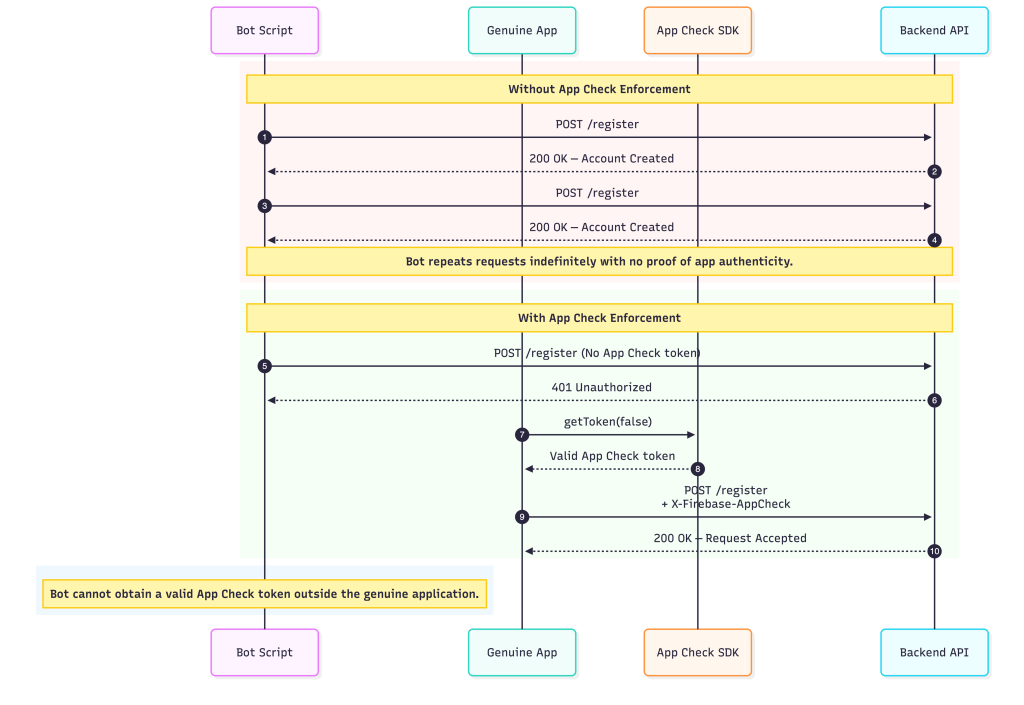
A backend endpoint, by default, just answers whoever asks. If someone extracts your /register or /login URL from your bundle, nothing stops them from scripting requests directly against it — at whatever volume they want.
This is what powers a lot of mobile abuse in practice: credential stuffing against login endpoints, scraping data through your own API, fake account creation at scale, and abuse of any backend function that costs you money per call.
The core issue is that your backend can verify what a request contains, but not where it came from. App Check exists to close that second gap.
What App Check Actually Does
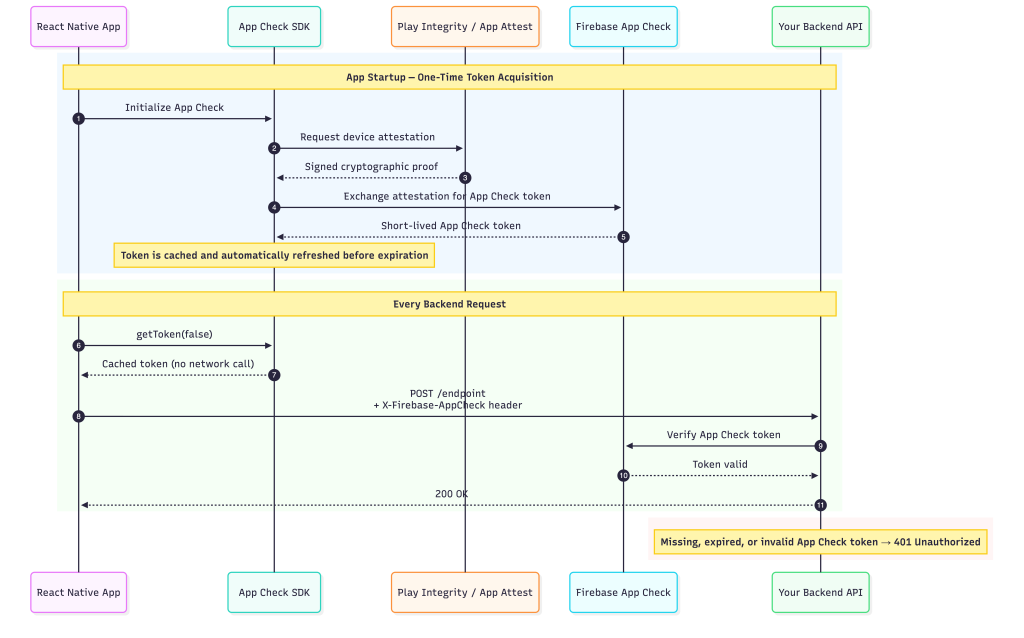
Firebase App Check issues a short-lived, cryptographically signed token proving a request came from your real, unmodified app, running on a real device. Your app attaches this token to every API call. Your backend checks that the token is valid before doing anything else.
The token itself is generated by a platform-specific attestation provider — your app never has to compute or fake it, and crucially, neither can an attacker’s script:
- iOS uses Apple’s App Attest (with DeviceCheck as a fallback), which gives cryptographic proof the request is coming from a genuine, unmodified app
- Android uses Google’s Play Integrity, which returns a verdict on app and device integrity
- Debug builds use a separate debug provider — never shipped to production
A bot calling your API from outside the app has no way to obtain a valid token from these providers. It can’t fake being a real app instance on a real device, because the attestation happens at the OS and hardware level, not inside your JS code where it could be reverse-engineered.
Here’s what the full token lifecycle looks like — from app startup through every API request:
Setting It Up
Install the App Check packages alongside your existing Firebase setup:
npm install @react-native-firebase/app @react-native-firebase/app-check
cd ios && pod install
On iOS, enable the App Attest capability in Xcode under Signing & Capabilities. On Android, your app needs to be published through the Play Console, even on an internal test track — Play Integrity only issues valid tokens for Play-distributed apps.
Initialize the provider once, at module load, switching between the debug provider and the real one based on environment:
import { ReactNativeFirebaseAppCheckProvider, initializeAppCheck } from "@react-native-firebase/app-check";
import { getApp } from "@react-native-firebase/app";

const provider = new ReactNativeFirebaseAppCheckProvider();

provider.configure({
    android: {
        provider: __DEV__ ? "debug" : "playIntegrity",
        debugToken: process.env.FIREBASE_DEBUG_TOKEN_ANDROID,
    },
    apple: {
        provider: __DEV__ ? "debug" : "appAttest",
        debugToken: process.env.FIREBASE_DEBUG_TOKEN_IOS,
    },
});

export const initAppCheck = async () =>
    initializeAppCheck(getApp(), {
        provider,
        isTokenAutoRefreshEnabled: true,
    });
Call initAppCheck() once at startup, before any authenticated requests go out.
Attaching the Token to Requests
Rather than fetching a token manually at every call site, attach it once via an interceptor on your shared API client:
import appCheck from '@react-native-firebase/app-check';

apiClient.interceptors.request.use(async (config) => {
    try {
        const { token } = await appCheck().getToken(false);
        config.headers['X-Firebase-AppCheck'] = token;
    } catch {
        // Let the request go through anyway — the backend will reject it.
        // This avoids blocking legitimate users during a transient provider outage.
    }
    return config;
});
With isTokenAutoRefreshEnabled: true set during initialization, the SDK refreshes the token proactively in the background. getToken(false) just returns the cached token — it isn’t making a network call on every request.
Enforcing It on the Backend
The token is only useful if your backend actually checks it. For a Node/Express API, that’s a single piece of middleware applied before any route logic runs:
export const appCheckMiddleware = async (req, res, next) => {
    const token = req.headers['x-firebase-appcheck'];
    if (!token) return res.status(401).json({ error: 'Missing App Check token' });

    try {
        await getAppCheck().verifyToken(token);
        next();
    } catch {
        res.status(401).json({ error: 'Invalid App Check token' });
    }
};

app.use(appCheckMiddleware);
If you’re using Firestore, Realtime Database, or Cloud Functions instead of a custom backend, enforcement is a toggle in the Firebase Console — no middleware to write at all.
What This Actually Changes
Without App Check, a bot operator who extracts your API URL can script requests directly and there’s nothing in their way — your /register endpoint will happily create as many accounts as they send.
With App Check enforced, that same bot’s request arrives without a valid attestation token and gets rejected at the middleware layer, before it ever reaches your business logic. The bot has no path to obtaining a real token, because it isn’t running inside your actual app on a real device.
Press enter or click to view image in full size
App Check Is Not SSL Pinning
It’s easy to conflate these two, since both involve trust and both involve tokens or certificates — but they protect against opposite problems, and you need both.
App Check is about your backend deciding whether to trust the client. It answers “did this request come from my real app?” SSL pinning, which we’ll cover in Part 6, is about your app deciding whether to trust the server it’s talking to. It answers “am I actually connected to my real backend, or to a MITM proxy?”
A request can pass one and fail the other. A bot with no App Check token gets blocked regardless of SSL pinning — it was never inside your app to begin with. A man-in-the-middle proxy intercepting a legitimate request with a valid App Check token gets blocked by SSL pinning instead — the token is real, but the connection isn’t going where it should.
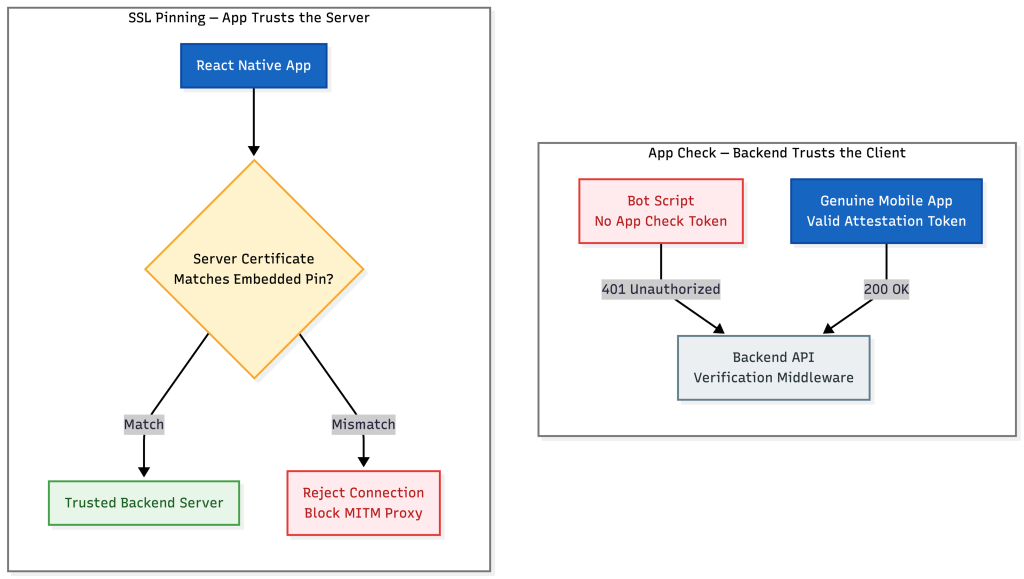
These two diagrams face in opposite directions by design — App Check is your backend defending against fake clients, SSL pinning is your app defending against fake servers. Both are necessary; neither covers the other’s threat.
A Note on Debug Tokens
Never ship the debug provider to a production build. Keep debug tokens in gitignored .env files, one per platform per environment, and register each one in the Firebase Console under App Check → Apps → Manage debug tokens. It’s an easy thing to forget during a rushed release, and a debug token in production defeats the entire point of attestation.
What’s Next
In Part 5, we’ll move from protecting requests in transit to protecting data sitting on the device itself — encrypted MMKV, Keychain, and biometric gating for credentials and session data.
Final Thoughts
Device integrity and runtime protection answer “is this app running in a safe environment.” App Check answers a different question entirely: “is this request even coming from my app at all.” Both matter, and neither one is optional if your backend is reachable from the open internet — which, for almost every app, it is.