


As test automation engineers, we have been striving to minimize this time difference between feature specification and test coverage for years. A conventional approach may involve time intensive QA engineers reading through user stories in Jira and then recreating acceptance criteria (AC) in test scenarios, copying the test scenarios into Zephyr Squad, and then recording test issues in Jira.
This process may take several hours, but with the proper use of Kiro IDE, Model Context Protocol (MCP), and user-provided Kiro Hooks, it can be streamlined into a controlled sub-two minute workflow.
Now let’s discuss how to leverage Kiro to automatically extract story information from Jira, generate story scenarios, generate associated DQA tickets, and write test steps in Zephyr Squad Cloud directly using the API.
Prerequisites :
For seamless interaction with Kiro across your ecosystem, make sure to configure the following setup:
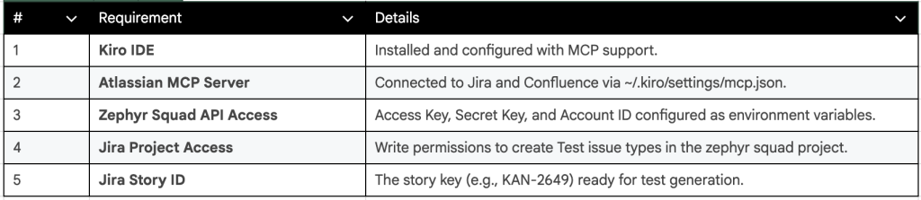
Prerequisites For TestCase Generation
Architecture at a Glance :
In this case Kiro orchestrates the automatic flow:
- Kiro Hook Trigger starts the generation logic, asking the user for the Jira Story ID.
- Atlassian MCP Server is responsible for retrieving context (fetes user stories), and for running basic Jira operations such as creating tickets and linking issues.
- Execution Scripting dynamically generates payloads to be included in JWT authenticated Zephyr Squad Cloud API endpoints.
Setting Up the Kiro Hook:
Agent Hooks: Hooks that connect the IDE triggers to automated AI actions in Kiro IDE. On the AGENT HOOKS panel of Kiro select a new manual hook:
Title: Generate Test Cases from Jira Story
Event: Manual Trigger (invoked via the Start Hook button or command)
Action: Ask Kiro
Hook Identifier: generate-test-cases
Hook Instructions for Kiro Agent
The sample instructions configured inside the Kiro Hook instruct the agent on its execution flow:
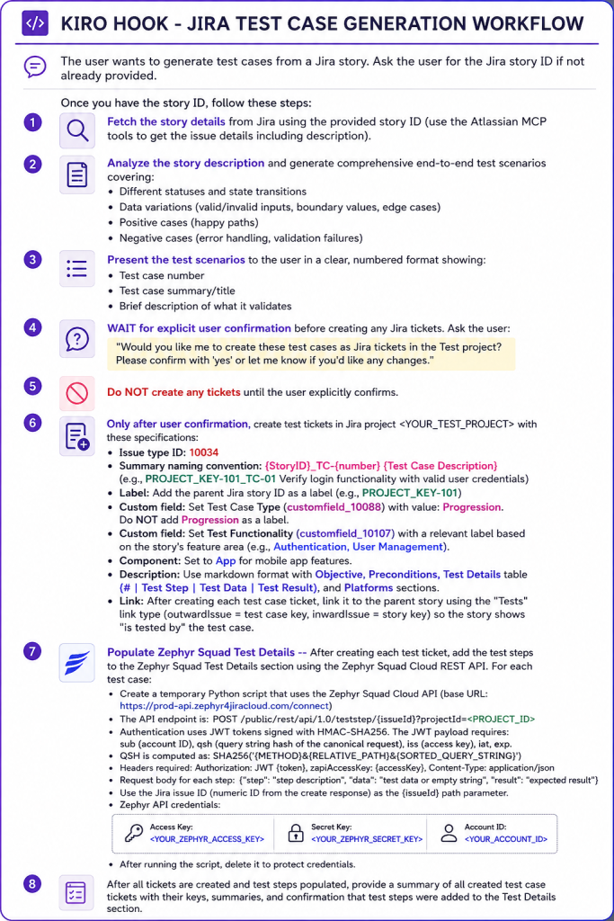
Jira Test Case Generation WorkFlow
Step-by-Step Workflow Execution:
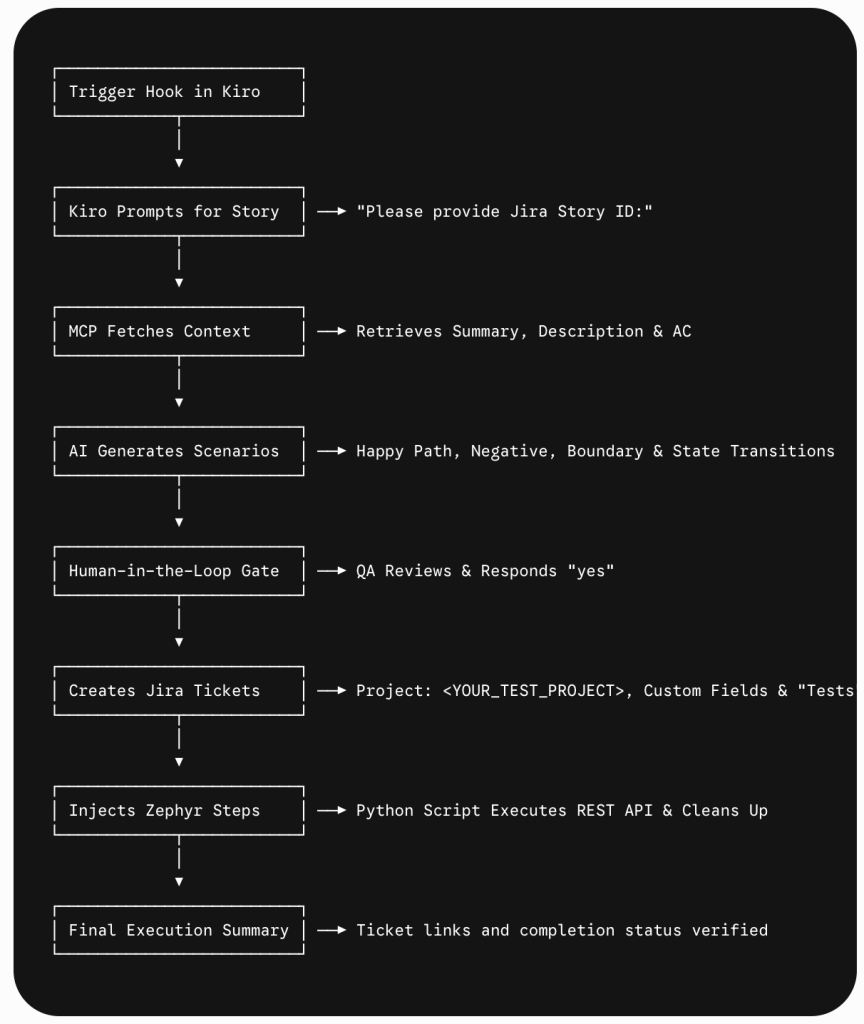
Step-by-Step Workflow Execution
Step 1: Hook Activation & Prompt
Inside Kiro IDE, click Start Hook to generate kiro test cases from Jira Story. Kiro begins the execution and requests the Story ID:
Kiro: “Please provide the Jira Story ID to generate test cases (e.g., PROJECT_KEY-101):”
User: “PROJECT_KEY-101”
Step 2: Context Retrieval & Scenario Review
Kiro requests the acceptance criteria & description from the Atlassian MCP tool (getJiraIssue) and generates a structured breakdown of the scenario.
Human-in-the-Loop Safety Gate: Kiro stops before tweaking Jira.
Kiro:I wrote 3 test cases to highlight the following: happy path scenario, an invalid password and print LOG OUT, for story PROJECT_KEY-101. Would you like to use Jira to write these test cases? Please specify ‘yes’ for confirmation or ask for changes.
Step 3: Ticket Creation & Bi-Directional Linking
If confirmed (“yes”) Kiro builds each Test issue (Type ID 10034) in Jira. Fills custom field mappings (customfield_10088 for Progression, customfield_10107 for Feature Area) and sets up a “Tests” link that allows the parent story to directly display: is tested by TEST-1001
Step 4: Zephyr Squad Step Injection via REST API
Kiro uses an ephemeral Python script to create and execute Standard Jira ticket creation because it does not populate the Zephyr Squad step tables automatically.
a. Generates HMAC-SHA256 JWT tokens, encoded in QSH.
b. Steps tested in a post to POST /public/rest/api/1.0/teststep/{issueId}projectId=<PROJECT_ID>.
c. Immediately removes the temporary script, to protect environment credentials.
Standardized Description Template
Kiro formats each generated ticket description using a clean Markdown structure:
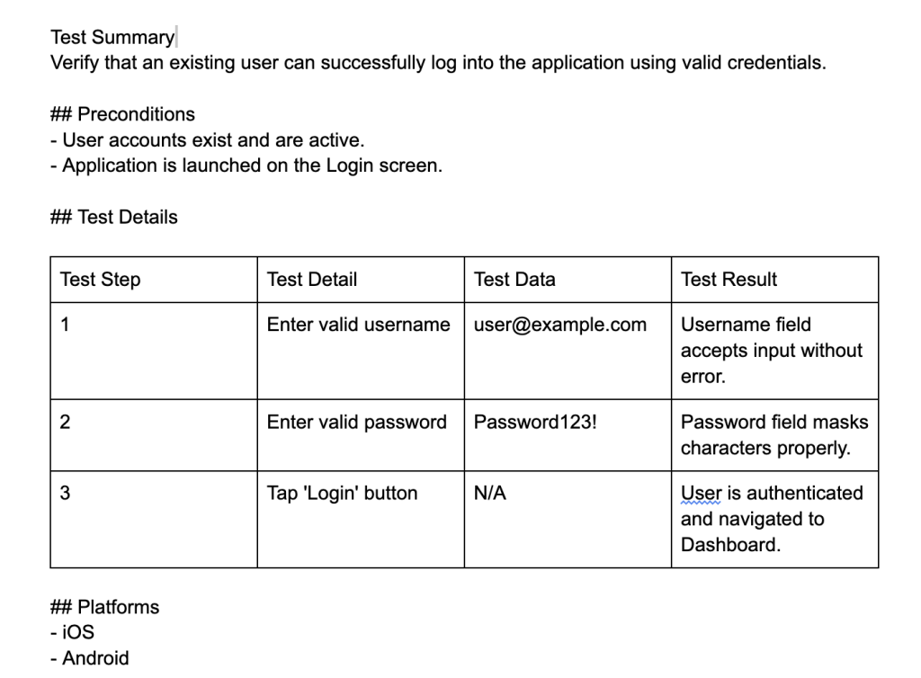
TestCase Sample Format
Final Execution Report
At the end of the run, Kiro provides a neat summary::
Execution Completed Successfully
Parent Story: PROJECT_KEY-101
Created Ticket: TEST-1001 — PROJECT_KEY-101_TC-01 Verify user login with valid credentials
Link Status: Linked via “Tests” relationship (is tested by)
Zephyr Steps: 3 steps injected into Zephyr Squad Test Details
Summary
Test engineers won’t be spending hours over-documenting, but rather are free to concentrate on exploratory testing, automation architecture and quality assurance. Now, the re-usable Kiro Hook, which automates context retrieval, scenario analysis, ticket generation and filling of the Zephyr API.