


Key takeaways
- AI agents can plan, execute, test, and iterate on development tasks.
- Tools such as GitHub Copilot, Cursor, Claude Code, and OpenAI Codex are moving AI-assisted development toward more agentic workflows.
- AI can reduce repetitive frontend work, but developers still need to review and validate the results.
- Developers will increasingly focus on architecture, product decisions, testing, security, accessibility, and code review.
- The most valuable skill may not be writing more code, but knowing how and when to use AI effectively.
Introduction
AI is more than code completion. The rise of AI agents is changing the way developers design, build, test, and maintain applications. Traditional AI coding assistants mainly respond to individual prompts, while AI agents can understand a goal, plan multiple steps, use tools, make decisions, and iterate on their work.
This is especially meaningful for frontend development, where developers spend considerable time on routine tasks such as building components, writing tests, fixing UI bugs, connecting APIs, and improving accessibility.
Research suggests that AI can improve developer productivity, although the results depend heavily on the task and development environment. For example, a Microsoft Research study found that developers using GitHub Copilot completed a JavaScript programming task 55.8% faster than those without it.
What does the rise of AI agents mean for frontend developers? Will developers write less code? Which AI tools for frontend development are becoming useful? And which skills will matter most in an agent-driven workflow?
What are AI agents?
AI agents are software systems that can perform tasks autonomously or semi-autonomously to achieve a specific goal. Instead of simply generating an answer to a prompt, an agent can break a problem into smaller tasks, execute those tasks, evaluate the results, and continue until the desired outcome is reached.
For example, instead of asking an AI assistant:
"Create a React login form."
A developer could give an agent a broader instruction:
"Build a responsive login page, connect it to the authentication API, validate the form, handle loading and error states, write tests, and fix any failing tests."
The agent can potentially handle several stages of this workflow rather than producing only a code snippet.
This is one reason AI agents in software development are attracting attention: they can operate at the level of tasks and workflows rather than individual lines of code.
How AI agents work
Understanding how AI agents work is important for developers who want to integrate them into their workflows.
A typical agent-based workflow looks something like this:
Goal → Planning → Tool Usage → Execution → Evaluation → Iteration
An AI agent usually combines several capabilities:
1. Understanding the goal
The agent first interprets the developer's request and determines what needs to be accomplished.
For example:
"Improve the accessibility of this dashboard."
The agent may identify potential tasks such as:
- Inspecting the existing components
- Checking semantic HTML
- Identifying missing labels
- Reviewing keyboard navigation
- Checking color contrast
- Adding accessibility tests
2. Planning
Instead of immediately generating code, the agent can create a sequence of actions.
For example:
- Inspect the dashboard components.
- Identify accessibility problems.
- Modify affected components.
- Run tests.
- Fix failures.
- Review the final implementation.
3. Using Tools
Agents become significantly more powerful when they can interact with development tools.
Depending on the environment, an agent may be able to work with:
- Code repositories
- File systems
- Terminals
- Package managers
- Testing frameworks
- Browsers
- APIs
- Documentation
- Git
- Development servers
4. Evaluating Results
After making changes, an agent can check whether the changes actually worked.
For example, it might run:
- Unit tests
- Integration tests
- Type checking
- Linting
- Build commands
- Browser tests
If something fails, the agent can analyze the error and attempt another solution.
This feedback loop is one of the biggest differences between an AI agent and a conventional autocomplete tool.
How AI agents change frontend development
The impact of AI for frontend development is likely to extend beyond faster code generation.
From writing code to defining outcomes
Traditionally, developers describe implementation details:
"Create a component using React and add a state variable for the modal."
With agents, developers can increasingly describe outcomes:
"Add a reusable modal that supports keyboard navigation, animations, accessibility, and mobile layouts."
The developer focuses more on what should be built, while the agent can assist with determining how to build it.
Faster prototyping
AI agents can reduce the time required to turn an idea into a working prototype.
A developer could provide requirements for a dashboard, ecommerce page, admin panel, or SaaS interface and ask an agent to create an initial implementation.
The developer can then review and refine the result instead of starting every component from scratch.
Automated testing
Testing is another area where agents can provide substantial value.
An agent can analyze existing components and identify potential test cases, generate tests, execute them, and help diagnose failures.
For example, a frontend agent could recognize that a form needs tests for:
- Valid submissions
- Invalid input
- Empty fields
- API failures
- Loading states
- Authentication errors
This doesn't eliminate the developer's responsibility for testing, but it can reduce repetitive work.
Debugging becomes more interactive
Debugging often requires developers to move between code, browser consoles, logs, documentation, and test results.
An agent with access to these tools can potentially investigate the issue across several sources.
For example:
Bug: Clicking "Save" does nothing.
The agent could inspect the component, trace the event handler, review the API request, check console errors, reproduce the problem, and propose or implement a fix.
The developer still needs to validate the solution, but the investigation process can become considerably faster.
AI tools for frontend development
The world of AI tools for frontend development is growing quickly, offering everything from coding assistants to autonomous agents that can handle larger development tasks.
These tools can help with creating components, refactoring code, debugging, writing tests, and making changes across a codebase.
AI coding assistants
Tools like GitHub Copilot, Cursor, and Claude Code support developers throughout the coding process.
They can help with:
- Creating components
- Refactoring code
- Explaining code
- Writing documentation
- Generating boilerplate
- Fixing bugs
- Creating tests
GitHub Copilot provides AI assistance in the editor, command line, and GitHub workflow, while its agent-based features can take on larger development tasks.
Cursor offers an Agent mode that can search a codebase, edit multiple files, run commands, and troubleshoot errors.
Claude Code can work directly with a codebase to complete software development tasks, allowing developers to focus more on planning and review while the agent handles execution.
Agentic coding tools
Agentic coding tools go beyond traditional AI assistance. They can take a broader goal, determine the steps involved, work with the codebase, run tests or commands, and return the results for review.
Examples include Cursor Agent, GitHub Copilot agents, and OpenAI Codex.
For frontend developers, they can help with:
- Building components
- Implementing features
- Fixing UI bugs
- Writing and running tests
- Refactoring applications
- Investigating build errors
- Improving accessibility
The key difference is how much of the workflow the tool can handle independently. Traditional AI assistants are useful for specific requests, while AI agents can work through broader, multi-step tasks.
In short, AI is moving from simply helping developers write code to helping them complete development work.
How to build AI agents for frontend workflows
Developers interested in how to build AI agents don't necessarily need to create a completely autonomous system from scratch.
A simple agent can be structured around four main components:
1. Define the objective
Start with a clearly defined task.
For example:
"Review React components for accessibility problems."
2. Give the agent context
The agent needs relevant information, such as:
- Source code
- Project structure
- Coding standards
- Framework documentation
- Design requirements
- Existing tests
Without sufficient context, even a powerful model can produce incorrect results.
3. Provide tools
The agent becomes more useful when it can interact with tools.
A frontend development agent might have access to:
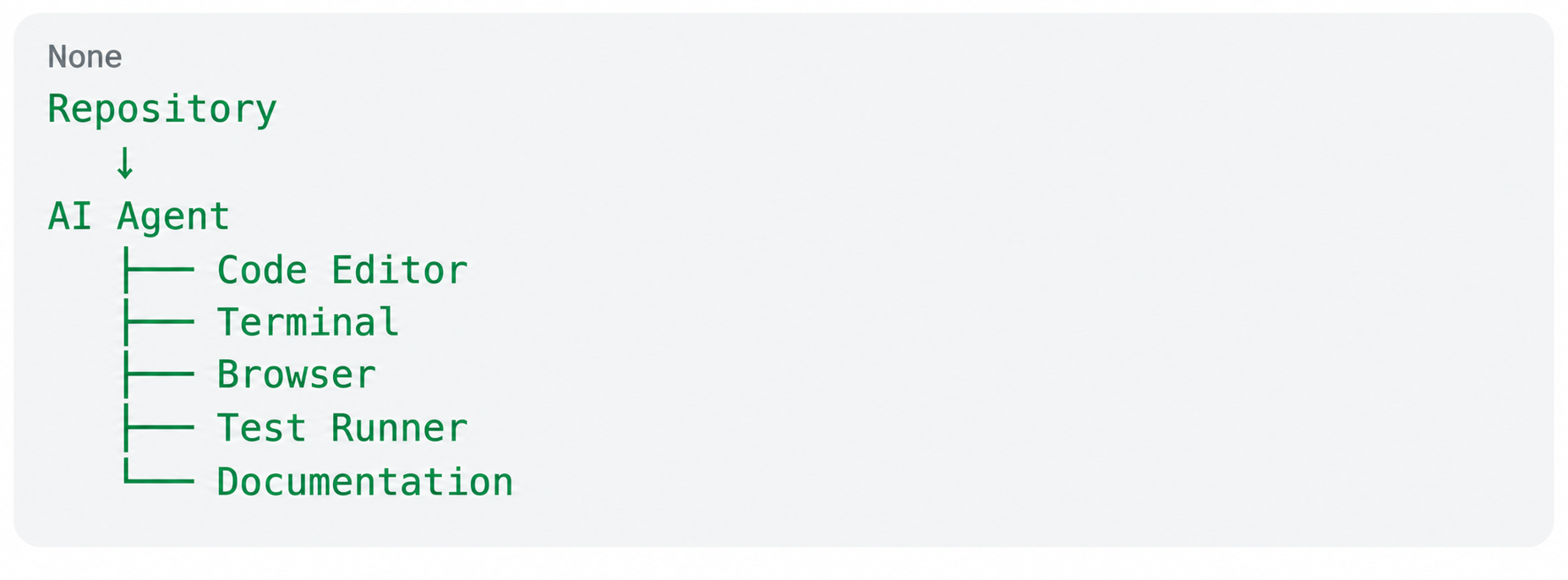
The agent can then reason about a task and use the appropriate tools to complete it.
4. Add validation
Never assume that an agent's first output is correct.
A robust agent should have ways to validate its work through:
- Automated tests
- Type checking
- Linting
- Browser testing
- Code review
- Human approval
The most effective approach is often human-in-the-loop development, where the agent handles repetitive execution while the developer remains responsible for important decisions.
AI agents examples in frontend development
Here are some practical AI agents examples that could become common in development teams.
Example 1: Component Agent
Goal: Create a reusable product-card component.
The agent could:
- Inspect the design system.
- Find existing card components.
- Create the component.
- Add responsive behavior.
- Generate tests.
- Run the test suite.
- Fix issues.
Example 2: Bug-Fixing Agent
Goal: Fix a broken checkout button.
The agent could inspect the relevant component, trace the event flow, examine API calls, reproduce the issue, make a change, and run tests.
Example 3: Accessibility Agent
Goal: Improve accessibility across a website.
The agent could scan components for common problems and suggest or implement improvements involving semantic markup, labels, keyboard navigation, and accessibility testing.
Example 4: Performance Agent
Goal: Improve the performance of a React application.
The agent could identify large dependencies, unnecessary renders, inefficient components, and potential optimization opportunities.
It could then propose changes and measure whether those changes actually improve performance.
The best AI agents are not necessarily the most autonomous
It may be tempting to ask which are the best AI agents and assume that the most autonomous system is automatically the best.
In practice, the best agent depends on the task.
For frontend development, an effective agent should ideally have:
- Strong coding capabilities
- Good understanding of large codebases
- Reliable tool usage
- Access to testing workflows
- Good context management
- Clear explanations of changes
- Strong error recovery
- Human approval mechanisms
An agent that makes dozens of changes without explaining them may be less useful than one that makes fewer changes but provides a clear reasoning trail and predictable results.
What happens to frontend developers?
The biggest question is whether AI agents will replace frontend developers.
The more likely outcome is that the role of frontend developers will change. The shift toward AI-assisted development does not necessarily mean developers will simply write less code. Instead, their work may move toward higher-level tasks such as architecture, review, debugging, and decision-making.
Recent research supports this more nuanced view. A 2026 IEEE Software study on AI-assisted development of AI-assisted development found a productivity–validation tension: developers reported faster routine work but still faced significant effort in validating AI-generated output and ensuring it aligned with architectural requirements.
This suggests that as AI becomes better at implementation, developers may spend more time evaluating whether the generated solution is correct, maintainable, secure, and appropriate for the product.
Developers may spend less time on repetitive implementation and more time on:
- Architecture
- Product decisions
- User experience
- Performance
- Accessibility
- Security
- Design systems
- Code review
- AI workflow design
The ability to understand code will remain important because developers need to evaluate whether generated solutions are actually correct.
In other words, AI may reduce the amount of code developers manually write without reducing the need for developers who understand software deeply.
New skills developers should learn
As AI agents become part of everyday frontend development, developers should consider developing skills beyond traditional coding.
Learn to work with agents
Prompting is useful, but effective agent-based development requires more than writing good prompts.
Developers need to learn how to:
- Define clear objectives
- Provide useful context
- Break complex problems into manageable tasks
- Give agents appropriate tools
- Review generated changes
- Build validation loops
Strengthen software fundamentals
Strong fundamentals become even more valuable when AI generates more code.
Developers should understand:
- JavaScript and TypeScript
- Browser behavior
- Web performance
- APIs
- Security
- Accessibility
- Testing
- Architecture
- Framework internals
AI can generate code, but developers need the knowledge to recognize good and bad implementations.
Become better reviewers
When machines generate more code, code review becomes increasingly important.
Developers should be able to quickly answer:
Does this code work?
Is it maintainable?
Is it secure?
Does it scale?
Does it provide a good user experience?
These questions require engineering judgment.
The future of AI agents in software development
The future of AI agents in software development is likely to move from isolated coding assistance toward more complete development workflows.
Instead of having separate tools for code generation, testing, debugging, documentation, and deployment, developers may increasingly interact with agent-based systems that coordinate multiple parts of the workflow.
Imagine starting a feature with:
"Build a subscription management page based on this product requirement."
An agent could potentially:
- Create the UI
- Connect the API
- Add loading and error states
- Generate tests
- Run the application
- Check accessibility
- Identify issues
- Prepare a pull request
The developer would then review the implementation and make the final decisions. Recent research on agentic coding also suggests a clear division of labor: people tend to remain responsible for planning and defining what needs to be built, while agents increasingly handle execution.
However, stronger autonomy also makes validation more important. Developers need to ensure that generated code meets project requirements, passes tests, and is appropriate for production.
This doesn't mean frontend developers disappear. Instead, developers may move higher up the abstraction level—from manually implementing every detail toward directing, reviewing, and architecting software systems.
Conclusion
AI is already changing frontend development, but AI agents represent a more significant shift than traditional code autocomplete.
The key difference is autonomy. AI assistants generally help with individual tasks, while AI agents can potentially plan, execute, evaluate, and iterate across an entire workflow.
For frontend developers, this means less emphasis on repetitive coding and more emphasis on architecture, product thinking, quality, security, accessibility, and technical judgment.
The developers who benefit most from AI for frontend development won't necessarily be those who let AI write the most code. They will be the developers who know when to use AI, how to build AI agents, how to guide them effectively, and how to verify their work.
AI agents are therefore not simply another coding tool. They are becoming a new layer in the software development workflow—and frontend developers who learn to work alongside them will be better positioned for the next phase of web development.