


Overview
Scaling Apache Airflow past 1,000 DAGs rarely fails because of DAG count alone; it fails because of DAG complexity, worker configuration, and downstream cloud quotas working against each other. The fix requires changes across three layers: how DAGs are parsed, how Celery allocates worker capacity, and how orchestration respects downstream service limits like AWS Glue concurrency.
Key Takeaways
- DAG complexity matters more than DAG count; optimize parsing, not just worker count
- Set AIRFLOW__CELERY__WORKER_PREFETCH_MULTIPLIER=1 to prevent worker hoarding on long-running jobs
- Separate retry policies: Transient failures (retry-safe) vs. downstream processing failures (fail-fast)
- AWS Glue job queuing handles concurrency limits; coordinate with Airflow orchestration
- Loaders reduce DAG parsing overhead by pre-computing metadata outside scheduler loops
- Worker capacity matters less than DAG parsing speed when tasks are backlogged
Introduction
Managing a few Apache Airflow DAGs differs significantly from operating an enterprise platform with more than 1,000 DAGs. Apache Airflow serves as an orchestration tool for complex data pipelines involving services like AWS Glue, Amazon S3, and Amazon Redshift. When Airflow DAGs scale beyond this threshold, major scalability bottlenecks emerge that remain invisible at smaller scales.
Organizations often encounter a specific challenge: DAG Factories that generate 150+ tasks within a single DAG file. As these definitions grow larger and more complex, parsing times increase dramatically, degrading scheduler throughput and task execution speed. Simultaneously, tasks waiting on long-running external jobs starve Celery workers, unoptimized retry loops add unnecessary overhead, and AWS Glue enforces downstream concurrency ceilings.
This article demonstrates how Apache Airflow architecture can be optimized across three distinct layers: DAG parsing, Celery execution, and downstream cloud quotas.
Why Does DAG Parsing Bottleneck the Airflow Scheduler?
Data pipelines built on Apache Airflow follow predictable architectural patterns:
Source Systems → Amazon S3 → Apache Airflow → AWS Glue → Amazon Redshift
While an environment might host over 1,000 DAGs, sheer DAG count represents only part of the problem. Some dynamic DAG Factories generate over 150 tasks per DAG file, creating parsing delays that cascade through the system.
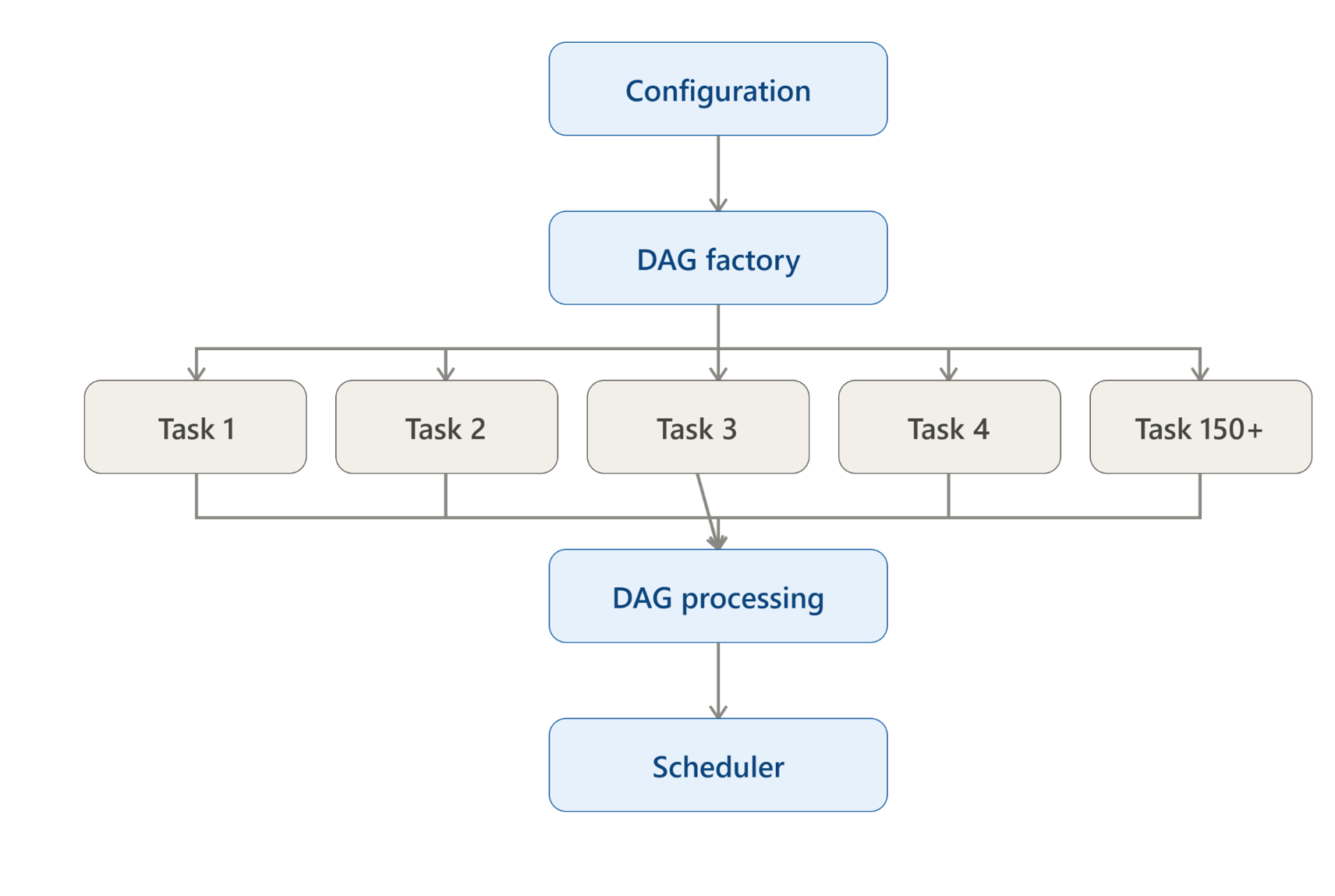
To discover and refresh schedules, Apache Airflow continuously executes the top-level Python code of every DAG file. That parsing workload lives strictly on the DAG processor and scheduler path; not on Celery workers. This architectural constraint means DAG parsing delays directly impact overall platform performance.
Official Airflow best practices emphasize keeping top-level DAG code lightweight for exactly this reason: parsing speed directly affects scheduler performance and airflow DAGs deployability at scale.
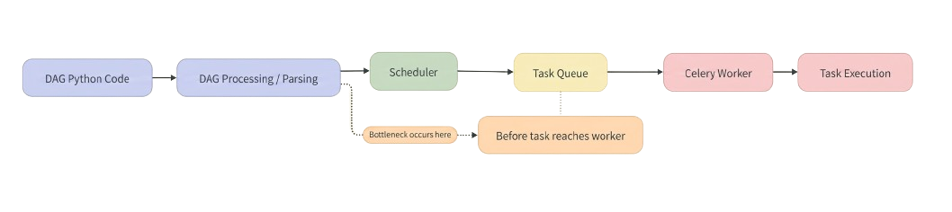
The critical distinction: This parsing work happens before any task reaches a Celery worker. This timing creates a scheduling bottleneck entirely separate from worker execution capacity.
Does Adding More Celery Workers Fix Airflow Scaling Issues?
The initial reaction to task delays typically involves scaling worker infrastructure. If tasks queue in the broker, adding more Celery workers appears to be the obvious answer. However, this approach addresses symptoms, not root causes.
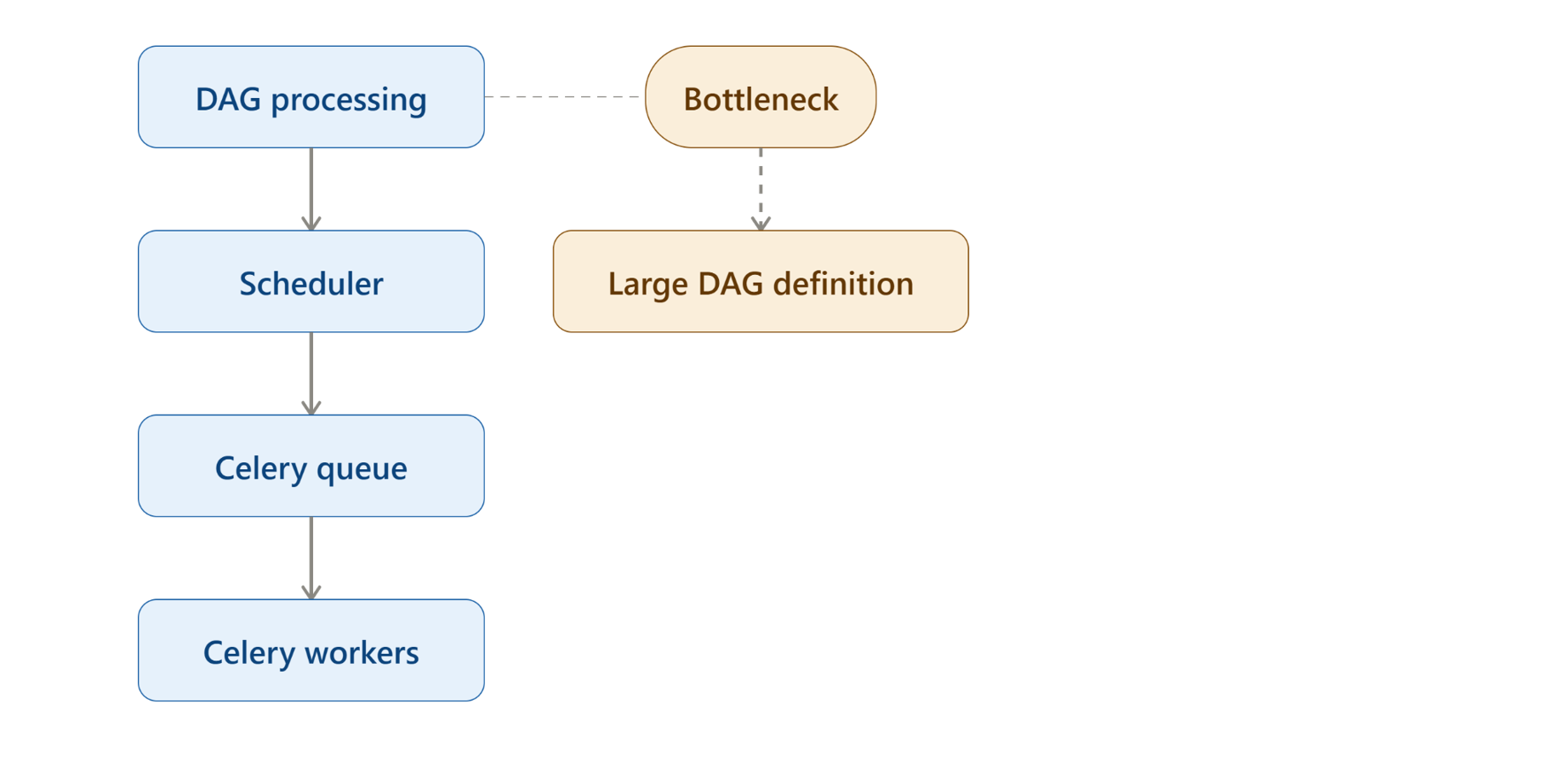
Workers only provide execution capacity after a task has been parsed, scheduled, and placed on the broker queue. During heavy parsing cycles, additional Celery workers sit idle while the scheduler struggles with bloated DAG definitions. The bottleneck exists upstream of worker deployment.
This realization demands a different approach, redesigning DAG generation itself rather than adding infrastructure. The solution aligns with Airflow's guidance on reducing DAG complexity and optimizing DAG file processing.
How Do You Reduce DAG Parsing Overhead at Scale?
To eliminate top-level parsing overhead, Loaders provide the architectural solution. Previously, DAG Factories handled both metadata preparation and DAG construction during every parse cycle, forcing redundant computation at each scheduler refresh.
Before Loaders:
DAG Factory → Load Configuration → Parse Configuration → Prepare Information → Create Tasks → Build Dependencies → Large DAG Definition → DAG Processing
The architectural improvement: Loaders run independently outside the scheduler's parsing loop to pre-compute metadata, leaving DAG files to perform pure task graph declaration. This decoupling of responsibilities represents a fundamental change to Apache Airflow architecture for enterprise deployments.
After Loaders:
Configuration → Loader → Prepared Information → DAG Factory → Create DAG → Create Tasks → Build Dependencies → DAG Processing
The takeaway: Prepare everything possible outside the DAG processor, and keep DAG definitions focused solely on defining task dependencies. This reduces DAG parsing delays significantly.
How Do You Configure Celery for Long-Running External Jobs?
DAG parsing optimization addresses only half the scaling challenge. At runtime, a different bottleneck surfaces: tasks that trigger external AWS Glue jobs and wait for them to finish. The Celery executor configuration becomes critical here.
A task waiting on a remote Glue run performs minimal local compute but still consumes an active Celery worker slot. At scale (1,000+ DAGs), dozens of tasks waiting simultaneously exhaust worker capacity, creating artificial resource starvation.
Airflow → Start Glue Job → Wait for Glue Job → Glue Running → Glue Completed → Airflow Task Completed
Celery Configuration for Enterprise Airflow:
AIRFLOW__CELERY__TASK_TIME_LIMIT=18000
AIRFLOW__CELERY__TASK_SOFT_TIME_LIMIT=18000
AIRFLOW__CELERY__WORKER_CONCURRENCY=32
The Critical Setting: Task prefetching controls how many tasks a Celery worker reserves from the queue. By default, Celery allows workers to prefetch multiple tasks (worker_concurrency × prefetch_multiplier).
When tasks are short-lived, this minimizes dispatch latency. But when tasks are long-running; waiting on external services; a worker busy waiting on Glue jobs hoards queued tasks.
AIRFLOW__CELERY__WORKER_PREFETCH_MULTIPLIER=1
By default, Celery prefetching allows workers to reserve a buffer of queued tasks beyond what their active processes are executing (worker_concurrency * prefetch_multiplier). When tasks are short, this minimizes dispatch latency. But when tasks are long-running, a worker busy waiting on external jobs hoards queued tasks, blocking other idle workers from executing them.
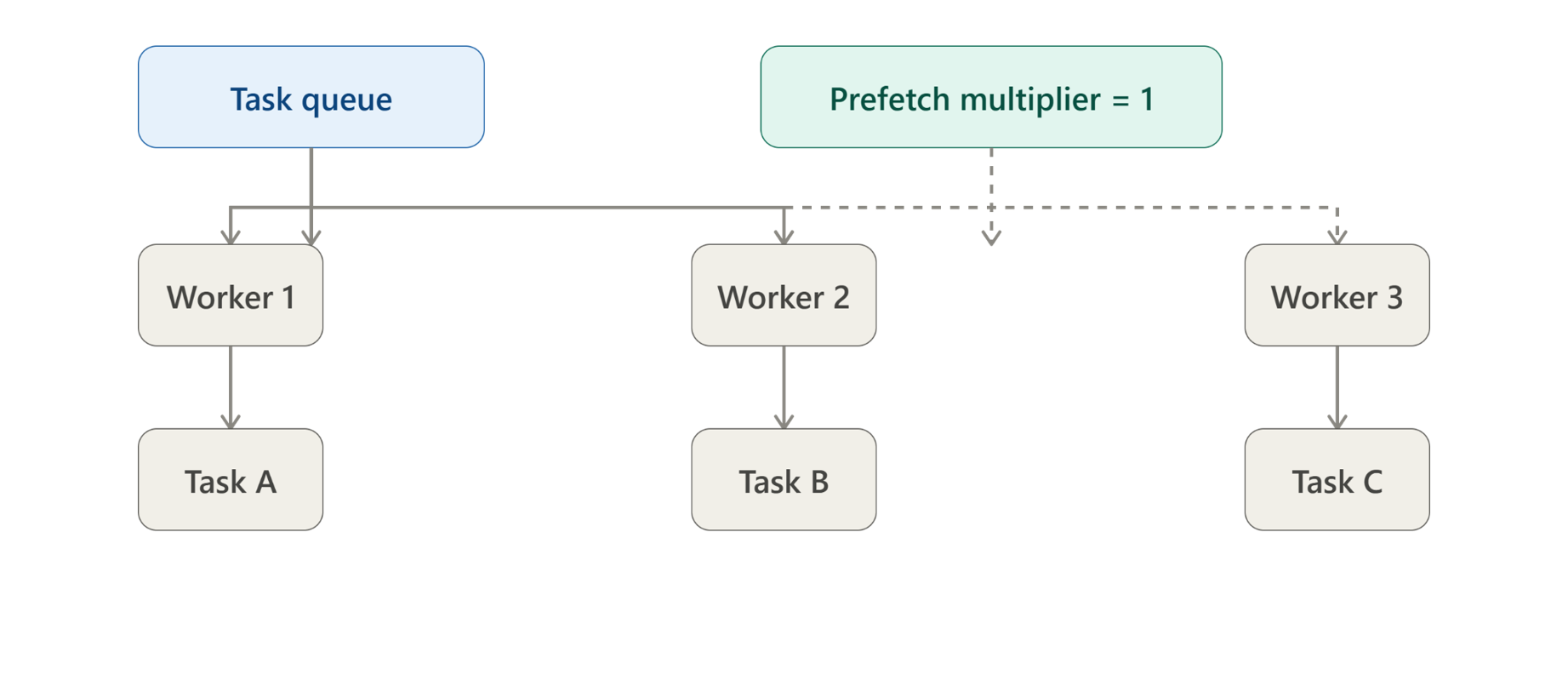
Setting AIRFLOW__CELERY__WORKER_PREFETCH_MULTIPLIER=1 restricts each worker process to reserving only one task at a time. Tasks remain in the central message broker until a worker is genuinely ready to execute them. This prevents artificial starvation across the cluster.
Beyond prefetch settings, retry policies require auditing: retrying a sensor polling a failed Glue run simply burns another worker slot without fixing the underlying issue. Tasks monitoring downstream systems should fail fast, reserving retries strictly for transient network disruptions or API throttling.
This matches both Airflow’s Celery configuration guidance and the official Celery optimizing guide on prefetch limits.
This is particularly relevant when Airflow tasks spend a significant amount of their execution time waiting for external systems.
When Should Airflow Tasks Actually Be Retried?
Worker starvation isn't caused solely by concurrency settings. Inefficient retry policies contribute substantially. Retrying an Airflow task proves useless if the retry cannot fundamentally recover the failure; yet many teams implement retry logic reflexively.
Consider this scenario: An Airflow sensor monitors an AWS Glue job.
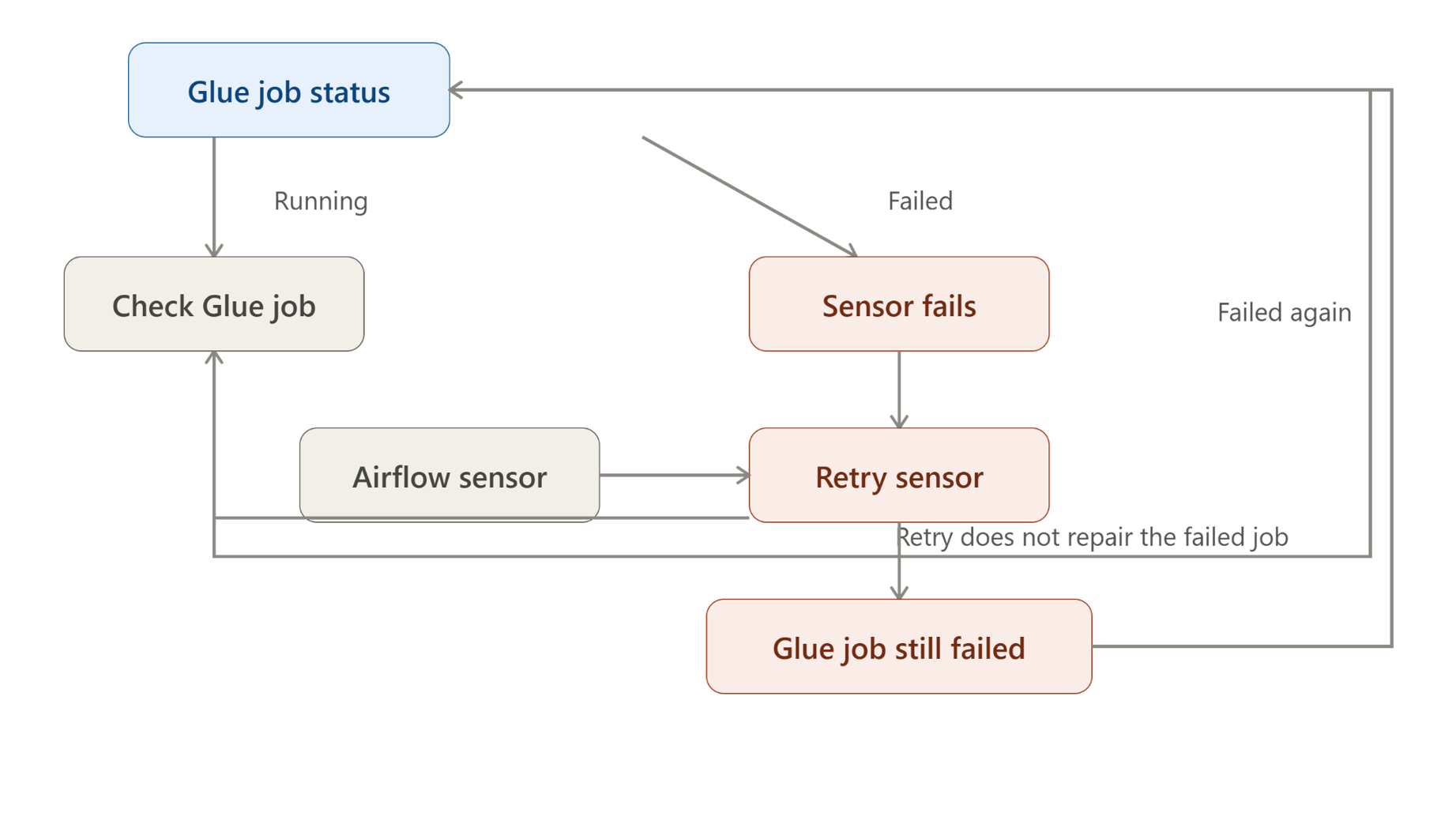
If that Glue job fails due to downstream processing errors or code issues, retrying the sensor does not restart the Glue job. It simply polls the failed status again, burning worker slots and orchestrator cycles without resolving the underlying problem.
Best practice separates task failures into two categories:
- Transient Failures (Retry-Safe): Temporary disruptions like network blips, connection resets, or API rate limits (API timeout -> Retry -> Success). Retries belong here.
- Downstream Processing Failures (Fail-Fast): Application crashes, bad inputs, or syntax errors (Glue Job Fails -> Sensor Checks -> Sensor Fails). Retrying an observation task cannot heal the underlying job.
Before configuring retries on an operator, ensuring re-executing the task can actually resolve the error. If not, fail immediately.
How Do AWS Glue Service Quotas Affect Airflow Orchestration?
Even with optimized parsing and Celery configuration, downstream cloud limits create new bottlenecks. Apache Airflow DAGs that submit jobs to AWS Glue encounter account- level and job-level Service Quotas (maximum concurrent job runs, DPU allocations, etc.).
For teams using Amazon Managed Workflow for Apache Airflow, these cloud service limits become critical scaling factors. The challenge: when Airflow accelerates pipeline submission, AWS Glue can't keep pace if quotas are reached.
The solution: Enable AWS Glue job run queuing so jobs wait for capacity instead of failing outright.
Conceptually:
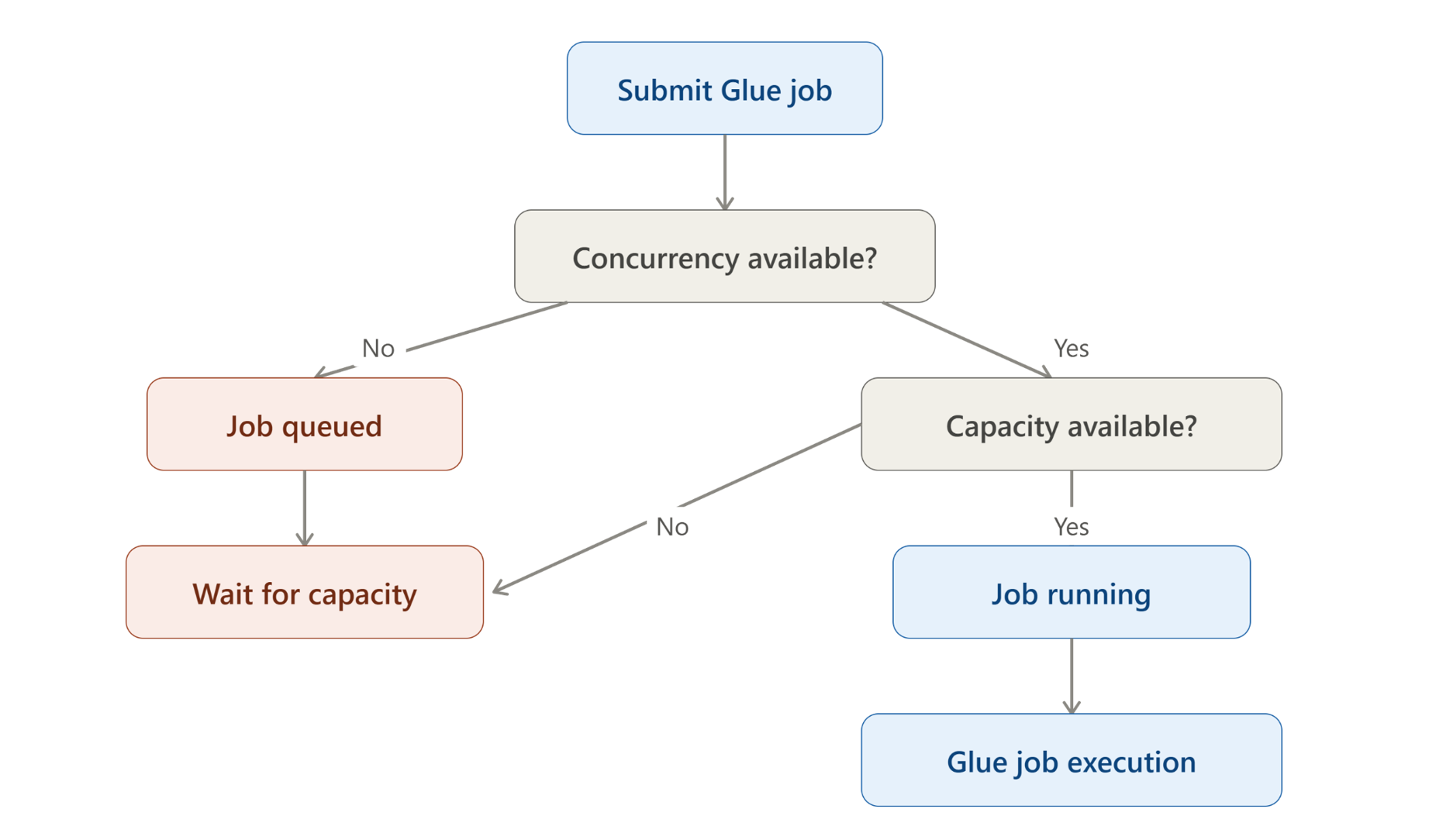
Triggering runs beyond these thresholds causes immediate failures via concurrency- exceeded errors. Simply increasing Airflow parallelism merely shifts the bottleneck downstream rather than resolving it.
When account or job-level limits are reached, jobs queue in AWS until capacity frees up. This architectural approach prevents pipeline failure and enables graceful backpressure management.
This clarifies separation of concerns:
- Airflow manages pipeline orchestration and dependency state
- Celery manages task execution capacity
- AWS Glue (or Apache Airflow managed services) manages compute execution and infrastructure scaling
- Glue job queuing absorbs temporary downstream concurrency spikes
Conclusion
Scaling Airflow past 1,000 DAGs rarely achieves success through simple horizontal scaling.
The three-layer optimization approach yields lasting results:
- DAG complexity outweighs DAG count: A single DAG with 150 tasks imposes more parsing overhead than dozens of simple DAGs.
- Parsing performance is critical: Keep top-level DAG code minimal by offloading metadata preparation to loaders.
- Prevent worker hoarding: Set AIRFLOW__CELERY__WORKER_PREFETCH_MULTIPLIER=1 when orchestrating long-running jobs.
- Respect downstream limits: Coordinate orchestrator concurrency with downstream quotas like AWS Glue queuing.
Next steps for teams facing similar challenges: Organizations implementing large-scale airflow data pipelines often benefit from specialized apache airflow consulting services. TO THE NEW’s Data Engineering services help teams scale their pipelines, optimize their Apache Airflow architecture, and handle enterprise cloud integration challenges.