


Introduction
In a multi-account AWS environment, log management for services such as Cloud Trail, VPC Flow Logs, and WAF is a complex and fragmented process. This is due to the fact that each account has its own log data, which is not easy for security and operations teams to manage centrally. This issue, however, can be addressed through a centralised logging solution, whereby logs from multiple AWS accounts are centralised in a single S3 bucket, encrypted with a shared KMS key, and integrated with a SIEM solution through SQS-based event notifications.
Problem Statement
In a distributed AWS environment:
- Logs are distributed over various accounts.
- There is no unified visibility.
- Security teams cannot access the logs efficiently.
- Compliance needs require unified auditing.
The goal is to design a system where:
- All logs are kept in a central location.
- There is secure sharing between accounts.
- SIEM tools can automatically download the logs.
Architecture Overview
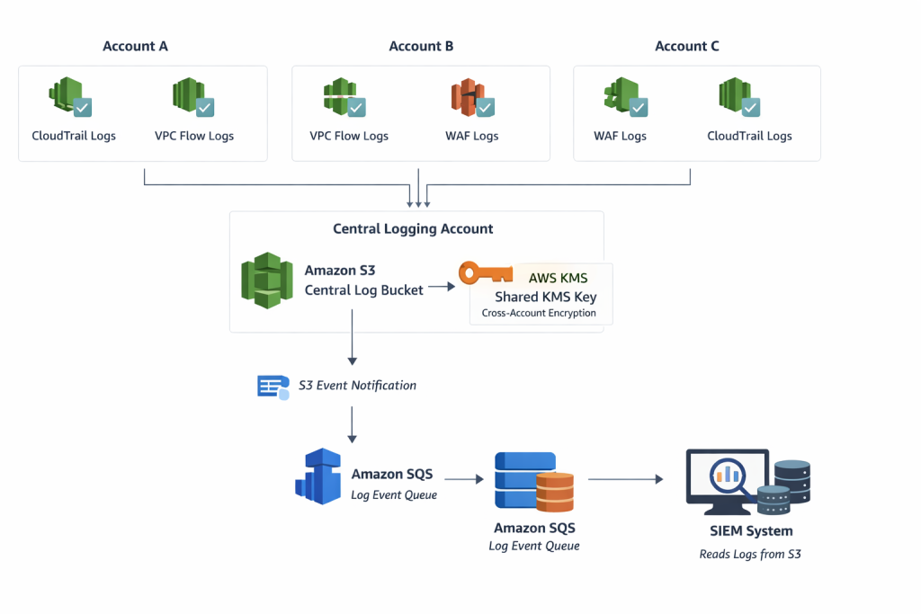
The architecture follows this flow:
- Many AWS accounts produce logs (CloudTrail, VPC Flow Logs, WAF).
- Logs are stored in a centralised S3 bucket in a dedicated logging account.
- Logs are encrypted using a shared KMS Customer Managed Key (CMK).
- S3 sends a notification for every newly created log file.
- Notification is sent to an SQS queue.
- SIEM tools read messages from SQS and fetch logs from S3.
https://www.tothenew.com/blog/wp-ttn-blog/uploads/2026/03/Centralized-logging-architecture-in-AWS.png
Components Used
- Centralised S3 Bucket: A dedicated S3 bucket is used to store logs from all accounts.
- AWS CloudTrail, VPC Flow Logs, and WAF Logs: These services generate logs for each account and store them in S3.
- AWS KMS (Customer Managed Key-CMK): This is used to encrypt logs and is shared between accounts.
- Amazon SQS: This is used to send notifications on new logs added to S3.
- SIEM System: This reads from SQS and fetches logs from S3.
Step-by-Step Implementation
Step 1: Create Central S3 Bucket
- Create an S3 bucket in a central logging account.
- Enable versioning on the S3 bucket.
- Enable server-side encryption using a single CMK.
- Use a structured path format for the S3 Bucket:
s3://central-logs-<service>/<account-id>/
Step 2: Configure Cross-Account S3 Access
Update the bucket policy to allow source accounts to write logs:
{
"Version": "2012-10-17",
"Statement": [
{
"Sid": "CloudTrailWrite",
"Effect": "Allow",
"Principal": {
"Service": "cloudtrail.amazonaws.com"
},
"Action": "s3:PutObject",
"Resource": [
"arn:aws:s3:::central-cloudtrail-logs/AWSLogs/<account-id-1>/*",
"arn:aws:s3:::central-cloudtrail-logs/AWSLogs/<account-id-2>/*",
"arn:aws:s3:::central-cloudtrail-logs/AWSLogs/<account-id-3>/*",
"arn:aws:s3:::central-cloudtrail-logs/AWSLogs/<account-id-4>/*",
"arn:aws:s3:::central-cloudtrail-logs/AWSLogs/<account-id>-5/*"
],
"Condition": {
"StringEquals": {
"s3:x-amz-acl": "bucket-owner-full-control"
}
}
},
{
"Sid": "CloudTrailBucketAccess",
"Effect": "Allow",
"Principal": {
"Service": "cloudtrail.amazonaws.com"
},
"Action": "s3:GetBucketAcl",
"Resource": "arn:aws:s3:::central-cloudtrail-logs"
},
{
"Sid": "AWSCloudTrailAclCheck20150319-8405a61a-8ea1-495f-97e6-1b70c6e5a06a",
"Effect": "Allow",
"Principal": {
"Service": "cloudtrail.amazonaws.com"
},
"Action": "s3:GetBucketAcl",
"Resource": "arn:aws:s3:::central-cloudtrail-logs",
"Condition": {
"StringEquals": {
"AWS:SourceArn": "arn:aws:cloudtrail:ap-south-1:<central-account-id>:trail/central-cloudtrail-logs"
}
}
},
{
"Sid": "AWSCloudTrailWrite",
"Effect": "Allow",
"Principal": {
"Service": "cloudtrail.amazonaws.com"
},
"Action": "s3:PutObject",
"Resource": "arn:aws:s3:::central-cloudtrail-logs/AWSLogs/entral-account-id/*",
"Condition": {
"StringEquals": {
"AWS:SourceArn": "arn:aws:cloudtrail:ap-south-1:entral-account-id:trail/central-cloudtrail-logs",
"s3:x-amz-acl": "bucket-owner-full-control"
}
}
}
]
}
Step 3: Set up KMS CMK and Share Across Accounts
- Create a Customer Managed Key in the Central Account.
- Update Key Policy to Allow All Source Accounts.
Example:
{
"Effect": "Allow",
"Principal": {
"AWS": [
"arn:aws:iam::<ACCOUNT_ID_1>:root",
"arn:aws:iam::<ACCOUNT_ID_2>:root"
]
},
"Action": [
"kms:Encrypt",
"kms:Decrypt",
"kms:GenerateDataKey"
],
"Resource": "*"
}
- Configure CloudTrail, VPC Flow Logs, and WAF to use this CMK
Step 4: Configure Log Delivery
CloudTrail:
- Enable the trail (organisation or per account).
- Set the S3 bucket to the centralised bucket.
- Enable the encryption using CMK.
VPC Flow Logs:
- Set the destination to S3.
- Select the centralised bucket.
- Select the log format.
WAF Logs:
- Enable logging.
- Set the destination to S3.
- Ensure the correct IAM permissions.
Step 5: Enable S3 Event Notifications
- Configure the event type: s3:ObjectCreated:*
- Set the destination as the SQS queue.
Step 6: Set up SQS Queue
- Create an SQS queue in the central account.
- Allow S3 to send a message.
Example policy:
{
"Version": "2012-10-17",
"Statement": [
{
"Effect": "Allow",
"Principal": {
"Service": "s3.amazonaws.com"
},
"Action": "SQS:SendMessage",
"Resource": "arn:aws:sqs:ap-south-1:<account-id>:Central_SIEM_CloudTrail",
"Condition": {
"ArnLike": {
"aws:SourceArn": "arn:aws:s3:::central-cloudtrail-logs"
}
}
},
{
"Sid": "__receiver_statement",
"Effect": "Allow",
"Principal": {
"AWS": "arn:aws:iam::247987132386:user/<SIEM-username>"
},
"Action": [
"SQS:ChangeMessageVisibility",
"SQS:DeleteMessage",
"SQS:ReceiveMessage"
],
"Resource": "arn:aws:sqs:ap-south-1:<account-id>:Central_SIEM_CloudTrail"
}
]
}
Step 7: Provide SIEM Access
- Create an IAM user or role for the SIEM system
- Permissions required: s3:GetObject
- sqs:ReceiveMessage
- sqs:DeleteMessage
Flow:
- Log is written to S3.
- S3 sends an event to SQS.
- SIEM reads the message.
- SIEM retrieves the log from S3.
Data Flow
- Logs are generated from various AWS accounts.
- Logs are pushed to a centralised S3 bucket.
- Logs are encrypted using a shared CMK.
- An event is triggered by the creation of a new object in the bucket.
- The event is sent to SQS.
- SIEM reads the message and retrieves the logs.
Security Considerations
- Least privilege IAM policies should be implemented.
- Restrictive policies should be implemented for the S3 bucket.
- KMS key rotation should be enabled.
- A separate logging account should be implemented.
- S3 access logging should be enabled.
Benefits
- Centralised logging for various AWS accounts.
- Secure storage of logs using encryption.
- Real-time SIEM integration for logs.
- Scalability of the architecture.
- Less operational effort required.
Challenges
- Managing KMS permissions for various accounts.
- Correct configuration for the S3 bucket policy.
- Correct configuration for the SQS event delivery.
- Handling high log volume.
Conclusion
This method is a scalable and secure way of centralising logs across AWS accounts. It utilises S3, KMS, and SQS services, ensuring logs are stored securely and can be consumed in real-time by SIEM systems. It improves visibility, simplifies compliance, and enables faster incident response.