


Introduction
Large Language Models (LLMs) are incredibly powerful, but they have a major limitation: they are cut off from the real world.
Imagine building a customer support bot. A user asks, “Where is my order #12345?” On its own, an LLM cannot fetch live database records, call a shipping provider’s API, or check inventory levels to answer this. It might guess or politely apologize.
Agents solve this problem. An agent is a system that uses an LLM as a reasoning engine to make dynamic decisions at runtime about which tools (functions you write) to call based on the user’s input. Instead of running a fixed, hardcoded sequence of steps, the agent evaluates the problem, selects the right tool, and decides what to do next based on the result. In our support bot example, the agent would recognize it needs the OrderLookupTool, generate a tool call with #12345, and formulate a helpful response based on the actual delivery status.
In this post, we will build a simple, working AI agent in LangChain.js using TypeScript. You’ll learn how to define custom tools using Zod schemas and run them inside an agent execution loop.
What You’ll Build
By the end of this guide, you will have:
- A custom tool (order_lookup) defined with a validated Zod schema that an LLM can reliably call.
- A working AI agent powered by Google Gemini that dynamically decides when and how to use your tool.
- A complete agent execution loop that sends user input to the LLM, executes tool calls, and returns a final natural-language response.
- A solid mental model of how Chains, Agents, Tools, and the AgentExecutor fit together — giving you the foundation to build more complex multi-tool agents.
Prerequisites & Setup
You’ll need Node.js, basic TypeScript knowledge, and a free Google AI Studio API key.
- First, install the dependencies:
npm install @langchain/core @langchain/classic @langchain/google-genai zod
- Then export your API key as an environment variable:
export GOOGLE_API_KEY="your-key-here"
- To run any .ts file in this post, the quickest way is tsx:
npx tsx agent.ts
Why Not Just Use Chains?
If you’ve worked with LangChain’s LCEL (LangChain Expression Language), you’ve built Chains. Chains are deterministic — the execution path is fixed. If you pipe Prompt → Model → Parser, it runs exactly in that order, regardless of input.
Agents, however, make dynamic decisions at runtime. Instead of hardcoding steps, you give an Agent a goal and a toolbox. It uses the LLM as a “reasoning engine” to decide on every turn:
- Which tool should I use?
- What arguments do I pass?
- Based on the result, should I call another tool or respond?
If you ask an Agent to “Cancel order #12345 and email a receipt”, it dynamically decides to call the Cancellation Tool, inspects the result, then calls the Email Tool. A standard Chain cannot do this.
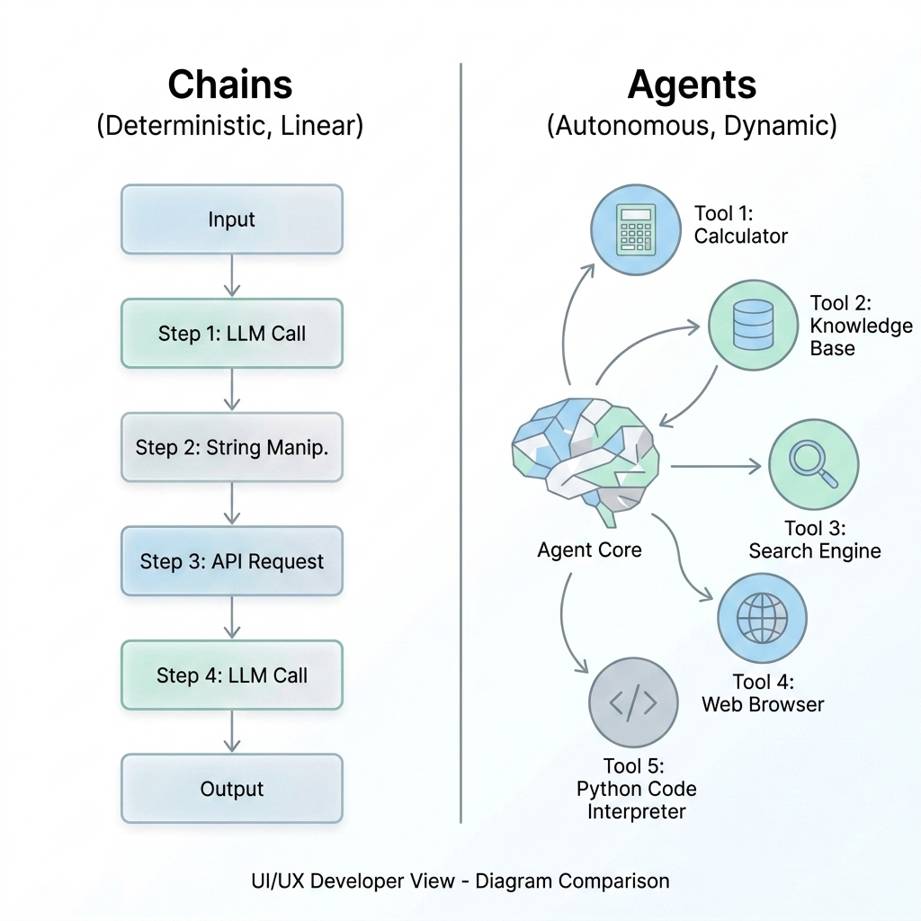
chains vs agents
What Exactly is a Tool?
A Tool is simply a JavaScript/TypeScript function that the LLM can request to be executed on its behalf. The LLM never runs the tool directly — it generates a structured tool call that your application then executes. However, for the LLM to know when and how to generate the right call, we must describe the tool clearly.
In LangChain, we use DynamicStructuredTool. It requires three things:
- Name — a unique identifier (e.g., order_lookup).
- Description — tells the LLM when to use this tool and what it does. This is arguably the most important part. The LLM reads this description to decide which tool fits the user’s request, so a vague description like “does stuff with orders” will lead to unreliable behavior. A good description is specific and action-oriented: “Use this tool to check the current delivery status of a customer’s order given an order ID.” The clearer you are, the more accurately the LLM will choose the correct tool and provide the right arguments.
- Schema (Zod) — a strict, validated schema (using Zod, a popular TypeScript validation library) defining exactly what arguments the function expects.
Why Zod Schemas Matter
Zod is not just a type annotation — it provides runtime validation of the arguments the LLM generates. This matters because LLMs can hallucinate or produce malformed arguments. A Zod schema:
- Validates inputs before your function ever runs, catching bad data early.
- Describes each field (via .describe()) so the LLM knows what values to provide.
- Makes function calling more reliable by giving the model a precise contract to follow, rather than guessing at a free-form structure.
Because models like Gemini 2.5 and GPT-4 are fine-tuned for “Function Calling,” they can reliably format their output to match your Zod schema — but only if the schema is well-defined and descriptive.
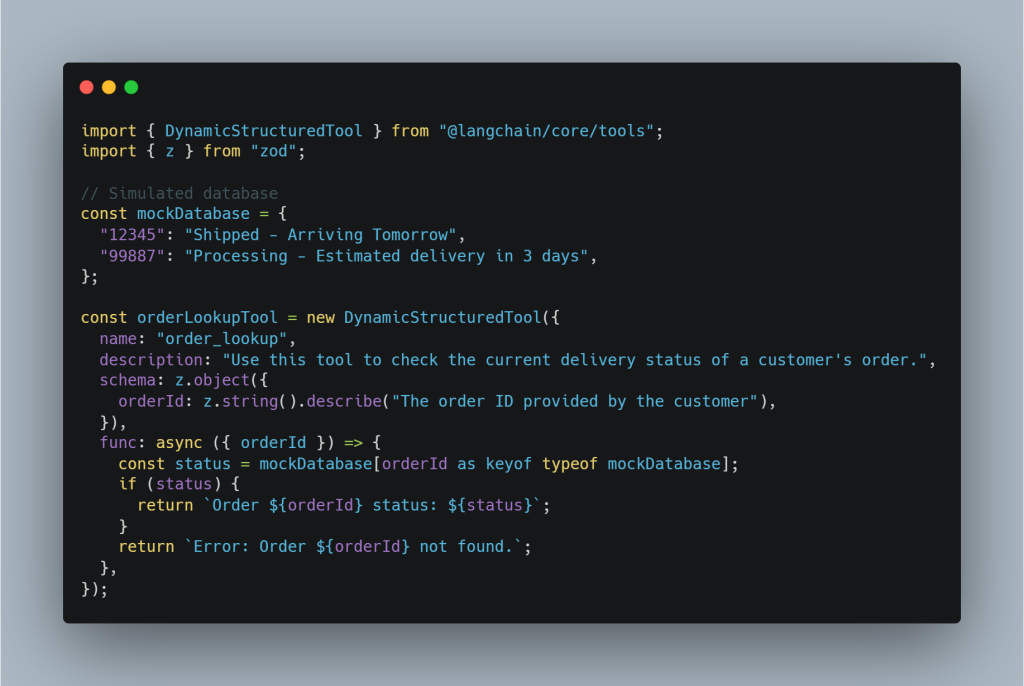
tool creation
When you bind this tool to a model and ask “Where is my order #12345?”, instead of answering directly, the LLM generates a tool call — a structured request to invoke your function:
{ "name": "order_lookup", "args": { "orderId": "12345" } }
The LLM is saying “I need to call this function with these arguments.” It doesn’t actually execute anything — it only produces the structured call. Your application is responsible for running the actual function. So who orchestrates this? That’s the Agent’s job.
How Does the Agent Actually Work?
The LLM does not execute tools directly. It only generates tool calls — structured requests specifying which function to invoke and with what arguments. Your application is responsible for actually running the code.
All tool-calling agents — regardless of the LLM provider or framework — follow the same fundamental execution cycle. LangChain automates this with the AgentExecutor, a continuous loop that runs on your machine:
- Sends the user’s prompt to the LLM.
- The LLM generates a tool call: order_lookup({ orderId: “12345” }).
- The AgentExecutor intercepts this, pauses the LLM, and executes your TypeScript function.
- The function returns Order 12345 status: Shipped – Arriving Tomorrow.
- The AgentExecutor feeds the tool result back to the LLM as a new message: “The tool returned ‘Shipped – Arriving Tomorrow’. What next?”
- The LLM decides no more tools are needed and responds: “Your order has been shipped and is arriving tomorrow!” — the loop terminates.
- This is the Thought → Action → Observation loop.
Expected Execution Flow
Here is the full sequence visualized for a single request:
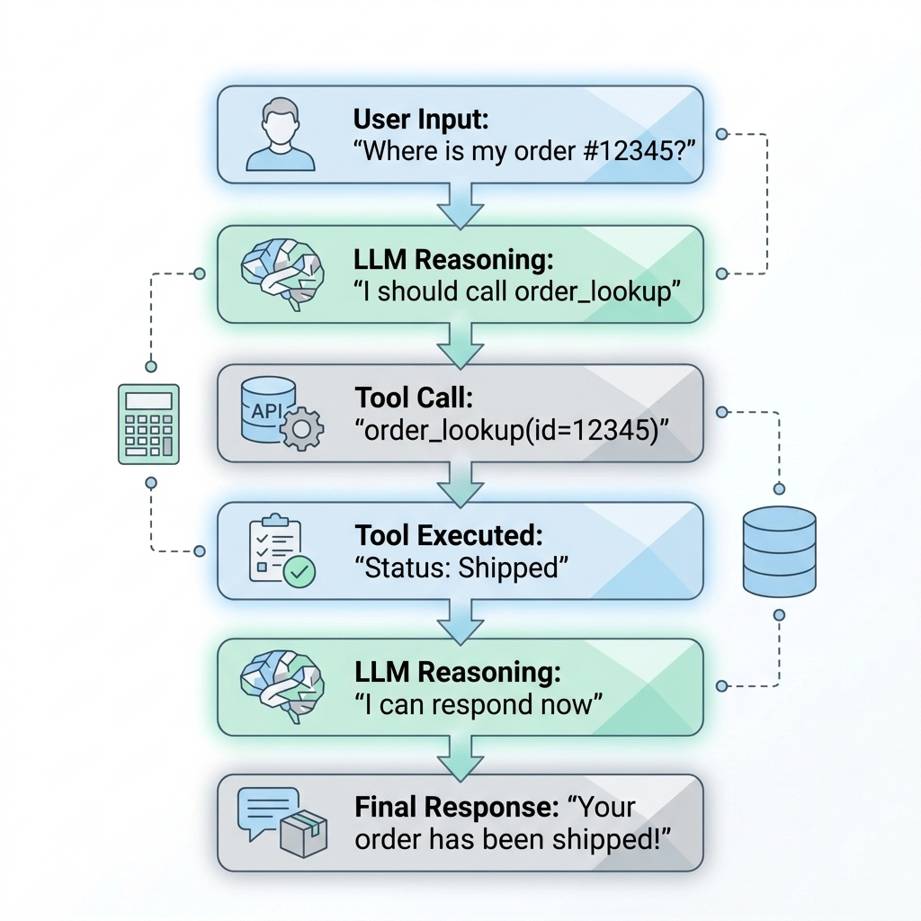
agent loop
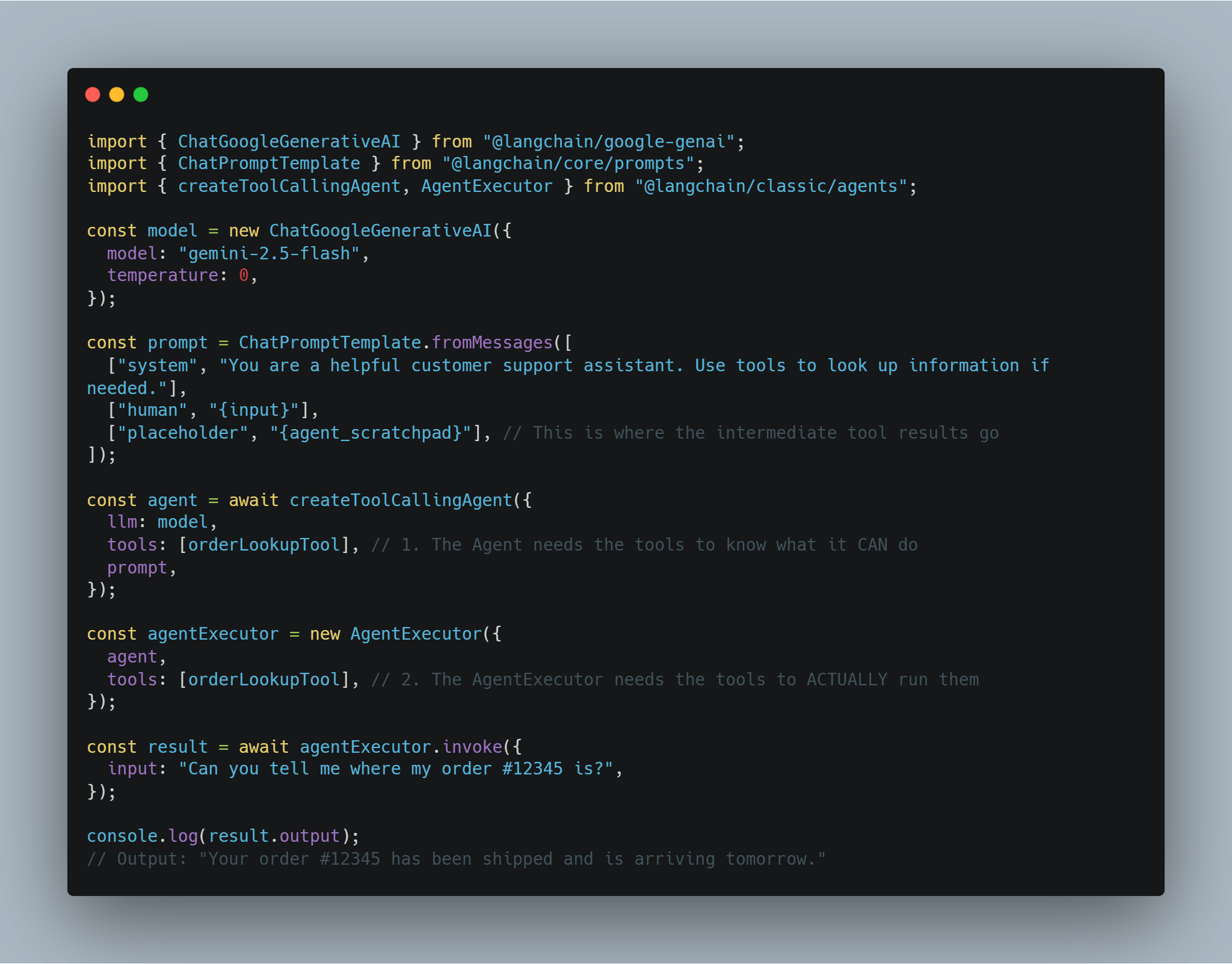
agent.ts
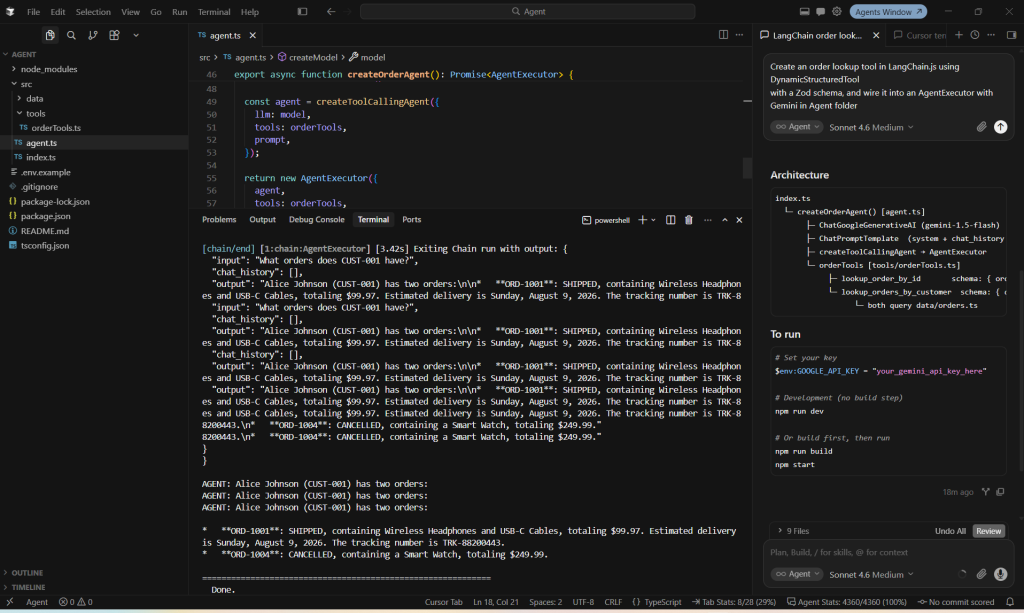
cursor IDE implementation
Understanding ‘ agent_scratchpad ‘
The agent_scratchpad placeholder is critical. It acts as the agent’s working memory within a single request. As the AgentExecutor loop runs, it injects the history of all intermediate tool calls and their results into this placeholder. This allows the LLM to see what tools it has already called, what results they returned, and reason about what to do next — all within the same invocation. Without it, the LLM would have no context about previous steps and would be unable to chain multiple tool calls together or decide when to stop.
Common Pitfalls
Before wrapping up, avoid these frequent mistakes:
Pitfall |
Why It Matters | Fix |
| Vague tool descriptions | LLMs rely on this to pick tools. Ambiguity causes errors. | Write specific, action-oriented descriptions. |
| Forgetting agent_scratchpad | The LLM forgets intermediate steps, causing infinite loops. | Include [“placeholder”, “{agent_scratchpad}”] in prompts. |
| Overly permissive schemas | Broad schemas (z.any()) allow hallucinated arguments. | Use precise Zod schemas and .describe() fields. |
| Assuming the LLM executes tools directly | The LLM only formats the request; it doesn’t run code. | Handle execution entirely on your server-side. |
Conclusion
The main takeaway is simple: Chains follow a fixed, deterministic path decided at design time, while Agents make dynamic decisions at runtime based on context and intermediate results.
By turning external capabilities — database queries, shipping APIs, payment processors — into well-described tools with strict Zod schemas, you give the LLM the ability to interact with the real world reliably. The AgentExecutor handles the orchestration loop so you can focus on building great tools.
This pattern unlocks powerful practical applications: agents that coordinate multiple APIs in a single request, retain conversation context across turns with memory, and automate multi-step workflows that would otherwise require complex, brittle if/else trees. While building true production-grade agents requires additional layers like observability, advanced error handling, and evaluation, mastering the fundamentals in this post gives you the exact foundation needed to start tackling real-world complexity.
Next Steps
- Multiple Tools: Right now, our agent only has one tool. But an agent’s true power comes from its toolbox. Try adding an InventoryCheckerTool, a ProcessRefundTool, or a ShippingCostCalculator. The LLM will dynamically decide which tool — or sequence of tools — to call based on the user’s request.
- Memory (BufferMemory): Our current loop is stateless; it forgets everything after one message. By injecting LangChain’s BufferMemory into the prompt, your agent can retain conversation context across turns. This allows the bot to remember the customer’s email or order ID without asking twice.
- Error Handling: What happens if the shipping API goes down, or the LLM generates a call to a tool that doesn’t exist? You can implement fallback logic using LangChain’s handleParsingErrors flag on the AgentExecutor to gracefully inform the LLM that the tool call failed, prompting it to try a different approach instead of crashing the app.
The possibilities are endless. Happy building!