


Speeding Up Angular Apps with Server-Side Rendering
Today’s web apps need to load quickly, no matter what device or internet connection someone’s using. Angular helps you build feature-rich, dynamic sites, but sometimes it feels sluggish, especially when loading the first page for users stuck with slower connections.
There’s an easy way to make Angular faster and boost its visibility in search engines: Server-Side Rendering (SSR). Let’s break down what Angular SSR actually does, how it works, and how you can set it up using Angular Universal.
What is Angular SSR?
So, SSR basically means your server builds the web page before sending it to the browser. Instead of shipping a barebones HTML file and waiting for JavaScript to fill in the blanks, the server crafts the full HTML content in advance.
Angular Universal handles SSR for Angular apps, letting your code run on the server first. Users hit your site and see a fully rendered page right away, instead of staring at a loading spinner while Angular starts up.
How SSR Changes Things
If you’ve used a regular Angular app before, you know the typical process: The browser asks for a page, gets some HTML, downloads JavaScript, then Angular finally builds everything you see. This works — but on slow connections, it can take forever for anything to actually show up.
With SSR, the story changes. Now, the browser requests a page and the server fires up Angular, builds the HTML, and sends it to the browser. Users see your site instantly, even if the JavaScript isn’t fully loaded yet.
Why Use SSR?
- Faster Loading:
SSR makes the initial load way faster. Since your HTML’s ready to go, people see content immediately. That’s a lifesaver for anyone on mobile or dealing with weak Wi-Fi. - Improved SEO
Google and other search engines sometimes struggle with JavaScript-heavy sites. If your server sends a full HTML page, search engines can read and index your content with no hassle. That gives your app a better shot at showing up in search results. - Better User Experience
Waiting ages for a page to appear turns people off. SSR changes that — your users see something as soon as they hit your page. The app feels snappier. - More Accessible
Tools like screen readers pick up HTML easily. SSR means accessibility isn’t an afterthought; your content’s there from the start.
How to Add SSR with Angular Universal
Thanks to Angular Universal, bringing SSR into your project isn’t complicated.
- Enable SSR
Use the Angular CLI to add SSR: ng add @angular/ssr
That command sets up everything and pulls in what you need. - Check the Server File
You’ll notice a server configuration file called server.ts — it sets up an Express server to deal with requests and build Angular pages on the server. - Make Your Code SSR-Safe
Some browser features, like localStorage or window, won’t work on the server. If you throw in code like: window.localStorage.setItem(‘token’, token);
It’ll crash outside the browser. To handle that, Angular offers isPlatformBrowser:
import { isPlatformBrowser } from ‘@angular/common’;
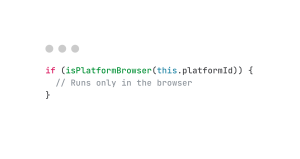
Use checks like this so your app stays smooth, both server- and client-side. - Build and Run
Build your SSR-enabled project: npm run build
Then run the server: npm run serve:ssr
Now your app runs through Express, with SSR in place.
SSR Best Practices
Here’s how to keep your SSR setup humming:
- Use Lazy Loading
Load only what’s needed, when it’s needed. That shrinks your bundle and speeds up initial loads. - Optimize Data Fetching
Don’t dump unnecessary data to the client. Tighten up API calls. - Cache Pages
Cache server-rendered pages so you don’t have to rebuild them every time. That boosts performance. - Monitor Your Performance
Use monitoring tools to track key stats — Time to First Byte (TTFB), First Contentful Paint (FCP), Largest Contentful Paint (LCP). They’ll help youhelp you spotspot bottlenecks.
Final Thoughts
SSR is a game changer for Angular. Faster loads, better SEO, accessibility right out of the gate — it’s hard to argue with the benefits. Angular Universal makes the setup pretty straightforward, though you’ll need to tweak some things in your code.
If you’re building anything with tons of content (blogs, online stores, etc.), SSR makes your app more discoverable and way more user-friendly. Not a bad investment if you want your site to actually get noticed.