


Modern web applications are becoming increasingly complex, making reliable automated testing an essential part of software development. Among the many testing tools available today, Cypress and Playwright have become two popular choices for E2E testing.
Both frameworks provide powerful browser automation capabilities, but they differ in areas such as browser support, component testing, debugging, API testing, scalability, CI/CD execution, and AI-assisted testing.
which E2E testing framework should you choose in 2026?
Cypress vs Playwright: Quick Comparison
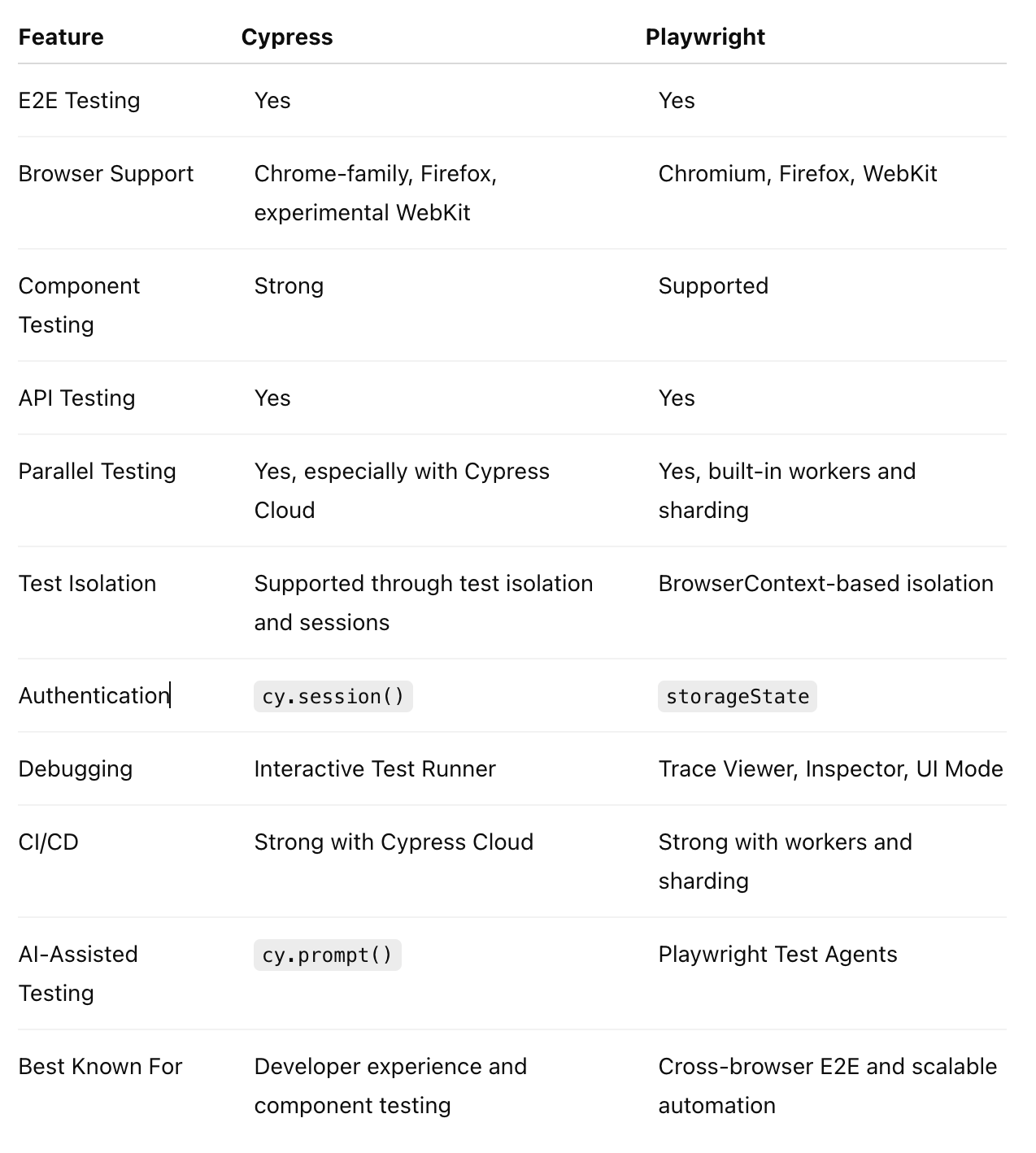
What Is Cypress?
Cypress is a JavaScript-based testing framework designed for modern web applications. It provides an interactive Test Runner that allows developers and testers to see application behavior while tests are running.
Cypress also supports component testing, allowing teams to test individual UI components in a real browser without running the entire application flow.
Key Capabilities of Cypress
Interactive Test Runner
Cypress provides an interactive Test Runner where users can see commands, assertions, and application state during test execution. This makes debugging failed tests particularly approachable for frontend developers.
Component Testing
Cypress has strong support for component testing with modern frontend frameworks such as React and Next.js. Developers can mount individual components and test their behavior independently, helping identify UI issues earlier.
Automatic Waiting and Retries
Cypress automatically waits for elements and commands to become ready before continuing, while assertions are retried until they pass or the configured timeout is reached.
This reduces the need for manually adding unnecessary waits. However, reliable automation still depends on good test design. Stable locators, proper test isolation, and independent test data are important for reducing flaky tests.
Network and API Testing
Cypress provides network control capabilities and supports API testing through cy.request().
This allows teams to validate API responses, prepare test data, and combine API and UI testing within the same workflow.
Authentication and Sessions
Cypress provides cy.session() for caching and restoring cookies, local storage, and session information.
Reusing authenticated sessions can avoid repeated login flows and improve execution time in larger test suites.
Cypress Cloud and CI/CD
Cypress Cloud provides capabilities such as parallel test execution, load balancing, test recording, and CI orchestration.
For larger suites, distributing tests across multiple CI machines can reduce feedback time. Teams should also consider test isolation, retry strategies, test data management, and environment stability to keep CI results predictable.
AI-Assisted Testing
Cypress provides cy.prompt(), which allows natural-language instructions to be converted into Cypress test commands.
AI-assisted capabilities can help create and maintain certain tests more efficiently. However, they should complement rather than replace proper test architecture, assertions, and human review.
What Is Playwright?
Playwright is a browser automation and testing framework developed by Microsoft.
It supports Chromium, Firefox, and WebKit, making it particularly useful for applications where cross-browser testing is important.
Playwright provides functionality for E2E testing, API testing, authentication, browser contexts, parallel execution, network interception, and advanced debugging.
Key Capabilities of Playwright
Cross-Browser Testing
Playwright supports Chromium, Firefox, and WebKit, allowing teams to test applications across multiple browser engines using the same framework.
Its WebKit support is particularly useful when WebKit-based browser behavior is part of the testing strategy. However, Playwright automates its own WebKit build rather than the branded Safari browser itself.
Browser Contexts and Test Isolation
One of Playwright’s important architectural features is BrowserContext.
Each context provides an isolated environment with its own cookies, local storage, and session information. This helps prevent one test from unintentionally affecting another.
Strong test isolation becomes increasingly important as suites grow because shared state is a common source of flaky tests.
API Testing
Playwright provides APIRequestContext for API testing.
Teams can use it to make API calls directly, prepare test data, validate backend behavior, or combine API and UI testing. This can reduce unnecessary browser-based setup in certain scenarios.
Fixtures and Reusability
Playwright provides a first-class fixtures system for reusable test setup and teardown.
Fixtures can be used for common functionality such as authentication, test data, pages, and environment setup. This reduces duplicated code and improves maintainability as test suites grow.
Authentication and Session Management
Playwright supports saving and reusing authenticated browser state through storageState.
Instead of performing the login flow before every test, teams can reuse authenticated state where appropriate. This can improve execution time while maintaining suitable test isolation.
Parallel Testing and CI Sharding
Playwright supports parallel test execution through workers and can distribute tests across multiple CI machines using sharding.
This makes it well suited to large E2E suites where sequential execution would create long feedback cycles.
As CI environments scale, teams should also consider retries, test data isolation, environment stability, and clear failure reporting alongside parallel execution.
Locator Strategy
Playwright provides user-focused locator methods such as:
- getByRole()
- getByLabel()
- getByText()
- getByTestId()
Using stable and meaningful locators can make tests more resilient to UI implementation changes. A consistent locator strategy is an important part of long-term test maintainability.
Debugging and Trace Viewer
Playwright provides tools including Playwright Inspector, UI Mode, screenshots, videos, and Trace Viewer.
Trace Viewer is particularly useful for investigating failures because it provides detailed information about actions, network activity, screenshots, and application state during a test.
AI-Assisted Testing
Playwright has introduced Playwright Test Agents, including Planner, Generator, and Healer workflows.
These capabilities can assist with exploring applications, generating tests, and helping diagnose or repair failing tests.
As with other AI-assisted testing tools, these capabilities should be treated as productivity enhancements rather than replacements for good test design and human validation.
Cypress vs Playwright: Key Differences
1. Browser Support
Playwright has an advantage when broad browser-engine coverage is required because it supports Chromium, Firefox, and WebKit.
Cypress supports Chrome-family browsers and Firefox, while WebKit support remains experimental.
For applications where WebKit coverage is an important requirement, Playwright is generally the stronger choice.
2. E2E Testing and Reliability
Both frameworks are capable E2E testing solutions.
Cypress focuses heavily on developer experience and interactive browser testing, while Playwright provides broader browser automation capabilities and strong support for scalable E2E suites.
From a QE perspective, the framework is only one part of test reliability. Test architecture, isolation, stable locators, reusable setup, and independent test data all contribute to maintainable automation.
Component Testing
Cypress has a strong component-testing experience and is a good option for teams that want to test frontend components directly in the browser.
Playwright is primarily recognized for E2E testing and browser automation, although component testing is also supported.
API Testing
Both frameworks support API testing, so this is not a major differentiator.
Cypress uses cy.request(), while Playwright provides APIRequestContext. Both approaches can be useful for preparing test data and validating backend behavior alongside UI tests.
Performance and Scalability
There is no simple answer to which framework is universally faster.
Execution time depends on factors such as test design, number of tests, browser instances, authentication setup, API calls, test data, parallel workers, and CI infrastructure.
For large suites, Playwright’s parallel workers and CI sharding provide strong options for distributing execution. Cypress can also scale through parallelization and Cypress Cloud.
In both cases, well-isolated and maintainable tests are important for keeping execution predictable as the suite grows.
CI/CD Execution
Both frameworks integrate well with modern CI/CD pipelines.
Playwright provides workers and sharding for distributing tests across available infrastructure, while Cypress Cloud provides parallelization, load balancing, test recording, and CI orchestration.
For large-scale automation, CI performance is not only about running tests in parallel. Reliable test data, isolation, retries, environment stability, and clear failure reporting are equally important.
Cypress vs Playwright for Next.js
Both Cypress and Playwright can be used effectively for Next.js applications.
Cypress can be particularly attractive when component testing and interactive debugging are important to the development workflow.
Playwright is a strong option when cross-browser E2E testing, WebKit coverage, API testing, authentication reuse, and large-scale parallel execution are priorities.
For a growing Next.js application, teams should also consider how fixtures, authentication, test data, locators, and CI execution will be structured over time.
Which One Should You Choose?
Choose Cypress if:
- Component testing is a major requirement.
- You prefer an interactive debugging experience.
- Your team primarily targets Chrome-family browsers and Firefox.
- Frontend developers will be heavily involved in writing tests.
- Cypress Cloud fits your CI/CD requirements.
Choose Playwright if:
- Cross-browser E2E testing is a priority.
- WebKit coverage is important.
- You need scalable parallel execution and CI sharding.
- Browser and API testing need to work together.
- Browser-context isolation is important.
- You expect a large and growing E2E test suite.
Final Verdict
Cypress and Playwright are both strong choices for modern web application testing, and neither framework is universally better.
Cypress stands out for its developer experience, interactive debugging, and strong component-testing capabilities.
Playwright stands out for cross-browser E2E testing, WebKit support, browser isolation, scalable parallel execution, and broader browser automation capabilities.
For teams prioritizing cross-browser E2E testing, scalable automation, and large CI workloads, Playwright is a strong choice.
For teams prioritizing component testing, frontend development experience, and interactive debugging, Cypress remains an excellent option.
Ultimately, the right choice depends on the application’s architecture, browser requirements, team workflow, and long-term automation strategy.