


Introduction
Routing HTTP/HTTPS traffic to workloads in Azure Kubernetes Service (AKS) is a basic necessity for cloud applications in the modern era. Although the Kubernetes Ingress resource addresses this, the manual work involved in maintaining an ingress controller is a considerable overhead.To address this, Microsoft launched the Application Routing add-on with Managed NGINX Ingress.
This is a fully managed service that automatically deploys and configures NGINX controllers, thus removing the need for complex Helm charts while providing smooth integration with the Azure ecosystem example azure DNS and Azure Key Vault.
Problem Statement / Objective
Before this managed offering, the teams were using community-supported versions of NGINX through Helm or self-managed reverse proxies. This was resulting in the following problems:
- High Maintenance: The teams were maintaining lifecycle updates and security patches manually.
- Complex Logistics: The workflows were broken for DNS record and TLS certificate management.
- Security Risks: The complexity of maintenance was resulting in configuration drifts and security problems.
Objective:
- Azure-managed ingress controllers
- Native Azure DNS integration
- Secure TLS termination using Azure Key Vault
- Simplified and standardized ingress management
Solution Approach
With the flexibility to enable the Application Routing add-on, Azure takes care of the complexity. Some of the most important advantages include:-
- Managed Controllers: Azure will manage the NGINX ingress controllers on your cluster
- Native DNS Integration: Azure will automatically manage both public and private Azure DNS records
- Vault-Backed Security: Azure Key Vault will supply the TLS certificates,and there will be no need to store sensitive information as Kubernetes secrets.
- Seamless Experience: Users can still work with standard Ingress resources without requiring custom CRDs.
Prerequisites
- Subscription to Azure
- AKS cluster with managed identity enabled
- Azure CLI version 2.54.0 or later
- Kubectl set up for the AKS cluster
Step-by-Step Implementation
Step 1: First, activate the Application Routing Add-on.
az aks approuting enable --name
                         --resource-group
                         [--attach-kv]
                         [--enable-kv]
                         [--nginx {AnnotationControlled, External, Internal, None}]
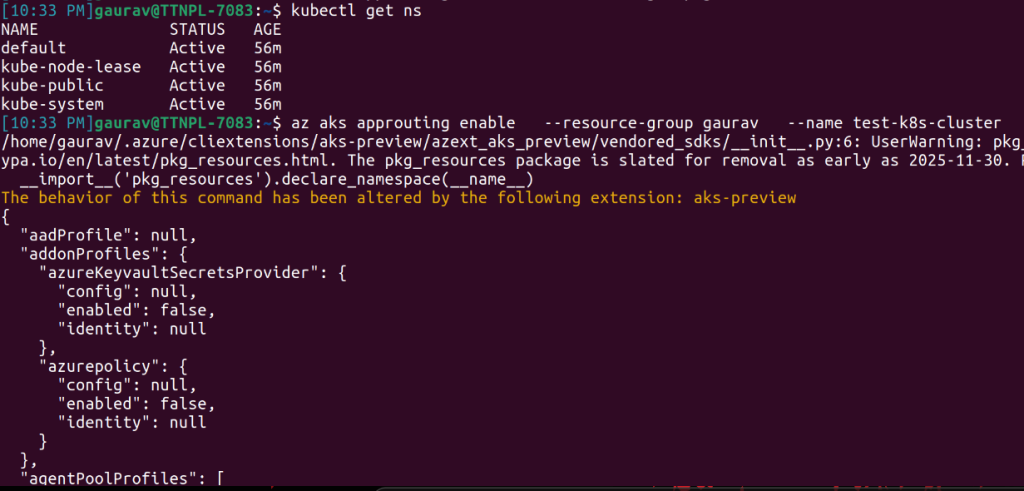
az aks approuting
This command:
- install the necessary managed NGINX ingress controllers
- Establish a system namespace
- Automatically Configures Ingress Classes
Optional Parameters
- –nginx
Configure default NginxIngressController resource.
Configure default nginx ingress controller type. Valid values are annotationControlled (default behavior), external, internal, or none.
Use none if you don’t want to create lb at the time of enabling the add on.
Step 2: Verify NGINX Ingress Controller Resource
kubectl get pods -n app-routing-system
You should see the pods running.
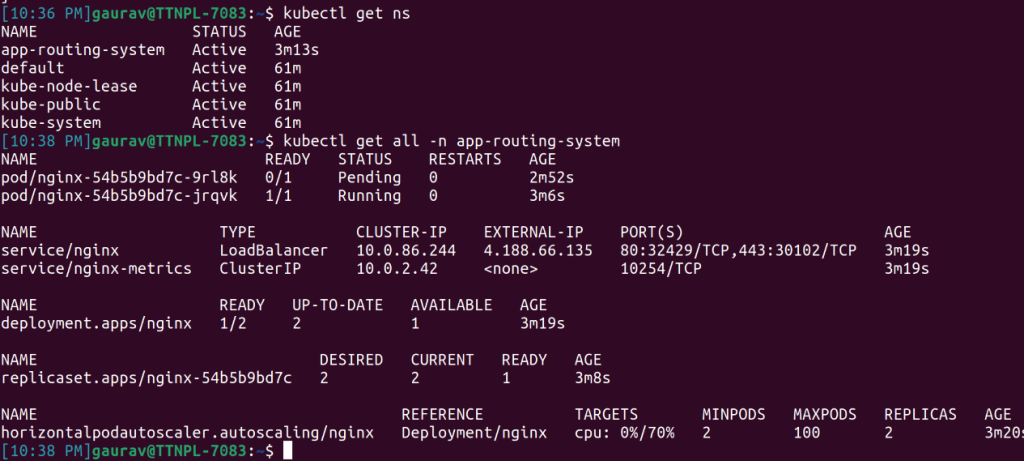
NGINX ingress controller
Step 3: Deploy a Sample Application
cat < demo-app.yaml
apiVersion: apps/v1
kind: Deployment
metadata:
  name: demo-app
spec:
  replicas: 2
  selector:
    matchLabels:
      app: demo
  template:
    metadata:
      labels:
        app: demo
    spec:
      containers:
      - name: demo
        image: nginx
        ports:
        - containerPort: 80

---
apiVersion: v1
kind: Service
metadata:
  name: demo-service
spec:
  type: ClusterIP
  selector:
    app: demo
  ports:
  - port: 80
    targetPort: 80
EOF
Deploy the yaml file
kubectl apply -f demo-app.yaml
Step 4: Create an Ingress Resource
First, check the ingress class.

Ingress controller
Then, use the above command to add the ingress class in the ingress file.
cat < demo-ingress.yaml
apiVersion: networking.k8s.io/v1
kind: Ingress
metadata:
  name: demo-ingress
  namespace: default
spec:
  ingressClassName: webapprouting.kubernetes.azure.com
  rules:
  - host: demo.local
    http:
      paths:
      - path: /
        pathType: Prefix
        backend:
          service:
            name: demo-service
            port:
              number: 80
EOF
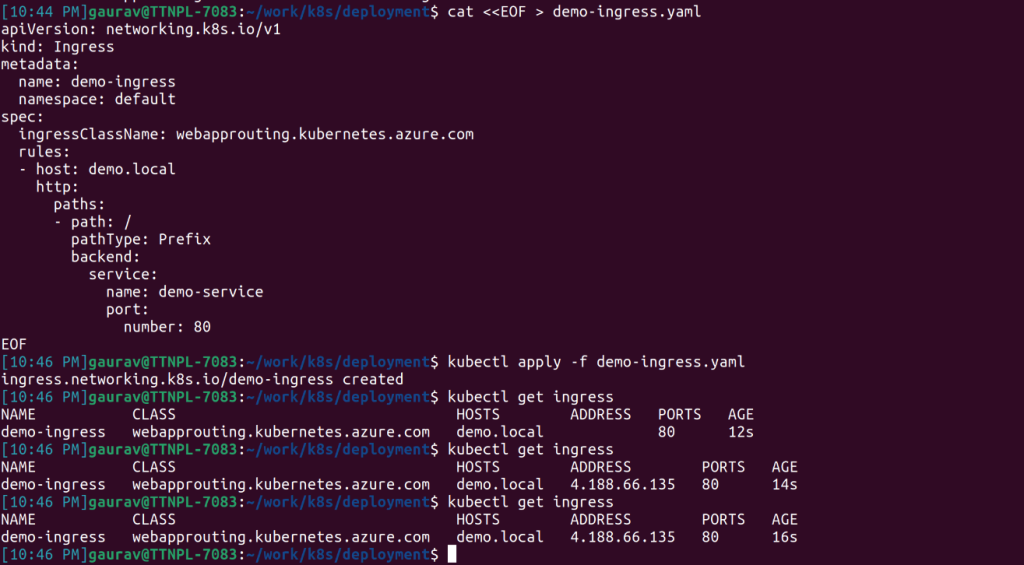
Ingress Resource
Once deployed:
- The traffic will be routed automatically using NGINX.
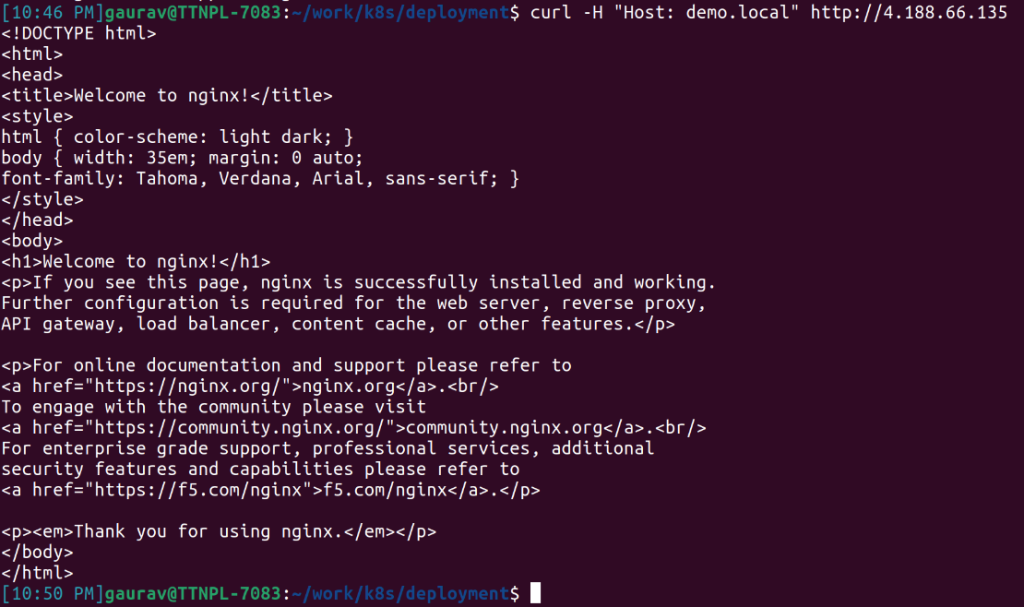
Curl
Security Headers Example
You can add a response header to the Ingress resource using annotations.
nginx.ingress.kubernetes.io/configuration-snippet: |
  add_header Expect-CT "max-age=31536000" always;
  add_header Strict-Transport-Security "max-age=31536000" always;
  add_header X-Content-Type-Options "nosniff" always;
  add_header X-Frame-Options "DENY" always;
  add_header X-XSS-Protection "1; mode=block" always;
  add_header Referrer-Policy "no-referrer" always;
  add_header Cross-Origin-Opener-Policy "same-origin" always;
  add_header Cross-Origin-Resource-Policy "same-origin" always;
  add_header X-Permitted-Cross-Domain-Policies "none" always;
  add_header Pragma "no-cache" always;
  add_header Cache-Control "no-store" always;
  add_header Content-Security-Policy "script-src 'self' 'unsafe-inline' 'unsafe-eval'; object-src 'none'" always;
  add_header Permissions-Policy "geolocation=(self), camera=(self), microphone=(self)" always;
These headers assist in enhancing the security posture of your application by safeguarding your application from various web threats such as cross-site scripting (XSS), clickjacking, MIME type sniffing, and unauthorized access to browser features.
Limitations
- Supports up to five Azure DNS zones
- Requires managed identity-based AKS
- Editing the ingress-nginx ConfigMap in app-routing-system namespace is not supported
- Certain NGINX annotations are not permitted, including:
- load_module
- lua_*
- proxy_pass
- location
- { }
Conclusion
The Application Routing add-on with Managed NGINX Ingress provides an enterprise-grade solution for your AKS cluster by combining Kubernetes-native ingresses with Azure-managed operations, thus reducing operational overhead while offering secure, scalable, and tightly integrated traffic management capabilities.