


Introduction
Working on a Drupal project often means going through the same pull request review cycle repeatedly. One reviewer checks functionality, another focuses on code quality, and sometimes simple issues still make their way into production.
Over time, the feedback starts to sound familiar:
- Use dependency injection instead of \Drupal::service()
- Optimize code and follow coding best practices
- Escape output properly
- Keep business logic out of Twig templates
- Avoid unnecessary raw SQL queries
Problem
As the number of pull requests increases, reviewers often find themselves pointing out the same coding standard issues repeatedly. This slows down the review process and takes attention away from more important discussions around business logic, architecture, and implementation decisions.
Solution
To reduce repetitive feedback, a solution was needed to catch common issues before human review begins.
CodeRabbit emerged as a suitable solution for this challenge.
Instead of replacing manual reviews, CodeRabbit acts as an early reviewer by automatically analyzing pull requests the moment they are created. It helps teams identify common coding issues early, making reviews faster and more focused.
In this blog, I’ll explain how to integrate CodeRabbit into a Drupal project and configure it to focus on the code that truly matters.
Step 1: Connect Your Repository
The first thing you need to do is connect your repository to CodeRabbit.
- Go to the CodeRabbit website and sign in using GitHub or GitLab.
- Install the integration.
- Select the repository that contains your Drupal project.
For Drupal projects, it is recommended to enable CodeRabbit only for repositories containing custom code. Otherwise, it may spend time reviewing files you never intended to modify.
After setup, open a pull request.
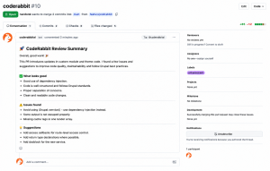
Within a few minutes, CodeRabbit typically posts a review summary highlighting:
- What changed
- Potential issues
- Suggestions for improvement
- Areas that may require attention
The initial setup is straightforward, but proper configuration is what makes the real difference.
Step 2: Add a .coderabbit.YAML Configuration File
By default, CodeRabbit reviews everything.
For a Drupal project, that usually creates noise because you probably do not want reviews on:
- Drupal core
- Contributed modules
- Vendor packages
- Minified assets
Instead, you want the focus to stay on custom modules and themes.
Create a .coderabbit.yaml file in your project root and add something like this:
language: "en-US"

reviews:
high_level_summary: true
review_status: true
collapse_walkthrough: false
poem: false

auto_review:
enabled: true
drafts: false
ignore_title_keywords:
- "WIP"
- "DO NOT MERGE"

path_filters:
- "!vendor/**"
- "!web/core/**"
- "!web/modules/contrib/**"
- "!web/themes/contrib/**"
- "!node_modules/**"
- "!*.min.js"
- "!*.min.css"
- "web/modules/custom/**"
- "web/themes/custom/**"

path_instructions:
- path: "web/modules/custom/**"
instructions: |
Review Drupal custom module code for:
- Dependency injection over service locator usage
- Drupal coding standards and best practices
- Proper hook implementations
- Safe rendering and sanitization
- Maintainable and readable code

- path: "web/themes/custom/**"
instructions: |
Review custom theme code for:
- Keeping business logic outside Twig templates
- Proper library attachment
- Drupal theming best practices
- Clean and maintainable Twig usage
This configuration helped reduce unnecessary comments in our workflow.
Instead of reviewing hundreds of unrelated files, it focused mostly on custom Drupal development.
That made the feedback much more useful.
Step 3: Using CodeRabbit Inside Pull Requests
A useful feature of CodeRabbit is the ability to interact with it directly within pull requests.
For example:
- @coderabbitai review → asks for another review after updates
- @coderabbitai summary → generates a fresh PR summary
- @coderabbitai ignore → skips a particular suggestion
This becomes useful when you push fixes after review or rebasing.
Instead of waiting, you can trigger another pass immediately.
Where It Actually Helps in Drupal Projects
In Drupal development workflows, CodeRabbit is particularly effective at handling repetitive review comments.
For example, it can catch:
- Service locator usage where dependency injection should be used
- Missing sanitization or escaping
- Incorrect hook signatures
- Small logic or consistency issues
- Potential maintainability concerns
For teams handling multiple PRs daily, this saves reviewers from repeatedly pointing out the same coding standard issues.
Final Thoughts
Code reviews are an important part of any Drupal project, but let’s be honest — many review comments tend to repeat over time. Things like dependency injection, escaping output, or coding standard issues often come up again and again in pull requests.
That is where CodeRabbit can be useful.
It does not replace human reviews, and it probably should not. But it helps catch common issues early, even before someone from the team starts reviewing the code. This means reviewers can spend less time on repetitive comments and focus more on things that actually need discussion, like business logic, architecture, and overall implementation.
One important observation is that configuration plays a significant role in the quality of review feedback. If everything is enabled by default, the reviews can become noisy. But when limited to custom Drupal modules and themes with clear instructions, the suggestions become much more useful.
If your team already uses tools like PHPCS or PHPStan, CodeRabbit can fit nicely into the existing workflow as an extra layer of review. It will not do everything, but it can definitely help make pull request reviews faster, cleaner, and a little less repetitive.