


Introduction
We had one API endpoint that generated a PDF report. It worked fine in testing. Then a customer ran it on a big dataset, and for about four seconds every other request to the server just hung. Health checks timed out, and the load balancer pulled the instance out of rotation.
The database was not the problem. The report was doing heavy CPU work, and in Node that blocks everything else on the thread. Around the same time we noticed our server was on an eight-core machine but only ever touching one core. Those were two separate problems, and I had reached for the wrong fix first. One needs worker threads, the other needs the cluster module.
First, Find Your Bottleneck
Node.js runs your JavaScript on a single thread with one event loop. That design is great for I/O-bound work: while one request waits on a database or a network call, the event loop happily serves others. Async code keeps that thread free.
The trouble starts with two situations that single thread cannot handle on its own:
- CPU-bound work: image resizing, PDF generation, encryption, parsing a huge file. This work never waits on anything. It just runs, hogs the thread, and every other request sits behind it.
- Using every CPU core: one Node process runs your JavaScript on a single core. On a multi-core box, the other cores sit idle unless you do something about it.
Most slow endpoints are I/O-bound and need neither of these. Work out which problem you actually have first, because the fix is different for each.
The Cluster Module: Use Every Core
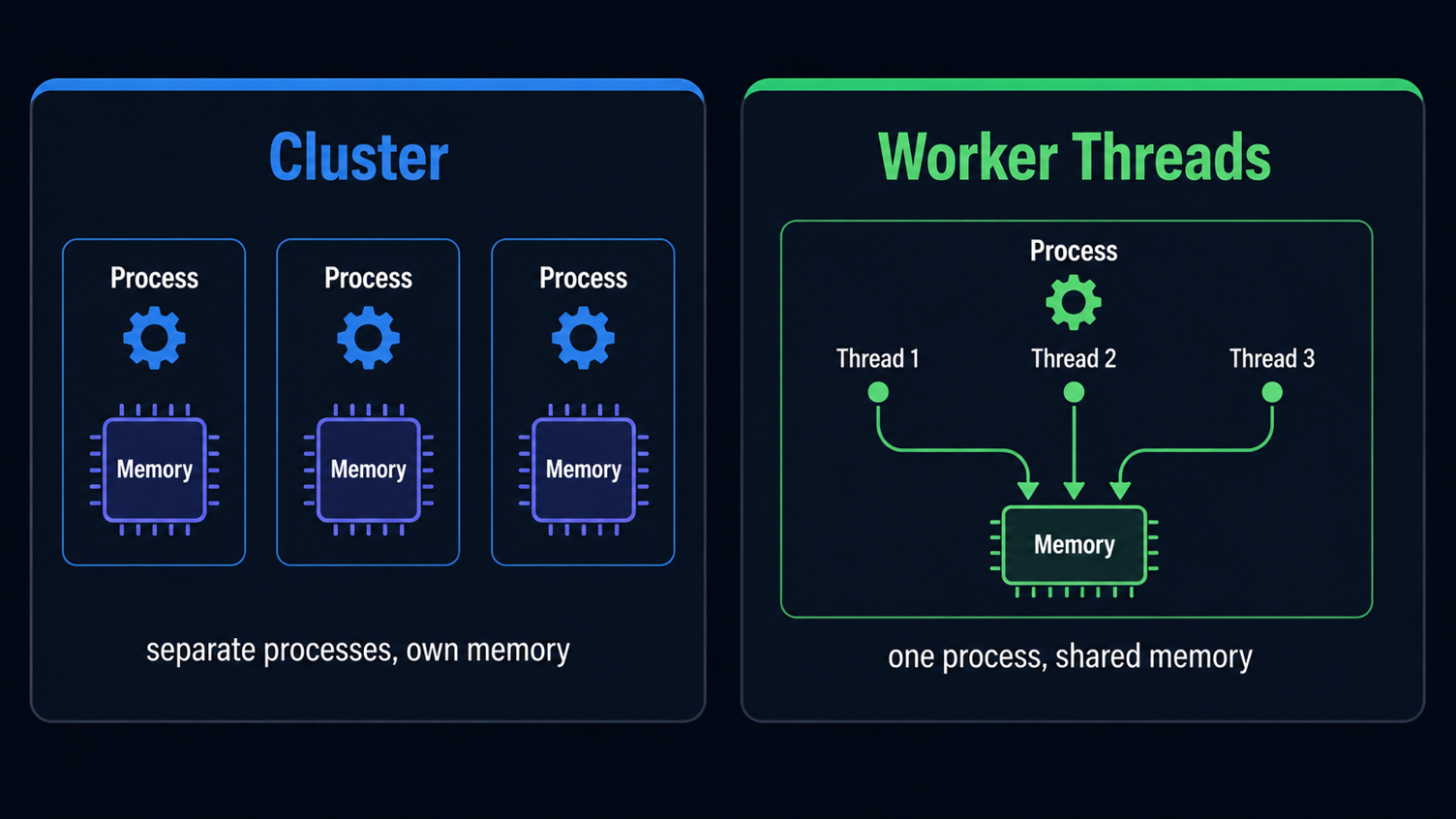
The cluster module forks your app into several identical processes, called workers, that all share the same server port. Node’s primary process accepts incoming connections and hands them to the workers (round-robin by default on Linux and macOS), so an eight-core machine can run eight event loops for your JavaScript instead of one.
const cluster = require('node:cluster');
const os = require('node:os');
const http = require('node:http');

if (cluster.isPrimary) {
  const cpus = os.availableParallelism();
  for (let i = 0; i < cpus; i++) {
    cluster.fork();
  }
} else {
  http.createServer((req, res) => {
    res.end(`Handled by worker ${process.pid}`);
  }).listen(3000);
}
Each worker is a full, separate process with its own memory and its own event loop. They do not share variables. If you need them to talk, you send messages between the primary and the workers. In practice most teams let a process manager like PM2 run cluster mode for them, so restarts and crash recovery are handled too.
Worker Threads: Move Heavy Work Off the Main Thread
Worker threads solve the other problem. They let you run JavaScript on a separate thread inside the same process, so a heavy computation no longer freezes the event loop that answers your requests.
const { Worker } = require('node:worker_threads');

function runHeavyTask(input) {
  return new Promise((resolve, reject) => {
    const worker = new Worker('./heavy-task.js', { workerData: input });
    worker.on('message', resolve);
    worker.on('error', reject);
    worker.on('exit', (code) => {
      if (code !== 0) reject(new Error(`Worker exited with code ${code}`));
    });
  });
}
And the worker file that does the actual crunching:
const { workerData, parentPort } = require('node:worker_threads');

const result = expensiveComputation(workerData);
parentPort.postMessage(result);
Because threads live in the same process, they can share memory by passing a SharedArrayBuffer explicitly (ordinary workerData is copied, not shared). For number-crunching over big buffers, sharing saved us the copy cost entirely.
The Real Difference
This is where the two actually differ.
| Cluster | Worker Threads | |
|---|---|---|
| Unit | Separate processes | Threads in one process |
| Memory | Isolated, message passing | Can share via SharedArrayBuffer |
| Solves | Using all CPU cores for a server | Heavy CPU work without blocking |
| Typical use | Scaling an HTTP server | Image, crypto, parsing, compute |
Cluster is about throughput across cores for a server that mostly does I/O. Worker threads are about keeping one heavy task from stalling everything else.
A Simple Way to Decide
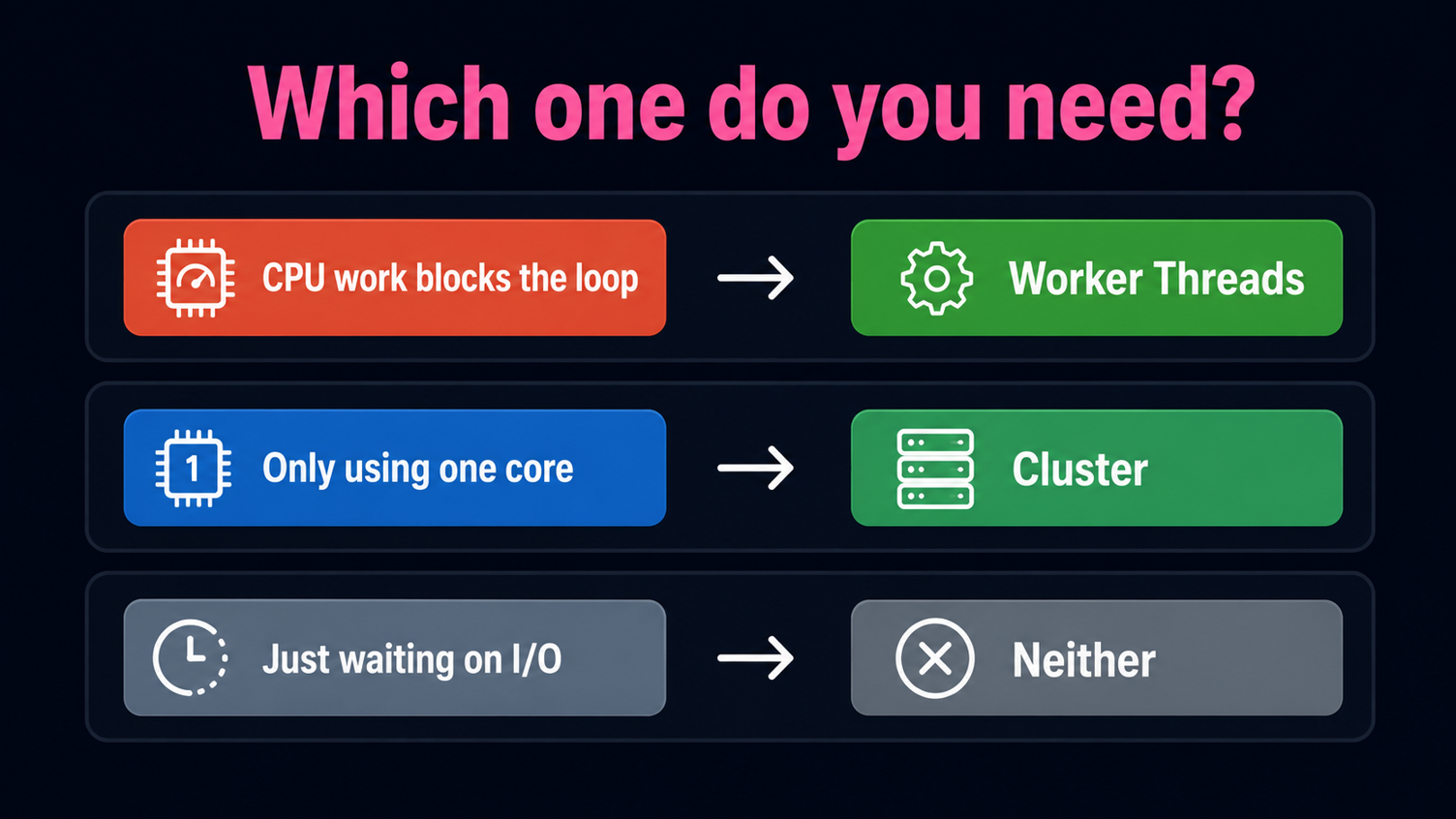
- One request doing heavy computation that blocks the event loop? That is a worker threads job.
- A healthy server pinned to one of many cores is what cluster (or PM2 cluster mode) is for.
- Endpoint just waiting on a database or an API? Neither helps. Fix the query or the async flow first.
These are not mutually exclusive. A busy service often runs in cluster mode and offloads its heaviest computation to worker threads inside each process.
Common Mistakes to Avoid
- Using cluster to speed up a slow computation. Forking more processes does not make one heavy request finish faster. It just gives you more event loops to block.
- Spawning a worker thread per request. Creating threads is not free. For steady load, use a pool (the
piscinalibrary is a clean option) instead of a fresh worker every time. - Reaching for threads on I/O-bound code. If the work is waiting on the network or disk, async already handles it. Threads add complexity for no gain.
- Sharing state across cluster workers in memory. Workers do not share memory. Keep shared state in something external like Redis or your database.
When You Need Neither
Most Node.js apps are I/O-bound and run happily on a single thread behind a load balancer that already spreads traffic across instances. If your containers scale horizontally, cluster inside one container is often redundant. I only reach for either one once a flame graph or a CPU metric actually shows the problem, not on a hunch.
Conclusion
So: cluster spreads a mostly-I/O server across every core, and worker threads keep one heavy computation from freezing the event loop your users are stuck behind. Different jobs, different tools.
Open your own service, find the endpoint that spikes CPU or the box that only uses one core, and try the tool that fits. If you are already running these apps in Docker, this pairs neatly with keeping the images small and the startup clean.
Building high-throughput Node.js services and not sure where the bottleneck is? Our engineering teams can help you find and fix it. Schedule a call with us today.
If a heavy endpoint has ever taken down a whole box for you, tell me in the comments whether cluster or worker threads fixed it.