


Introduction
API integration plays a large role in Roku application development. Most of the applications are built with APIs as their core foundation. Whether an app is displaying movies, loading product information, showing live channels, checking subscriptions, or fetching search results, there is usually an API working behind the scenes.
For the end user, it can appear as simply selecting an item and expecting the next screen.
For a Roku developer, it can mean making a request, headers, authentication, parsing JSON, updating SceneGraph, and handling errors.
API Communication in Roku
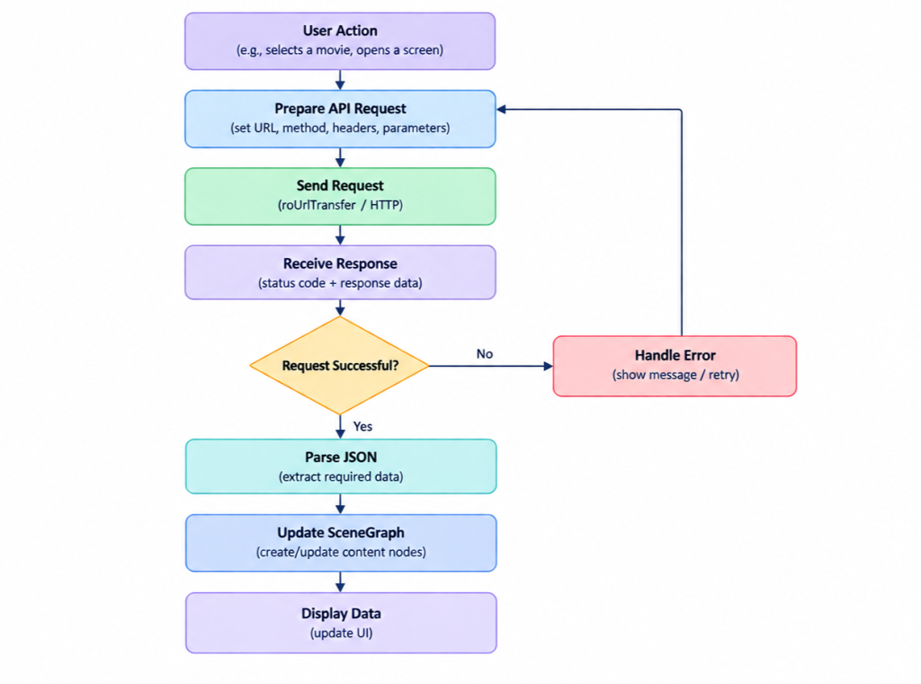
API Journey
Roku provides the predefined component named roUrlTransfer, which is responsible for making HTTPS and HTTP requests. we can create the ‘roUrlTransfer’ object using the method CreateObject(“roUrlTransfer”).
In a production application, you would likely include certificates, timeouts, headers, authentication, and error handling.
API Request Creation
A request can take various forms depending on the API requirement.
You may have to make HTTP requests, set query parameters, headers, authentication tokens, or a request body.
While working with APIs in Roku, it is essential to learn about the HTTP method and the corresponding BrightScript function required to perform an operation.
Below are some HTTP methods that are commonly used in API requests:
- GET: Retrieves information from the server (it does not have a body)
- POST: Sends or receives information from the server (It has a body that consist required data)
- PUT: Update or replace information
- DELETE: Delete information from the DB
Example:
url=baseUrl + "/product?id=" + productId '// consisting a query params
transfer=CreateObject("roUrlTransfer")
transfer.AddHeader("api-key", "apiKeysecretstring")
transfer.SetUrl(url)
if method = "POST"
response = transfer.AsyncPostFromString(bodyParams)
else if method = "GET"
response = transfer.AsyncGetToString()
end if
If your query params have some spaces or special characters, those query params need to be encoded first to maintain a valid URL format. This method is also known as URL encoding. Do not need to encode the entire URL, it is recommended to encode only the specific values/qurey params that contain special characters.
Asynchronous API Calls
API requests can take time, and Roku applications should not freeze while waiting for a response. So, Asynchronous API calls help the app to execute other operations without being paused for API responses. In Roku applications, we can execute asynchronous operations with the help of Task node threads. The Task node thread runs separately from the render thread, preventing the application from hanging during API calls.
To create a task node, just extend the “task” in the XML scenegraph component.
//Create the XML component for task node
<component name="ApiTaskComponent" extends="Task">
<component body...>
</component>
//Calling the task node to execute asynchronous task from other components or render threads
m.apiTask = CreateObject("roSGNode", "ApiTaskComponent")
m.apiTask.observeField("response", "onGetApiResponse")
m.apiTask.control = "RUN"
JSON Response Handling
Modern applications typically consume JSON data, and Roku applications are no different. A common pattern is to turn a JSON response into data that can be displayed by SceneGraph controls. Parsing converts the JSON format string to the BrightScript equivalent component, so the app can understand the response structure. Roku has a predefined method for JSON parsing named ParseJson(jsonResponse)
Authentication and Tokens
These are the security guards of the APIs. Developers can add an extra layer of security by applying some Authentication headers or tokens. In other words, these are extra headers that are used to protect the API from unauthorized use. We can pass the token headers using the method named AddHeader() in Roku.
Example:
request=CreateObject("roUrlTransfer")
request.SetUrl(apiUrl)
request.AddHeader("Authorization","Bearer "+token)
response = request.AsyncGetToString()
Authentication should be centralized rather than implemented in each component.
This is especially true for applications with multiple screens that communicate with different backend services.
Error Handling
A successful API response is only one possibility.
Production-ready applications must have proper error handling to handle timeout errors, authentication failures, empty responses, JSON parsing errors, and network errors.
response = transfer.GetToString()
statusCode = transfer.GetResponseCode()
if statusCode = 200 and response <> invalid
data = ParseJson(response)
else
print "API failed: " statusCode
end if
statusCode = 200 means OK or Success response from API, this is the first level of checking the response is in correct way, after this the 2nd step to check if the data is valid or invalid, if it is valid and the required fields are not empty then app executes the ext steps else display the error messages as per requirement.
Timeouts
A Roku application should never be completely frozen waiting for an API response.
Timeouts help the app abort the API request if the response is not received within the given timeout duration.
Example:
transfer=CreateObject("roUrlTransfer")
transfer.SetTimeout(10000)
The application can display an error message or retry button if the API request fails due to a timeout. A loading indicator is also a good idea, but it should always lead to either an error or a successful request.
SceneGraph Updates
After the API response has been processed, the application must update the UI. A common pattern is:
API response -> Parse JSON -> Create ContentNodes -> Update UI
For example:
data = ParseJson(response)
if data <> invalid
content = CreateObject("roSGNode", "ContentNode")
content.title = data.title
content.HDPosterUrl = data.imageUrl
m.top.content = content
end if
The amount of UI data that is created should be considered.
If an API returns hundreds of products there is typically no need to create hundreds of SceneGraph nodes immediately. This can be especially important for RowLists, search results and other UI patterns that display a large amount of data.
Caching
There is no need to make an API call every time a Roku application is opened.
Some information may change frequently while other information may stay the same for a long period of time.
Caching the appropriate data can have a significant impact on application performance.
Example:
if m.global.apiCache <> invalid
data = m.global.apiCache
else
data = getDataFromAPI()
m.global.apiCache = data
end if
Caching should be implemented carefully since there are potential issues with displaying old information. Information that changes frequently such as inventory, pricing, accounts or anything else that involves user input may require much shorter caching intervals.
Reusable API Layer
As a Roku application grows, it becomes increasingly difficult to manage API logic within individual screens.
A reusable API layer can encapsulate common logic such as request creation, headers, authentication, error handling, logging and response parsing.
For example:
function createApiRequest(url as String) as Object
transfer = CreateObject("roUrlTransfer")
transfer.SetUrl(url)
transfer.SetTimeout(10000)
transfer.SetCertificatesFile("common:/certs/ca-bundle.crt")
transfer.InitClientCertificates()

response = transfer.AsyncGetToString()
return response

end function
Individual API methods can include common request configuration rather than repeating the same logic throughout the application.
This is especially valuable for large OTT applications with Home, Search, Live, VOD, PDP, Account, Subscription and Checkout modules.
Conclusion
API integration in Roku is more than making a request and parsing JSON. A production-grade application must account for asynchronous requests, authentication, timeouts, error handling, data size, caching and SceneGraph updates.
The actual BrightScript code for an API call may only be a few lines, but the supporting architecture is what makes the difference. Organizing API communication properly makes the application easier to maintain, easier to troubleshoot, and more reliable in a variety of network and backend conditions.
As a Roku developer, your goal should be to make sure that the API does its work in the background while the user enjoys a fast, responsive and reliable application.