


Introduction
In node.js while building a scalable application the main problem that we encounter while creating APIs are how to validate the incoming requests. If the incoming requests are safe or not. How can we validate each keys. That’s where the express-validator library comes into the picture.
While using the express-validator library it helps you design a schema for your API and lets you define each key with validations for your respective API.
There could be some fields which are optional, required or if there is an email id then domain name should be there so all these can be done in a seamless manner using this library
Benefits of using this:
1) One of the biggest advantages is this is a standardized way to validate incoming api data. Without this writing validation for each key becomes a tedious process.
2) We can use multiple types of validations here. Some common validations are like isEmail(for checking a valid email id), notEmpty(make sure the key contains a value), isLength(length check) etc.
3) It supports validations for Body, Query & Params
4) Repetitive code can be avoided for writing same validations for multiple APIs.
5) Provide centralised error handling.
Let me show you with the help of an example
In the below example I have created a schema for validating the verify-otp API. For now ignore the register API. I will explain this further.
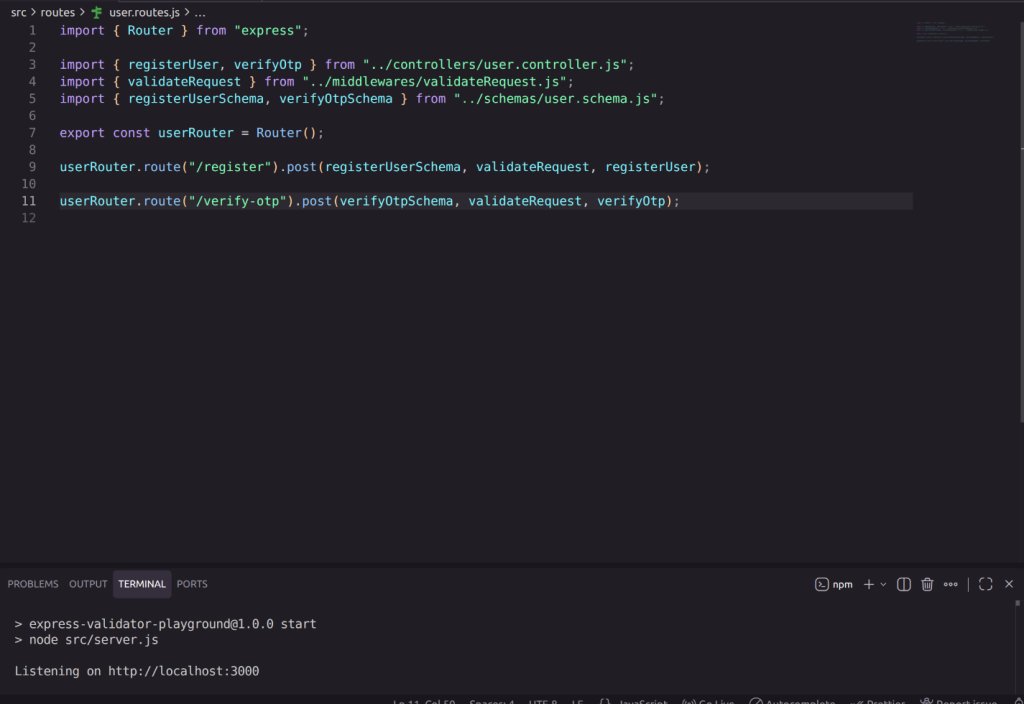
I have created an API route called verify-otp. I am validating the api by providing the verifyOtpSchema
Below is the schema which i have prepared for the verify-otp API route.
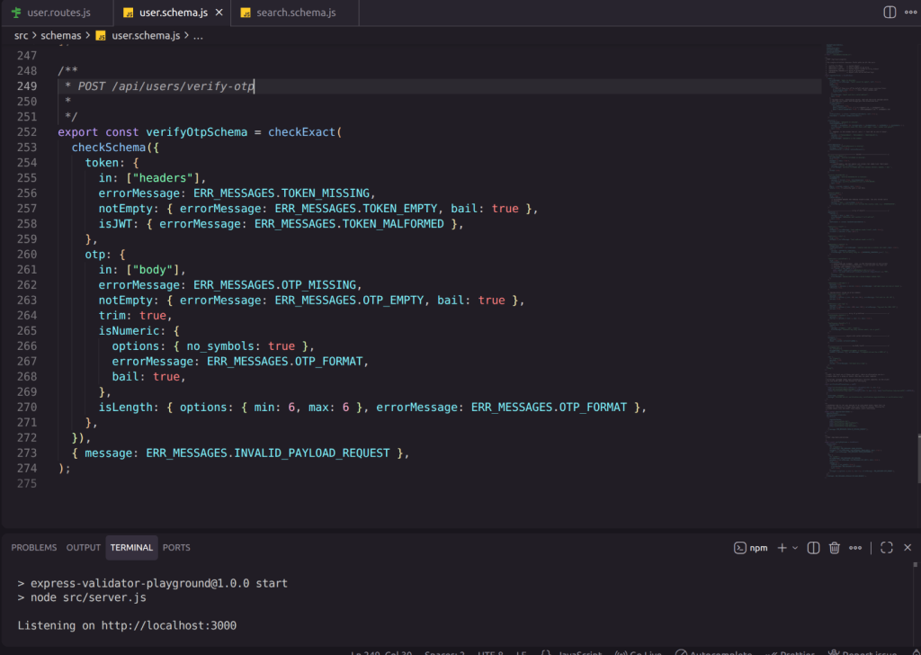
Validation Schema for verify-otp API.
If you look closely I have used checkExact which is used to reject unexpected fields and checkSchema is used for defining the incoming structure of the API. Below is how it’s imported from the library
import { checkExact, checkSchema } from “express-validator”
I will help you in understanding what is written in the schema of verify-otp
Let’s talk about token first:-
Token: I am expecting this in headers so I have created an object and inside that token is defined and now I will define whether the request is in headers or body. Since, it’s in headers
in:[“headers”]: this will check for the token in headers of the API request.
errorMessage: As the name suggests it takes care of the error handling like what error to show if something goes wrong.
notEmpty: this states that the token should not be empty, it should contain some value. The bail:true in notEmpty means that if notEmpty validations fail, stop executing the validation there and don’t move further.
isJwt: This checks whether the jwt is malformed or not and it only runs if notEmpty passes.
Now, in OTP:
in:[“body”]: which means the otp will be received in the request body.
isNumeric: is the validator that tells the otp should be numeric and we add further validator options / configuration options.
options: In this we have defined that no symbols should be there in the otp like +,- etc.
isLength: In this we are defining what should be the length of the OTP.
The rest of the validators have already explained above in the token part
Now let’s check how it works. Below is the screenshot of the api with otp sent as a string instead of a number hence it is throwing an error.
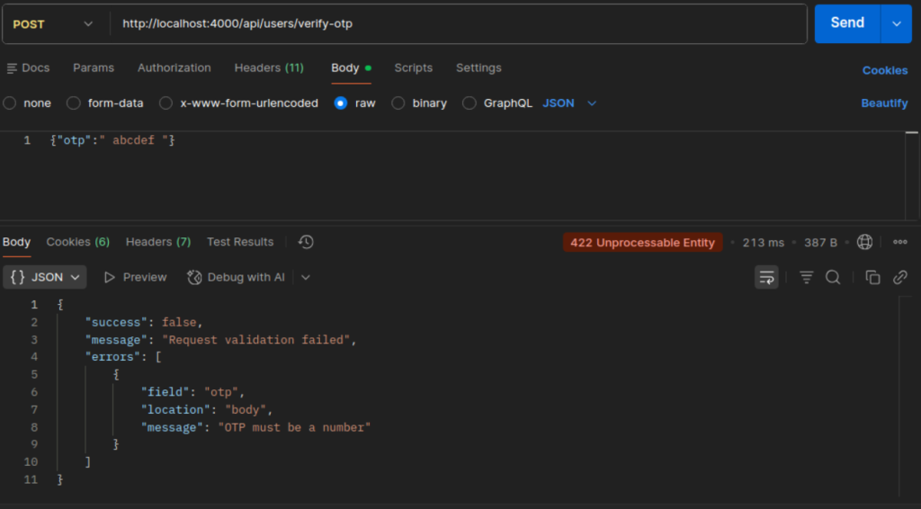
verify-otp failed as we tried to send the otp as string instead of number
Below is the same API with correct payload
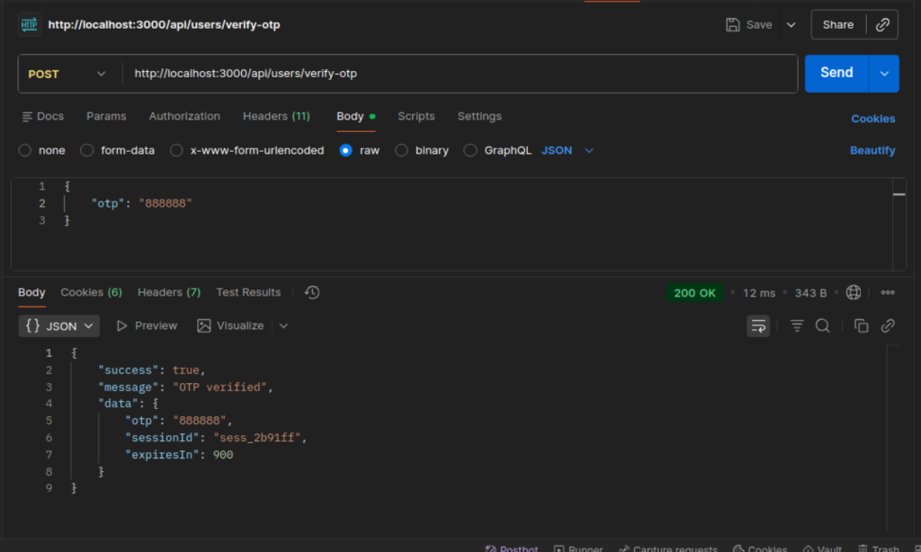
verify-otp working as expected with correct payload
Now let’s check the register API. It’s a bit complex structure and contains multiple validations that are practically very useful for a production grade application.
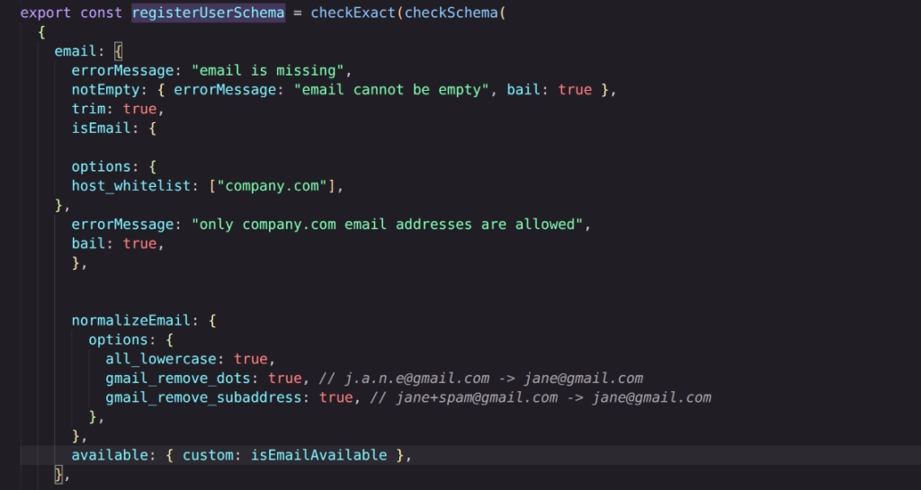
Schema of register API
In this above structure I am expecting an email in body. I have structured the schema in my own way and I require basic validations like it should not be empty if empty what to show and all. But what if I want something like a user from a certain domain should not be able to register then I can do that as well for that in isEmail validator I have added a option like host_whitelist this can take array of domain names and only those domain names will be valid rest all will throw an error.
Also, you might be wondering why I haven’t mentioned the email should be in the body. That is because once I mention all the keys and it’s validation inside the checkSchema outside the outside the schema object I can add a parameter like
Below.

stating that to find tall the keys inside body for the register api.
What this will do is it will search for all the keys in body of the request in which I haven’t mentioned where to find the key using the in: validator. Incase certain for certain keys I mention in:[“headers”] then for those it will check the headers.
Look at the below Postman Request for the register API
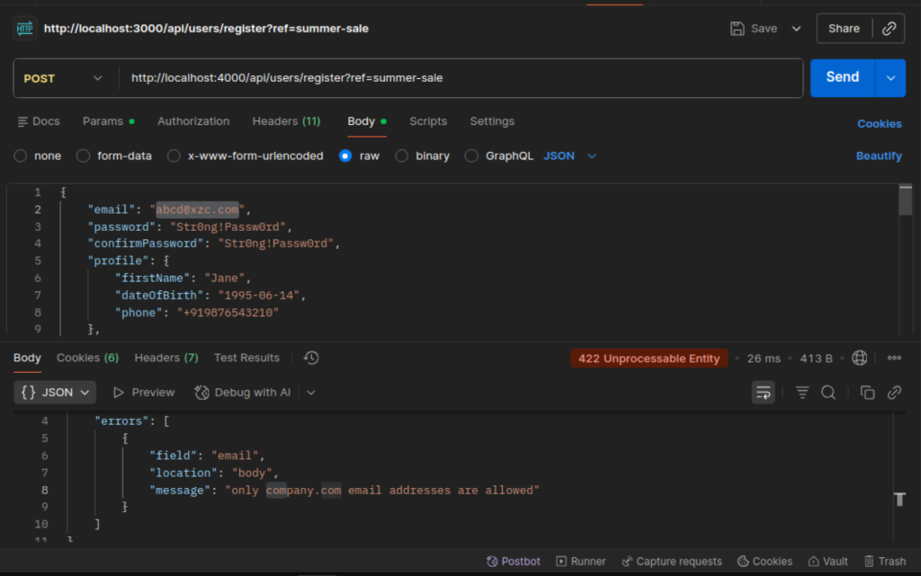
register api throwing error as I tried to register using different domain and the validation worked correctly
Now, when I hit the API from a different domain it’s giving me error and if I hit from @company.com domain it will work. Since, I have whitelisted only company.com so rest all domains will throw error.
Let me show you the working result with @comapny.com domain
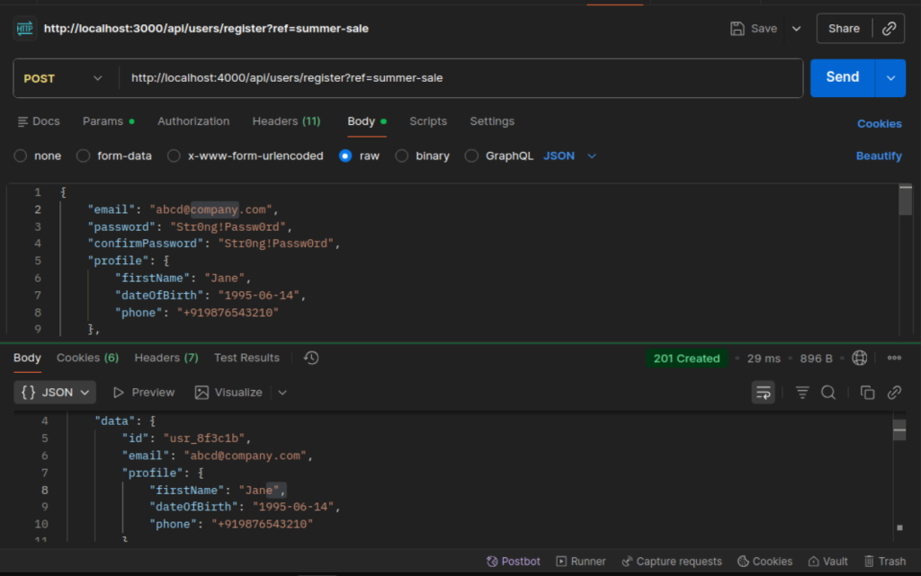
with @company.com domain the api gives success.
I can also add custom validation here as you could see in I also used the “available” validator in the schema of register api and it calls the custom function isEmailAvailable.
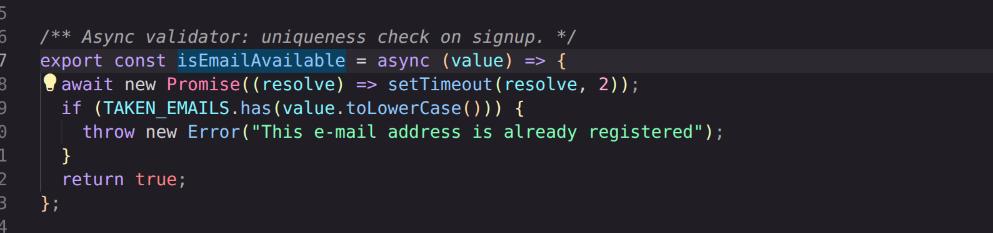
function created for custom validation of email
This checks if the emailId already exists/registered and if true it throws the error. For now I have used dummy data but in real you can actually check in the DB if the user exists and throw an error accordingly as per the use case.
I will show you one example for query params.
Now, let us take the example of order-details api
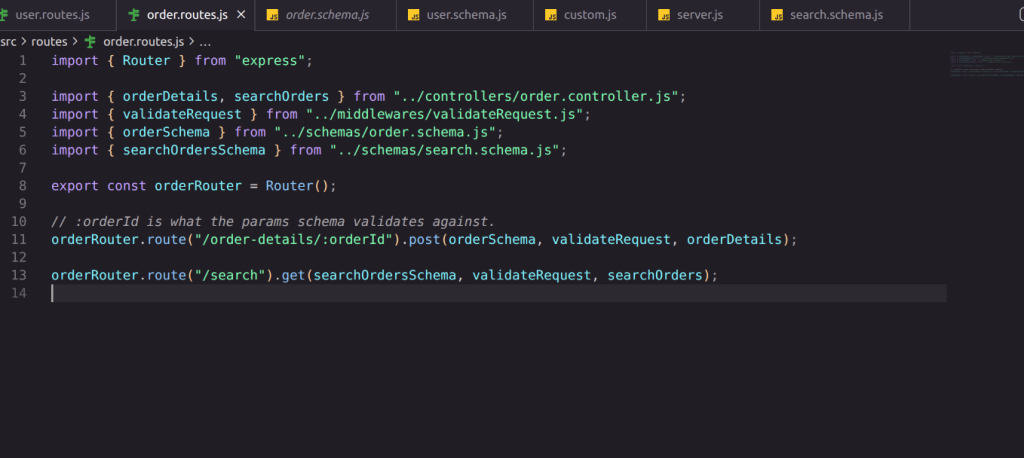
order-details api
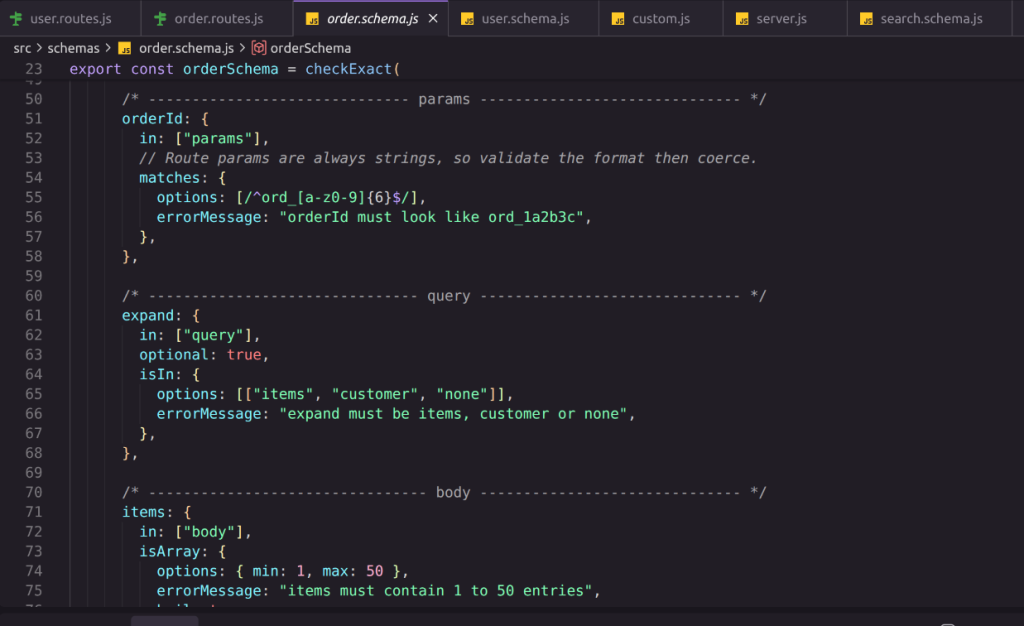
order-details API Schema
Above I have mentioned that the orderId will be present in the params and it should match the regex as I have mentioned in the matches validator and the query params will be expected as query and and it’s optional and also isIn validates that it should have either value as items, customer or no query params.
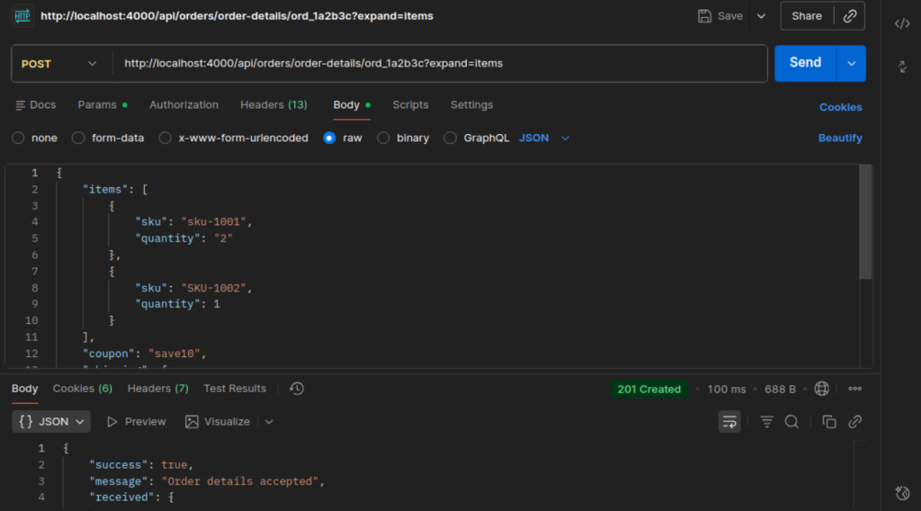
order-details working API
Above is the working request.
Let’s see If I hit the api with order is only numeric and expand with some other value it will fail. As we can see in the below screenshot
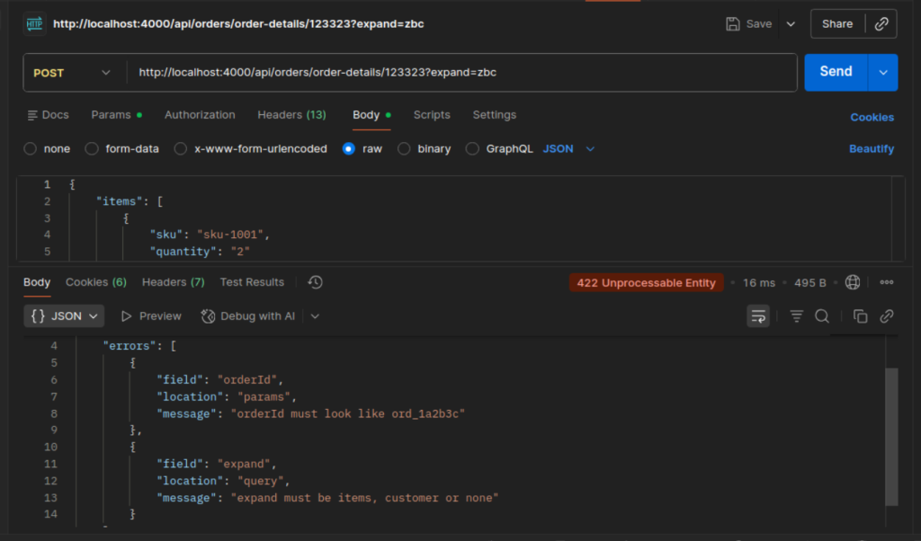
order-details failed due to incorrect query param. As it expected expand=items or customer or no query param and received expand=zbc in query params.
That’s the basic Idea of how the express-validators work. You can read in detail by visiting their site and reading the documentation further.
This really saves a lot of time for validating the requests and the schema can also be reused. It’s definitely worth trying.