


As a developer, I thought that once I pushed the code to the repository, I was done. I thought that things such as deployment, scalability, networking, and monitoring were all handled by the DevOps team.
However, this is only true for a short period of time. At some point, when something go wrong in production and it will not be your code. Maybe an API will become unresponsive. Maybe a service will not be able to reach the database. Maybe a Lambda function will not work due to permission errors. When these types of things happen, having zero knowledge of AWS makes debugging very difficult.
You don’t have to become a DevOps engineer. You don’t have to know how to deploy an application to production. However, if your application is hosted on AWS, it is imperative that you have a basic knowledge of the different components of your application that make it work.
I have come to realize that many DevOps teams assume that developers have a basic knowledge of these concepts. However, this is not the case.
AWS Is Just Infrastructure Delivered as Services
It is helpful to think of AWS as a collection of cloud services.
Instead of buying computers and operating your own data center, you are selecting services that deliver those capabilities.
For example:
-
-
-
- IAM is the identity and access management service that controls who can sign in and what they are allowed to do
- VPC is your private virtual network in AWS, where you launch and isolate your resources
- EC2 is a virtual computer where your application can run
- S3 is storage for your files, such as images, videos, and backups
- RDS is the database service for your relational databases
- Lambda is the service for running small pieces of code
- CloudFront is a content delivery network, distributing your content from locations all over the world
-
-
These services generally work together as part of a system. One of the most popular architectures for a web application looks like this:
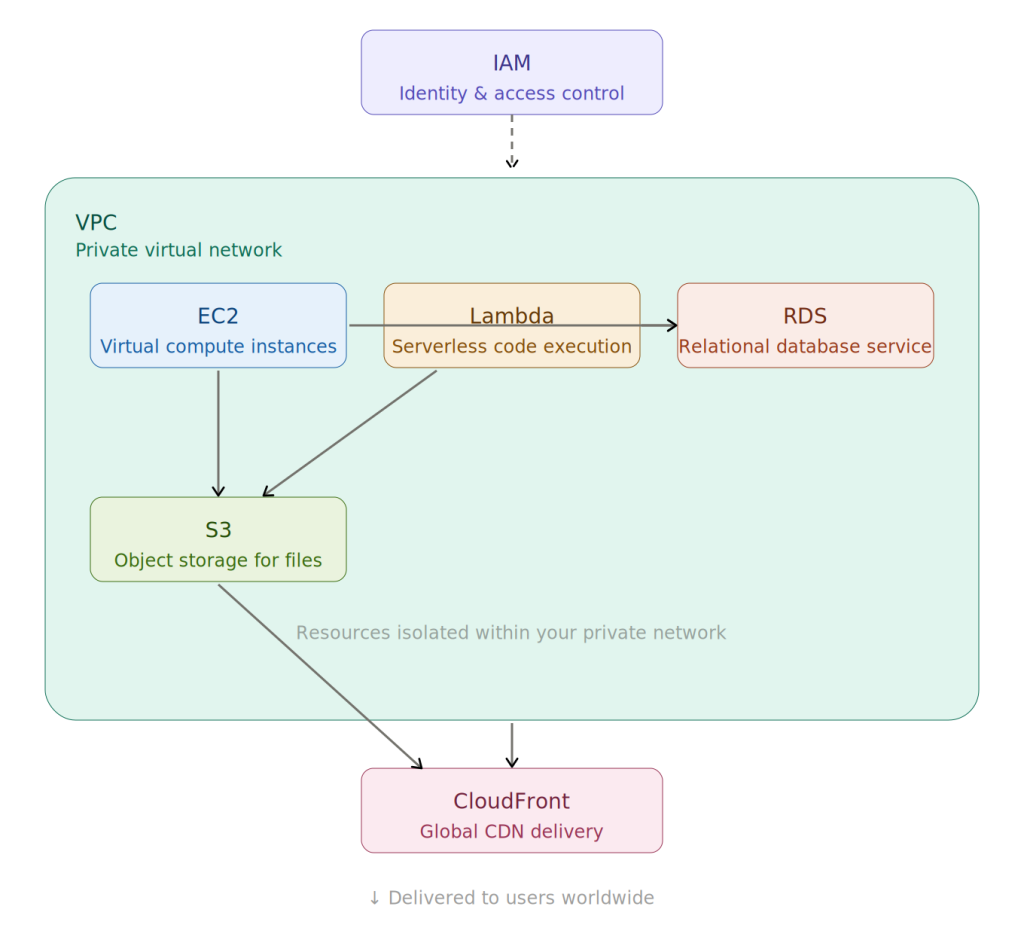
From IAM to CloudFront: mapping the essential AWS services and how they fit together in your cloud stack
If you are building backend APIs, your code may be running on these EC2 instances. Knowing where your code sits in this architecture can help you if there are any issues with its performance. Sometimes, what you think is a slow-running application is actually a database instance running on underpowered machines.
IAM (Identity and Access Management): Probably the Most Important AWS Service
One thing developers often miss is IAM, which stands for Identity and Access Management. IAM is a set of security features and tools that define which actions are allowed in your AWS account. Every service in AWS runs under some identity. This could be a user, a role, or another AWS service. For instance, if a Lambda function needs to upload images to an S3 bucket, it needs permission to do so. One solution developers have is to give very broad access for a short period of time.
One such policy is:
Allow: *
Resource: *
Although this will work, it is essentially granting full access to everything in the account. A better way to do this is to only grant the permissions needed. For instance, if we were to upload images using Lambda, we might only need:
-
-
-
-
- Permission to upload objects
- Permission to access the bucket
-
-
-
nothing else. Knowing IAM can help programmers diagnose permission issues and can even help to improve the security of applications.
VPC (Virtual Private Cloud): Private network containing the app and database
Networking terms such as VPC and subnets can be daunting to developers. A VPC, in simple terms, is your own network within AWS. Within a VPC, you will have different types of subnets.
A public subnet will contain resources that need to be accessible from the internet, such as a load balancer. A private subnet will contain internal resources, such as application servers and databases. A simple architecture will look something like:
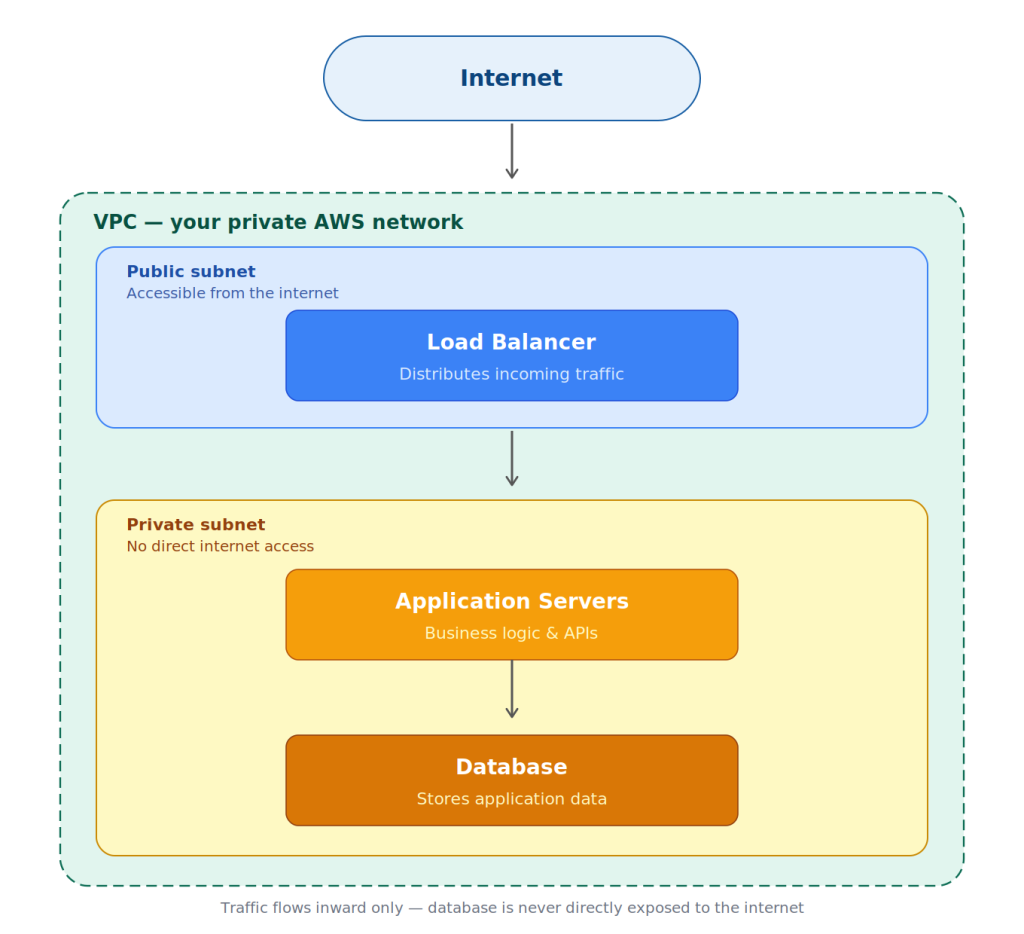
Inside a VPC: how public and private subnets protect your application stack
Having a basic knowledge of these elements can help developers troubleshoot these problems in a much faster way.
EC2: The Virtual Server Workhorse
Elastic Compute Cloud is basically a rented computer from AWS that comes equipped with the required software and hardware that is assigned by you based on the type of job. It continues to be active until it is shut down by you. Once activated, it will operate as any normal Linux or Windows server and will allow you to log in via SSH, install your application, and customize the setup as needed. This is precisely what makes EC2 such a good choice for any application that has to run all day, requires a particular OS configuration, or has to perform some long operation.
Lambda: Code Without the Server
Lambda is a serverless compute service provided by Amazon Web Services (AWS). In place of setting up a server, you simply upload a function that you want to run, and you configure AWS on what needs to trigger your function, whether that’s an HTTP request, data placed in an S3 bucket, data queued up somewhere, or a timer. The instant the triggering occurs, AWS creates a transient execution environment where your function will execute, and once it has executed, it terminates. You will only be charged for the time taken by your code to execute.
Choosing Between EC2 and Lambda
Another popular debate in recent architecture styles is the choice between EC2 and Lambda. Lambda is popular because it eliminates the server management hassle. You can simply push your code to Lambda, and AWS will take care of the execution when the event occurs. But it is not always the best choice. EC2 is still very useful if your application is running all the time or if you want to control the OS.
For example, consider a worker application running in the background and processing files. This is still best suited to EC2. Lambda is best suited to short-lived applications.
Consider the scenario where users can upload images. Each time the user uploads the image, it triggers the Lambda function to resize the image. This is scalable without the hassle of server management. Knowing the difference between these two styles can help developers design applications efficiently.
All of this service knowledge pays off the moment something actually breaks in production, and the very first place that knowledge points you to is the logs.
Logs Are Your First Clue When Things Break?
The first place to check in such cases is usually the logs. For example, in AWS environments, the application logs are usually found in CloudWatch.
For instance, in cases where a Lambda function fails, the error in the CloudWatch logs might look like:
“Task timed out after 3 seconds.”
This means that the execution timeout is too short.
Another type of error that might come up is:
“AccessDeniedException.”
This usually means that the service role does not have the required permissions.
Getting comfortable reading the logs can save a significant amount of time in resolving production issues.
AWS Costs Are Influenced by Development Decisions
One area that is sometimes overlooked by developers is cost. While infrastructure costs are managed by DevOps teams, application design can sometimes impact costs in AWS as well. A simple example is when developers store temporary data in S3 without any cleanup mechanism in place. This can lead to increased costs as more data is stored in S3.
Similarly, Lambda functions can sometimes be designed in a way that they are invoked too frequently or use too much memory.
This can lead to increased costs due to Lambda usage.
This is another area where developers can benefit by knowing how costs are calculated in AWS.
Why Developers Benefit from Learning AWS?
End-to-end ownership is the focus of modern software development. It is not enough for the developer to simply write the code; they must also be familiar with the behavior of the code. Understanding AWS is important for the following reasons:
-
-
-
- Helps to quickly recognize infrastructure-related problems.
- work well with DevOps teams.
- To design an application that scales well.
- Recognize performance bottlenecks.
-
-
It is not important to memorize all the AWS services. New services are constantly being introduced on the platform. Understanding the basic concepts is important.
Conclusion
The concepts of DevOps and development are often seen as two different roles, but in reality, the lines are more blurred than most people think.
The most successful engineering teams are those where developers are aware of the environment in which the application runs.
Learning about AWS from a developer’s point of view is not about replacing DevOps teams. It is about delivering better systems and being more efficient in problem resolution.
And once you grasp the infrastructure level, a number of problems that have puzzled you about production will become much easier to understand.