


The Problem With ‘Flip the Switch’
We’ve all been there: the new version is ready, the tests are passing in the staging environment, everybody is reasonably confident, and you deploy – only to find out that in a matter of minutes, the error rates are through the roof. Suddenly, you’re in the process of an emergency roll-back, with half your user base seeing broken pages. The real problem isn’t the code; the real problem is the blast radius. When you’re hitting the untested path with 100% of your traffic, even the smallest bug turns into a widespread crisis. What we really want is to be testing in production, just not with the entire user base at once.
“Production stops being the place where things go wrong — and starts being the place where you safely find out if things are right.”
That is exactly what canary deployments give you. The new version ships to 5% of users first. You watch it. If it holds up, you gradually expand to 10%, 25%, 50%, and finally 100%. If anything looks off at any stage, you pull back instantly. The other 95% of users never knew anything happened.
Goals
- Enable zero-downtime deployments across all rollout stages
- Reduce release risk by validating new versions against real production traffic
- Enable rapid, no-friction rollback capability without infrastructure changes
- Maintain high availability and service continuity throughout
High-Level Architecture
The design avoids anything heavy. No DNS switches, no load balancer reconfigurations, no infrastructure restarts. Routing decisions happen at the edge and are enforced inside the mesh using a simple HTTP header.
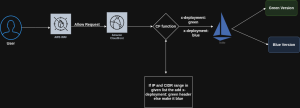
- Cloud Front acts as the CDN and request router.
- A Cloud Front function dynamically injects an x-deployment header (blue or green) into the request based on predefined logic (e.g. IP).
- Requests hit the Istio ingress, which examines the header. Based on the header(x-deployment) value, traffic is routed to either the Blue or Green version of the application.
- No DNS switching or infrastructure restart is required.
Key Components
| Component | Role |
| Cloud-Front | Global entry point for all incoming requests |
| Cloud-Front Function | Injects the x-deployment header (blue/green) per routing logic |
| Istio Ambient Mode | Zero-sidecar mesh that reads headers and routes traffic |
| Blue Deployment | Current stable version of the application |
| Green Deployment | New canary version under validation |
The key is the x-deployment header. Cloud-Front stamps each request as either blue or green before it ever reaches your cluster. Istio reads that header and routes accordingly.
Request Flow
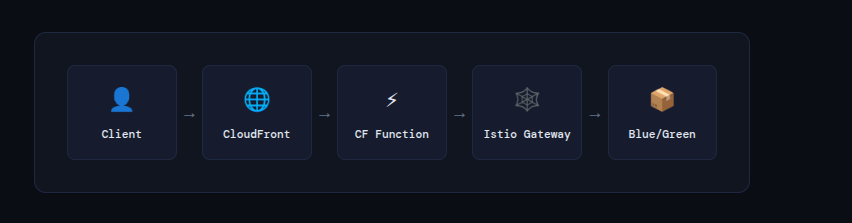
Tracing a single request end-to-end:
- Client request arrives at CloudFront’s nearest edge PoP.
- CloudFront Function fires on the viewer-request event. It checks the user’s IP against pinned CIDR lists and applies the green_percentage probability. It then stamps the request with x-deployment: blue or x-deployment: green.
- Istio Ingress Gateway receives the forwarded request and reads the header.
- VirtualService rules match the header value and route to either the Blue or Green Kubernetes service.
- Application serves the response. From the user’s perspective, nothing unusual happened.
Deployment Strategy Logic
- Start with 100% traffic to Blue (current stable release).
- Deploy new version (Green) in parallel without affecting live users.
- Canary shift: Gradually direct a portion of users to Green via Cloud-Front logic.
- Monitor for performance, stability, and errors in Green.
- Full switch to Green once validated.
- Rollback instantly by routing traffic back to Blue if needed.
Benefits
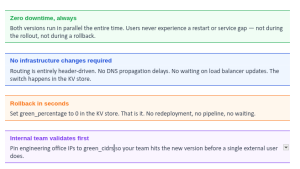
- Zero downtime for users during deployment or rollback.
- No DNS or load balancer updates required — all routing is done through headers.
- Fast rollback if issues are detected in the new version.
Security & Observability
- Secure TLS termination and traffic inspection via Istio.
- Observability into which version is receiving traffic via telemetry.
- Full auditability of deployments and version history.
Implementation Steps
- Setup istioctl and istio ambient mode: The ambient profile is the critical difference from a standard Istio install. It skips sidecar injection entirely, meaning no Envoy proxy is stuffed into every pod. The result is a much lighter resource footprint with all the routing capabilities you need.
# Pull and install Istio
curl -L https://istio.io/downloadIstio | sh -
cd istio-1.22.3
export PATH=$PWD/bin:$PATH

# Install istio ambient mode
istioctl install \
--set profile=ambient \
--set "components.ingressGateways[0].enabled=true" \
--set "components.ingressGateways[0].name=istio-ingressgateway" \
--skip-confirmation
Flag breakdown:
-
- profile=ambient: This sets the Istio installation profile to ambient. The ambient profile is part of Istio’s ambient mesh, which is a lightweight, proxyless service mesh. This profile configures Istio without the need for sidecar proxies (Envoy).
- ingressGateways[0].enabled=true”: This enables the first ingress gateway component in the Istio deployment. An ingress gateway is a Kubernetes resource that allows external HTTP/TCP traffic to enter the mesh.
- ingressGateways[0].name=istio-ingressgateway”: This sets the name of the first ingress gateway to istio-ingressgateway. By default, Istio creates an ingress gateway with the name istio-ingressgateway, but this command explicitly specifies the name.
- skip-confirmation: This skips the confirmation prompt that typically appears when installing Istio, allowing the installation to proceed automatically.
-
- Create the Cloud-Front Function: The function runs at the edge on the viewer-request event. It consults the Key Value Store and injects the routing header before forwarding the request. The KV store holds three fields:
| KV Field | Description |
| blue_cidrs | List of IP ranges that always route to the stable Blue version (e.g., your office network) |
| green_cidrs | List of IP ranges that always route to Green (useful for internal QA before public rollout) |
| green_percentage | Integer 0–100. What percentage of unspecified users should receive the Green/new version |
Why This Approach Works
Conclusion
Canary deployments change the relationship between engineering and production. Production stops being the place where things go wrong and starts being the place where you safely find out if things are right. That’s not just a reliability improvement — it’s a confidence improvement, and it compounds over time as teams learn to ship smaller, faster, and without fear.