


Introduction
There are many different tools available, which allow us to manage complicated applications and the infrastructure we need to develop them. There are different ways that we can approach the architecture of our application, and different tools to help us along the way. However, if we are developing a cloud ready application, especially one based on .NET, there’s one clear solution to approaching the development of that application is .NET Aspire.
What is .NET Aspire?
.NET Aspire is designed to easily build observable and reliable cloud-native applications that help us improve productivity and building applications quickly. It provides us with tools, templates, and packages for building observable, production-ready distributed apps. At the center, is the app model a code-first, that defines our app’s services, resources, and connections. It gives us a unified toolchain to launch and debug our whole application locally with one command and then deploy anywhere in Kubernetes, the cloud, or our own servers using the same composition.
.NET Aspire does using below main areas:
- .NET Aspire Dashboard
- Application orchestration
- Components
- Service discovery
- Deployment.
Why .NET Aspire Matters
As the transition towards microservices, containerization, and distributed system architectures are creating new challenges for .NET teams, specifically in onboarding, service orchestration, and monitoring.
.NET Aspire directly addresses these issues, making it attractive for:
- Enterprises that are running large-scale distributed systems on Azure/hybrid cloud environments as it cuts costs and speeds up the maintenance.
- Startups that are adopting microservices technology, as it lowers the barrier to modern architectures and do not require deep expertise on Kubernetes or advanced cloud orchestration.
- Teams which are modernizing legacy .NET applications into cloud-native solutions applications.
Key Features of .NET Aspire
- Simplified Multi-Service Orchestration: It allows developers to run APIs, frontends, databases, and messaging systems in harmony just by using a single command. Which makes it easy to locally replicate a production environment without the hassle of employing multiple tools.
- Built-in Service Defaults: All important aspects, like logging, health checks, retries, and circuit breakers, are preconfigured. Teams no longer need to implement them from scratch, and services stay uniform and trusted.
- First-Class Observability: Observability for Aspire is built using Open Telemetry. Developers gets lot of distributed tracing, metrics, and logging that assist as a tool for identifying any flaws.
- Health Checks and Service Discovery: Applications can now automatically identify if a service is down or not and reroute traffic when there is need.
- Resilience with Retries and Circuit Breakers: Aspire provides facility that prevents minor issues from becoming major outages by automatically retrying failed requests and applying circuit breaker patterns whenever necessary.
- Developer-Friendly Local Environment: It reduces the days spent setting up a local environment, and developers can get everything running very fast.
Getting Started with .NET Aspire
To try Aspire locally, make sure you’re using .NET 8 SDK or later.
- Firstly we need to create a new Aspire solution using a template: aspire new aspire-firstapplication -n AspireFirstApp -o AspireFirstApp
- Examine the created template structure.
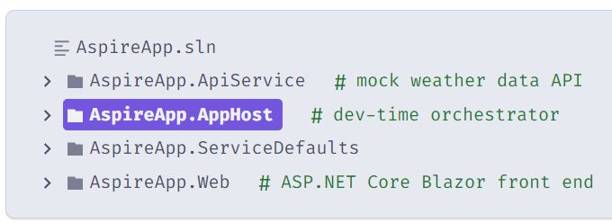
Template structure
- Explore the AppHost code that orchestrates your app.
var builder = DistributedApplication.CreateBuilder(args);
var apiService = builder.AddProject<Projects.AspireApp_ApiService>(“apiservice”)
.WithHttpHealthCheck(“/health”);builder.AddProject<Projects.AspireApp_Web>(“webfrontend”)
.WithExternalHttpEndpoints()
.WithHttpHealthCheck(“/health”)
.WithReference(apiService)
.WaitFor(apiService);builder.Build().Run();
- CreateBuilder creates the distributed application builder
- AddProject registers your API service and web frontend
- WithReference will create a connection between the services
- WaitFor ensures services start in the correct order
- WithHttpHealthCheck monitors service health
- Run the app
- Change output directory: cd ./AspireFirstApp
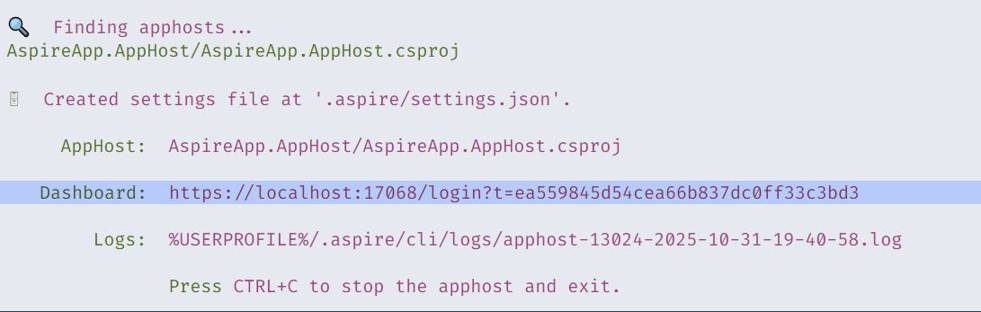
- Now we can call aspire run to start dev-time orchestration: aspire run When you run this command, the Aspire CLI :
– Automatically finds the AppHost
– Builds your solution
– Launches dev-time orchestration
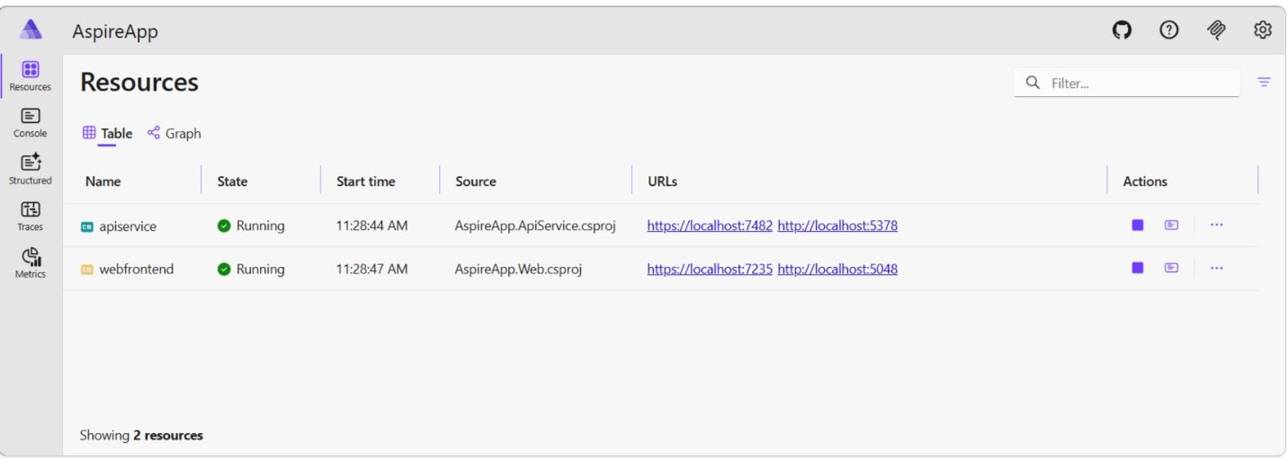
Once the dashboard is ready, its URL (with a login token—highlighted in the example output below) appears in your terminal. This dashboard provides a live, real-time view of our running resources and their current states.Example output
- Explore the running distributed application. From the dashboard, open the HTTPS endpoint from each resource.
Aspire dashboard
Pros and Cons of .NET Aspire
Pros
- Separation of concerns: MVC architecture allows us to use separate input processing and output of the applications.
- Reduce coding time: Impactful reduction in coding time in case of bigger app developments. Also provides code reviews which helps improved code quality.
- Provides some of out of the box features: It provides features such as just-in- time compilation, early binding, native optimization and caching services, and enhanced performance and scalability.
- World class toolbox: Provides toolbox with its Visual Studio integrated development environment and provides aids developer in creating applications.
- Power and flexibility: Provides language independent power and flexibility for developers.
- Simplicity: Every task can be performed very easily, even if they are complicated and tricky ones.
- Configurability and Scalability: Provides us with ability to extend or replace runtime with own custom prepared components.
- Controllability: This makes tasks much easier, with no server restart, or with the necessity to deploy them separately, or replace running compiled code.
- Monitoring: Continuous and constant monitoring is an incredible feature. We do not have to monitor on the status of the applications, components and the pages themselves.
- Cross platform migration: Provides us cross-platform migration, configuration and deployment services.
Cons
- Immature Deployment & Tooling: Current deployment options, such as the manifest JSON, are limited, making it hard to manage granular, phased deployments or rollbacks.
- High Complexity/Overhead: It is overkill for simple apps, adding unnecessary complexity and, for some, reduced flexibility by forcing specific project structures.
- Limited Legacy Support: Aspire does not support local IIS or SQL Server Reporting Services, making it difficult to use with older, established technologies.
- Learning Curve & Newness: As a relatively new technology, it lacks extensive resources, and users may encounter bugs or limitations during development.
- Dependency on Containers: It strongly relies on Docker/containers for orchestration, requiring team proficiency with containerization.
- Operational Costs: While great for local dev, it requires setting up external storage for persistent telemetry and managing container images.
Conclusion
.NET Aspire is a promising step forward for developers building distributed .NET applications. With built-in orchestration, telemetry, and modular components, it drastically reduces setup time and boosts productivity. While still evolving, Aspire provides a great starting point for any cloud-native .NET app. If you’re working on microservices or multi-service solutions, it’s definitely worth exploring.