


A Roku application can be technically correct but still feel slow.
This is a realization that many Roku developers come to at some point. The application performs as expected, the API calls are working, the screen renders and the video is playing, but something about the experience feels off.
Navigation is choppy, the focus movement is laggy, images appear late, or the performance is inconsistent across devices.
This is where performance optimization comes in.
Roku application performance optimization is not about squeezing out every last drop of performance by making the BrightScript as lean as possible. It is more about understanding the fundamentals of how SceneGraph, BrightScript, memory, threads, images, APIs, and rendering interact with each other.
Start With the Real Problem
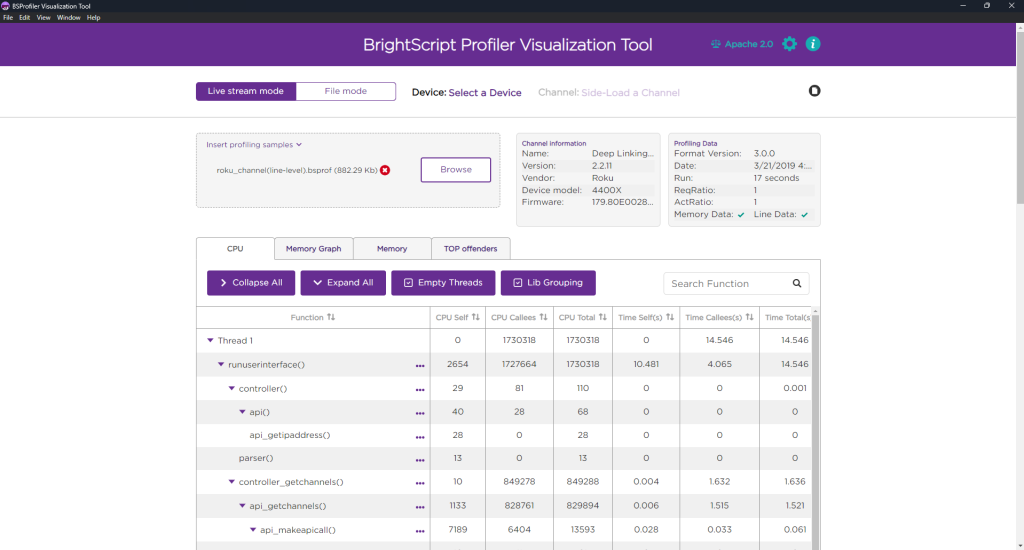
Brightscript profiler
One of the simplest mistakes to make when optimizing Roku applications is to guess at what may be wrong, rather than measuring.
Roku provides several built-in tools for profiling and debugging performance issues. The BrightScript Profiler can be used to analyze CPU time, wall time, function calls and memory consumption.
Before making any changes in code, it is important to profile the “hot paths” of the application.
Some of the interesting things to look at include:
- How long it takes for the first screen to appear
- What functions are consuming the largest amount of CPU time
- How much memory the application is using
- How many SceneGraph nodes are being created
- If significant amounts of data are being copied
- Whether the render thread is being blocked
- How many images are being drawn simultaneously
Once we understand what is happening and the root cause of the problems, optimizing becomes much easier.
Don’t Do It All in the Render Thread
One of the most important concepts that every Roku developer should understand is the difference between the render thread and the task threads.
The SceneGraph render thread is primarily concerned with rendering the visual elements of the application. Doing intensive operations in the render thread will cause the UI to freeze.
Network requests, JSON parsing, heavy processing, API calls, and other such operations should be delegated to Task node threads when possible. The task node threads consist of those operations that could block execution if included in the render thread.
But there is an important catch. Moving everything into a Task node doesn’t automatically make an application faster. Excessive communication between Task and Render threads can introduce rendezvous overhead. Roku recommends avoiding unnecessary rendezvous operations and, where possible, building a complete node or content tree before passing it to the render thread.
SceneGraph Nodes Optimization
Creating a large number of SceneGraph nodes can be very expensive.
A UI with several rows, hundreds of ContentNodes, image components, labels, buttons, animations and inactive UI elements that are not actually rendered can create an enormous amount of overhead.
The recommended solution here is to create only what is necessary.
Re-use components where possible. Remove nodes that are no longer needed. Avoid keeping large sections of old UIs alive when they are no longer needed.
Optimize Images
Images are another potential culprit when it comes to performance optimization.
If a UI component is using a 300 × 200 image, there is typically no point in requesting a 3000 × 2000 image from the server and asking Roku to scale it down.
The Roku optimization guide specifically recommends reducing both the quantity and the size of the images.
The simplest optimizations for image-heavy screens are:
- Requesting the right size from the backend
- Only loading the images that are actually needed
- Re-using previously loaded images where possible
- Avoiding unneeded high-resolution images in memory
- Avoiding displaying too many images at the same time
The last point is particularly relevant for product grids and rows of content where dozens of thumbnails can be present onscreen at the same time.
Avoid Passing Large Objects
BrightScript associative arrays and arrays are convenient, but large data structures can contain more data than you may expect.
SceneGraph field nodes typically use copy semantics when passing data. This means that passing huge arrays or associative arrays can consume significant amounts of CPU time and memory. Roku recommends using small associative arrays for shallow data structures and ContentNodes for larger objects.
A good example of this is parsing a large API response.
Assume that an application uses a product card and needs the following information: ID, Title, Price, ImageURL
There is typically no reason for the product card to have a reference to the entire API response containing all of the metadata for that product.
We can extract the necessary information and pass it to the card instead of passing the entire response.
Example:
' Assume this is a large API response
productResponse = {
id: "12345",
title: "Gold Necklace",
price: 129.99,
imageUrl: "https://example.com/necklace.jpg",
description: "Beautiful 18K gold necklace",
specifications: {...},
reviews: [...],
recommendations: [...],
shippingDetails: {...},
inventory: {...},
}

' Passing the complete response to the ProductCard
productCard.productData = productResponse


' Extract only the data required by ProductCard
productData = {
id: productResponse.id
title: productResponse.title
price: productResponse.price
imageUrl: productResponse.imageUrl
}
' Pass the smaller object to the SceneGraph node
productCard.productData = productData
Keep JSON Processing Under Control
JSON processing is yet another potential issue.
Calling formatJSON() on large associative arrays can be expensive, especially if it is done repeatedly.
Avoid unnecessary JSON processing and keep a processed copy of the data in memory and reuse it instead of reprocess it.
Memory Issues Are Everywhere
Performance optimization is not only about the CPU.
Memory leaks or excessive memory usage can greatly impact performance, especially as the user navigates through an application.
When a user opens a screen, nodes are created, images are loaded, a Task may be executed and another screen is opened. In the process, the old objects may still be referenced somewhere and not properly destroyed. After several minutes of such navigation, the application may be using much more memory than it did at launch.
Roku provides the component named as roAppMemoryMonitor, which allows applications to monitor the memory situation and respond to low-memory events.
Avoid retaining references to large data structures when they are no longer needed.
Optimize Startup Time
The launch flow of any application are very important and crucial. It highlights the App’s overall performance to the end user.
An app that begins to load but takes several seconds of processing before the first screen is displayed can give the user the perception of being very slow. Roku suggests that applications should avoid putting substantial amounts of initialization code in the main SceneGraph and static children, and defer it to task threads where possible.
Testing on Multiple Devices is Important
An application that looks good on a developer’s device may not look good elsewhere.
Roku has a wide range of devices, and performance can vary greatly depending on the class of the TV.
This is why performance testing should be done on multiple devices rather than a single high-end Roku.
Particular attention should be paid to:
- Startup performance
- Focus movement
- Row scrolling
- Image loading
- Screen transitions
- API-heavy screens
- Search
- Playback screens
- Memory after several minutes of navigation
It is also important to test user journeys rather than individual screens.
A memory leak may not appear after loading Home, but it may appear after navigating to several screens multiple times.
Use Profiling to Find the Gaps
Performance optimization is best approached as an investigative process.
Roku’s newer developer tools make it easier to investigate performance issues.
The Roku OS 15.2 update added BrightScript heap graph visualization to Perfetto-based app tracing. This allows us to examine what BrightScript and SceneGraph objects are using memory.
This makes it much easier to answer questions like “Why is memory still high after leaving this screen?”
By investigating what objects are being retained, we can find and fix memory issues.
Conclusion
The truth is, a fast application is not made by one optimization. It is made by a series of decisions that take place throughout the development process.
If we keep performance in mind from the beginning, we will not have to deal with painful optimizations later. We will understand our options and be able to choose the best ones for the task at hand.