
Introduction
React makes local state management simple, but things become different when the same data needs to be accessed by multiple parts of an application. This is common in OTT applications, where a single action such as pressing the Play button can affect playback status, Continue Watching, watch history, analytics, subtitles, and other UI elements.
Passing this information through several component levels can lead to prop drilling and tightly coupled components. This is where state management becomes useful.
There is no single solution that works for every React application. Context API, Redux Toolkit, and Zustand all solve the problem differently. In this article, I’ll compare them from a practical development perspective, focusing on code structure, rendering behavior, scalability, and developer experience.
Understanding the Type of State
Before choosing a state management solution, it is important to understand what kind of state the application actually has.
Local state belongs to a particular component, such as a modal, selected tab, or form input. Shared client state can include authentication information, user preferences, or shopping cart data. Server state is data received from APIs, such as movie metadata or recommendations, and usually has different requirements such as caching and refetching.
A common mistake is putting everything into one global store. Keeping local state, client state, and server state separate usually makes the application easier to understand and maintain.
Redux Toolkit
Redux Toolkit (RTK) is the modern approach to writing Redux applications. It provides APIs such as configureStore and createSlice, which remove much of the boilerplate associated with older Redux code.
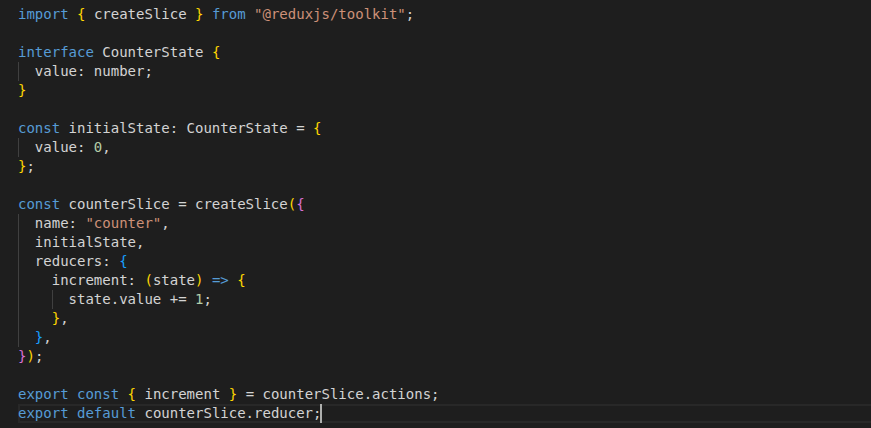
A component can then select the required state and dispatch an action.
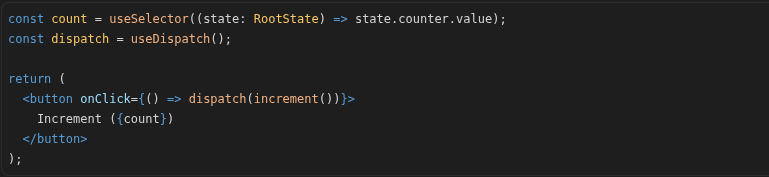
The biggest advantage of Redux Toolkit is structure. Large applications can divide state into feature-based slices, making it easier for multiple developers to understand where state changes belong.
Redux DevTools is another major advantage. Developers can inspect actions and state changes while debugging complex flows.
The trade-off is that Redux introduces more concepts than the Context API or Zustand. Developers need to understand stores, slices, reducers, actions, selectors, and middleware. For a small application, this can feel like unnecessary setup. For a large application, the same structure can become useful.
Context API
Context API is part of React and is mainly used to share values through the component tree without passing props through every level.
A simple example is application theme management.
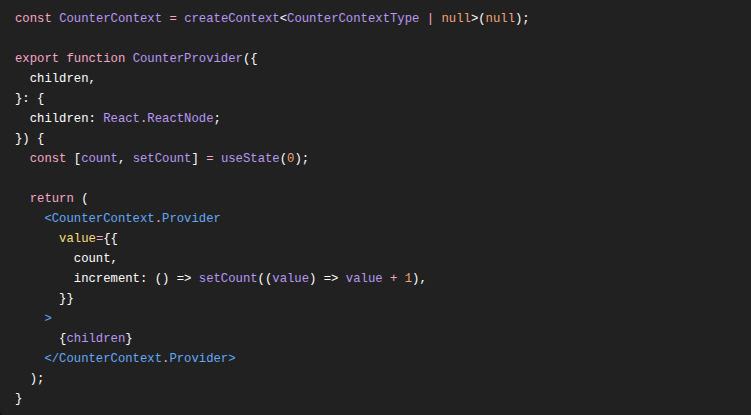
A component can consume the value using useContext().

Context is a good fit for relatively stable values such as themes, language settings, authentication information, or application configuration. It requires no additional state-management package and has a very small learning curve.
However, Context needs to be designed carefully. When a Context value changes, components consuming that Context are updated. If authentication, theme, notifications, and frequently changing UI state are all placed into one large Context, an update to one value can affect unrelated consumers.
This does not make Context slow by default. It means the structure of the Context matters. Splitting unrelated contexts and avoiding frequently changing values in a large Context can help.
Zustand
Zustand takes a simpler store-based approach. A store can be created without adding a Provider around the application.
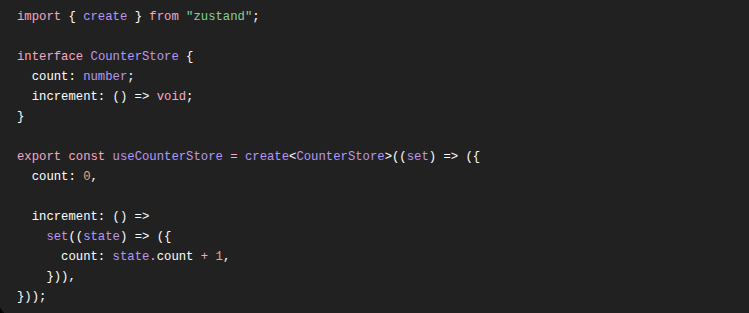
A component can subscribe to the exact state it needs.

This selector-based approach is one of the main reasons I find Zustand useful for applications with frequently changing shared client state. Components can subscribe to specific pieces of state instead of consuming an entire Context value.
Zustand also supports TypeScript, middleware, persistence, and Redux DevTools integration. The API remains small, but the library can handle more than simple counters.
The trade-off is that Zustand provides fewer architectural conventions than Redux Toolkit. That flexibility is useful for small and medium-sized applications, but larger teams need to define their own rules for organizing stores and business logic.
A Practical Rendering Comparison
Instead of describing performance using words such as “Excellent”, “Moderate”, or “High”, it is better to compare a controlled scenario.
For this example, consider an application with 100 components. The counter is updated 10,000 times. Only one component needs to display the counter when using Redux Toolkit and Zustand, while all 100 components consume the same Context value in the Context example.
| Test Setup | Redux Toolkit | Context API | Zustand |
| Components rendered | 100 | 100 | 100 |
| State updates | 10,000 | 10,000 | 10,000 |
| Components reading counter | 1 | 100 | 1 |
| Selector used | 1 | 0 | 1 |
| Provider required | 1 | 1 | 0 |
The numbers above describe the test setup, not a universal performance result. Actual rendering behavior depends on the component structure, state design, selectors, and how frequently the state changes.
The important point here is how precisely components respond to state changes. Redux Toolkit and Zustand allow components to select the state they need, while Context works at the Context value level.
How the State Flow Differs
The architectural difference becomes easier to understand when we look at how a state update moves through each solution.
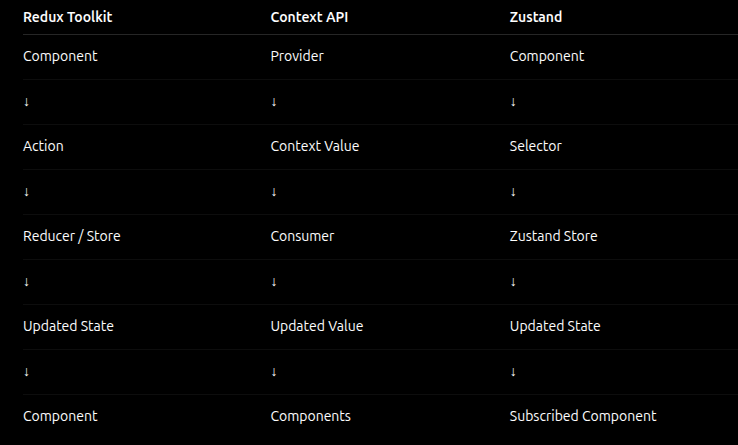
The diagram should show:
Redux Toolkit:
Component → Action → Store/Reducer → Updated State → Component
Context API:
Provider → Context Value → Consumer Component → Updated Value
Zustand:
Component → Selector → Zustand Store → Updated State → Subscribed Component
This difference is important when an application grows. Redux Toolkit provides a more structured flow, Context keeps the state-sharing mechanism close to React, while Zustand provides a lightweight store with direct state selection.
Comparing the Three in Practice
| Area | Redux Toolkit | Context API | Zustand |
| Initial setup | Higher | Very low | Low |
| Architecture | Strong | Minimal | Flexible |
| Debugging | Redux DevTools | React DevTools | DevTools support |
| Selectors | Yes | No built-in selector model | Yes |
| Middleware | Yes | No | Yes |
| Provider | Yes | Yes | No |
These differences explain why the three solutions feel different during development. Redux Toolkit gives more structure, Context keeps things close to React, and Zustand provides a lightweight global store with selector-based state access.
Production Practices
The library itself is only one part of the performance story. I prefer keeping state as close as possible to where it is used. If only one component needs a value, there is usually no reason to put it into a global store.
I also avoid creating one large store or Context containing unrelated state. Organizing state around business domains makes the code easier to understand.
Selectors are important when using Redux Toolkit or Zustand because they allow components to read only the state they need. Server state should also be kept separate from client state where appropriate. API caching and refetching are different problems from managing UI state.
Common Mistakes
A common mistake is using Redux for every piece of state. A modal, selected tab, or form field usually does not need a global store.
Another mistake is putting everything into one Context. Context works well, but a large Context containing unrelated and frequently changing values can make rendering harder to reason about.
I have also seen API data stored in client-state stores without considering caching and refetching. A server-state solution can be a better fit for that problem.
Which One Should You Choose?
For a small application with a few stable shared values, I would start with Context API.
For shared client state where I want a simple API and selector-based subscriptions, Zustand is a strong option.
For large applications with complex business logic, multiple teams, and a need for predictable state transitions and debugging, Redux Toolkit is usually the better fit.
There is also no rule that says an application must use only one approach. Local state, Context API, Redux Toolkit, Zustand, and TanStack Query can each have a separate role in the same application.
Conclusion
The Redux Toolkit vs Context API vs Zustand discussion is not really about finding a winner. It is about choosing the right tool for the state you actually have.
Context API keeps simple shared state close to React. Zustand provides a lightweight store for frequently changing client state. Redux Toolkit adds more structure and tooling for applications where complexity and team size justify it.
The best approach is to start with the simplest solution that solves the current problem and introduce more structure only when the application needs it.