


Introduction
Imagine running a restaurant during lunch hour. Hundreds of customers suddenly arrive, so you quickly bring in more chefs and waiters. When the rush is over, keeping all those extra employees around would be unnecessary and expensive.
Applications running on Kubernetes face a similar challenge.
At certain times, an application may receive thousands of users and require additional computing capacity. At other times, traffic may be very low, making those extra servers unnecessary.
This raises an important question:
How can Kubernetes automatically get more computing capacity when it needs it and remove that capacity when it is no longer required?
This is where Karpenter comes in.
What You Will Learn
In this article, we will cover:
- What Amazon EKS is
- What Karpenter is and why it was created
- How Karpenter automatically provisions EC2 instances
- How Karpenter makes scaling decisions
- Karpenter vs. Cluster Autoscaler
- Key benefits and best practices
- Common misunderstandings about Karpenter
What is Amazon EKS?
Before understanding Karpenter, it is important to understand Amazon EKS.
Amazon Elastic Kubernetes Service (EKS) is AWS’s managed Kubernetes service.
Think of EKS as the manager of your Kubernetes environment. It manages things such as:
• Kubernetes applications
• Pods
• Desired application replicas
• Application health
• Scheduling workloads
However, EKS does not automatically decide which EC2 instance to create whenever the cluster runs out of computing capacity.
This is where Karpenter becomes useful.
What is Karpenter?
Karpenter is an open-source node provisioning tool for Kubernetes.
In simple terms, Karpenter automatically creates new compute capacity when Kubernetes workloads cannot be scheduled because the cluster does not have enough resources.
In an Amazon EKS environment, this generally means Karpenter can provision suitable Amazon EC2 instances for pending Pods.
It can also consolidate or remove underutilized capacity when it is no longer needed.
Instead of manually deciding:
• Which EC2 instance type to launch
• How many instances are required
• When additional capacity should be created
• When unnecessary capacity should be removed
you define your requirements and let Karpenter make the provisioning decisions.
Think of Karpenter like Uber
A simple way to understand Karpenter is to compare it with Uber.
When you request an Uber, you don’t decide:
• Which car should arrive
• Which driver should pick you up
• Which vehicle is most suitable
You simply request a ride, and the platform finds an appropriate option.Karpenter works in a similar way.
Your Kubernetes workload effectively says:
“I need more resources to run this Pod.”
Karpenter evaluates the workload requirements and determines suitable compute capacity.
It can consider factors such as:
• CPU requirements
• Memory requirements
• Architecture
• Instance types
• Availability zones
• Capacity type such as Spot or On-Demand
• Other scheduling constraints
Why was Karpenter created?
Before Karpenter, many Kubernetes environments used Cluster Autoscaler.
Cluster Autoscaler works with predefined Auto Scaling Groups and increases or decreases their size based on pending workloads.
For example, you might configure several node groups:
Small Instances
—————
m5.large
Medium Instances
—————-
m5.xlarge
Large Instances
—————
m5.2xlarge
If a workload requires additional capacity, Cluster Autoscaler generally scales one of these existing node groups.
The problem is that the available node types are predetermined.
You may have a workload that fits much better on another instance type, but if that instance type isn’t available in your configured node groups, Cluster Autoscaler has fewer options.
Karpenter takes a more flexible approach by evaluating available instance options based on the workload requirements and provisioning suitable nodes.
How Karpenter Works
Let’s look at the complete flow.
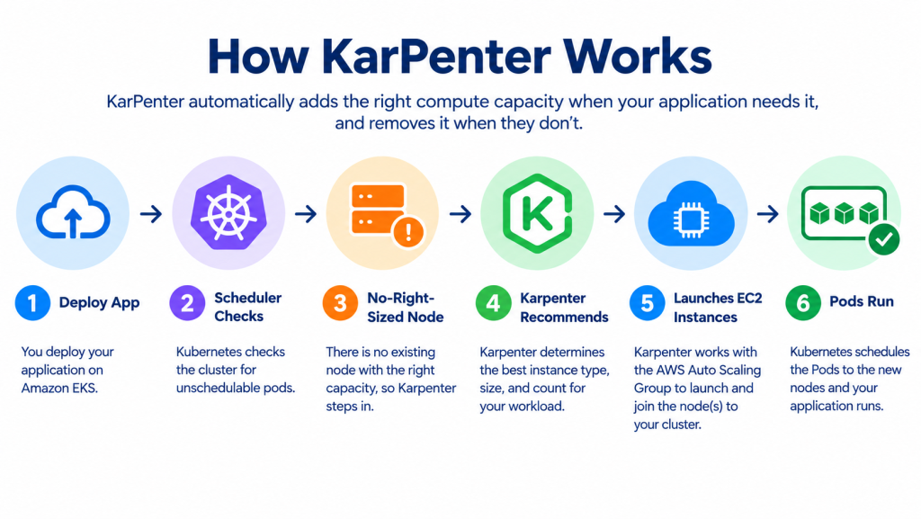
Everything happens automatically.
No manual intervention is required.
A Real-Life Example
Imagine an online shopping application.
During normal hours:
Traffic
↓
100 users
↓
Existing capacity is sufficient
Only a small amount of compute capacity may be required.
Now imagine it is Black Friday.
Traffic suddenly increases:
Traffic
↓
10,000 users
↓
More Pods are required
↓
Existing nodes don’t have enough capacity
↓
Pods become Pending
↓
Karpenter detects the capacity requirement
↓
New EC2 instances are provisioned
↓
Pending Pods are scheduled
When the traffic decreases again, the additional capacity may no longer be necessary.
Karpenter can help consolidate or remove unnecessary capacity, improving resource utilization and potentially reducing infrastructure costs.
What Decisions Does Karpenter Make?
Karpenter evaluates the requirements of pending workloads and available infrastructure options.
Depending on your configuration, it can select suitable options based on:
• EC2 instance type
• CPU capacity
• Memory capacity
• ARM or x86 architecture
• Availability Zone
• Instance family
• Spot or On-Demand capacity
• Kubernetes scheduling requirements
You define the constraints and requirements; Karpenter handles the provisioning decision.
Why People Like Karpenter
Benefits of Karpenter
1. Cost Optimization
Running oversized EC2 instances continuously can result in wasted capacity.
Karpenter can provision capacity based on actual workload requirements and consolidate underutilized nodes when appropriate.
This can help reduce unnecessary infrastructure costs.
2. Faster Scaling
When Pods cannot be scheduled because there is insufficient capacity, Karpenter can respond by provisioning suitable nodes.
This helps applications obtain the compute resources they need without requiring administrators to manually resize node groups.
3. Less Manual Work
Without automated node provisioning, teams may need to:
1. Monitor cluster capacity.
2. Identify capacity shortages.
3. Modify node groups.
4. Add additional instances.
5. Remove unused capacity later.
Karpenter automates much of this process.
4. Better Resource Utilization
Karpenter evaluates workload requirements when selecting capacity.
Instead of relying entirely on a fixed set of node types, it can select from compatible options based on your requirements.
This can improve overall resource utilization.
Karpenter vs. Cluster Autoscaler
| Feature | Cluster Autoscaler | Karpenter |
| Scaling model | Scales existing node groups | Provisions suitable nodes |
| Instance selection | Based on configured node groups | More flexible instance selection |
| Flexibility | More limited | Higher flexibility |
| Node provisioning | Through existing node groups | Directly provisions capacity |
| Configuration approach | Node-group focused | Workload/constraint focused |
| Resource optimization | Depends on node-group design | Can optimize node selection and consolidation |
Does Karpenter Replace Amazon EKS?
No.
Karpenter and EKS have different responsibilities.
Think of them as teammates:
Amazon EKS
│
│
Manages Kubernetes
│
▼
Karpenter
│
│
Provisions compute capacity
│
▼
EC2 Instances
│
▼
Kubernetes Pods
Amazon EKS
EKS provides the managed Kubernetes control plane and Kubernetes environment.
Karpenter
Karpenter helps ensure that appropriate compute capacity is available for Kubernetes workloads.
So, a simple way to remember it is:
EKS manages Kubernetes, while Karpenter helps provide the compute capacity required to run Kubernetes workloads.
Best Practices
Here are a few simple tips:
✅ Allow multiple EC2 instance families instead of only one.
✅ Use Spot Instances where possible to reduce costs.
✅ Set limits so Karpenter doesn’t create more capacity than you want.
✅ Monitor your workloads regularly.
✅ Keep Karpenter updated to benefit from improvements.
Common Misunderstandings
“Karpenter Creates Pods”
No.
Kubernetes creates and manages Pods.
Karpenter provisions the compute capacity required to run those Pods.
“Karpenter Replaces Kubernetes”
No.
Karpenter works as part of the Kubernetes environment. It focuses primarily on node provisioning and capacity management.
“Karpenter Only Saves Money”
Not exactly.
Cost optimization is an important benefit, but Karpenter can also provide:
• Flexible instance selection
• Automated node provisioning
• Better resource utilization
• Reduced manual operations
• Faster response to capacity requirements
Summary
Karpenter makes Kubernetes infrastructure management easier by automatically provisioning compute capacity when Kubernetes workloads need additional resources.
Instead of manually planning EC2 capacity for every workload, you define the requirements and constraints, and Karpenter evaluates suitable infrastructure options.
The basic concept is simple:
Workload needs capacity
↓
Pod Pending
↓
Karpenter
↓
Suitable EC2 capacity
↓
Pod Scheduled
When workloads decrease, Karpenter can also help consolidate or remove unnecessary capacity.
For organizations running applications with changing workloads, Karpenter can improve infrastructure flexibility, simplify operations, and help optimize AWS costs.
Conclusion
Karpenter is an important tool for organizations running Kubernetes workloads on Amazon EKS.
The easiest way to remember its role is:
EKS manages Kubernetes, while Karpenter helps ensure there is enough suitable compute capacity to run the workloads.
By automatically provisioning and consolidating EC2 capacity based on workload requirements, Karpenter can reduce manual infrastructure management while improving resource utilization.
Key Takeaways
• Kubernetes manages Pods and workloads.
• Karpenter manages Kubernetes compute capacity.
• Karpenter can dynamically provision suitable EC2 instances.
• It provides more flexibility than relying only on predefined node groups.
• It can help improve resource utilization and optimize costs.
• Proper limits, monitoring, and workload requirements are important for a successful implementation.
If you’re running Amazon EKS and frequently deal with changing workloads or manually managed node groups, Karpenter is worth exploring.
Learn More
• Amazon EKS Karpenter Best Practices https://docs.aws.amazon.com/eks/latest/best-practices/karpenter.html
• Karpenter Official Documentation https://karpenter.sh/
• AWS Containers Blog https://aws.amazon.com/blogs/containers/
• Amazon EKS Documentation https://docs.aws.amazon.com/eks/latest/userguide/