


Every data engineer knows the dread of a process that looks perfect on paper but relies entirely on manual intervention.
Not long ago, I was managing a critical regulatory compliance data pipeline for a client. The raw ingredients were complex, multi-format regulatory list updates provided in Excel and CSV files. The destination was Snowflake, where all our business transformations and mapping logic needed to live.
The middle, though? It was a manual mess.
Files were hand-carried to Azure Blob Storage, manually loaded into Snowflake external stages, and processed via ad-hoc scripts. It worked, but it absolutely didn’t scale. It was error-prone, completely lacked version control, and kept our data consumers waiting.
Here is how we turned that brittle, manual workflow into an automated, production-grade enterprise data pipeline using Snowflake, Streamlit, and FastAPI.
The Core Challenge: Standardizing the Unstandardized
Regulatory lists—like chemical substance inventories and restriction lists—are notoriously messy. They are full of multi-value fields (like semi-colon-separated CAS numbers), irregular date formats, and unpredictable schema drift.
To bring order to this chaos, I established a strict architectural foundation inside Snowflake before even touching the automation layer.
1. Hardening the Ingestion Layer
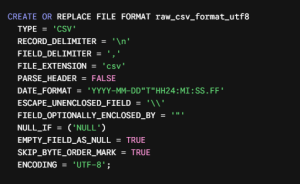
We designed a custom Snowflake file format to handle the nuances of incoming UTF-8 encoded files, ensuring that a single malformed row wouldn’t bring the entire pipeline to a screeching halt.
Image
2. Schema-on-Read with Variadic Data
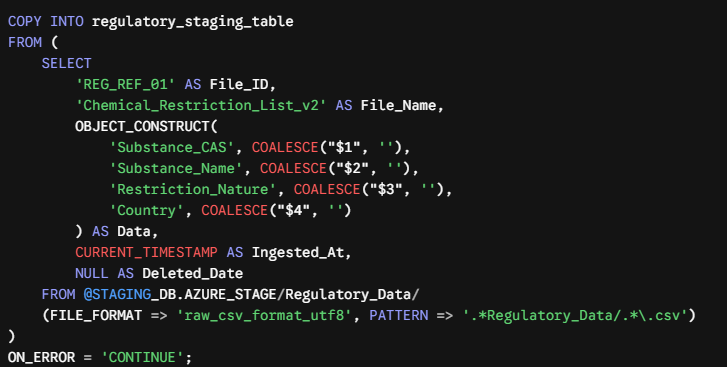
Instead of forcing raw, unstable file structures directly into rigid relational columns, we used Snowflake’s OBJECT_CONSTRUCT to ingest the data as a structured JSON payload. This shielded our staging tables from sudden, unexpected column changes.
Image
Why this matters:
· OBJECT_CONSTRUCT standardizes downstream consumption into flexible key-value pairs, making schema drift a non-issue.
· ON_ERROR = ‘CONTINUE’ guarantees pipeline resilience, isolating bad records without killing the entire ingestion batch.
Centralizing the Logic: Why I Used UDFs
Regulatory transformations require highly specific mapping rules, like parsing conditional values or handling complex string logic. Embedding this directly inside execution scripts is a recipe for code duplication and maintenance nightmares.
Instead, we encapsulated the mapping logic into a centralized User-Defined Function (UDF) in Snowflake. This gave us a few massive advantages:
· One Source of Truth: All regulatory mapping rules live in a single, easily auditable repository.
· Reusability: The exact same mapping logic applies to both historical processing and real-time ingestion.
· Cleaner Pipelines: It keeps our primary SQL ingestion syntax modular and incredibly easy to maintain.
Enter Streamlit: Giving Control Back to the Business
While the database foundation was solid, we still had to solve the human problem: how do non-technical business stakeholders upload new lists without touching Azure Storage or running SQL commands?
We solved this by building an interactive internal web application using Streamlit.

Image
Why Streamlit Changed the Game
· Familiar, Intuitive UI: Users simply drag and drop their updated Excel or CSV regulatory lists right into the browser.
· Embedded Automation: The moment a file is uploaded, the Streamlit app interacts with Snowflake behind the scenes via native Python connectors to run the staging copy and execute the transformation queries.
· Bulletproof Auditing: To prevent accidental data overwrites, we implemented an IS_LATEST flagging strategy. Every upload generates a unique FILE_VERSION_ID and captures an INGESTED_AT timestamp, ensuring we never lose historical lineage.
Data Modernization: Secure Views and API Readiness
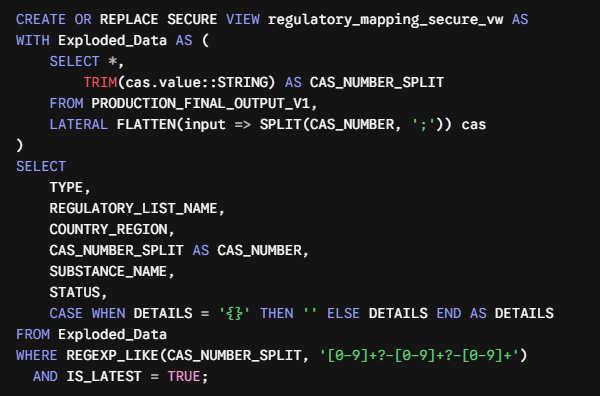
Regulatory data is highly sensitive and constantly requested by downstream enterprise applications. To protect it, we avoided letting third-party tools query our physical base tables directly. Instead, we built a Secure View Layer that handles both data parsing and access control.
Image
The Engineering Behind the View
1. Dynamic Flattening: We used LATERAL FLATTEN to split multi-CAS number strings (e.g., 123-45-6; 789-10-1) into clean, distinct rows on the fly.
2. Regex Cleansing: A strict REGEXP_LIKE filter guarantees that only syntactically valid CAS numbers are exposed to downstream systems.
3. Data Security: Because it’s a Secure View, Snowflake prevents external consumers from analyzing the underlying base tables, ensuring tight data governance.
Exposing Data Safely via FastAPI
To transform this warehouse asset into an agile data service, we wrapped the Snowflake Secure View in a lightweight, asynchronous FastAPI application.
Secure Connection Engineering
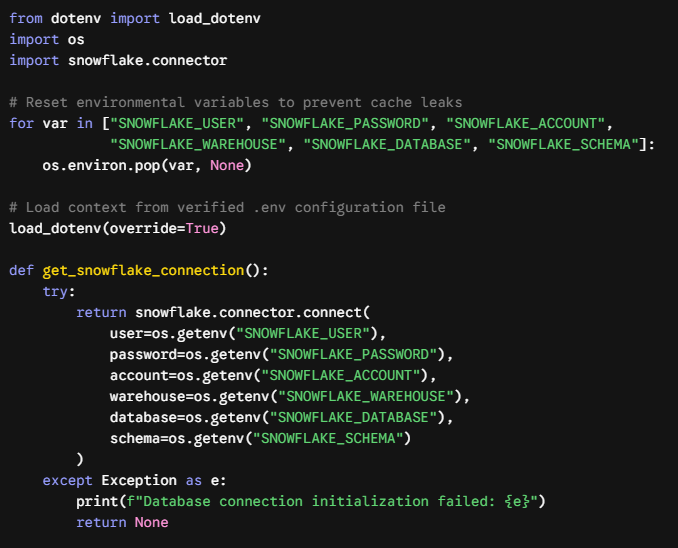
To keep credentials secure, we decoupled our configuration from the application logic entirely by using an isolated .env environment file.
Here is the clean implementation pattern we utilized to connect safely to Snowflake:
Image
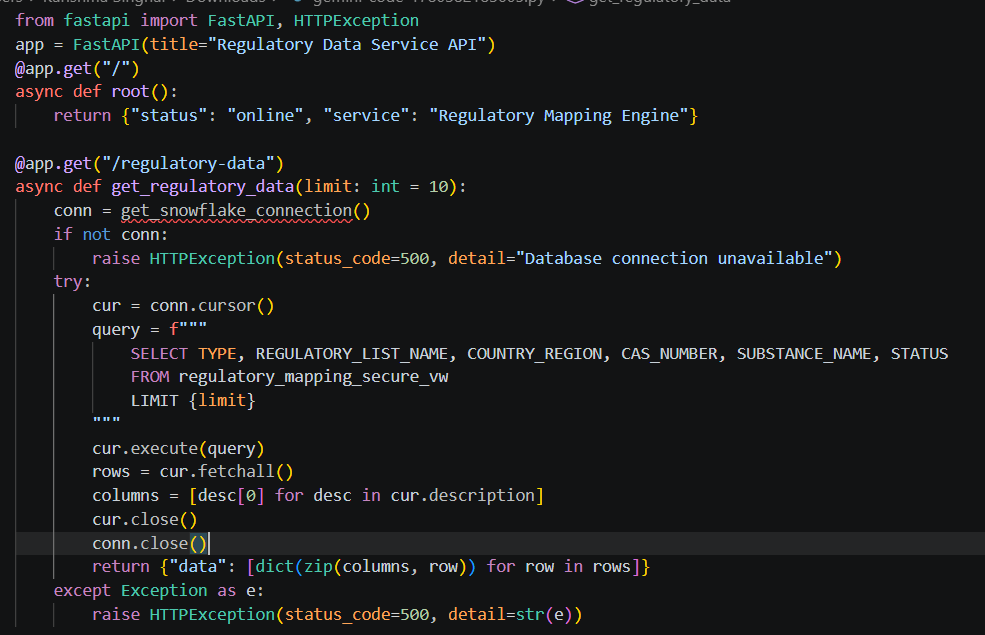
The Production API Endpoints
With our database connection handled, we exposed real-time endpoint paths to deliver data dynamically to external teams.
Image
Lessons from the Field: Troubleshooting Infrastructure
Moving a pipeline from manual execution to automated, local code always uncovers a few environmental quirks. During development, we hit a couple of classic infrastructure roadblocks:
· Account Identifier Subtleties: Snowflake’s account identifier format can be deceptive. A simple typo like company.azure-westeurope instead of the correct, cloud-provider-specific format company.west-europe.azure will result in frustrating network timeouts. If you run into this, verify your settings natively using:

Image
· Network & Firewall Whitelisting: Local API setups require strict coordination with IT security policies. When connecting over enterprise VPNs, you have to ensure your public IP routing matches the client’s Snowflake Network Policies and that traffic can seamlessly traverse port 443.
The Value Delivered
By eliminating the manual data-shuffling middleman and wrapping our data platform inside user-friendly web frameworks and secure APIs, we completely changed how the business interacts with this data:
| Before: Manual Process | After: Modern Automated Stack |
| 1. Hand-carried file uploads took hours and introduced human error. 2. Inconsistent transformation scripts caused frequent schema discrepancies. 3. Overwriting older files erased critical historical audit trails. 4. Monolithic access patterns exposed raw base tables to consumers. |
1. Streamlit App allows self-service uploads with instant, automatic processing. 2. Snowflake UDFs enforce central, standardized mapping logic. 3. Audit Versioning (IS_LATEST) preserves permanent tracking and history. 4. FastAPI & Secure Views expose data safely via production-ready REST endpoints. |
Building modern data pipelines isn’t just about moving data from point A to point B—it’s about creating clean, secure, and accessible entry points that empower both business users and downstream software. By combining Snowflake, Streamlit, and FastAPI, we took a slow, painful chore and turned it into a robust, hands-off enterprise asset.