


Building Reliable Power BI Dashboards with GitHub Version Control and QA
The Digital Analytics Team | Analytics Architecture Experts
Can You Trust Your Power BI Dashboard?
If you’ve worked on Power BI projects, you’ve probably experienced this at least once.
A report has been thoroughly tested, the numbers match the source data, and everything looks ready for deployment. But after publishing the latest version, a critical KPI suddenly looks wrong. An outdated report was overwritten, a DAX measure was modified unintentionally, or a last-minute change slipped into production unnoticed.
Imagine a sales dashboard being reviewed during a monthly business meeting. It shows an 18% drop in sales compared to the previous month. Concern spreads quickly, teams begin investigating the apparent decline, and valuable time is spent searching for a business problem that doesn’t actually exist.
The root cause isn’t the business-it’s the dashboard.
A seemingly minor change in the report has produced inaccurate insights, highlighting how even small mistakes can have a significant business impact.
Scenarios like this are more common than many teams realize. As Power BI dashboards become the foundation for strategic decision-making, ensuring their accuracy is just as important as building them. This is where Version Control and a structured Quality Assurance (QA) process become essential, enabling teams to collaborate confidently, track every change, and deliver dashboards that decision-makers can trust.
Why QA Matters in Power BI
Unlike traditional software, Power BI projects involve:
- Data transformations
- Business logic in DAX
- Visual storytelling
- Multiple data sources
Inaccurate business judgments can result from even a tiny inaccuracy in a measure or dataset. Common challenges include:
- Overwriting reports accidentally
- Lack of version history
- Difficulty tracking changes
- Inconsistent data models across environments
Without a structured QA process, these issues can quickly escalate.
The Missing Piece: Version Control- Many teams still manage .pbix files through shared folders or local machines, making collaboration difficult and rollbacks nearly impossible.
This is where GitHub adds real value.
By integrating GitHub into the Power BI development process, teams can:
- Track every report change
- Maintain version history
- Collaborate without overwriting work
- Review changes before deployment
- Restore previous versions whenever needed
Just like software development, analytics projects benefit from version control and structured review.
A Simple QA Workflow
A reliable Power BI development process doesn’t have to be complicated.
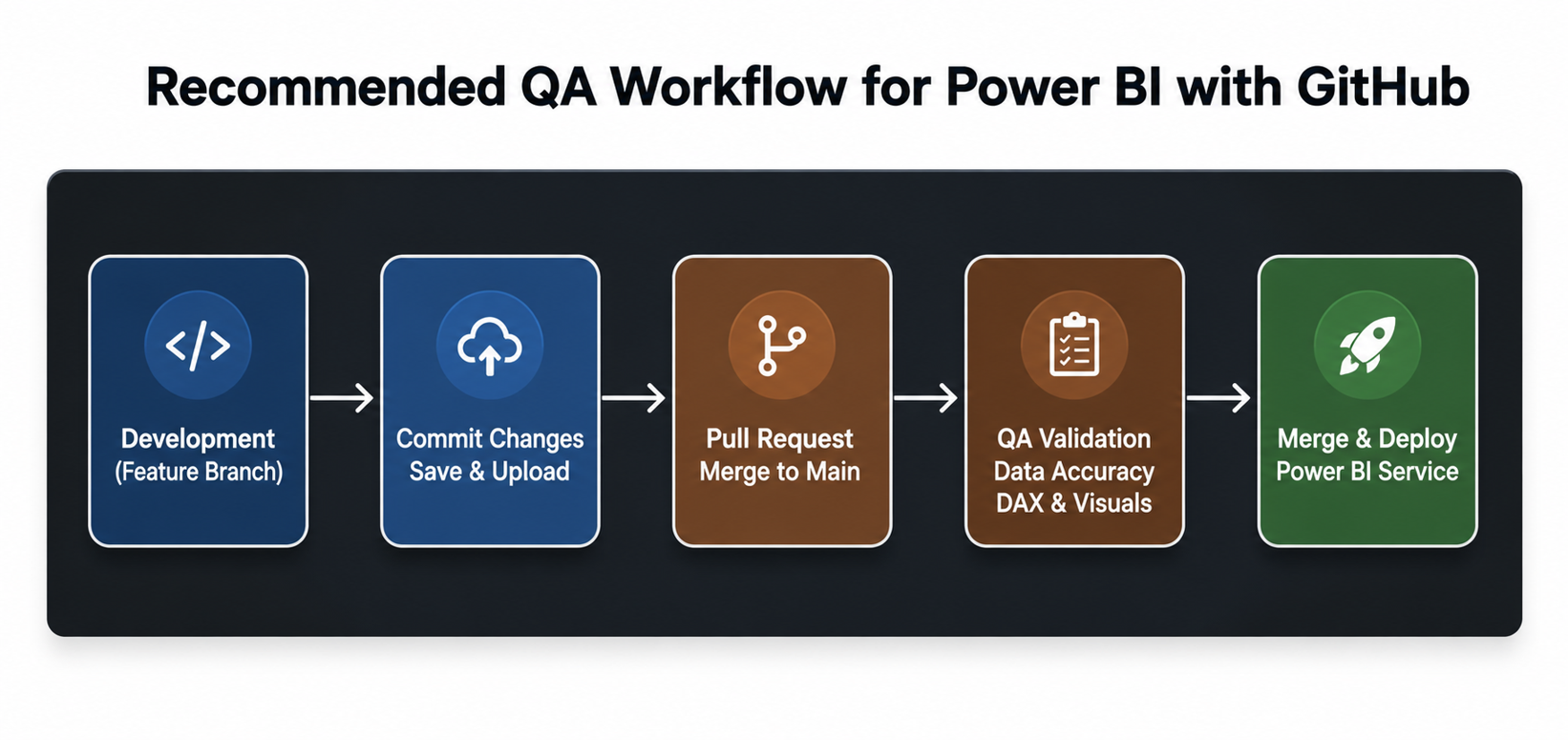
Develop → Commit to GitHub → Peer Review → QA Validation → Deploy
Before publishing a report, QA should verify:
- Data accuracy
- DAX calculations
- Filters and drill-through
- Visual formatting
- Performance
- Security and access
This simple workflow significantly reduces the risk of publishing incorrect dashboards.
After GitHub – What Changed – Three things changed immediately:
- Every change became traceable
Every modification – a renamed measure, an updated filter, a new visual – is committed with a message explaining what changed and why. The 18% drop scenario becomes a five-second investigation, not a two-hour fire drill. - Peer review became the gate
Nothing reaches production without a second set of eyes. Feature branches mean developers work in isolation until their changes are deliberately reviewed and merged – not accidentally overwritten. - Rollback went from painful to instant
When something breaks in production, the fix isn’t rebuilding from memory. It’s a single command back to the last stable version. Two checkout disruptions became zero.
What One Workflow Change Actually Delivered
The impact was measurable and immediate:
- Deployment incidents dropped majorly in the first quarter after adoption
- Investigation time on dashboard errors reduced from hours to minutes
- Stakeholder confidence improved, leadership stopped questioning the numbers and started acting on them
- External vendors could work safely in isolated branches without affecting production dashboards.
- The analytics team stopped firefighting and started designing how everyone else worked
Challenges to Consider
While the approach is powerful, there are some practical challenges:
- Handling large .pbix files in version control
- Initial learning curve for Git workflows
- Need for disciplined adoption across the team
- However, these challenges can be managed with proper setup and training.
Future of QA in Analytics
As analytics advances QA procedures will get more complex. Automated testing will further improve reliability. Will also improve AI-driven validation and integration with CI/CD pipelines.
Platforms like GitHub and tools like Power BI are making Engineering-grade analytics techniques possible.
Conclusion
A broken Power BI dashboard is not a careless mistake – it is a governance problem. And governance problems are not solved by asking teams to be more careful. They are solved by putting the right structure in place.
GitHub version control provides that structure: full change history, scoped collaboration, peer review before deployment, and instant rollback when things go wrong. The result is a reporting infrastructure that is auditable, reliable, and scalable as your team and vendor relationships grow.
The business impact is direct – fewer reporting errors means fewer false alarms, less wasted investigation time, and decision-makers who trust what they’re looking at. When leadership confidence in data is high, decisions get made faster and with more conviction.
For analytics teams operating at enterprise scale, the question is no longer whether to govern your Power BI environment – it is whether your current setup gives you the architecture to do so effectively.
If it does not, GitHub is worth a serious look.