


Organizations have plenty of analytics data, but finding meaningful insights often requires manual effort. With AI and MCP, users can connect Claude to GA4 via the Stape MCP Server and ask business questions in natural language to get instant, data-driven answers. This article explores how conversational analytics simplifies insight generation and improves decision-making.
What You’ll Learn:
- Why traditional analytics workflows are slowing down decision-making
- How conversational analytics works and why it matters
- Step-by-step guide to connect Claude to GA4 using Stape MCP
- Real ROI and implementation best practices
The Changing Role of Analytics
The analytics landscape has evolved significantly over the years.
Initially, organizations focused on collecting accurate data. Later, attention shifted toward visualization, with dashboards and business intelligence tools helping teams monitor performance more efficiently.
Today, a new layer is emerging: conversational analytics.
Instead of navigating menus and reports, users can ask questions such as:
- Why did traffic increase yesterday?
- Which acquisition channel delivered the best results?
- What impact did the latest product release have?
- Can you summarize this month’s performance?
The interaction becomes less about reporting and more about asking questions and receiving answers.
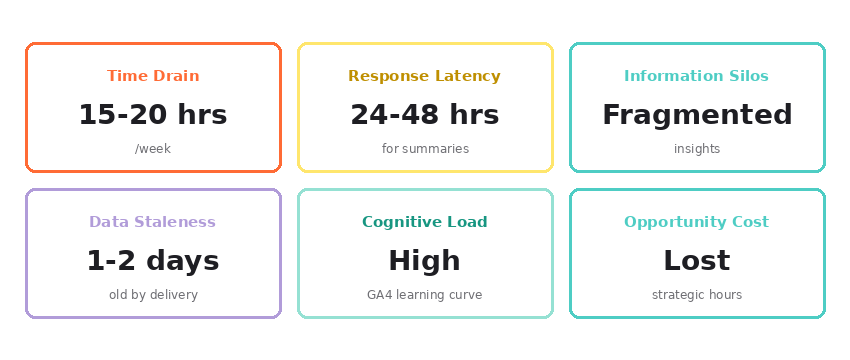
The Reporting Bottleneck: Why Manual Analytics Drain Resources
Although GA4 provides powerful reporting capabilities, extracting actionable insights involves multiple manual activities: accessing the GA4 interface, selecting date ranges, building custom reports, applying filters and segments, exporting data, comparing periods, identifying trends, and preparing stakeholder summaries. Each task is manageable alone, but together they consume valuable time and slow down decision-making.
What Is Conversational Analytics?
Conversational analytics simplifies how users access data.
Instead of requiring business users to understand metrics, dimensions, filters, or attribution models, an AI assistant acts as an intermediary between the user and the analytics platform.
The process is straightforward:
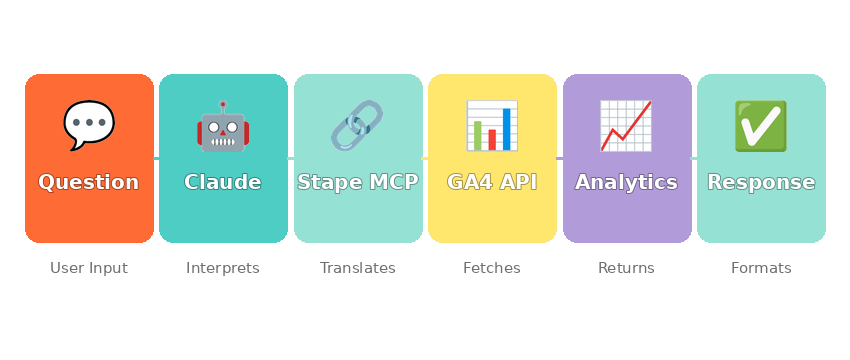
- Connect Claude to GA4 using the Stape MCP Server.
- Provide access to the required GA4 property.
- Ask questions in natural language.
- Receive responses supported by relevant metrics and insights.
The focus shifts from learning reporting tools to simply asking business questions.
Understanding MCP and the Architecture
The Model Context Protocol (MCP) is an open standard that enables AI assistants to interact with external systems through a structured framework.
Rather than depending solely on information embedded within the language model, MCP allows the assistant to retrieve current data directly from trusted sources.
In this implementation, the Stape MCP Server serves as the bridge between Claude and Google Analytics 4.
Stape MCP vs Direct GA4 API: Why the Abstraction Matters
Organizations might ask: why not connect Claude directly to the GA4 API? The answer lies in complexity and user experience.
Direct GA4 API Requires:
- Managing authentication credentials
- Constructing complex queries with GA4 dimension/metric syntax
- Handling rate limits and pagination
- Parsing raw JSON responses
- Troubleshooting API errors
This demands technical expertise that most business users lack.
Stape MCP Eliminates These Friction Points:
- Handles authentication transparently
- Normalizes natural language questions into GA4 queries
- Manages rate limits automatically
- Abstracts API complexity
- Returns human-readable insights
The Trade-off: For technical teams building custom integrations, direct API offers flexibility. For business users seeking quick answers, Stape MCP’s convenience justifies the abstraction layer. Most organizations prioritize accessibility over control.
Moving Beyond Data Retrieval
Accessing metrics is valuable, but the greater benefit comes from interpretation.
For example, when a marketing manager requests “Generate a performance report for the last 30 days,” instead of returning raw numbers, the assistant can organize the information into business-friendly sections such as:
- Overall performance
- Acquisition trends
- User engagement
- Conversion performance
- Traffic anomalies
- Growth opportunities
- Areas requiring attention
- Executive summary
The result is closer to an analyst’s interpretation than a standard report export.
A Practical Scenario
Consider gaining access to a new GA4 property.
Traditionally, an analyst would spend time understanding site structure, reviewing reports, identifying key metrics, and studying historical trends before producing meaningful observations.
With conversational analytics, the process can begin immediately with a simple request: “Analyze this GA4 property and summarize last month’s performance.”
Within a short period, the assistant may highlight:
- Top-performing acquisition channels
- High-engagement pages
- Conversion patterns
- Returning user behavior
- Significant traffic changes
- Geographic insights
- Device performance trends
- Potential optimization opportunities
Follow-up questions can naturally build on previous answers:
- Which pages lost engagement month over month?
- Why did direct traffic increase?
- Which campaigns appear to be driving the best outcomes?
This creates a more interactive and efficient way to explore performance data.
Getting Started: 5 Implementation Steps
Implementing conversational analytics requires minimal setup: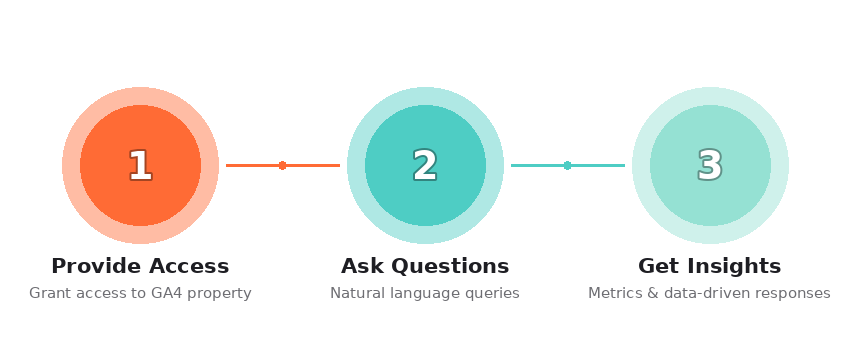
- Create or access your GA4 property and note the Property ID and View IDs needed for authentication.
- Set up a Stape MCP account and configure your GA4 credentials within the Stape dashboard.
- Obtain your Claude API key via the Anthropic platform and configure the Stape MCP integration.
- Test the connection with a simple prompt: “Summarize my website performance for the last 7 days.”
- Begin with exploratory questions to understand what data is available and how the assistant interprets your GA4 implementation.
Sample Prompts to Start:
- “Which acquisition channels drove the most conversions this month?”
- “Identify unusual traffic patterns in the past week”
- “Create an executive summary comparing last month to the previous month”
Start with simple, specific questions; complex requests build naturally from there.
Key Learnings from Implementation
Several important lessons emerged during implementation.
First, the quality of outputs depends heavily on the quality of underlying analytics data. Missing events, inconsistent naming conventions, and tracking issues can affect the reliability of insights.
Second, clear and specific questions generally produce more focused and actionable responses than broad requests.
Third, conversational analytics works best alongside existing dashboards and reporting frameworks. Dashboards remain valuable for monitoring performance, while conversational interfaces excel at exploration, interpretation, and decision support.
Finally, governance and access control should remain a priority. Organizations must ensure that only authorized users can access sensitive analytics information.
Considerations and Limitations
Like any emerging technology, conversational analytics has limitations.
AI-generated insights should be reviewed before being used for major business decisions. More advanced areas such as attribution analysis, experimentation, and statistical modeling still require experienced analysts and subject matter expertise.
Organizations should also establish clear policies around security, privacy, governance, and auditability to support responsible adoption.
The objective is not to replace analysts but to make analytics more accessible across the business.
Conclusion
Analytics has long been centered on collecting, organizing, and visualizing data. While those capabilities remain essential, organizations are increasingly looking for faster ways to access and understand information.
Connecting Claude to Google Analytics 4 through the Stape MCP Server demonstrates how conversational interfaces can simplify the reporting experience. Users can move from navigating complex reports to asking straightforward business questions and receiving meaningful responses.
The biggest advantage is not simply reporting efficiency—it’s faster decision-making.
As artificial intelligence becomes more integrated with business systems, conversational analytics is likely to become a standard capability rather than an emerging trend. Organizations that adopt it thoughtfully can improve access to insights, reduce reporting overhead, and allow analytics teams to focus on higher-value work.
Ultimately, the future of analytics may be defined less by the number of dashboards available and more by how quickly organizations can turn trusted data into informed action.