


Introduction
Managing IAM (Identity and Access Management) compliance manually is one of those tasks that sounds simple but quietly consumes hours every week. Someone has to read the daily report, identify non-compliant users, send individual emails, track who responded, follow up again, and eventually rotate keys manually for users who never got around to it.
In our MSP team at ToTheNew, we decided to fix this once and for all. We built an end-to-end IAM compliance automation that detects violations, notifies users, auto-generates new credentials, and enforces policies — all without any manual intervention. This blog walks through what we built, how it works, and how you can implement it in your own AWS project.
- What IAM compliance issues we were dealing with
- The 5-stage escalation system we designed
- How emails, credentials, and enforcement are handled
- How to deploy it in any AWS project
The Problem
Every AWS project we manage runs an IAM compliance script that generates a daily report. The report tells us who hasn’t rotated their access keys, who hasn’t changed their password in months, who doesn’t have MFA enabled, and who hasn’t logged in for over 75 days. Detection was never the issue.
The issue was everything that came after. There was no automated follow-up, no enforcement, and no guarantee that a non-compliant access key would ever get rotated. Keys could stay active for months if no one followed up aggressively enough. Our team was spending 1–3 hours every week on repetitive manual work with inconsistent results.
We needed a system that could handle the entire lifecycle automatically — from the first notification all the way to disabling old keys.
The Solution: 5-Stage Escalation Automation
We designed a Python-based automation that runs daily via a Jenkins pipeline or cron job. It scans all IAM users, compares them against compliance thresholds, and escalates through five stages over 14 days before automatically disabling non-compliant access keys.
Compliance Checks
- Access key 1 rotation — flagged if not rotated in 75+ days
- Access key 2 stale — flagged if not used in 15+ days
- Password age — flagged if not changed in 75+ days
- MFA not enabled — flagged if console access is active without MFA
- Inactive user — flagged if no console login in 75+ days
- Inline policies — reported in weekly summary only
The 5-Stage Escalation Flow
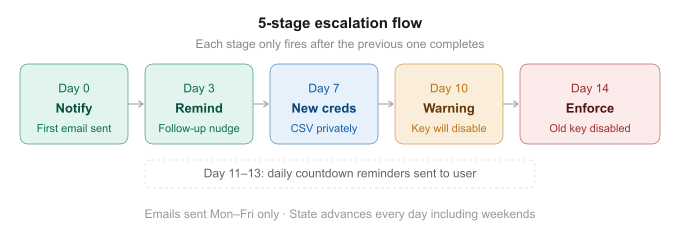
5-Stage Escalation Flow
- Day 0 — Notification: User receives a consolidated email listing all their violations with specific remediation steps. MSP team is CC’d.
- Day 3 — Reminder: A follow-up nudge is sent in the same email thread if the issue is unresolved.
- Day 7 — New Credentials: New access keys are created and a password reset is triggered. Credentials are sent as a CSV attachment in a separate private email (no CC). Old keys remain active at this stage.
- Day 10 — Warning: A warning is sent that the old key will be disabled in 4 days.
- Day 11–13 — Countdown: Daily countdown reminders are sent.
- Day 14 — Enforcement: Old access key is automatically disabled. It is never deleted — it can be re-enabled manually if needed.
Each user’s escalation state is stored in an S3 JSON file (encrypted) so the automation remembers exactly where it left off between daily runs. If a user resolves their violation at any point, the state is cleared automatically.
One Email Per User. One Thread.
A core design goal was to avoid inbox clutter. Instead of sending separate emails for each violation type, the system sends one consolidated email per user listing all their issues with a per-violation stage badge. All follow-ups are threaded in the same Gmail conversation using SES threading headers (In-Reply-To and References).
The email uses a navy banner header with color-coded stage badges (green for notification, amber for warning, red for enforcement) so the user can immediately understand the urgency at a glance.
Email Routing Rules
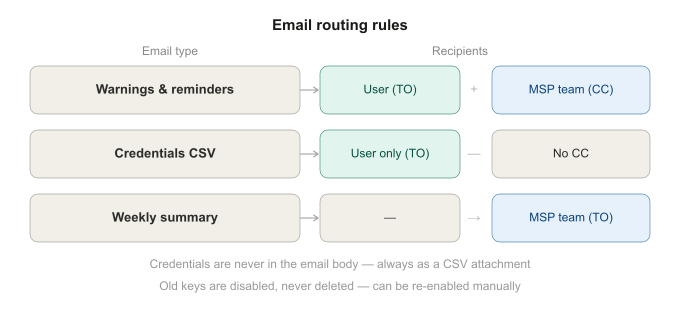
Email Routing Rules
Credentials are never written in the email body. They are always sent as a CSV attachment in a separate private email with no CC. Every generated credential is also backed up to S3 under iam-compliance/{project}/credentials/ with AES-256 encryption as a fallback.
Built to Be Reused Across Projects
We made sure the automation is completely project-agnostic. Every hardcoded project reference was removed from the codebase. The entire project identity flows from a single line in config.yaml:
project_name: "ETV"
This one setting drives:
- Email subjects →
[ETV] IAM Compliance: john.doe@company.com - S3 state path →
iam-compliance/etv/state.json - Credential backups →
iam-compliance/etv/credentials/access-keys/
We provide two deployment options:
- Jenkins version — Scripted pipeline with built-in cron, DRY_RUN parameter, and log archiving
- Cron version — Standalone
run.shwrapper for projects without Jenkins
Deploying to a new project takes approximately 30 minutes including S3 bucket setup, IAM policy creation, SES verification, and user email tagging.
Key Technical Decisions
- Old keys are disabled, never deleted — manual re-enable is possible if a user urgently needs their old key
- State persists across runs — S3 JSON tracks each user’s escalation stage independently
- Weekday-only emails — notifications are sent Monday to Friday only; state advances every day including weekends so the 14-day timeline is always accurate
- Enforcement survives key rotation — once Stage 3 creates a new key, the old key violation technically resolves. We track the old key ID separately so Stage 4 and Stage 5 still fire correctly
- Password reset forces change on first login —
PasswordResetRequired: trueis set so users must immediately change their auto-generated password
Results
- Deployed on 2 live projects — AzamTV and SpoTV
- Zero manual follow-ups needed per week
- 14-day maximum for any non-compliant key to be enforced
- 1–3 hours per week of manual effort eliminated
Conclusion
IAM compliance is a critical part of any AWS security posture, but enforcing it manually doesn’t scale. By building a 5-stage escalation automation with consolidated emails, auto-credential generation, threaded follow-ups, and guaranteed enforcement, our team went from spending hours every week on compliance chasing to spending zero.
The system is fully open for adoption across any AWS project in the competency. All you need is an AWS account with SES configured, an S3 bucket, and about 30 minutes. Full documentation, setup guide, and deployment packages are available — reach out to the MSP team and we’ll get you set up.