
As a tester, I have always tried to improve efficiency without compromising quality. Over the past year, AI tools have become a part of many testing workflows, including mine. When I first started using AI, I thought that it would be very easy, like:
- Just ask a question.
- Answer will be generated
- Use the output.
And to be fair, it seriously worked.
But only to a certain extent.
The test cases generated by AI were usually correct, but they often lacked depth.
- Important edge cases were sometimes missing
- The output format wasn’t always useful
- I often found myself spending additional time refining the generated content.
Initially, I assumed these limitations, thinking AI wasn’t so helpful. Later, I realized the real issue wasn’t AI. It was the way I was communicating with it.
My Initial Experience with AI:
When I started using AI for testing-related activities, my prompts looked very similar to how I would explain a requirement to a colleague over chat.
For example: “Help me write test cases for registration. There are two entry points. Include functional, UI, negative, and edge cases. Cover all screens and provide results in Excel format.”
The information was there, but it wasn’t structured. As humans, we naturally understand context and fill in missing details. AI, however, depends heavily on the clarity of the instructions we provide. The more generic my prompt was, the more generic the response became. At that time, I didn’t know there was an actual skill behind communicating effectively with AI.
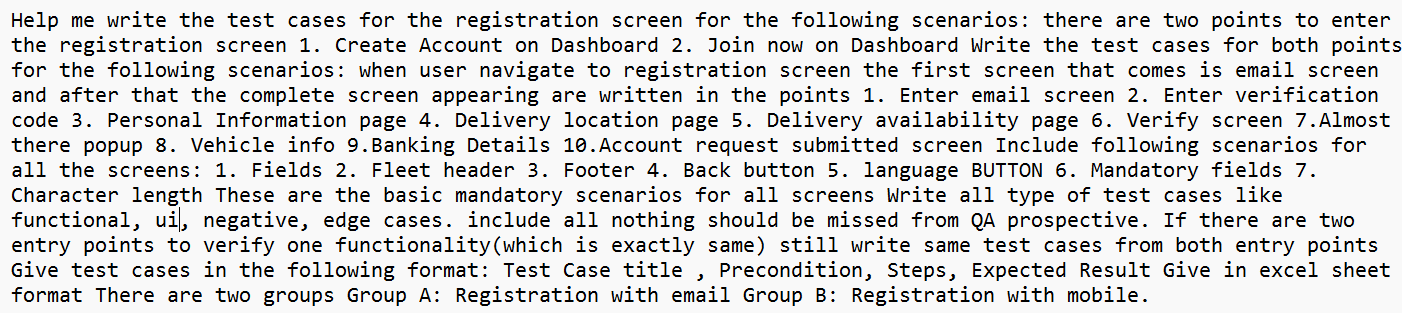
Before Prompt Engineering
How AI Learning Courses Changed My Perspective:
As part of my learning journey, I completed AI-focused courses and started exploring concepts such as prompt engineering. Initially, I thought prompt engineering simply meant writing longer prompts. What I learned was very different:
- Prompt engineering is not about writing more.
- It’s about communicating better.
One of the most valuable lessons I learned was that AI performs best when it receives:
- Proper context
- Clear objectives
- Defined constraints
- Expected output formats
- Specific instructions
The courses helped me understand that AI is not a magic tool that automatically knows what we want. It responds based on the information we provide. The quality of the output reflects the quality of the input. This simple realization completely changed how I started interacting with AI.
What Changed in My Prompting Style?
Today, whenever I use AI for test case generation, requirements understanding, or documentation, I structure my prompts almost like mini requirement documents. Instead of writing everything in one paragraph, I break my prompts into sections such as:
- Module details
- Scope
- Functional expectations
- Business rules
- Exclusions
- Output format
- Edge cases
- Language requirements
- UI expectations
- I explicitly mention what should be covered and what should not.
- I define the format I expect.
- I describe the user flow.
- I specify the type of test cases I want.
This structured approach has significantly improved the quality of the responses I receive.
A Real Example from My Daily Work:
One of the biggest difference how I generate test cases today. Earlier, I would simply ask AI to generate test cases for a module using basic details, but I would write them in a single paragraph.
Now, I provide details such as:
- Module information
- User role
- Existing functionality
- Screens involved
- Language support requirements
- UI validations
- Edge cases
- Expected output columns
- Functional limitations
- Migration considerations
As a result, the generated test cases are much more comprehensive and usable.
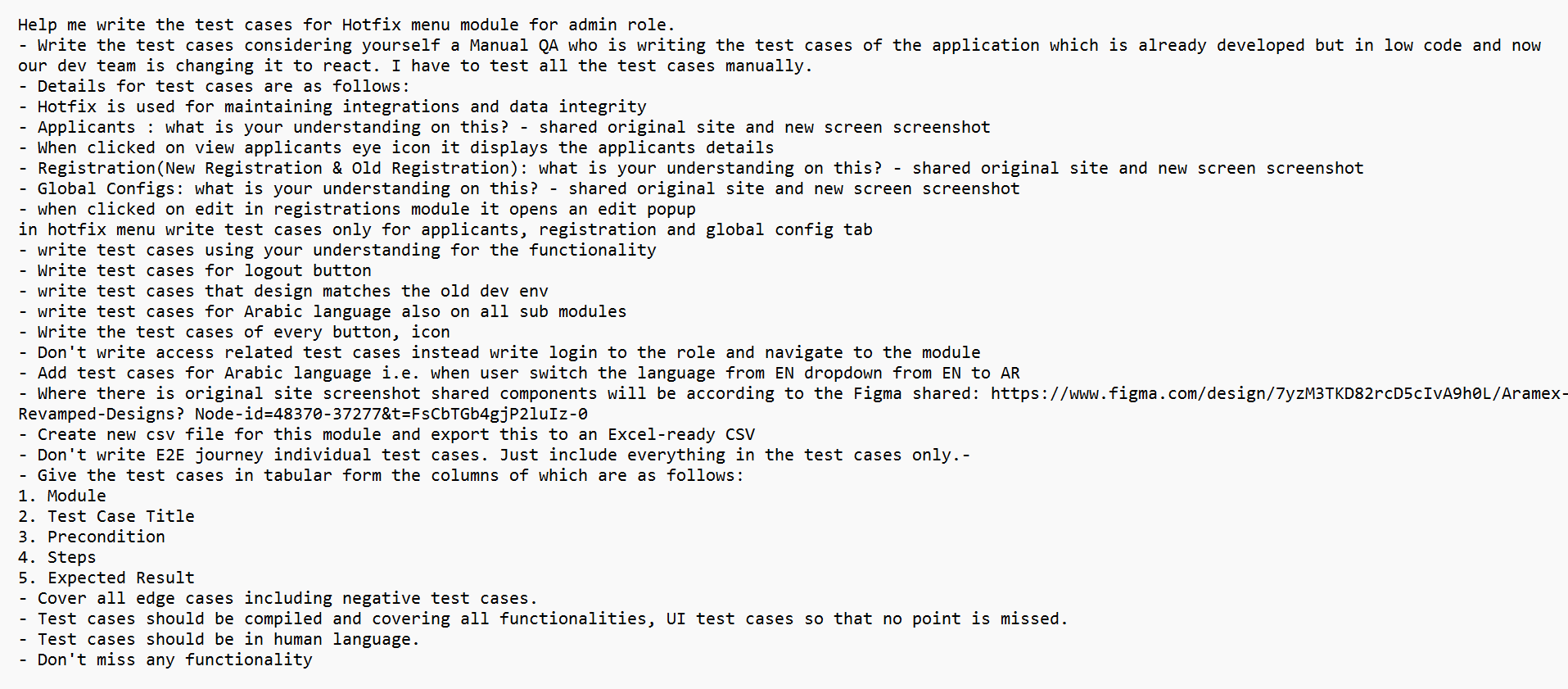
After Prompt Engineering
Instead of getting a basic list of positive and negative scenarios, I receive structured outputs covering functional, UI, validation, negative, edge-case, and localization scenarios. The difference is not because AI changed. The difference is because my prompts changed.
What Helped Me the Most: Working Without Complete Requirements
One challenge many testers face is the absence of detailed requirement documents. Not every project comes with perfectly documented requirements. There have been situations where I needed to write test cases using:
- Existing application screens
- Screenshots
- Figma designs
- Observed system behavior
- Discussions with team members
In such scenarios, understanding the functionality itself becomes a challenge before test case creation even begins.
This is where prompt engineering suddenly helped me. Instead of directly asking AI to generate test cases, I first used it to understand the application. I would provide screenshots, design references, business flow observations, and existing application behavior.
Then I would ask questions such as:
- What is your understanding of this functionality?
- What business purpose does this module serve?
- What validations can exist here?
- What edge cases should be considered?
- What scenarios might a tester miss?
- These discussions helped me build my own understanding of the feature.
Only after that would I move to test case generation. This approach transformed AI from a simple test-case generator into a requirement analysis partner. As a QA engineer, one of the most valuable benefits of learning prompt engineering has been
Prompt Engineering Improved My Requirement Analysis Skills:
One unexpected outcome of this journey was improved analytical thinking.
Before writing a detailed prompt, I now ask myself:
- What exactly needs to be tested?
- What assumptions am I making?
- What dependencies exist?
- What information is missing?
- What scenarios might fail?
- What should be excluded?
- Without realizing it, prompt engineering trained me to think more deeply about the feature itself.
The process improved not only my AI outputs but also my overall approach to testing. AI Is Like a New Team Member. One analogy that helped me understand prompt engineering is this: Imagine onboarding a new team member. If you say: “Write test cases for registration.” You’ll probably receive a basic set of test cases. But if you explain:
- The business flow
- User journey
- Special validations
- Design expectations
- Scope limitations
- Output format
The result will be much closer to what you’re looking for.
AI works in a very similar way. The quality of guidance directly influences the quality of output.
Why Every Tester Should Learn Prompt Engineering
Many testers are already using AI tools. However, learning prompt engineering can help them unlock much more value from those tools. It can help with:
- Requirement analysis
- Test case generation
- Test scenario brainstorming
- Test data creation
- Documentation
- Defect investigation
- Understanding unfamiliar modules
- Most importantly, it helps testers ask better questions.
And in testing, asking the right questions is often more important than having the right answers.
Final Thoughts:
My biggest takeaway from this journey is simple. Using AI and using AI effectively are two different things. I was already using AI before learning prompt engineering. The real difference came when I learned how to structure my thoughts, provide context, define expectations, and communicate clearly. Prompt engineering didn’t just improve the responses I received from AI. It improved the way I approach requirement analysis, test design, and problem-solving as a QA engineer. Today, I don’t see AI as a replacement for testing expertise. I see it as a powerful assistant that becomes more effective when guided properly. And for me, that’s been the most valuable lesson from learning AI and prompt engineering.
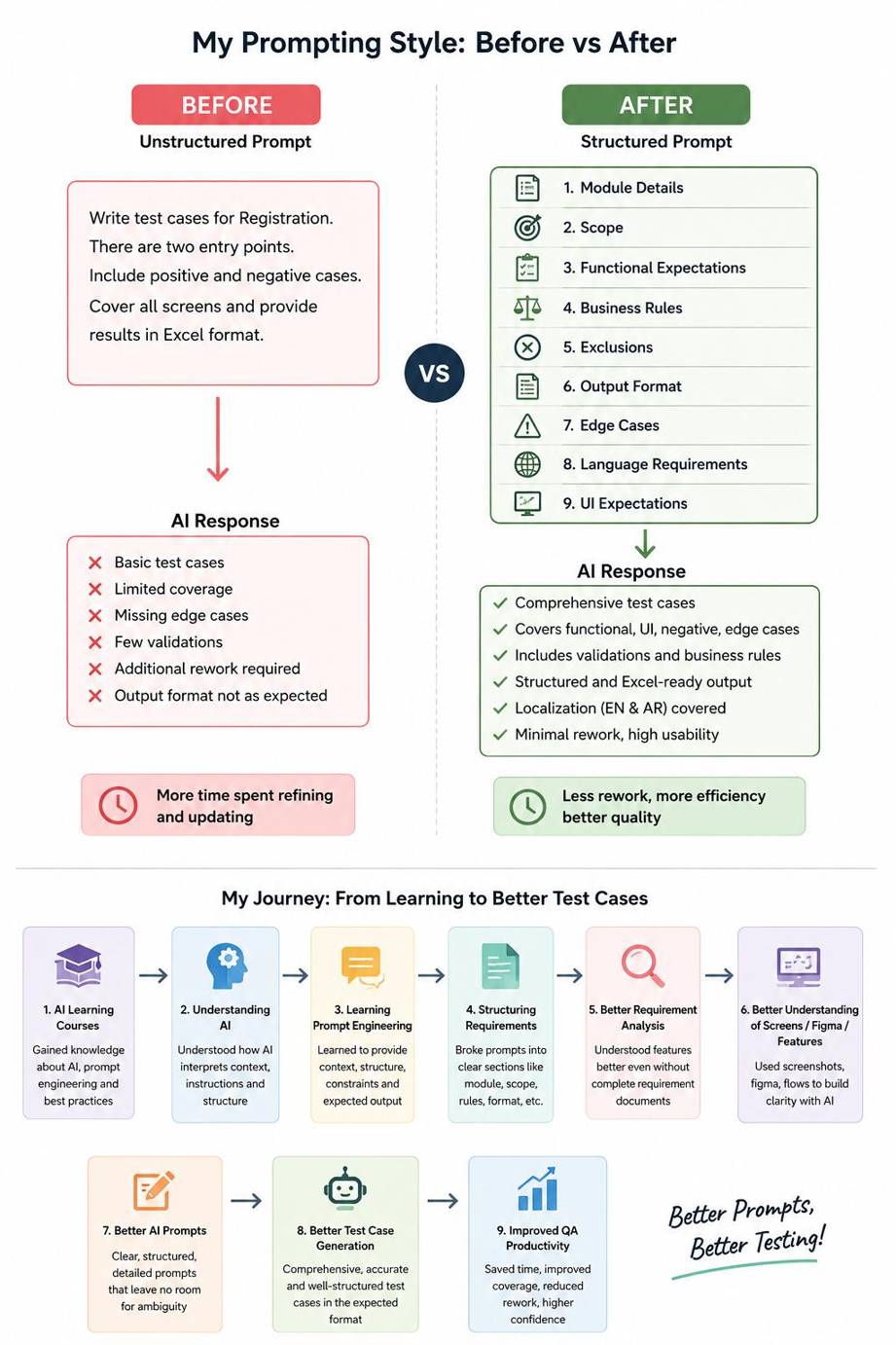
Final Thoughts