

Introduction
Migrating a TV application across platforms is rarely straightforward.
If you have ever built a React Native Android TV application and later heard the question:
Different programming languages.
Different UI systems.
Different focus and navigation models.
This is not a simple port, it’s a rewrite.
In this blog, I share a practical, production-focused approach to migrating a single reusable UI module from React Native Android TV to Roku TV using Claude AI as a developer assistant.
The goal is not automation hype, but realistic productivity gains: around 40–45%, achieved by reducing friction, not engineering responsibility.
Who This Blog Is For
This blog is written for:
- React Native developers exploring TV platform development
- Android TV engineers looking to expand into Roku
- Engineering teams planning multi-platform TV apps
- Developers interested in AI-assisted development workflows
If you are already comfortable with React Native but new to Roku’s ecosystem, this guide should help you understand where AI can realistically assist.
Why This Migration Is Fundamentally Different
React Native and Roku SceneGraph are built on very different architectural models.
React Native Android TV
React Native relies on modern web-inspired development patterns.
Typical characteristics include:
- JavaScript / TypeScript codebase
- Component-based UI architecture
- Flexbox-based layout system
- Declarative rendering
- Mostly implicit focus handling
Developers define UI components and let the framework manage rendering and focus transitions.
For Android TV specifically, React Native provides built-in focus support through Touchable components and TV-specific APIs.
Roku TV (SceneGraph)
Roku uses a completely different environment built around BrightScript and SceneGraph.
Typical characteristics include:
- BrightScript scripting language
- XML-based UI definitions
- Node-based SceneGraph architecture
- Explicit focus management
- Fixed layout structures
Unlike React Native, SceneGraph does not provide a dynamic layout system like Flexbox.
Instead, UI elements are structured in hierarchical nodes, and focus must often be managed manually.
The Core Constraint: No Shared Runtime
The biggest challenge is that React Native and Roku share no runtime compatibility.
This means:
- React Native components cannot be reused
- Layout systems are incompatible
- Navigation systems behave differently
- Focus handling must be rewritten
- Developers must rebuild the UI logic, not translate code line-by-line.
The goal is not to translate code line-by-line.
The goal is to recreate UI behavior within a completely different system.
Understanding this early prevents fragile implementations that try to mimic React Native patterns in Roku.
Where Most Migrations Go Wrong
Before getting into the solution, it’s worth calling out common mistakes teams make:
- Trying to auto-convert entire applications
- Forcing React Native patterns into Roku’s architecture
- Ignoring focus and navigation differences
- Starting too large, too early
These approaches often lead to brittle systems, rework, and delays.
Where AI Adds Real Value (and Where It Doesn’t)
AI tools are often misunderstood when applied to software development.
Claude AI does not magically convert React Native apps into Roku apps.
However, it provides significant assistance in areas that slow developers down during migration.
Claude is particularly helpful for:
- Reading and summarizing large codebases
- Explaining unfamiliar Roku concepts
- Mapping UI behavior to SceneGraph patterns
- Reducing documentation hopping
- Speeding up experimentation
Think of Claude not as an automatic converter, but as a senior developer assistant that helps you reason through the migration process.
The productivity improvement does not come from automatic code generation, it comes from reducing mental overhead and context switching.
A Practical, Step-by-Step Migration Approach
With the fundamentals clear, the focus shifts from theory to execution.
Step 1: Let Claude Understand the Entire Codebase First
Before converting a single component, the first step is asking Claude to analyze the full project structure.
Why This Step Matters
- Prevents inconsistent conversions
- Identifies reusable components early
- Flags risky areas (navigation, focus, video)
- Helps define a safe migration order
Prompt: Codebase Structure Analysis
I have a React Native Android TV application and I want to migrate it to Roku TV.

Before converting any code, please understand the full project structure.

Focus areas:
- Navigation patterns
- Reusable UI components
- Video playback logic
- State management
- Platform-specific code
This prompt enforces architecture-first thinking, not blind conversion.
Start Small: Choose One Reusable Module
Migrating an entire app at once is risky.
Instead, start with one reusable UI module to:
- Validate Roku focus behavior
- Understand SceneGraph limitations
- Build confidence early
- Create a repeatable migration pattern
Example Module: Poster Card
The Poster Card is a common TV UI pattern:
- Displays a poster image
- Responds to remote focus
- Scales slightly when focused
- Appears across multiple screens
This makes it an ideal first migration candidate.
React Native Android TV Implementation
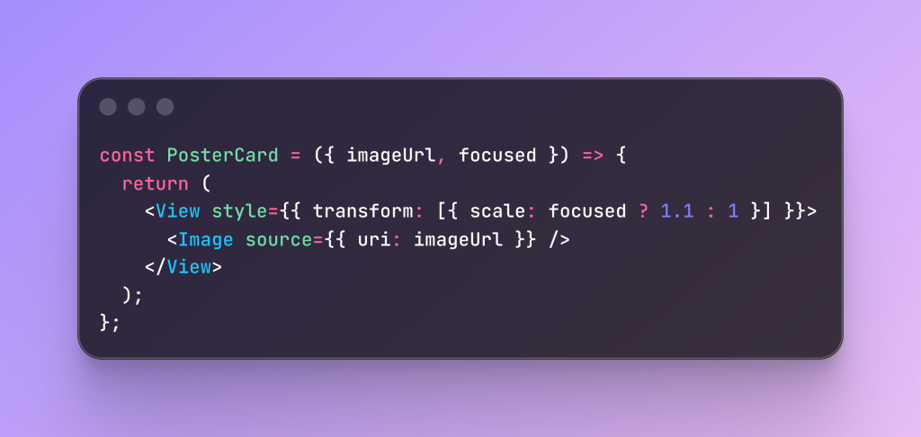
React Native Android TV Implementation
Simple and expressive, but Roku requires a different approach.
Step 2: Plan the Migration With Claude Before Writing Code
After Claude understands the React Native project structure, the next step is planning the migration, not immediately writing Roku code.
A common mistake when using AI tools is jumping directly into implementation. Instead, treat Claude like a technical collaborator and discuss the migration strategy first.
Claude’s Plan mode is especially useful here. In this mode, Claude analyzes the system and proposes a step-by-step approach before generating code.
This allows you to:
- Identify architectural differences early
- Decide which modules should be migrated first
- Understand Roku-specific constraints
- Avoid unnecessary rewrites later
Prompt: Ask Claude to Create a Migration Plan
Start by asking Claude to create a structured migration plan.
I have a React Native Android TV application and I want to migrate
selected modules to Roku TV.

Before writing any code, please create a migration plan.

Focus on:
- Key architectural differences
- Modules that should be migrated first
- UI components that require redesign
- Roku focus/navigation considerations
- What patterns from React Native should NOT be replicated

Provide a clear step-by-step migration strategy.
Do not generate implementation code yet.
This prompt encourages analysis first, code later.
Step 3: Convert Only This Module Using Claude
Once Claude understands the project structure, converting a single module becomes predictable.
Prompt: Module Conversion
Convert this React Native Android TV component to Roku SceneGraph.

Requirements:
- Remote focus handling
- Slight scale animation on focus
- Clean SceneGraph structure
- BrightScript focus logic

Return XML and BrightScript separately.
Roku SceneGraph XML Output
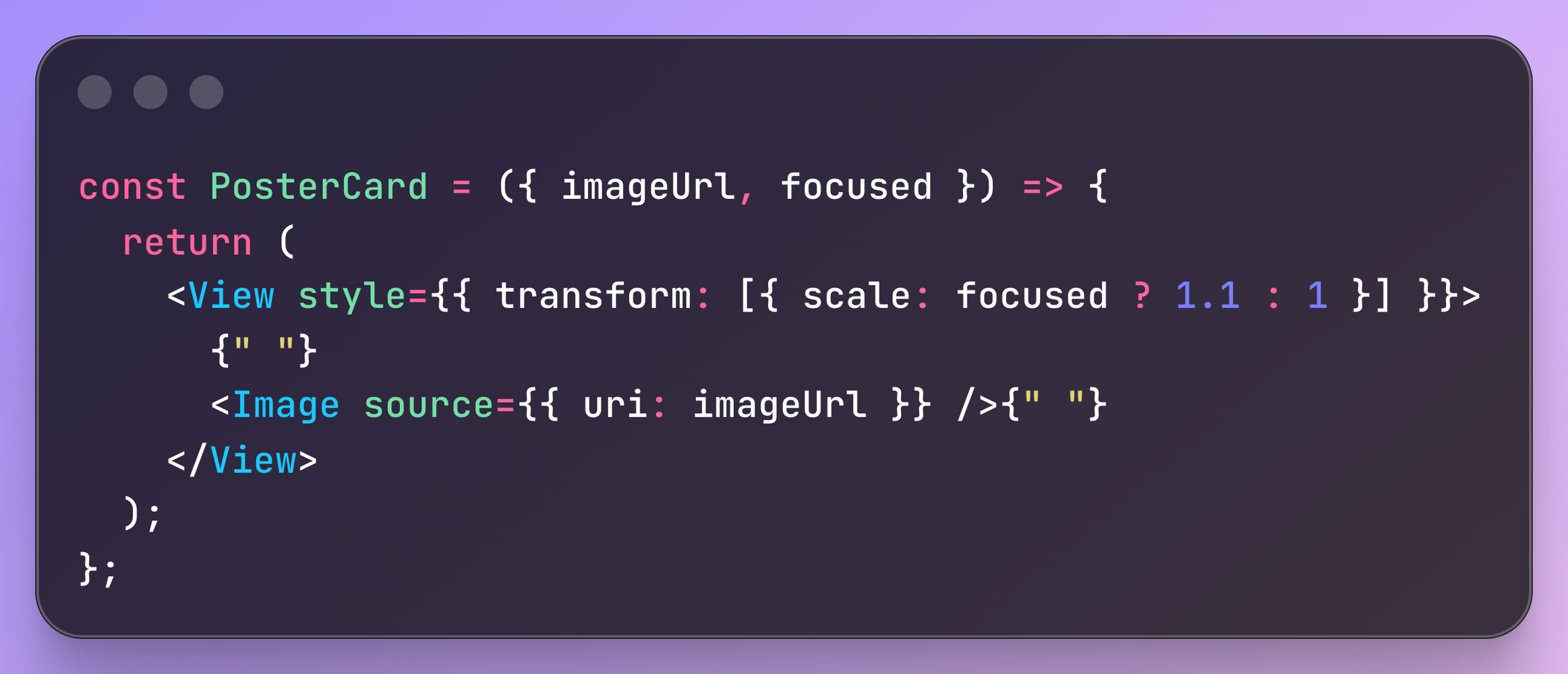
PosterCard
BrightScript Focus Handling
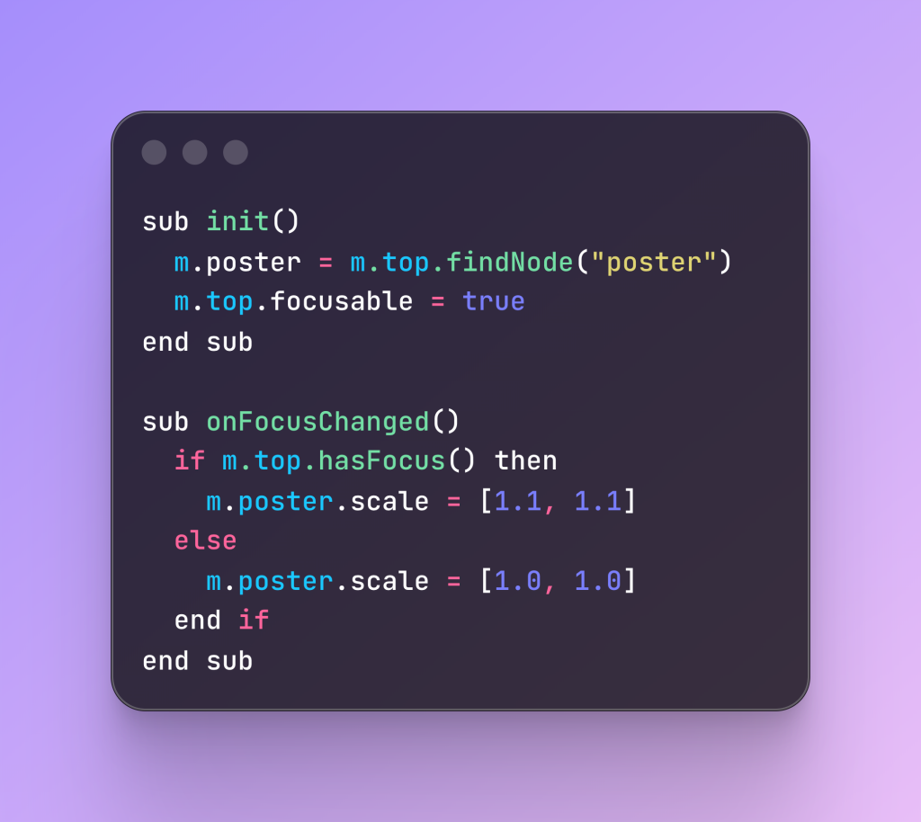
BrightScript Focus Handling
This is not production-ready code, but it provides a correct and testable baseline.
Step 4: Validate the Generated Code
Never blindly trust AI output.
Prompt: Validation & Review
Please check:
- Focus correctness
- Performance impact
- Roku best practices
- Potential certification risks

Only suggest improvements.
Do not rewrite everything.
Validation prompts reduce long-term issues and improve code quality.
Productivity Impact: What Actually Improved?
Claude AI reduced:
- Documentation lookup time
- Trial-and-error cycles
- Mental fatigue during Roku onboarding
- Realistic productivity improvement: ~40–45%
Not because AI wrote everything, but because it removed friction and context switching.
Common Mistakes to Avoid
Teams experimenting with AI-assisted migrations often make several common mistakes.
Avoid the following pitfalls:
- Asking AI to migrate the entire app at once
- Ignoring Roku focus rules
- Copy-pasting BrightScript without understanding it
- Assuming AI-generated code is certification-ready
- AI should assist engineering judgment, not replace it.
The best results occur when developers combine domain expertise with AI guidance.
Conclusion
Migrating from React Native Android TV to Roku TV is a mindset shift. Claude AI helps bridge that gap by accelerating understanding, clarifying intent, and reducing unnecessary effort, not by magically converting code.
Used correctly, AI becomes a force multiplier for experienced developers.
The real advantage isn’t just faster migration.
It’s better architectural decisions under pressure.
If your team is planning a multi-platform TV strategy, start small, validate early, and build with intent. Because successful platform migration isn’t about speed, it’s about getting the foundations right.
Check out our other engineering blogs for more insights!