


When we run Elasticsearch in production, one of the common issues is imbalance in “shards”. There may be one node in the cluster that is out of disk space, while a few nodes with no shards on them.
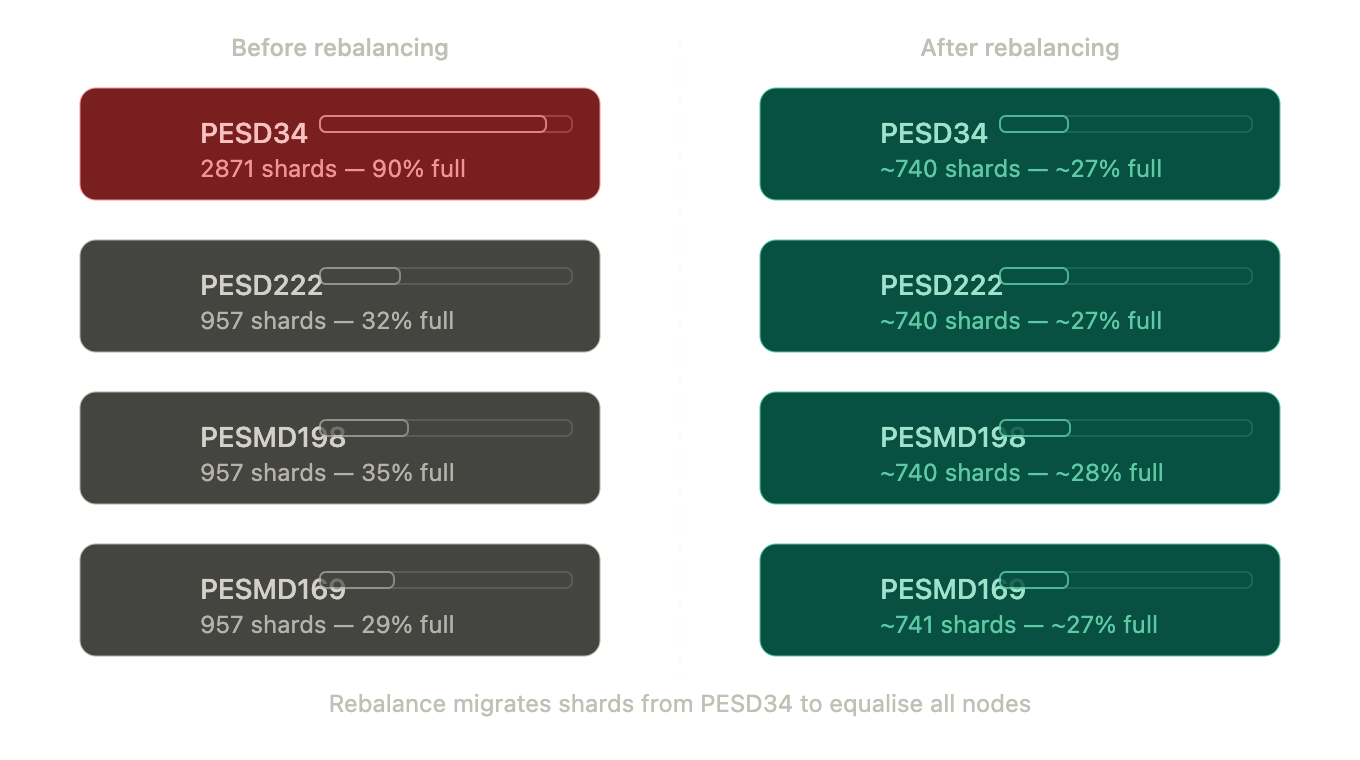
For example, here is a node with all the shards:
| Node | Shards | Disk Used | Disk % | Free Space |
| PESD222 | 957 | 329.1 GB | 32% | 694.2 GB |
| PESD34 | 2871 | 929.2 GB | 90% | 94.1 GB |
| PESMD198 | 957 | 364.9 GB | 35% | 658.4 GB |
| PESMD169 | 957 | 301.4 GB | 29% | 721.9 GB |
So PESD34 is at 90% with 2871 shards, the rest is only at ~30%. This is very unpleasant and even dangerous, because as soon as PESD34 has no space, your cluster would go down. Why does it happen?
Why Is Shard Allocation Unbalanced?
Shard allocation in Elasticsearch is determined by cluster settings. Some possible reasons why might that happen are
1. Disk Watermarks Misconfigured
- Elasticsearch has disk based watermarks (low, high and flood_stage) to help determine when to move or block shards.
- If you set them to absolute values, say 50GB, they don’t scale when you have bigger disks. For example, on a 1TB node with 100GB free, Elasticsearch still considers this “healthy”! (even though it’s 90% full).
2. Shard Allocation Disabled
- It could be that allocation was disabled during some maintenance or upgrade. But if you leave it that way, Elasticsearch would never rebalance the shards!
Obviously, too many shards per node Having thousands of shards per node, like 2871 in the example above, would cause performance issues, plus the more shards your cluster has, the harder is to maintain balance. Typical guidelines are 20–50GB per shard, and few hundred shards per node.
shard_rebalancing_flow
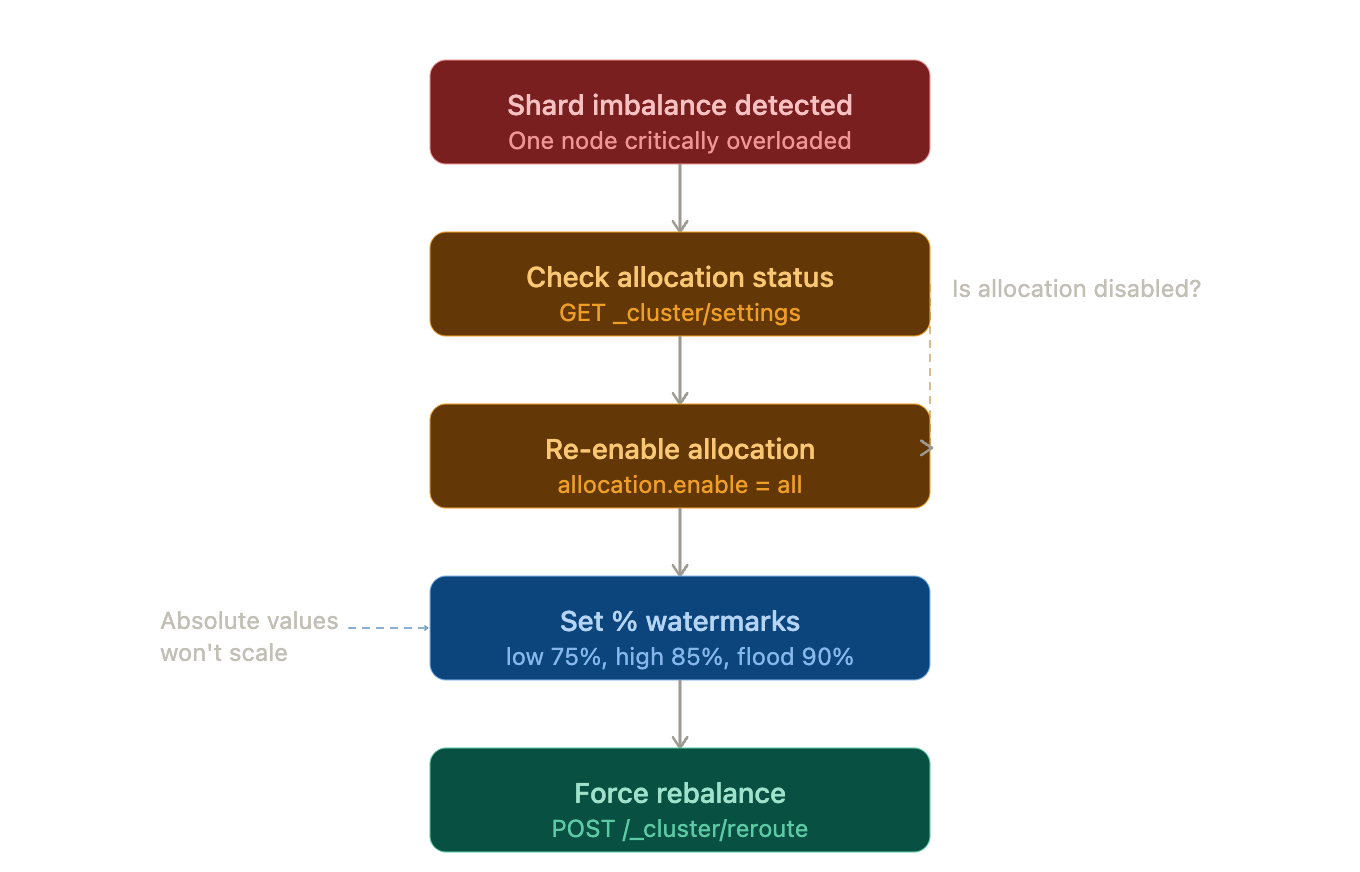
Checking and Enabling Shard Allocation
In some cases, shard allocation might have been disabled.
GET _cluster/settings?include_defaults=true&flat_settings=true
If allocation is disabled, re-enable it:
PUT _cluster/settings
{
  "persistent": {
    "cluster.routing.allocation.enable": "all"
  }
}
This ensures Elasticsearch is allowed to move shards between nodes.
Use Percentage-Based Watermarks (not absolute)
This way the threshold evolve with disk size.
PUT _cluster/settings
{
  "persistent": {
    "cluster.routing.allocation.disk.watermark.low": "75%",
    "cluster.routing.allocation.disk.watermark.high": "85%",
    "cluster.routing.allocation.disk.watermark.flood_stage": "90%"
  }
}
disk_watermark_level
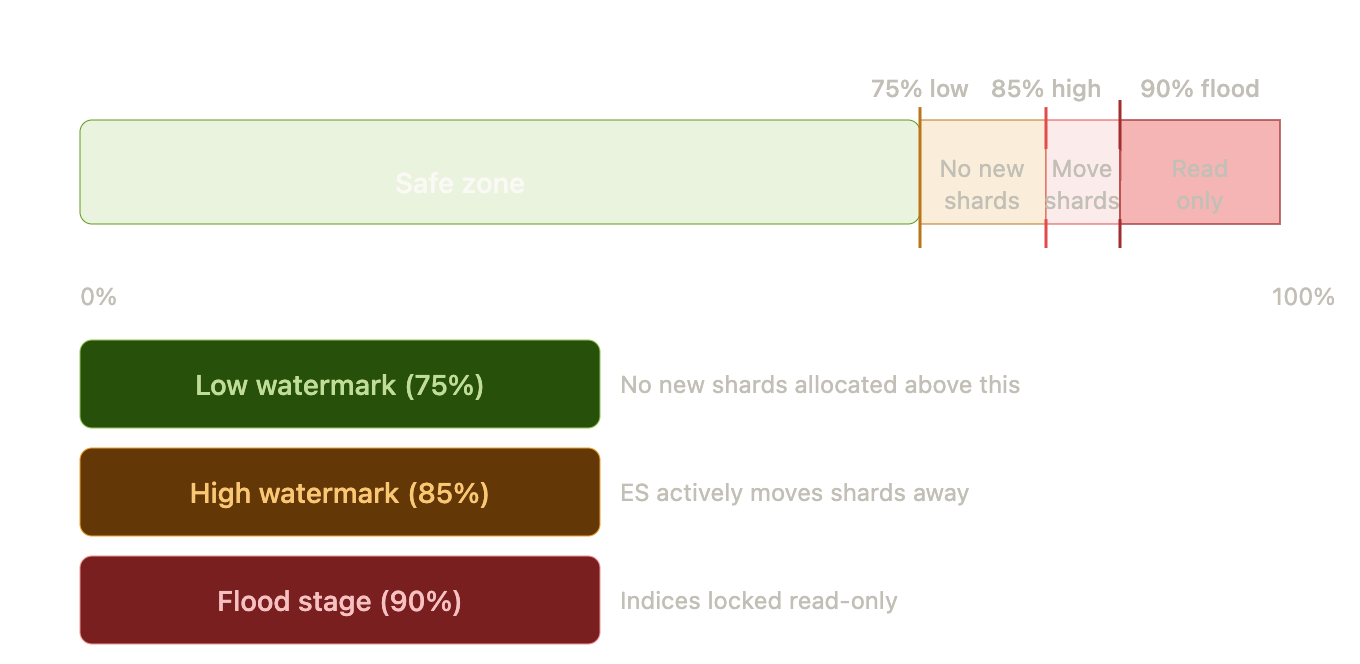
With these settings:
- Low (75%) → ES will not allocate any new shards to nodes above 75%
- High (85%) → ES will actively redistribute shards from nodes above 85%
- Flood Stage (90%) → Any index(s) ending up on that node is locked in read-only mode to avoid corruption.
As your overloaded node (PESD34) is well above the high watermark, any such shard will start getting migrated on other nodes.
Forcing a Rebalance
Once settings are updated, you can trigger a rebalance:
POST /_cluster/reroute?retry_failed=true
Or move specific shards manually:
POST /_cluster/reroute
{
  "commands": [
    {
      "move": {
        "index": "your-index",
        "shard": 0,
        "from_node": "PESD34",
        "to_node": "PESD222"
      }
    }
  ]
}
Long-Term Solution: Reduce Shard Count
Elasticsearch will always need to rebalance if you put 2871 shards on one node!. The long term solution will be to reduce the number of shards:
- Right size shards (IA: 20-50GB per shard)
- Use Index Lifecycle Management (ILM) for rollover / retention / delete
- Shrink indices : Resize all indices back to a smaller number of shards (Shrink API, Reindex with fewer shards, etc.)
shard_imbalance_before_after
Key Takeaways
- Always use percentage based watermarks
- Re-enable allocation if you disabled it (cluster.routing.allocation.enable=all)
- Two small shards: We’re fine. Ten small shards: We need this.
- Two shards on one node: We need this. Ten shards on one node: We need this.
- Force rebalance manually if necessary. But properly configure shards from day one. All this will help to make Elasticsearch do it automatically.