


Introduction
Modern applications have distributed systems consisting of multiple services, containers, and infrastructure components. While it improves scalability, security and reliability, it also increases the chances of unexpected failures and downtime.
Application testing methods majorly focus on application functionality, but they rarely test how systems behave in real-world failures such as instance crashes, network latency, or service outages in a live production environment on the cloud.
Chaos Engineering solves this problem by intentionally introducing failures into systems to test their resilience and recovery capabilities before such failures occur in production.
What is Chaos Engineering?
Chaos engineering is the intentional and controlled causing of failures in the production or pre-production environment to understand their impact and plan a better defense posture and incident maintenance strategy.
Instead of relying on failures to happen by chance, engineers intentionally attempt scenarios such as server crashes, network failures, and other stress tests to see how the system behaves under stress or failure.
Netflix learned this concept firsthand when it switched from on-premises to the cloud1 -they experienced an outage that led to a three-day interruption to service delivery in 2008.
Netflix created chaos monkey, an open source tool that creates random incidents in IT services and infrastructure meant to identify weaknesses that can be fixed or addressed through automatic recovery procedures. They implemented chaos monkey when it moved from a private data center to Amazon Web Services (AWS) in response to unreliability from the cloud.
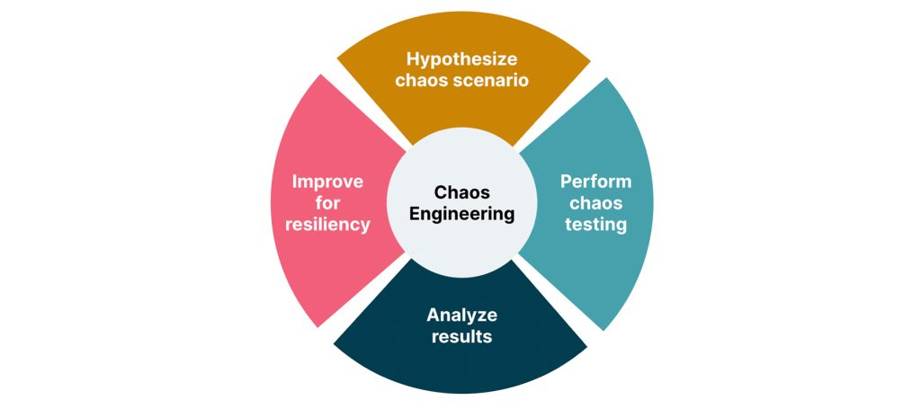
Chaos Engineering
Types of chaos engineering experiments
- Latency injection: DevOps teams intentionally create scenarios that emulate a slow or failing network connection. This includes the introduction of network delays or slower response times.
- Load generation: This relates to intentionally stressing the system by sending significant traffic levels well beyond normal operations. This helps the site reliability engineers (SREs) or DevOps to understand any bottlenecks in the system.
- Fault injection: This involves introducing errors into the system to determine how it affects the application and other dependent systems and whether it interrupts services. Examples of fault injections include inducing disk failures, terminating processes, shutting down a host or introducing power or temperature increases.
Why Chaos Engineering Matters
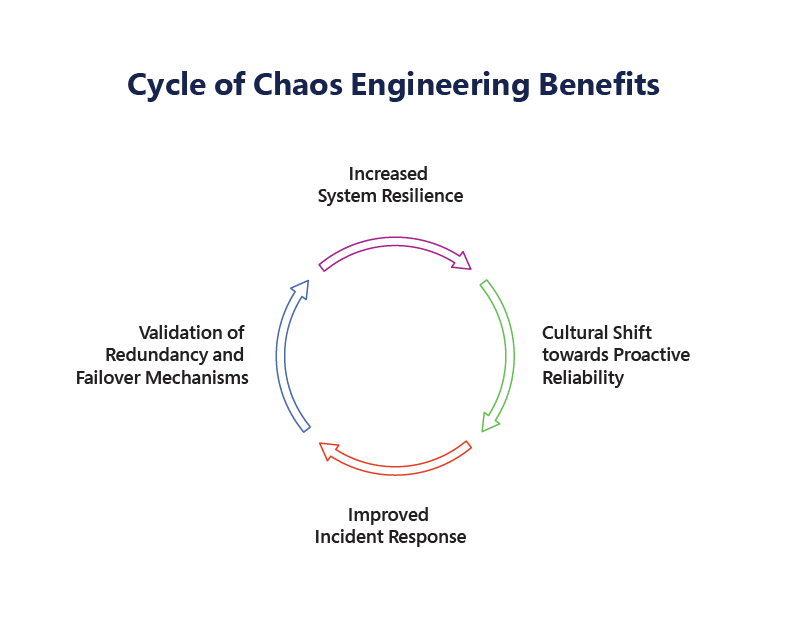
Chaos Engineering Cycle
Increased System Resilience: Resilience refers to a system’s ability to recover from disruptions and continue functioning at an optimal level despite having failures and ability to recover from failures.Improved Incident Response: By intentionally introducing disruptions in a controlled environment, teams can gain valuable insights into how their systems break under pressure and act on the incidents proactively without delays and get feedback on failures. These failures help engineering teams to identify potential bottlenecks, inefficiencies, or issues in the System.
Cultural Shift towards Proactive Reliability : Chaos Engineering flips this script by encouraging proactive reliability. Through the practice of chaos experiments, organizations are not merely responding to failures—they are actively seeking them out, understanding them, and learning from them.This fosters the members to understand and experiment with the systems.
Validation of Redundancy and Failover Mechanisms: Through chaos experiments, teams can validate the effectiveness of their redundancy and failover strategies in real-world conditions.
For instance, by simulating the failure of a database server, engineers can test whether traffic is properly rerouted to a backup system without degrading performance. Another real-world example can be introducing latency in the application to validate network lags and performance issues.
In this blog, we will explore Chaos Engineering on AWS and walk through a practical experiment using AWS Fault Injection Simulator
What is AWS Fault Injection Simulator (FIS)?
AWS Fault Injection Service (AWS FIS) is a managed service that enables you to perform fault injection experiments on your AWS workloads. Fault injection is based on the principles of chaos engineering. These experiments stress an application by creating disruptive events so that you can observe how your application responds. You can then use this information to improve the performance and resiliency of your applications so that they behave as expected.
With AWS FIS, you can simulate scenarios such as:
- EC2 instance termination
- CPU stress on instances
- Network latency injection
- EBS I/O disruption
- API throttling
- Database load testing
Simulating Network Latency Using AWS Fault Injection Simulator (FIS).
In this experiment, we use AWS Fault Injection Service to inject artificial network latency into an EC2 instance.

FIS
Step 1: Launch an EC2 Instance
Allow ports in Security Group: 22 (SSH), 80 (HTTP)
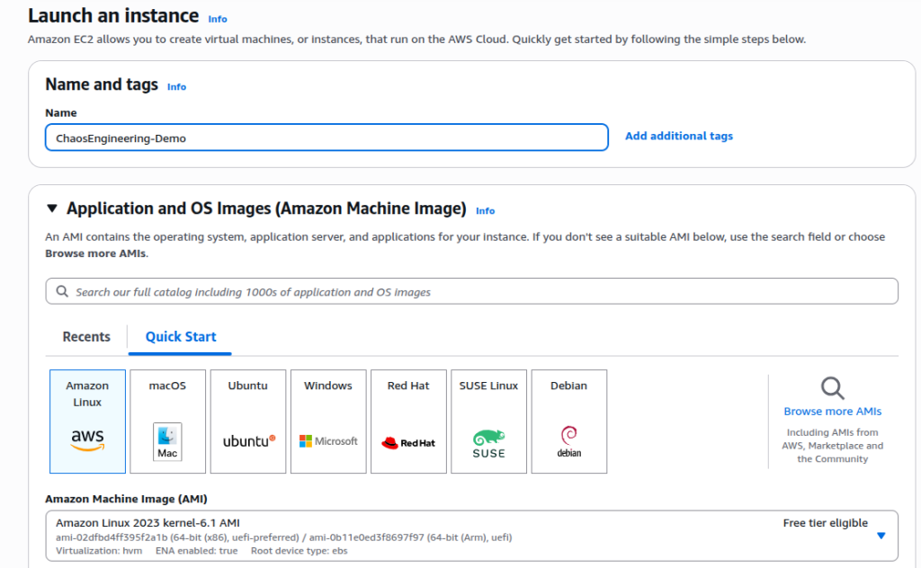
EC2 Instance
Step 2: Install a Web Server
Install Apache to simulate an application service.
$ sudo yum update -y
$ sudo yum install httpd -y
Start the server:
$ sudo systemctl start httpd
$ sudo systemctl enable httpd

starthttpd
Create a simple test page:
$ echo “Chaos Engineering Demo Application” | sudo tee /var/www/html/index.html

DemoApp
Step 3: Measure Normal Application Response Time
Before introducing failures, measure the application’s normal latency.
Command
$ curl -o /dev/null -s -w “Response Time: %{time_total}s\n” http://54.92.212.143

Initial Response
The application responds in approximately 0.83 ms, indicating normal network performance.
Step 4: Create an IAM Role for Fault Injection
-> Go to AWS Identity and Access Management
-> Click Roles → Create Role
-> Select Fault Injection Service
-> Attach policy:
AWSFaultInjectionSimulatorNetworkAccess
AWSFaultInjectionSimulatorEC2Access
AmazonSSMManagedInstanceCore
Step 5: Create a Fault Injection Experiment Template
Now configure the chaos experiment.
-> Open AWS Fault Injection Service
-> Click Experiment Templates
->Click Create experiment template
Configure the Template
Target
Resource type: EC2 instance
-> Select the instance created earlier
-> Action
Choose:
aws: AWSFIS-Run-Network-Latency
Select the IAM role created earlier.
Save the template.
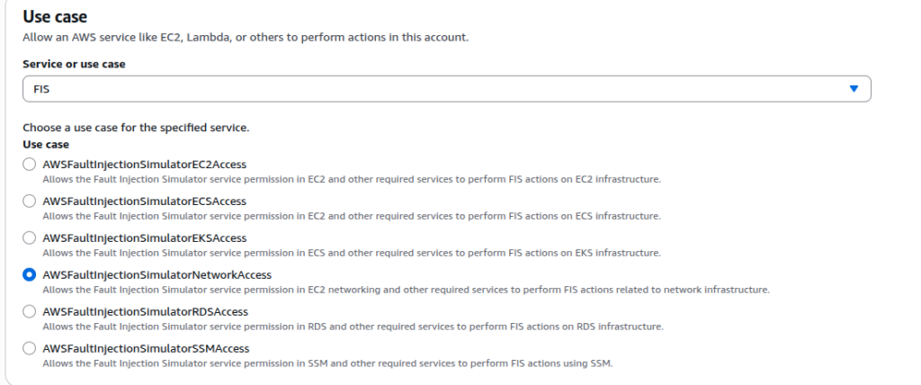
setupFIS
Step 6: Start the Chaos Experiment
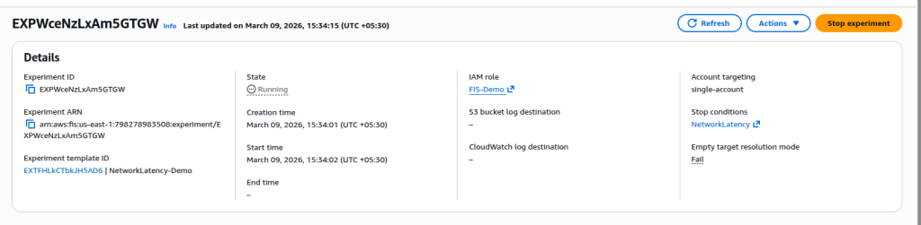
Run the experiment from the template.Experiment Status: Running
Target: EC2 Instance
Fault Type: Network Latency Injection
Latency: 200 ms
Duration: 1 minute
During this time, AWS injects a 200 ms network delay into the EC2 instance
runningFIS
Step 7: Test Application During the Experiment
While the experiment is running, test the application again.
Command
$ curl -o /dev/null -s -w “Response Time: %{time_total}s\n” http://54.92.212.143

response
Observation
Response time increased from: 0.80s → 1.78s
This confirms that the injected network latency is affecting the application.
Step 8: Observe Monitoring Metrics
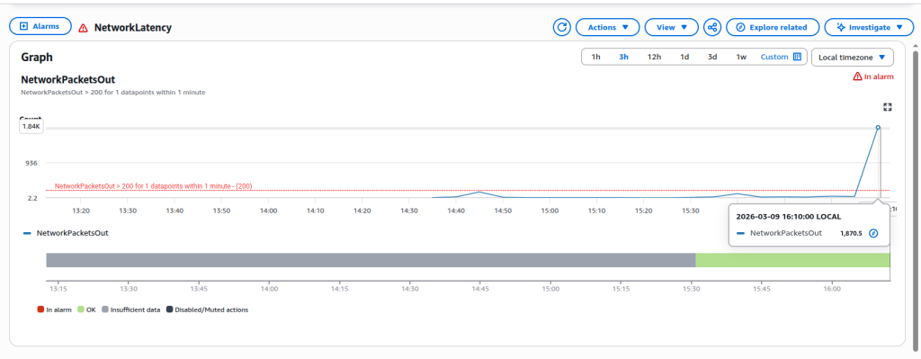
While the experiment is running, open Amazon CloudWatch and observe the instance metrics.
CloudWatch
Final Result of the Experiment
This chaos engineering experiment demonstrated that:
- AWS Fault Injection Service can simulate network failures safely.
- Application response time increases when network latency is injected.
- Monitoring tools like CloudWatch detect performance degradation.
- The system recovers automatically after the experiment ends.
- Such experiments help engineers validate the resilience and observability of cloud applications.
Conclusion
Chaos engineering plays an important role in making the system more reliable and resilient. The goal of modern infrastructure engineering is not to eliminate failures but to design systems that recover quickly and automatically.
Chaos Engineering helps teams proactively identify weaknesses before they impact production environments.
With AWS Fault Injection Simulator, organizations can safely run controlled experiments to validate the resilience of their architecture.
By regularly testing failure scenarios, teams can build systems that are not only scalable but also truly fault-tolerant and resilient distributed systems.
In the world of distributed systems, resilience isn’t proven through design diagrams — it’s proven through experiments.