


Introduction
There is no doubt that Angular is powerful. But after using Angular from v1 to v20 in real production systems, I found that most performance problems and messy codebases come from a small number of mistakes that keep happening.
In this article, I’ll talk about what I’ve learned from my own projects that helped me make Angular apps that are cleaner, more scalable, and faster.
Some mistakes I made in the past that you should try to avoid as much as possible:
- Misusing the Default Change Detection Strategy
- Poor Subscription Management in Reactive Angular Apps
- Not Using trackBy in ngFor
- Not Using Lazy Loading and Angular’s Feature Modules
- Not Using Angular HTTP Interceptors for Centralized Error Handling
- Ignoring Angular-Specific Performance Tools
Let’s explore them in more detail.
Misusing the Default Change Detection Strategy
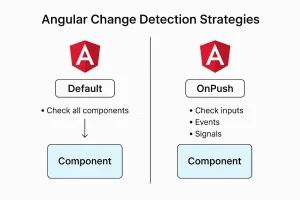
change detection
At first, I used the default change detection strategy everywhere in my work.
For small apps, the default strategy works very well. But as the component tree gets bigger, it causes change detection to happen in big parts of the application, which slows it down and makes it check things that don’t need to be checked. Using OnPush only checks for changes when inputs change, which makes our app more efficient and predictable.
Default Strategy
@Component({
   selector: 'app-user-card',
   templateUrl: './user-card.component.html'
})
export class UserCardComponent {
  @Input() user!: User;
}
Optimized with OnPush
import { ChangeDetectionStrategy } from '@angular/core';

@Component({
     selector: 'app-user-card',
     templateUrl: './user-card.component.html',
     changeDetection: ChangeDetectionStrategy.OnPush
})
export class UserCardComponent {
     @Input() user!: User;
}
When to use it:
Use OnPush for components that only show things, components with inputs that can’t be changed, big lists, or parts of your app that need to be fast and where you want more control over change detection.
Switching to OnPush on one of our enterprise dashboards with thousands of rows cut down on unnecessary re-renders and made the dashboard much more responsive.
Poor Subscription Management in Reactive Angular Apps

Subscribing Without Unsubscribing
If you subscribe to Observables without unsubscribing, your Angular app may have memory leaks that you don’t know about. If a component is destroyed but the subscription is still active, it keeps listening and running logic that isn’t needed. This can slow down your app over time and make it act in ways you didn’t expect.
Bad Example:
ngOnInit() {
  this.userService.getUsers().subscribe(users => {
    this.users = users;
  });
}
If the component is destroyed, the subscription may still remain active.
A better approach:
Use takeUntil, AsyncPipe, or manually unsubscribe in ngOnDestroy.
private destroy$ = new Subject<void>();

ngOnInit() {
this.userService.getUsers()
.pipe(takeUntil(this.destroy$))
.subscribe(users => {
    this.users = users;
});
}

ngOnDestroy() {
    this.destroy$.next();
    this.destroy$.complete();
}
Using AsyncPipe example
HTML
<div *ngFor="let user of users$ | async">
  {{ user.name }}
</div>

Typescript

users$ = this.userService.getUsers();
Managing subscriptions properly keeps your app clean, efficient, and memory-safe.
Not Using trackBy in ngFor

TrackBy
Angular tracks list items by object reference when you don’t use trackBy in *ngFor. Angular might re-render the whole list instead of just what changed if the array changes even a little bit. This can cause a lot of DOM re-renders and slow down performance in applications that use a lot of data.
Bad approach:
If the users array is replaced (even with the same data), Angular recreates all DOM elements.
<li *ngFor="let user of users">
  {{ user.name }}
</li>
Good approach:
// HTML
<li *ngFor="let item of items; trackBy: trackById">
  {{ item.name }}
</li>

// Typescript
trackById(index: number, item: any) {
   return item.id;
}
Using trackBy helps Angular figure out which items really changed, which stops unnecessary DOM re-renders and speeds things up, especially in big lists or lists that change often.
This is especially critical for:
- Tables
- Virtual scroll
- Data-heavy dashboards
When you didn’t use trackBy in big data tables, the whole table would re-render every time you refreshed with a small data or even if only one row changed.
Not Using Lazy Loading and Angular’s Feature Modules
Combining everything into a single Angular module may work initially, but as the application expands and grow. It becomes disorganised, challenging to scale, and difficult to maintain. Large modules make lazy loading impossible, increase coupling, and slow down compilation.
Bad approach: All features live in one place with no clear separation.
@NgModule({
  declarations: [
     AppComponent,
     HeaderComponent,
     DashboardComponent,
     UserListComponent,
     AdminComponent,
     ReportsComponent
  ],
imports: [
   BrowserModule,
   FormsModule,
   ReactiveFormsModule,
   HttpClientModule
  ]
})
export class AppModule {}
Better approach: Feature modules. Now your app is modular, organized, and ready for lazy loading.
@NgModule({
  declarations: [UserListComponent],
  imports: [CommonModule],
})
export class UsersModule {}

@NgModule({
  declarations: [AdminComponent],
  imports: [CommonModule],
})
export class AdminModule {}
When to split modules:
- When a feature has multiple related components
- When you want lazy loading
- When different teams work on separate features
- When the module starts becoming too large
Small, focused modules make your Angular app cleaner, scalable, and easier to maintain.
Not Using Angular HTTP Interceptors for Centralized Error Handling
Error handling
When Angular HTTP Interceptors are not used for centralised error handling, each component or service handles errors independently, resulting in repetitive code and inconsistent user experience. Uncaught errors can cause your app to crash or confuse users.
Create an HTTP interceptor
@Injectable()
export class ErrorInterceptor implements HttpInterceptor {
   intercept(req: HttpRequest<any>, next: HttpHandler) {
     return next.handle(req).pipe(
       catchError((error: HttpErrorResponse) => {
         console.error('Global Error:', error.message);
       return throwError(() => error);
    })
   );
  }
}
Using a global handler:
@Injectable()
export class GlobalErrorHandler implements ErrorHandler {
   handleError(error: any) {
    console.error('Global error:', error);
   // show notification or log to server
  }
}
// Add it to the AppModule
@NgModule({
   providers: [{ provide: ErrorHandler, useClass: GlobalErrorHandler }]
})
export class AppModule {}
Why it helps:
- Centralized error management
- Consistent user notifications
- Cleaner, maintainable code
- Easier logging and monitoring
Global error handling makes your app more robust, predictable and professional.
Ignoring Angular-Specific Performance Tools

Performance Boost
Small Angular apps may become sluggish and unresponsive as they grow if performance is not considered early on. Longer load times and a slow user interface result from ignoring optimisations like OnPush, lazy loading, or effective change detection.
In large Angular applications, I always evaluate:
• Lazy loading at the route level with Angular Router
• Tailored preloading techniques
• Using Angular CLI build statistics to determine bundle size
• Choosing a change detection strategy
• RxJS operators such as debounceIt’s time for events driven by users
Example:
searchControl.valueChanges
.pipe(debounceTime(400))
.subscribe(value => {
    this.search(value);
});
Conclusion
Even though Angular is a powerful tool, writing code alone is not enough to create scalable and maintainable applications. Performance and long-term maintainability can be greatly enhanced by implementing techniques like OnPush change detection, trackBy in ngFor, structured feature modules, appropriate subscription management, and centralised error handling.
The framework does not cause large Angular applications to fail. Architectural choices are the reason they fail.
You can create systems that are quick, dependable, and maintainable even as they grow if you comprehend how Angular’s change detection, dependency injection, routing, and reactive patterns operate internally.