


Introduction
Over the past few sprints, a recurring question has been: GraphQL or REST? Most discussions revolved around frontend flexibility, performance, and how much complexity we want in our APIs.
For example, a mobile app often needs just user names, not full profiles—overfetching in REST can impact performance, increasing bandwidth and slowing down user experience.
Instead of relying on opinions or trends, I decided to dive into both approaches using examples and scenarios we actually face day-to-day. This post summarizes my findings, focusing less on theory and more on what we genuinely gain and what we sacrifice when choosing GraphQL over REST (and vice versa).
What Problem Are We Trying to Solve?
At their core, both REST and GraphQL solve the same problem: exposing backend data to clients in a reliable, scalable, and maintainable way. The main difference is:
- REST: Server defines the data shape and endpoints. The client consumes what is provided.
- GraphQL: Client defines exactly what data it needs. Server provides only that.
This difference impacts overfetching, underfetching, number of network requests, caching strategies, and frontend velocity.
REST APIs: What We Gain
Simplicity and Familiarity
- Resources via endpoints: Each resource has a unique URL (e.g., /users, /orders/123).
- HTTP methods define behavior: GET, POST, PUT, PATCH, DELETE map clearly to CRUD operations.
- Backend controls response: The server decides response structure.
- Multiple endpoints for different needs: Each endpoint is specialized and predictable.
Trade-offs:
- Over-fetching is common: frontend may receive unnecessary data.
- Under-fetching requires multiple requests to get related data.
Why REST is still great:
- Easy to understand for new developers
- Easy to document and maintain
- Clear mapping between HTTP methods and CRUD operations
| Advantage | Trade-off |
|---|---|
| Easy to understand | May overfetch data |
| Easy to document | Requires multiple requests for nested data |
| Clear CRUD mapping | Backend controls response shape |
HTTP Caching and Infrastructure Support
- Browser caching improves repeated request performance.
- CDN caching delivers content closer to users.
- HTTP headers like
ETagandCache-Controlenable reuse and conditional requests.
Key Takeaway: REST is simple, predictable, and cache-friendly, making it ideal for public, read-heavy APIs.
Debugging and Observability
REST APIs are straightforward to debug. Each endpoint represents a clear resource, making logs readable and issues easier to trace. Developers can quickly pinpoint which API call failed.
REST Example
(1) Fetch a User
Let’s start with a simple REST request that retrieves user details using a standard GET endpoint.
The client sends a request to fetch a specific user resource:

REST API request to fetch user details using GET /users/1
The server responds with the full user object, which may include fields the client does not immediately need.
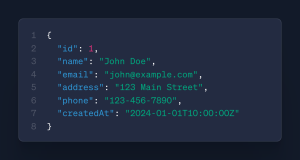
REST response returning full user object (includes potential overfetching)
- Returns user details like name and email.
- Email may not always be needed → potential overfetching.
(2) Fetch Posts for a User
To retrieve related posts, the client must call a separate REST endpoint.
This request targets the posts resource associated with the user:

Separate REST request to fetch posts for a specific user
The response contains all posts, requiring the client to manually combine this data with the user details.
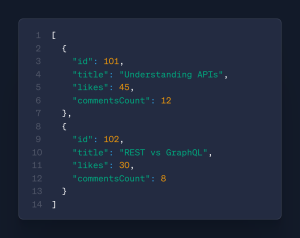
REST response returning all posts, requiring client-side data merging
- Returns all posts.
- Requires a separate request.
- Client must combine data manually.
(3) Combined REST Endpoint
To reduce multiple requests, the backend may expose a custom aggregated endpoint.
This combined endpoint attempts to return related resources in a single call:

Combined REST endpoint to fetch user and posts in a single request
The response includes both user and post data, but the structure is fixed by the backend.
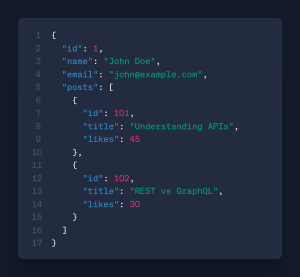
Aggregated REST response combining user and posts
- Returns user info + posts in one request.
- Mimics GraphQL behavior but may still overfetch.
REST APIs: What We Lose
Overfetching Data
- Impacts mobile networks.
- Large nested responses degrade performance.
- Extra data increases payload and slows apps over time.
Multiple Network Requests
- Increased latency for nested data.
- More frontend complexity (manual combination of data).
- Complex error handling across multiple endpoints.
Versioning and API Evolution
- REST often uses versioned endpoints:
/api/v1/users,/api/v2/usersfor breaking changes. - Clients need to switch manually to a new version.
- Maintaining multiple versions adds backend overhead and complexity.
Now that we’ve seen REST’s strengths and limitations, let’s explore what GraphQL brings to the table.
GraphQL: What We Gain
Precise Data Fetching
- Client controls response shape.
- Reduces overfetching.
- Smaller payloads improve mobile and low-bandwidth performance.
Single Endpoint, Flexible Queries
- Single
/graphqlendpoint for all queries. - No need for multiple API versions.
- Reduced API surface area simplifies management.
Frontend Velocity
- Combine related data in one request.
- Faster frontend iteration.
- Less dependency on backend changes.
GraphQL Example
Full Query

GraphQL query requesting user and nested posts in one request
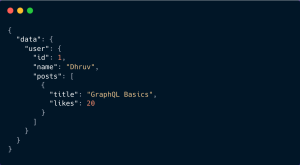
GraphQL response returning only requested fields
- Single request for multiple data points.
- No unnecessary fields are returned.
- Payloads are efficient for network and frontend rendering.
Partial Query (Only Titles)

GraphQL query requesting only post titles

Reduced payload response containing only required fields
- Returns only post titles.
- Reduces payload size further.
- Frontend dynamically controls response shape based on needs.
REST vs GraphQL Visual Comparison

Visual comparison of REST multiple requests vs GraphQL single query
- REST favors simplicity and clear endpoints but may require multiple requests and return extra data.
- GraphQL enables precise, single-request data fetching by allowing the client to control the response shape.
Performance Metrics
| Approach | Requests | Payload | Details |
|---|---|---|---|
| REST | 3 | 10 KB | /users/1 (2KB) + /posts (6KB) + /comments (2KB) |
| GraphQL | 1 | 5 KB | Single precise query (id, name, posts title & likes) |

Practical performance comparison between REST and GraphQL
GraphQL Caching: How It Works
Unlike REST, GraphQL does not benefit from built-in HTTP caching. Caching must be implemented at the resolver level or via external tools.
Example: resolver-level caching with TTL (time-to-live) to optimize repeated queries.
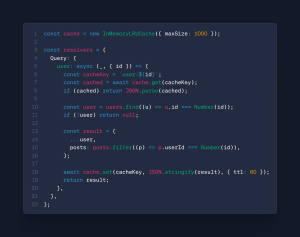
Example of resolver-level caching with TTL in GraphQL
Console Behavior :-
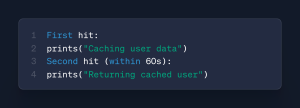
Console output showing cache hit after initial request
- First request stores data.
- Subsequent request uses cache.
- TTL controls expiration.
However, flexibility comes with its own trade-offs.
GraphQL: What We Lose
Caching Becomes More Complex
- No natural HTTP caching.
- Requires resolver-level caching.
- Custom caching strategies increase development complexity.
Risk of Expensive Queries
- Deep nested queries may strain the backend.
- Requires query depth limits or query complexity analysis.
- May require rate limiting to prevent abuse.
Harder Debugging in Production
Errors are often nested within query responses, making observability and error tracing more complex compared to REST.
Schema Evolution and Versioning
- GraphQL encourages schema evolution: add new fields, deprecate old ones using the
@deprecateddirective. - Clients automatically ignore deprecated fields; a single endpoint is sufficient.
- Careful planning is required to avoid breaking existing clients.
Beyond theory, real-world systems introduce additional concerns.
Practical Production Considerations
Authentication & Authorization
- REST: Each endpoint can enforce role-based access; simpler to monitor per resource.
- GraphQL: Fine-grained access control may require resolver-level checks; a single query can access multiple resources, increasing the risk of overexposure.
- Production Tip: Implement middleware for authentication and enforce field-level authorization in GraphQL.
Error Handling & Observability in Production
- REST: Each endpoint returns HTTP status codes; logs can be tied to a specific resource request.
- GraphQL: Multiple fields in a single query may fail independently; errors are returned alongside partial data.
- Production Tip: Use structured logging, monitoring, and tracing tools (e.g., Datadog, Sentry) for GraphQL.
Rate Limiting & Throttling
- REST: Apply per-endpoint rate limits to prevent abuse.
- GraphQL: Must calculate query cost (depth, field complexity) to avoid heavy queries affecting server performance.
- Production Tip: Implement query depth limits and cost analysis for GraphQL queries.
Monitoring & Logging
- REST: Endpoint-specific logs allow easy identification of bottlenecks.
- GraphQL: Single endpoint means field-level logging is needed to track performance.
- Production Tip: Use query-level tracing and cache metrics to optimize GraphQL performance.
Security Considerations
- REST: Each endpoint can be validated separately; easier to enforce CORS and CSRF protections.
- GraphQL: Single endpoint requires strict input validation and query depth limits to avoid abuse.
- Production Tip: Use persisted queries, depth limiting, and input sanitization for GraphQL.
Performance: A Practical Comparison
| Scenario | Better Choice |
|---|---|
| Simple CRUD APIs | REST |
| Public APIs | REST |
| Mobile or low-bandwidth clients | GraphQL |
| Data-heavy dashboards | GraphQL |
When REST Is the Better Choice
- Stable APIs with infrequent model changes.
- Caching is critical for performance.
- Simplicity is preferred over flexibility.
When GraphQL Makes Sense
- Frequent frontend changes or new views.
- Multiple clients with varying data requirements.
- Overfetching concerns on mobile/low bandwidth.
- Team is comfortable managing backend complexity.
Final Thoughts
GraphQL isn’t a replacement for REST — it’s a trade-off.
Key Takeaways
- REST: Best for stable, predictable systems, public APIs, and caching-heavy scenarios.
- GraphQL: Excels when frontend flexibility and precise data control are critical.
- Hybrid approach: Combining REST for public APIs and GraphQL for frontend-heavy apps often delivers the best balance.
Ultimately, the right choice depends on your system’s scale, team expertise, and client requirements. The goal is not to choose the trendiest tool — but the one that best aligns with your architectural needs.