
If you’ve been running email in the Salesforce Marketing Cloud for more than a few months, you’ve likely realized that the platform makes it extremely easy to send email. However, it’s significantly harder to figure out who you should be sending email to and who you shouldn’t be sending email to. Opt-in and opt-out might seem like simple concepts. The reality is that they’re anything but. Particularly if you have more than one Business Unit.
This guide will cover all aspects of the topic. What is opt-in and opt-out? What are the different types of each? How do they behave at the Enterprise and Business Unit levels? The Subscriber Data Model? Publication Lists? Cross-BU Consent Sync? Compliance? The mistakes that lead to silent compliance failures in orgs that think they’re doing it right.
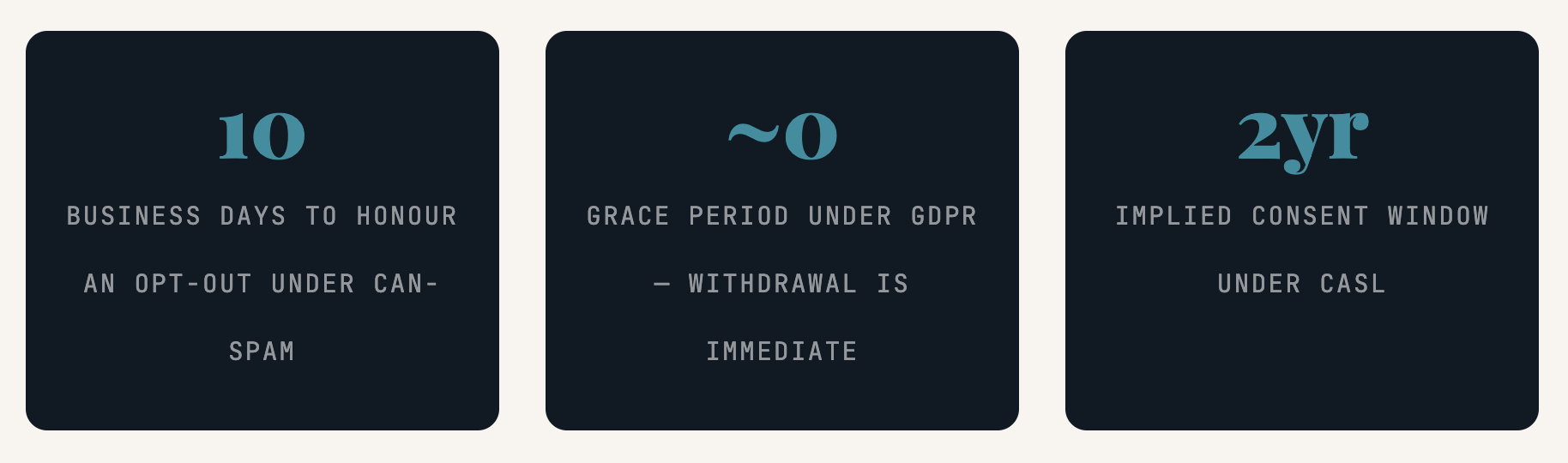
Opt-In & Opt-Out
Opt-In & Opt-Out: What They Actually Mean
Before we dive into architecture, let’s first define the basics. Opt-in is defined as “a person who has given you permission to send him email, i.e., he checked a box or clicked on a link to confirm he wants email from you. Opt-out is defined as “a person who has asked you not to send him email.”
The relationship between these two states is not simply an on/off switch. This is the basis for your relationship with your subscribers. Get it wrong and you’ll be losing people who want to hear from you, or worse, violating people who want nothing to do with you.
The Three Types of Opt-In
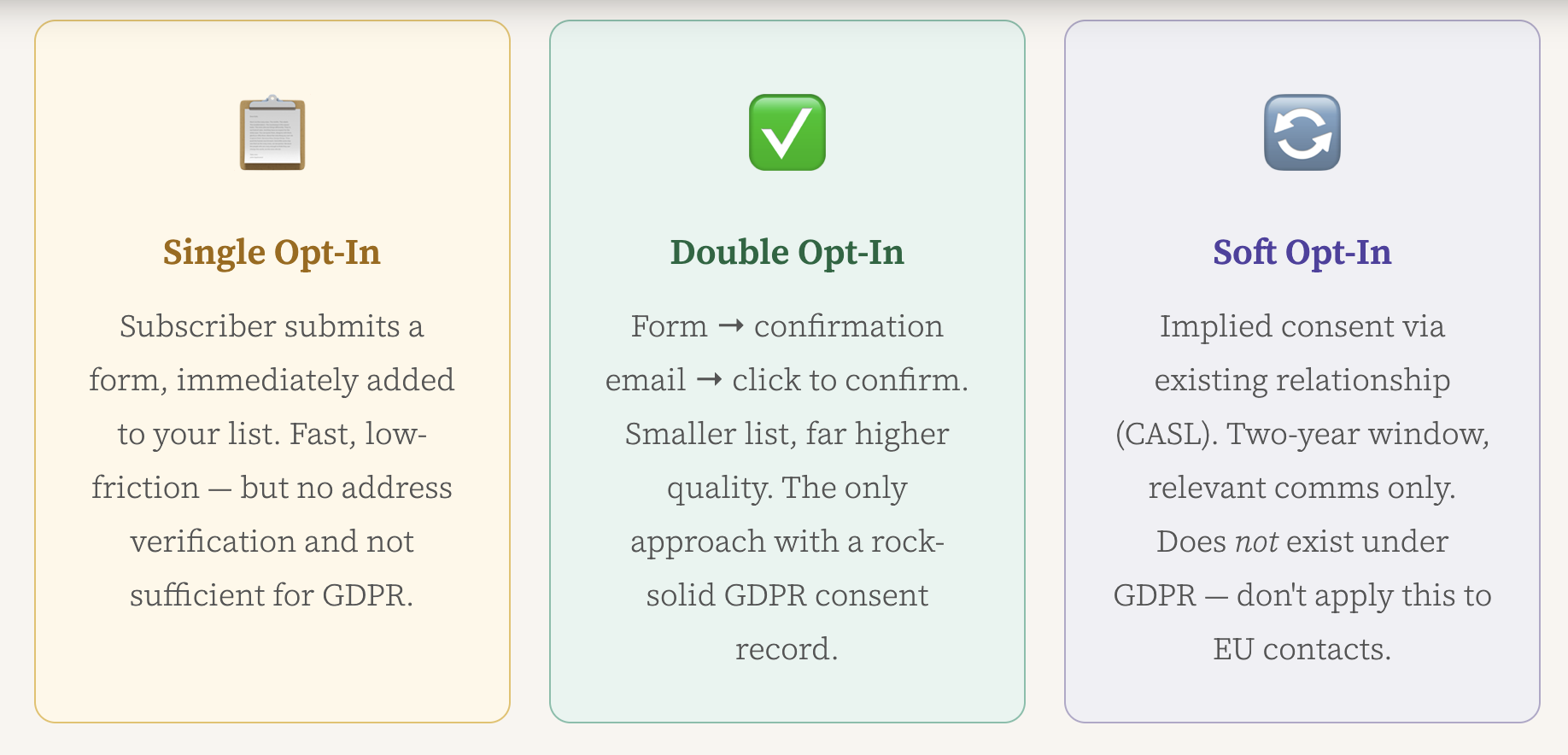
The Three Types of Opt-In
When to use double opt-in: Any EU/UK audience, any use case where you need to prove consent under scrutiny, and any B2C program where unsubscribe risk is high. The smaller confirmed list is worth the quality increase every time.
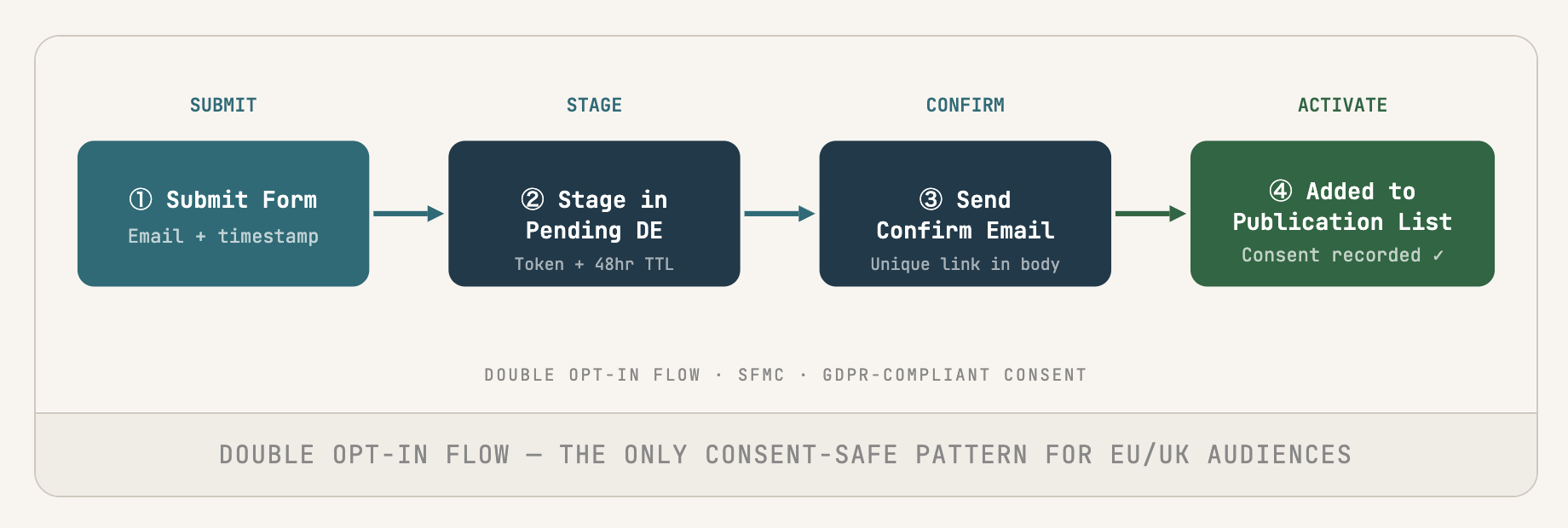
Double Opt-In flow — the only consent-safe pattern for EU/UK audiences
The Four Types of Opt-Out
Not all opt-outs are created equal. The type of opt-out determines the extent of the opt-out in the context of SFMC. And that’s where most teams go wrong.
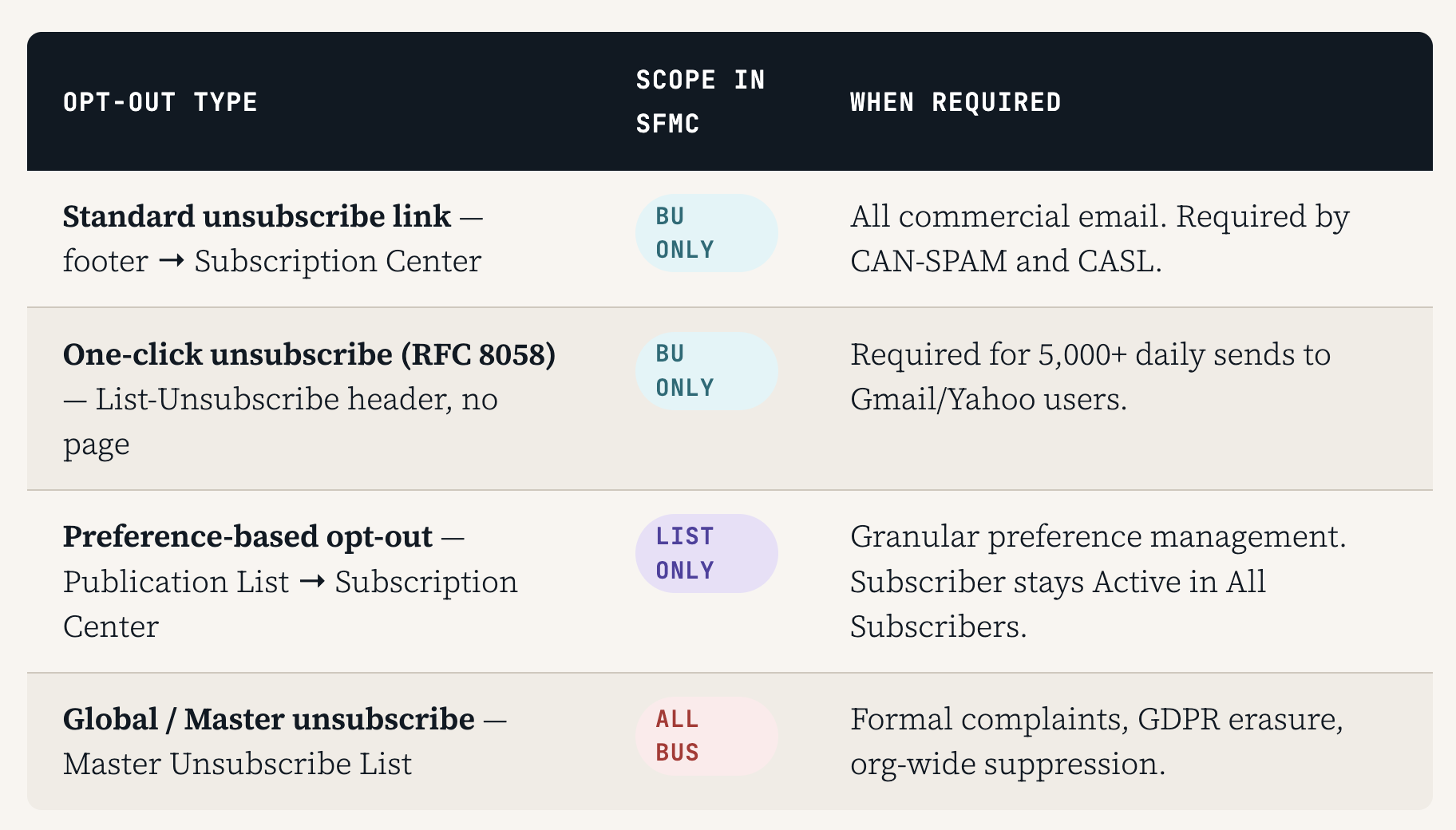
The Four Types of Opt-Out
Enterprise Level vs BU Level: The Critical Difference
This is where most multi-BU SFMC configurations fail silently. There are two different levels where the decision about the opt-in resides, and they do not necessarily talk to each other. If they are mixed up, either too many people are suppressed across brands, or too many people continue to receive emails who should be opted out.
“When someone unsubscribes from Brand A, they don’t know or care that Brand B is a separate business unit. From their point of view, they asked you to stop, and you kept messaging them.”
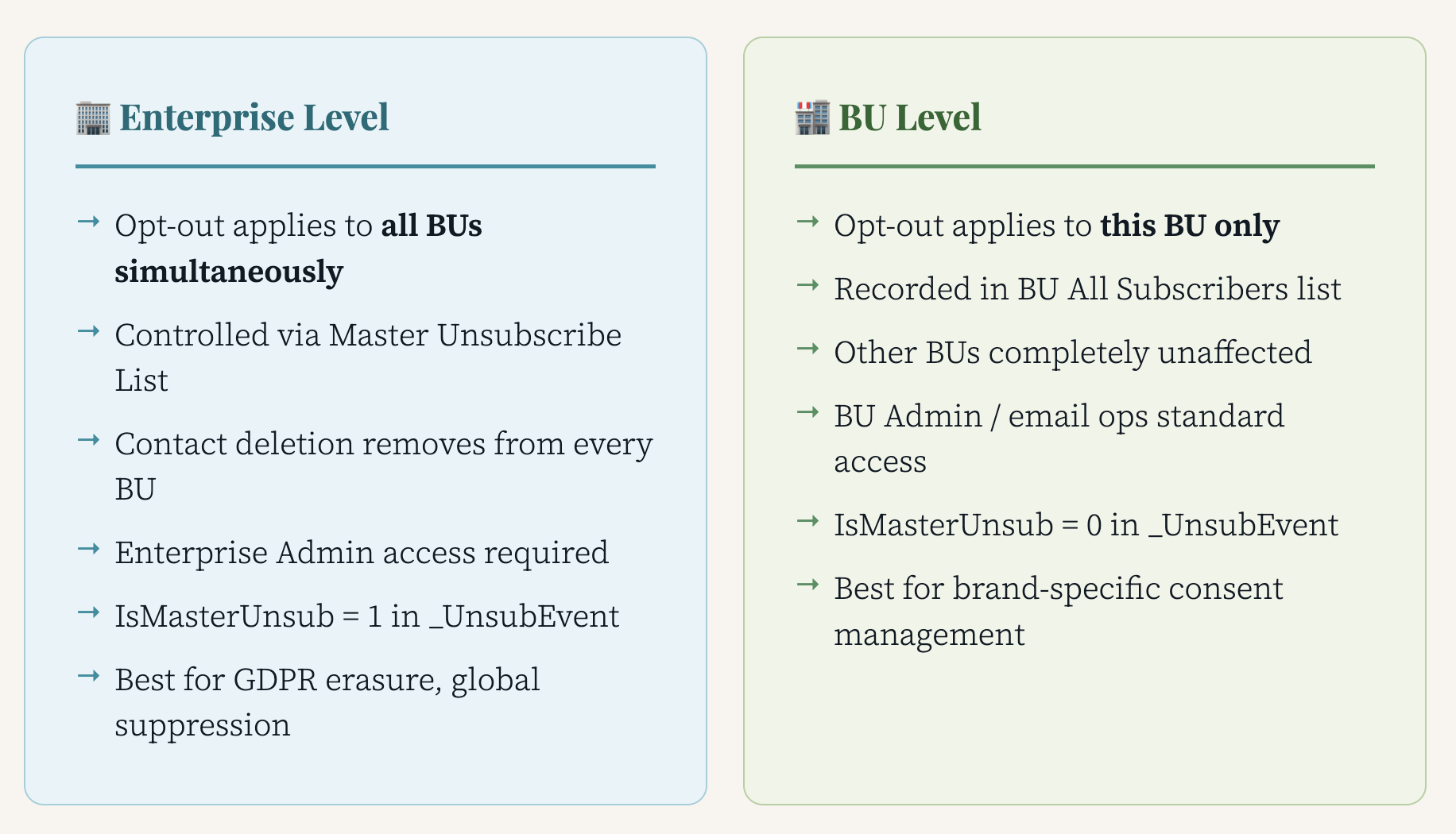
Unsubscribed from Brand
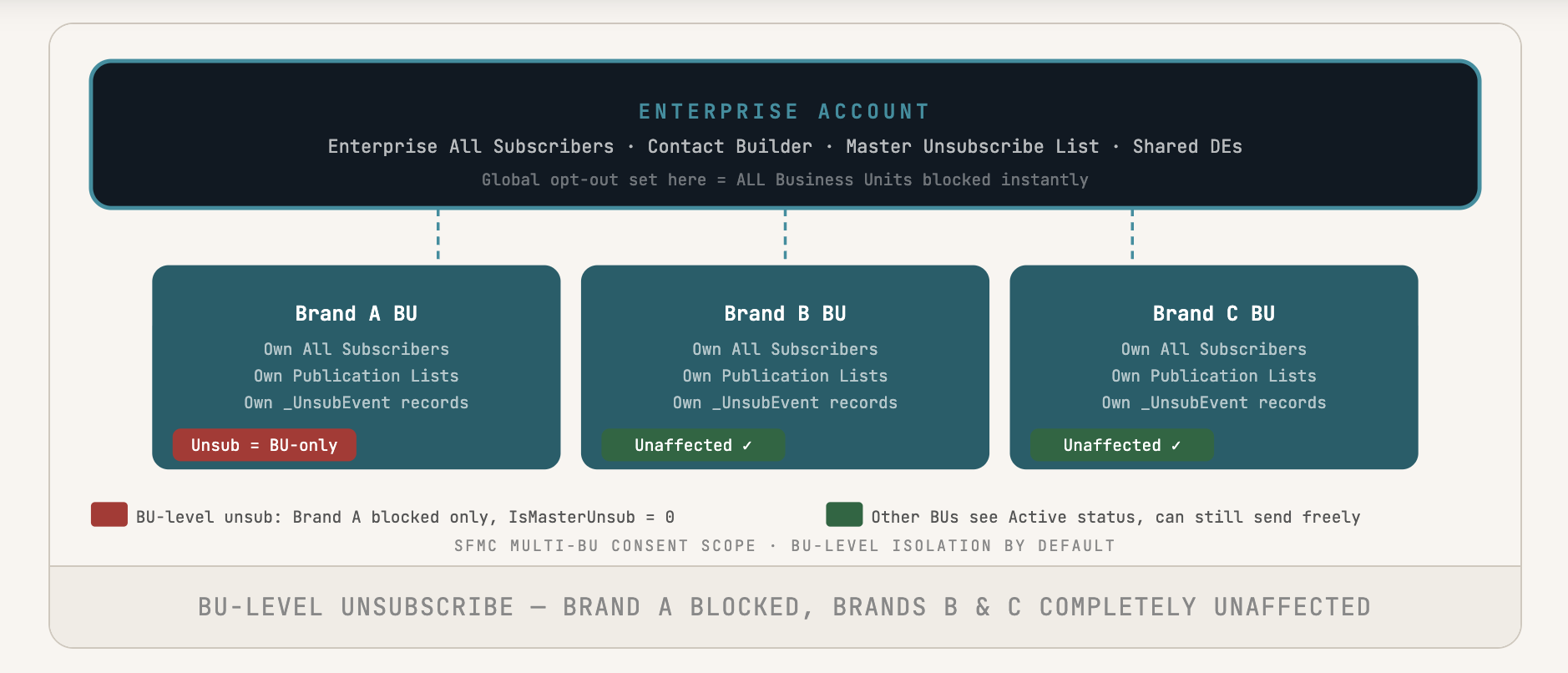
BU-level unsubscribe — Brand A blocked, Brands B & C completely unaffected
The Three Inheritance Rules
- Global (Master) Unsubscribe blocks all BUs at once. No BU can opt out of this. Flows down from Enterprise and stays.
- BU-level unsubscribe stays put. Doesn’t move up to Enterprise or over to another BU. Other BUs are free to send.
- Contact deletion via Contact Builder clears all Suppression Lists. For GDPR erasure, always write the email to a Suppression Data Extension first. DEs persist after deletion. Lists don’t.
The Subscriber Data Model: Four Statuses, One Silent Killer
Every subscriber is checked against the All Subscribers list before every send. If a subscriber is Unsubscribed, Bounced, or Held, they are silently skipped, and no error, bounce, or indication of any action occurring will be seen. It’s not optional to understand all four statuses.
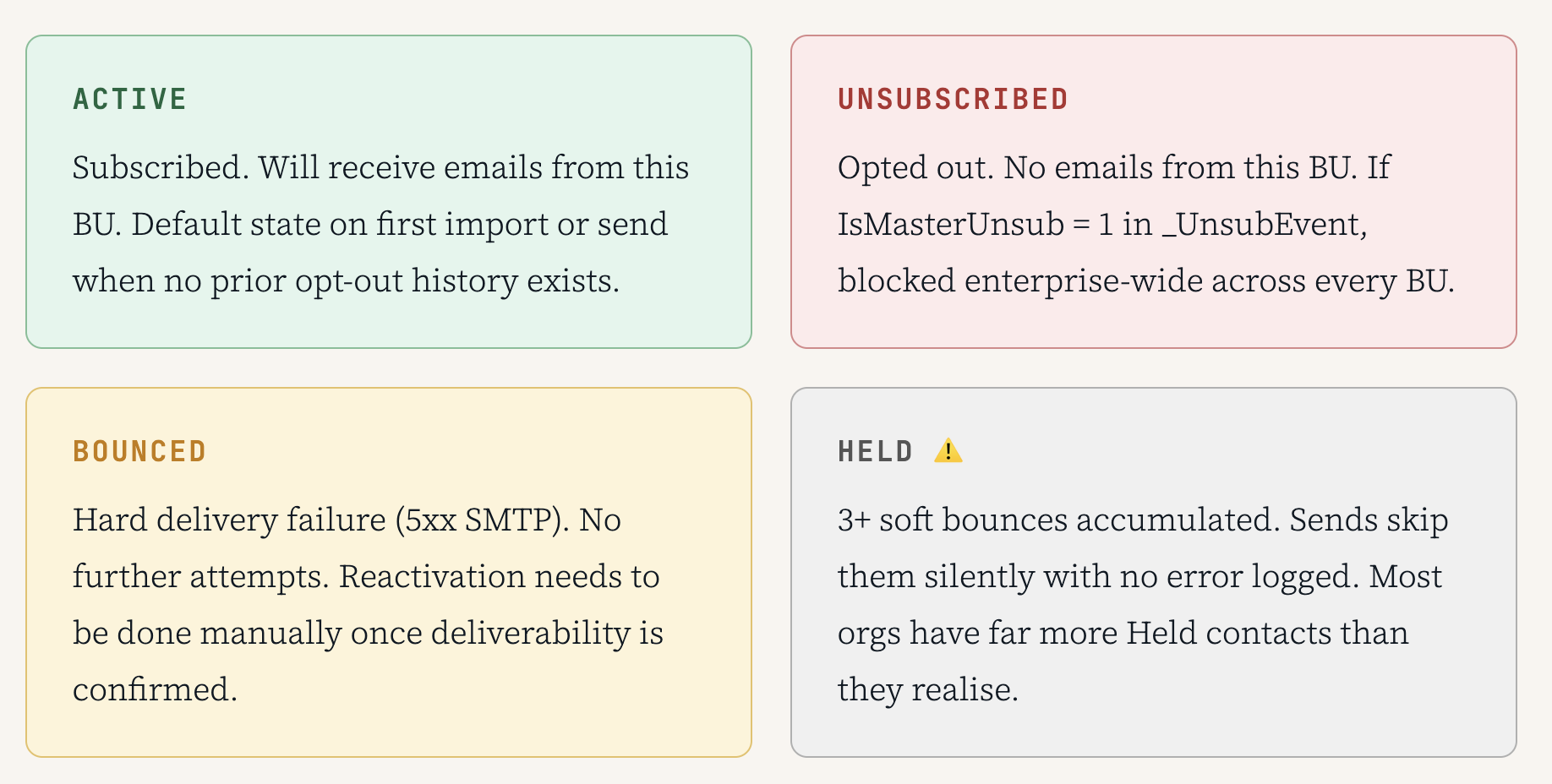
The Subscriber Data Model: Four Statuses, One Silent Killer
Held contacts are the quiet problem. Your send finishes with zero errors, but a bunch of your list has gotten nothing. Run a Held audit on _Subscribers WHERE Status = ‘Held’ monthly. Flat engagement with no obvious cause? Check Held first.
The two data views in the System that you should be familiar with are _Subscribers (the current status of all your contacts per BU) and _UnsubEvent (all opt-out events that have occurred across your System). The most important field in _UnsubEvent is IsMasterUnsub. A value of 1 signifies that the opt-out event is global, affecting all BUs. A value of 0 indicates the opt-out event is only impacting the BU in which it occurred.
Never put in an import file a Status column with ‘Active’ in it. If they are Unsubscribed in All Subscribers, the import file will overwrite them and set them back to Active. So they will be resubscribed without any knowledge of it. SFMC allows it. CAN-SPAM does not care.
Publication Lists: Giving Subscribers a Smarter Choice
The standard unsubscribe process will remove someone from your entire BU with one click. Promos, newsletters, product updates, transactional emails – all of it. Gone. Even if all they want to do is stop the weekly promo emails. Publication Lists give your subscribers the ability to opt out of one type of email and remain Active for all the rest.
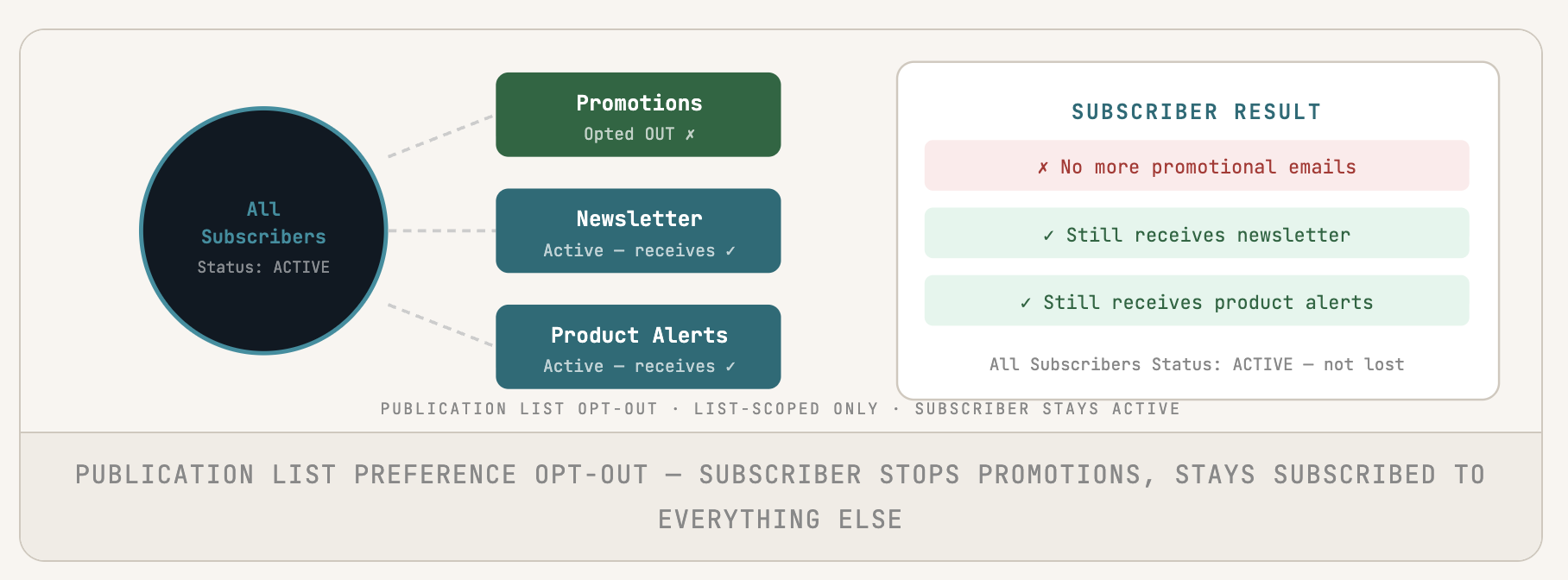
Publication List preference opt-out — subscriber stops Promotions, stays subscribed to everything else
Don’t leave the default Subscription Center. This is so general that people often click the “Unsubscribe from all” option just to get out of the Subscription Center, when they wanted to adjust one option. A branded CloudPages Preference Center eliminates the need for “Unsubscribe from all” altogether without changing any policy.
Cross-BU Consent Sync: Three Patterns
BU consent isolation is the appropriate default for truly separate brands. The issues arise when a subscriber takes an action that should be applied to multiple BUs, which SFMC does not automatically handle unless it is a Master Unsubscribe. When you need to sync, use the appropriate pattern for your volume and architecture.
- Shared DE at Enterprise. All business units read from and write to a shared data extension. Near real-time, low dev effort. Adds a query dependency to every send, which can be manageable at moderate volume, but significant overhead at high volume.
- Nightly SQL sync. Schedule an SQL Activity to query _UnsubEvent in all BUs, writes to a central DE called ConsentMaster. Can be up to 24 hours behind, which is sufficient for batch sends, but would be problematic for sends that should be in real-time or near real-time.
- REST API real-time. The Journey Event fires on every unsubscribe and calls the SFMC REST API to update subscriber status across all target BUs within seconds. Highest accuracy requires real integration work and ongoing maintenance.
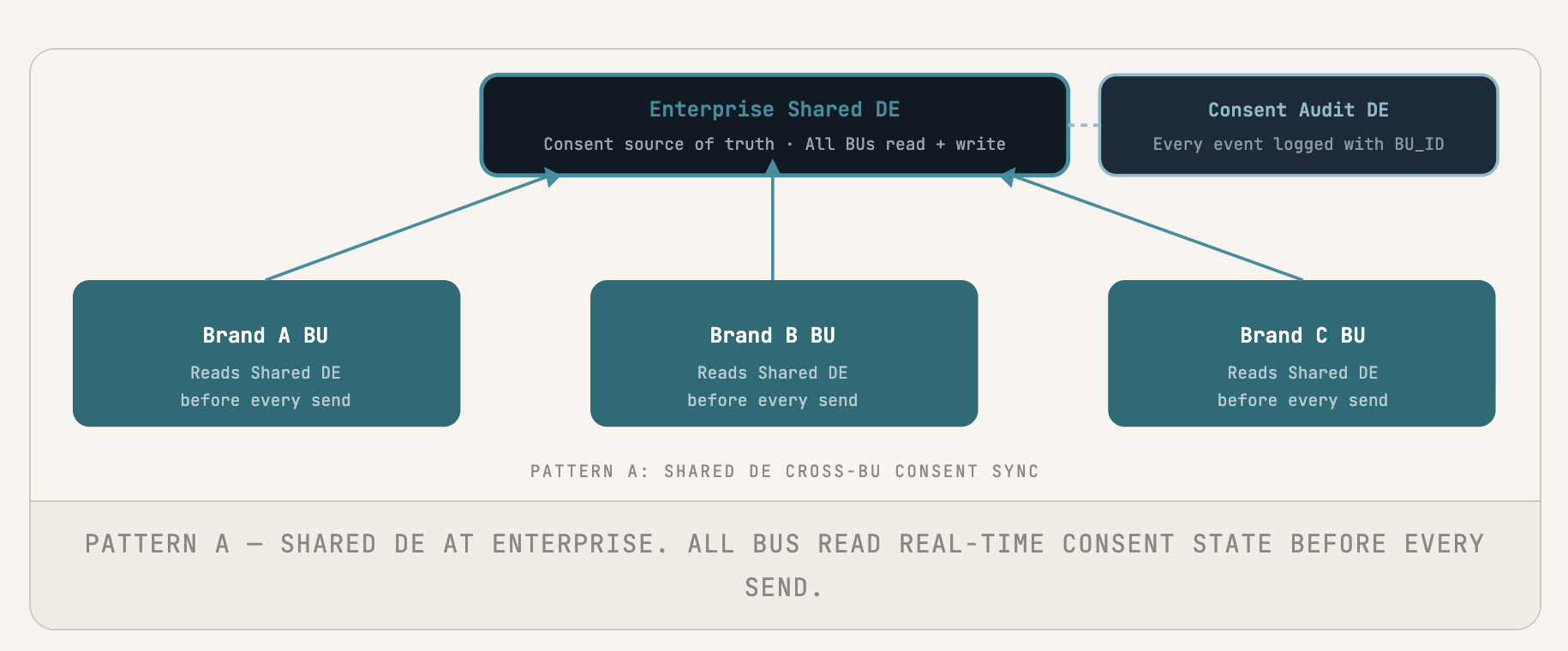
PATTERN A: SHARED DE CROSS-BU CONSENT SYNC
The GDPR Erasure Trap — and How to Avoid It
If you erase the contact in Contact Builder in GDPR erasure, it removes them from All Subscribers and all Suppression Lists in business units. However, the email can be re-imported and contacted again. To prevent this, email addresses should be stored in a Suppression Data Extension and erased from all send definitions.
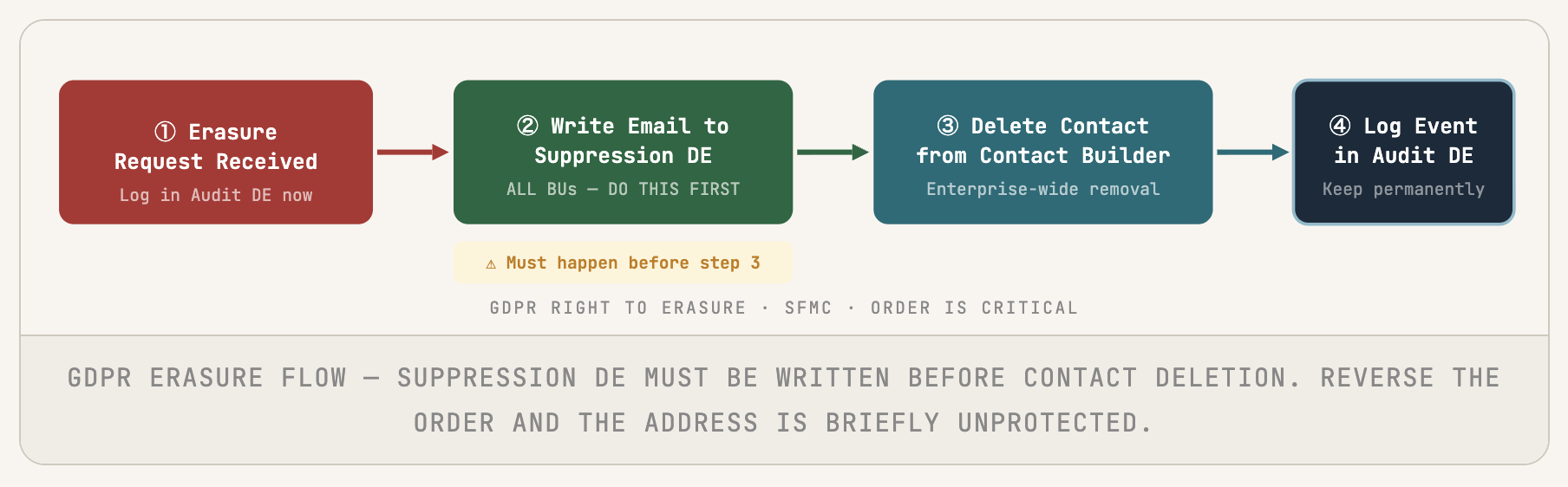
GDPR RIGHT TO ERASURE · SFMC · ORDER IS CRITICAL
Recommended for multi-BU orgs with GDPR exposure: Shared DE for real-time reads + Consent Audit DE for logging + REST API hooks for Journey-triggered updates. All three are required for accuracy, audit trail, and automated propagation.
Six Mistakes That Keep Coming Up
Each of these has been the source of actual compliance failure in an SFMC production environment. So these are not edge cases.
- Importing with Status=’Active’ – In the file, if the contact is marked ‘Unsubscribed’ in the data file, the import will overwrite them back to ‘Active’ without permission. Don’t import the Status column. Use a pre-import SQL filter. Import type should be ‘Update existing only’.
- Treating a BU opt-out as org-wide suppression – Someone who has opted out of one brand in the BU is still reachable by all the other brands in the BU. If your suppression logic does not take this into account, you are sending to people who have already asked to be stopped.
- Using All Subscribers as your send audience – It looks like ‘everyone in the BU’ but it completely circumvents the preference management at the List level. Send to Data Extensions or Publication Lists. Never send it to All Subscribers.
- Leaving the default Subscription Center live – Too vague; people often click “Unsubscribe from all” just to get away. A branded CloudPages Preference Center reduces opt-outs while keeping your policies intact.
- GDPR erasure without a Suppression DE – Deleting a contact from the data extension also removes them from the suppression list. To ensure true suppression, add their email to the suppression list first, then delete the contact and apply that list as an exclusion in every BU.
- No consent audit trail built in from day one – Without a record of when and how someone gave permission or which policy they agreed to, you can’t defend a GDPR investigation. Build your consent audit before the first email, not after the first complaint.
Conclusion
Ultimately, customers see your brands as one experience. Respecting their unsubscribe request across the board shows you’re listening—and that kind of consistency builds trust and strengthens the relationship.