


What is Microsoft Azure
Azure is Microsoft’s cloud computing platform. And it does a lot — virtual machines, storage, networking, monitoring, identity management, databases, you name it. The idea is actually pretty simple. Instead of buying physical servers, setting them up in an office or data center, and then maintaining them yourself, organizations just use Azure to create and manage all of that online.
Understanding the Basic Azure Hierarchy
Before jumping into services like virtual machines or storage accounts, understand how Azure is actually structured. This part matters more than people think it gives context to everything else.
The basic hierarchy looks like this:
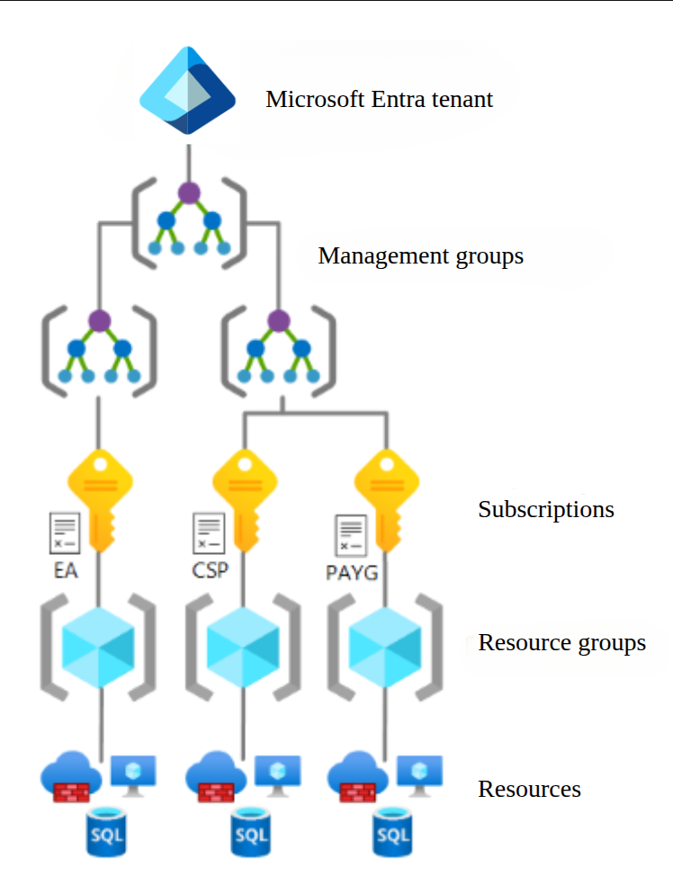
Azure Scopes
Let’s go through it one by one.
Tenant – Your Organisation’s Identity Home
A tenant is the highest level identity boundary in Azure. It basically represents your organization in Microsoft Entra ID, which was previously known as Azure Active Directory. This is where users, groups, applications, and identity-related settings are managed. Simply put, the tenant is your organization’s own dedicated space in Azure.
If a company is using Azure, it will usually have one tenant where all the employee identities, access controls, and authentication are connected. So before even thinking about resources, there is usually a tenant behind it.
This part can feel a little abstract in the beginning, which is normal. But later, when working with users, roles, or permissions, it starts making more sense.
Management Group – The Thing Nobody Tells You About
Management Groups are used to organize multiple subscriptions under a common structure.
This becomes useful in larger organizations where there may be many subscriptions for different teams, departments, business units, or environments. Instead of applying governance separately everywhere, management groups help apply policies and permissions at a higher level.
For example, if a company has separate subscriptions for development, testing, and production across multiple departments, management groups help bring some structure to that setup.
You may not use management groups daily as a beginner, but it is still good to know where they fit in the hierarchy.
Subscription – Billing and Access Boundary
An Azure subscription is one of the main billing and management boundaries in Azure. Resources are created inside subscriptions, and access control is also often managed at this level. A company may have one subscription, or it may have many. For example:
- one for development
- one for testing
- one for production
This separation helps with cost tracking, access management, and overall organization. It also reduces confusion, which matters more than people think.
A lot of practical Azure work starts from the subscription level.
Resource Group – Your Daily Driver
A resource group is basically just a logical container for related Azure resources. Say you’re deploying an application , you’d keep its virtual machine, storage account, virtual network, and public IP all inside the same resource group. Keeps things together.
Resource groups are very important in day-to-day Azure work. They help in organizing resources based on application, environment, or project.
Resource Group: rg-ecommerce-prod
├── App Service: ecommerce-api
├── Azure SQL: ecommerce-db
├── Storage Account: ecommercestorage
└── Key Vault: ecommerce-kv
Resources – The Actual Stuff You Build With
Resources are the actual services you create and use in Azure. This includes things like:
- virtual machines
- storage accounts
- virtual networks
- load balancers
- app services
These are the building blocks of your environment. Once the hierarchy above is clear, understanding where these resources belong becomes much easier.
Core Azure Services Every DevOps Engineer Should Know
1. Virtual Machines
Azure Virtual Machines are cloud-based servers. They’re one of the most basic and widely used services in Azure. A VM can host applications, run services, create test environments, or even act as a self-hosted agent for CI/CD pipelines.
For someone learning DevOps, VMs are useful because they make cloud infrastructure feel real. You can log in, configure software, check logs, manage services. It stops being just theory at that point.
2. Storage Accounts
Azure Storage is used to store data in different forms. Depending on the need, Azure provides different storage options such as –
- Blob Storage — unstructured files. Logs, images, backups, Terraform state files. This is what you’ll use the most.
- File Storage — managed file shares over SMB. Useful when apps need shared network storage.
- Queue Storage — simple message queuing.
- Table Storage — lightweight key-value NoSQL.
In DevOps work, storage often comes into use for logs, backups, deployment packages, application files, or VM disks. It is one of those services that quietly shows up everywhere.
3. Virtual Network – your private network inside Azure. Resources inside
A Virtual Network, or VNet, lets Azure resources communicate with each other securely.
This matters because not every resource should be exposed to the public internet. Some should stay internal. Some should only talk to specific services.
With VNets, you can define IP ranges, create subnets, and set up isolated communication between resources. If an application has frontend, backend, and database layers, networking becomes very important very quickly.
4. Network Security Group – inbound and outbound traffic rules. Your firewall.
A Network Security Group, or NSG, controls inbound and outbound network traffic. You can create rules like:
- allow SSH from a trusted IP
- allow HTTP and HTTPS traffic
- deny other unnecessary access
This is a key security concept in Azure. Even if someone is just starting, NSGs are worth understanding early because they directly affect how secure a resource is.
5. Application Security Group
An Application Security Group, or ASG, helps group virtual machines based on their role, so security rules become easier to manage.
This is where it differs from NSG.
An NSG is used to define the actual traffic rules.
An ASG is used to group resources logically inside those rules.
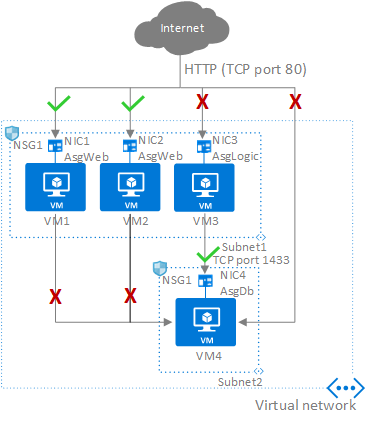
ASG
Suppose you have: 2 web servers ( VM1 , VM2 ) and 1 application servers (VM3)
Instead of creating NSG rules using private IP addresses for each server, you can put the web servers in one ASG and the application servers in another ASG.
Then the NSG rule can simply say:
Allow traffic from AsgWeb to AsgLogic on port 8080
So in simple words:
- NSG decides what traffic is allowed or denied
- ASG helps apply those rules in a smarter and more organized way
6. Load Balancer
Azure Load Balancer distributes incoming traffic across multiple backend resources.
Why does this matter? Because depending on one server is risky. If traffic spikes or a server goes down, a load balancer is what keeps the application running.
In production environments, this becomes very important. Maybe not on day one of learning, but definitely later.
7. Azure App Service
Azure App Service is a managed platform for hosting web apps and APIs. It’s useful when teams want to deploy applications without dealing with the underlying server directly. Azure handles most of the infrastructure side, so teams can focus more on the application and the deployment process.
For DevOps engineers, it’s good to understand both sides — server-based hosting like VMs, and platform-based hosting like App Service.
8. Azure Monitor
Monitoring is a huge part of DevOps work. Deploying is only half of it. Once something’s live, you need to actually know if it’s behaving, is the app healthy, is the server holding up, are errors quietly piling up somewhere.
Azure Monitor pulls in metrics, logs, and alerts from your resources and applications. CPU running hot? App throwing errors every few minutes? Azure Monitor catches it. Faster troubleshooting, less guesswork.
For example, if CPU usage shoots too high or an app starts failing repeatedly, Azure Monitor can help catch and report that. Makes troubleshooting easier — and sometimes a lot faster.
9. Identity and Access Management
Azure uses Microsoft Entra ID for identity and access management. This is what handles users, groups, roles, and permissions. In cloud environments, not everyone should have full access to everything.
That’d be messy and honestly a security disaster. For DevOps engineers, understanding role-based access matters because environments need to stay secure while still letting teams actually get their work done.
10. Azure and Automation
One of the biggest reasons Azure matters in DevOps is automation. Doing everything manually might work in very small setups, but it falls apart quickly. Manual work leads to inconsistency, repeated effort, and mistakes that are hard to trace back.
That’s why Azure environments are usually managed using tools such as:
- Azure CLI
- PowerShell
- ARM templates
- Bicep
- Terraform
With these tools, infrastructure and deployments can be repeated the exact same way every single time. And that repeatability — that’s really what DevOps is about.
Conclusion
It’s really not about memorizing every service Azure has. The structure matters more understanding the building blocks and how they actually fit together in a real setup.
Get the hierarchy straight first:
Tenant → Management Group → Subscription → Resource Group → Resources
Once that’s clear in your head, picking up virtual machines, storage, networking, monitoring, access management all of it starts clicking into place much faster.