


Sometimes we get the requirement to change the key-pair for some security reasons. In this article, we will be changing the key pair of running EC2 instances.
Steps:
1. Create a new key pair from AWS Console.
2. Generate Public key from newly created key pair ( Private Key ).
3. Paste the generated public key ( from Step 2 ) in ~/.ssh/authorized_keys of Server.
4. Delete the existing key from ~/.ssh/authorized_keys of Server
5. Perform ssh using new key.
I have a running EC2 Instance ( Ubuntu 14.04 ) having key-pair “testing-key”.

Let’s change the key
1. Create a new key pair from AWS Console
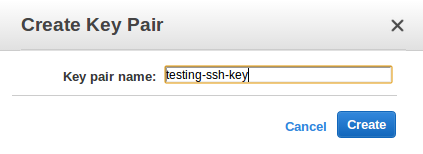
This is a private key that you have to download on your local machine.
2. Generate Public Key from Private Key (testing-ssh-key)
Execute
[js]"$ ssh-keygen -y"[/js]
and provide the path for private key.
Here “testing-ssh-key.pem” is the new private key

3. Append the above generated public key to ~/.ssh/authorized_keys
4. Remove the old key from ~/.ssh/authorized_keys ( “testing-key.pem” )
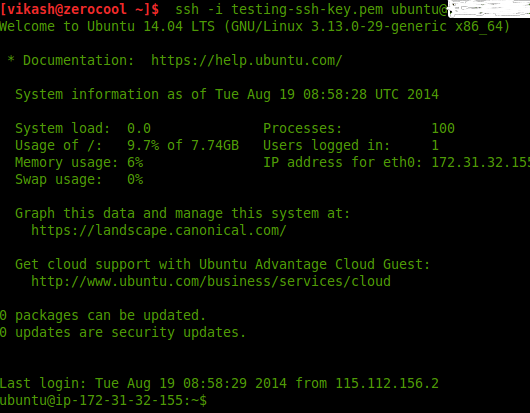
5. Perform ssh using new key
[js]
$ ssh -i testing-ssh-key.pem ubuntu@X.X.X.X
[/js]
You can now log in using new key.
Read more about our DevOps AWS capabilities.
Note: This article is not for changing key-pair if it is lost or deleted. Before performing below actions, it is advisable to take the backup of existing EC2 Instance.
Thanks. This worked perfectly. Only issue is the EC2 instance is still showing the old key name in dashboard. Any suggestions to change it to new name?
Yes i too tried this, but it doesn’t updates the key name in the dashboard, which might create a problem for a new person, if he doesn’t knows about the change of the perm file.
i followed the above steps for changing the key pair and i changed the authorized keys after that i am not able to login into my ec2 instance . please help me .thanks
Tks! Gread step by step. Solved my problem.
this doesnt help if you cannot get into the instance
Brilliant! It was the best article I’ve found about changing the key pairs. Tks heaps!