


Introduction
One year ago, I was suggested to use AI to write test cases. I got confused at that time — can AI really write test cases the way we do?
But then I thought, if AI can do so many things, why not test case writing? So, I decided to give it a try. Over time, I realized that AI in testing is not just helpful for writing basic test cases, but it can also help in identifying edge cases and real-world failure scenarios that are easy to miss.
Through this post, I want to share how I used AI in testing to improve test coverage in manual testing, especially in complex flows like checkout scenarios.
The Coverage Gap in Manual Testing
Manual testing relies heavily on human effort, which increases the chances of missing important scenarios. This often leads to gaps in test coverage. Before going further, let’s understand what test coverage is.
Test Coverage
Test coverage is the extent to which requirements and functionality are validated by test cases. It should include both positive and negative scenarios. Better test coverage helps reduce production issues and leads to smoother releases.
Common Issues
Even with proper planning, gaps can still exist in manual testing. Some common ones are:
- Missed edge cases
- Limited negative scenarios
- Regression gaps
- Cognitive bias
These gaps affect product quality. They can lead to production defects, lower stakeholder confidence, and unexpected issues for users.
Reasons Behind Coverage Gaps
- Tight deadlines shift focus to execution
- Difficulty identifying uncommon scenarios
- Over-reliance on happy path testing
- Limited time for deep test design.
How AI helps in Test Design
AI in testing can be a helpful assistant, but it cannot replace a tester. When used properly, it helps in identifying gaps and expanding test scenarios. It simply adds another layer of thinking without taking control away from the tester.
How I Used AI
When I started using AI in testing, I first created the basic functional test cases myself. Then, I used AI to expand them.
It helped me think about scenarios that I might not have considered, especially around unusual user behavior and boundary conditions. In some cases, where requirements were high-level, AI also helped me break them down into more structured test cases.
I also shared my existing test scenarios and asked if anything was missing. This helped me validate my approach and improve test coverage.
Validating AI-Generated Test Cases
While AI in testing helps generate additional test scenarios, it is important to validate the output before using it.
In my experience, I followed these steps to ensure quality:
- Reviewed each test case against the requirement
- Removed duplicate or irrelevant scenarios
- Adjusted test cases based on business logic
- Prioritized scenarios based on risk and impact
- This step ensured that AI-generated test cases were useful and aligned with real application behavior.
Practical Example: E-commerce Checkout
User Story: User should be able to place an order successfully.
Initial Test Cases:
TC_001: Add item to cart
TC_002: Proceed to checkout
TC_003: Apply the coupon
TC_004: Verify the discount
TC_005: Complete payment successfully
These were the basic functional scenarios covering the happy path.
Additional scenarios suggested by AI:
TC_006: Applying an expired or invalid coupon
TC_007: Changing the delivery address during checkout
TC_008: Payment succeeds, but the order is not created
TC_009: Network failure during the payment process
TC_010: User clicks “Place Order” multiple times
TC_011: Session expires during checkout
TC_012: Refreshing the page during the transaction
Impact:
After using AI, I noticed
- Increased edge case and negative scenario coverage
- Reduced time spent on scenario brainstorming
- Improved focus on critical business flows
Practical Experience Using Cursor AI
When I started using Cursor AI, my approach was simple. I wrote the primary scenarios myself and then shared the user story with the tool to expand the test cases.
I specifically asked it to:
- Add negative scenarios
- Suggest boundary cases
- Recommend alternate flows.
This gave me a broader set of test cases to work with and helped improve overall test coverage.
Benefits
- Faster initial drafting of test cases
- Better coverage of edge and negative scenarios
- Reduced effort in thinking of every possible variation
- More focus on logic rather than listing scenarios
Limitations
- AI requires clear prompts to give useful output
- All responses need manual validation
- Sometimes the output is too generic or too detailed
- It may not fully understand the business context
Prompt Used
Help me write test cases for my new task <Task Name>. Refer to requirements <Requirements>. Write all types of test cases like functional, UI, negative, edge cases, etc., include all, so nothing should be missed from a QA perspective. Provide:
- Test Scenario
- Test Case Description
- Test Steps
- Expected Result
Notes: Using the artifacts below, you can give the AI a well-defined prompt, which explains the complete requirement, so that no point will be missed.
- Task Name can be a JIRA ID link, which shows the complete description, or you can write the description of the requirements story.
- Requirements can be the Figma, PRD document, or any other document that explains the complete requirements.
- If the AI tool is unable to access the links, then you can describe the task with some scenarios and a screenshot (refer to the following screenshots)
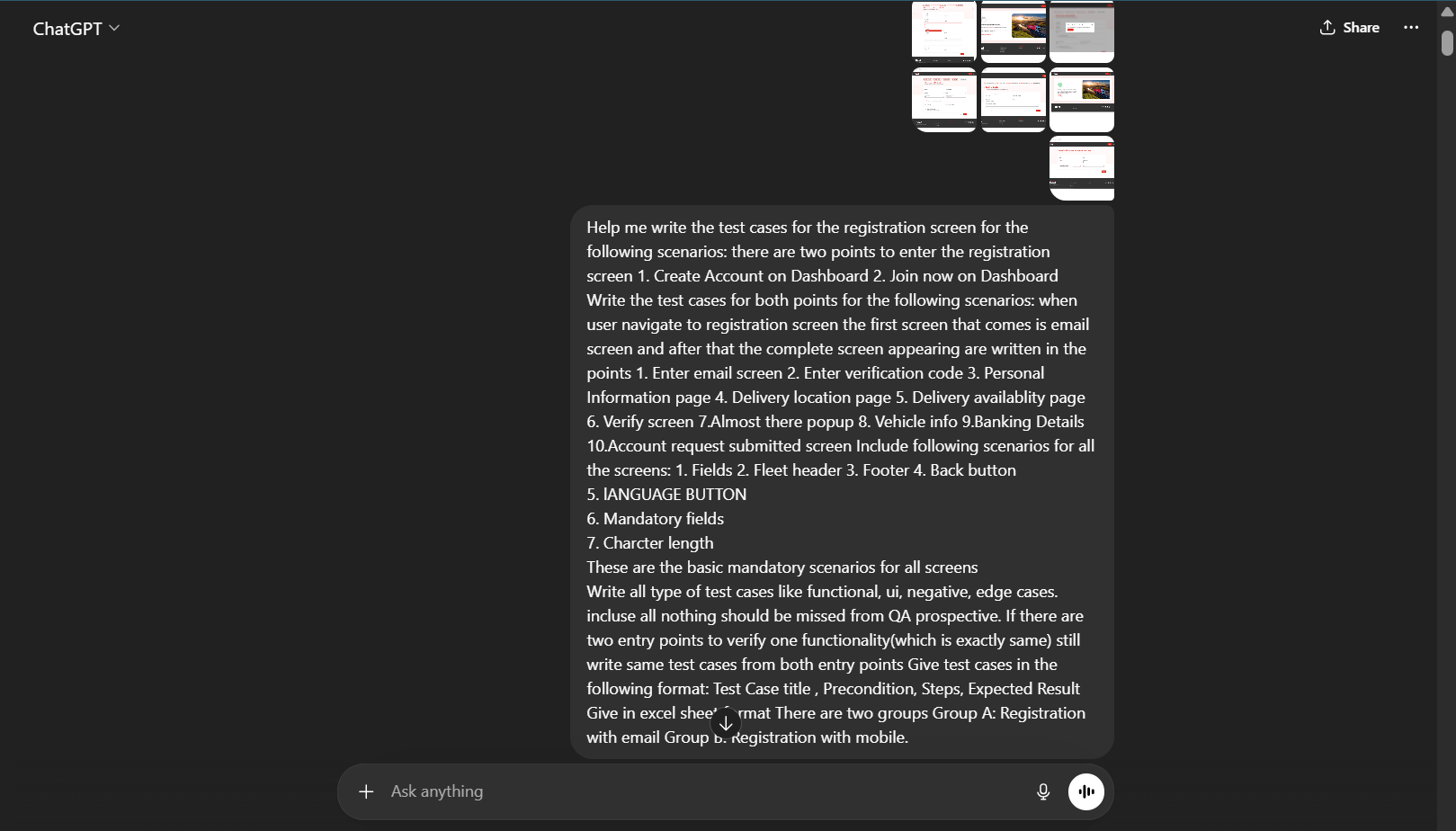
Prompt
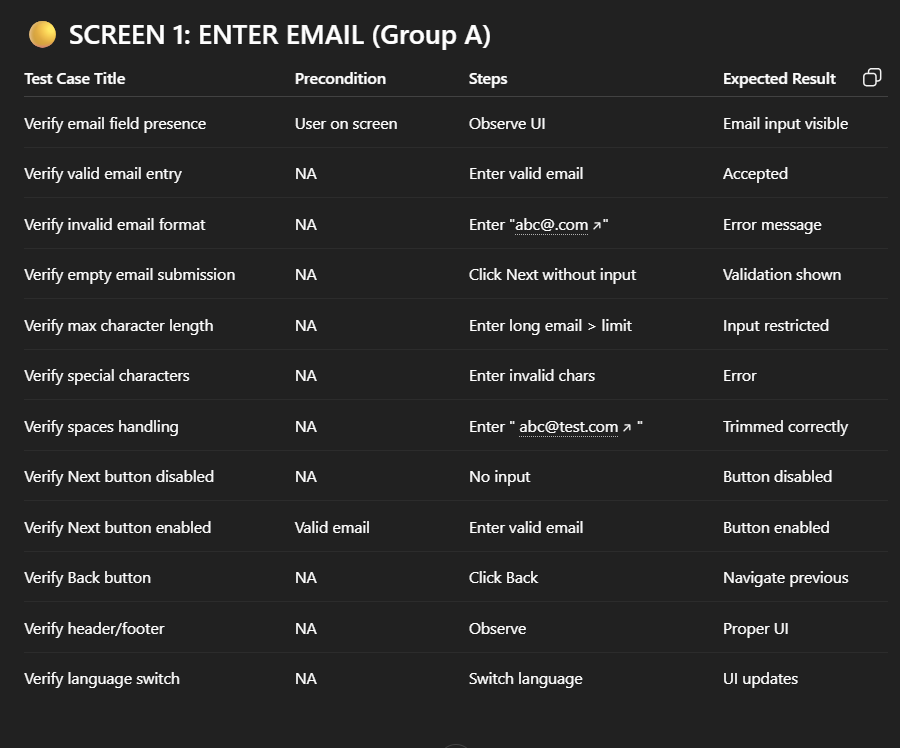
Response
Conclusion
AI tools enhance test coverage by expanding thinking and uncovering scenarios that are easy to miss during manual testing. However, they do not replace the tester’s role. The real value lies in using these tools effectively while applying domain knowledge and validation to ensure accuracy.
Key Takeaways
- AI helps improve test coverage by identifying hidden scenarios
- Manual validation is essential for accuracy
- Best results come from combining human expertise with AI suggestions
- Focus on using AI for complex and edge case scenarios