Architecting with Multi-Account AWS Organizations: How to Design Your Organization
Introduction
Picture a busy factory — one large room where designers, testers, builders, and even the CEO are working shoulder to shoulder. Machines hum as prototypes are built right next to the production line, all sharing the same tools, the same power supply, and the same cramped space. Sounds messy, doesn’t it?
One of our clients was facing the same issue running everything — development, testing, and production — all in a single account. It all seemed pretty straightforward at first. But as their workloads increased, that setup became a constant headache. The costs were confusing, scalability hit limits, and security started to slip through the cracks. Developers had too much access to production, and the monthly bill was a huge puzzle that gave no visibility into where money was actually being spent. To fix this, we are in the process of rebuilding their AWS structure with AWS Organizations, a service designed to manage and govern multiple accounts in one place. The concept was simple: we wanted a secure, scalable, and cost-effective setup in which each environment could be self-contained but still follow one governance model.
The Old Way: One Account, Too Many Problems.
In the beginning, everything was created inside one AWS account. It worked fine when there were only a few people managing it. But as teams grew, so did the chaos. Developers, testers, and operations were all deploying into the same environment. Security groups were reused across stages, IAM roles were shared, and even production credentials were lying around with more people than they should have been. The worst part? Costs were a mystery. With everything billed under the same account, it was almost impossible to separate Development, UAT, and Production expenses. Logs from all environments were mixed up, so tracking issues or doing audits took ages. And scaling? Every infrastructure change carried the risk of breaking something critical in Production.
Modern Architecture: Re-defining Environments with AWS Organizations.
To solve this, we implemented a fresh design using AWS Organizations. This enabled us to split each environment into its own AWS account while still managing everything from one centralised structure. Finally, each account got its own space, its own budget (a limited amount of funding), and its own access boundaries — but everything was still being governed consistently.
Here’s what the new architecture looked like:
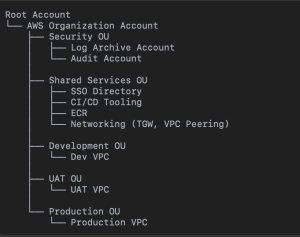
Flow Chat
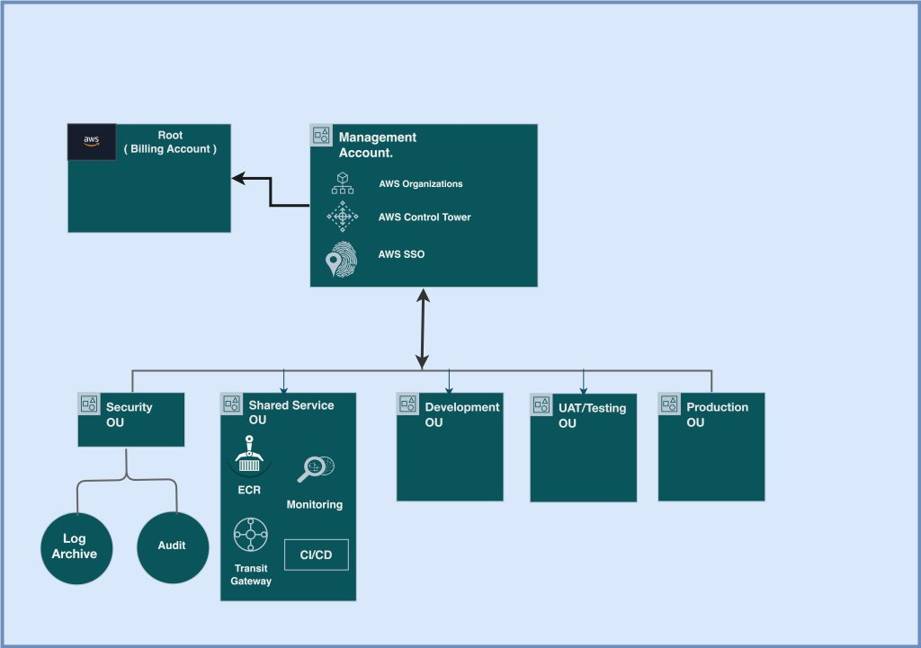
Architecture Diagram
Root Organization:
The main control centre for the entire AWS landscape. It’s managed through AWS Organizations and AWS SSO (now IAM Identity Centre), and it ties into AWS Control Tower for governance and guardrails.
Security OU (Organizational Unit):
This is where all security and compliance-focused accounts live.
• Log Archive Account: Stores logs from every environment — CloudTrail, AWS Config, and more — in a secure, read-only location.
Shared Services OU:
It will include all the shared platforms and tools like CI/CD pipelines, ECR (Elastic Container Registry), logging and monitoring systems & networking services, including Transit Gateway and VPC Peering. Centralizing these avoids duplication and keeps everything consistent. This new setup at long last put clean boundaries between environments — ones that could be secure, isolated, and scalable. It gave developers the freedom to move fast and operations the visibility and control they were looking for.
Why AWS Organization-Based Design Just Works
The new design transformed three major areas — security, cost management, and Scalability.
Security:
Isolation was the real game-changer. Each account became its own security bubble. If something broke in Dev — say, a key was leaked — the breach couldn’t spread. Production stayed safe. All actions across accounts were logged centrally into the Log Archive Account, ensuring full traceability and immutability. Organization-wide AWS Security Hub and GuardDuty findings flowed into the Security OU, giving teams a single, consistent view.
Cost Management:
When we enabled consolidated billing with AWS Organizations, everything finally started to make sense. For the first time, every environment had its own check — no more late-night “is it burning right now?” guessing games about which project was burning through resources. They could actually see where the money was going and who was spending it. We also added budgets and alerts at the account level to keep things in check before costs got out of hand. And honestly, something as simple as tagging each resource with “Environment” and “Owner” made a world of difference. Suddenly, tracking costs wasn’t a guessing game anymore — it was clear, organized, and transparent.
Scalability:
Now, each account was free to scale on its own schedule. New environments could be spun up in Dev and never touch UAT or Prod. Networking was designed as hub-and-spoke, with a Shared Services account hosting Transit Gateway connections across all environments. As the company grew, they could keep onboarding new accounts smoothly using the same governance model — no re-architecture necessary.
The Migration Journey: What We Learned.
On paper, this all looks neat and tidy. But the migration? That was a different story.
Resource Migration
Moving resources such as EC2, RDS, and S3 between accounts isn’t a copy-paste operation. Many services are tightly coupled to the account where they were originally created. So, we rewrote some things from scratch and took a gradual approach to migrating data using AWS DataSync and Database Migration Service (DMS) — without any downtime.
At the same time, we moved the client’s former monolithic system to a microservices-based architecture. That allowed us to containerize the important parts, make it more deployable and adhere to the new multi-account setup. Scaling and updates became smoother, with each microservice being deployable independently on any environment.
Networking Rework
The old config had overlapping CIDR blocks – a classic pain point. We had to re-architect the IP plan and connect everything via TGW so all of these have their clean address space.
IAM and Access Control
All users and roles had been in a single account before. At that time, we switched to a multi-account setup on AWS SSO. Now, if the users had roles assigned to them, they were automatically put into the right accounts — developers in Dev, testers in UAT, and ops in Production. All roles were created by CloudFormation StackSets, and everything looked the same.
Data and Cost Tracking
We used tagging to keep us in sight during migration. Since new accounts didn’t have a billing history, AWS Cost Explorer was used to correlate old and new costs. Each resource is tagged with its env and owner to help remain transparent.
Compliance and Monitoring
For all accounts, CloudTrail and AWS Config were turned on with logs streaming to the Log Archive Account. Guardrails in the Control Tower made sure that no one swayed from standards of compliance.
Post-Migration Benefits
The minute we flipped the switch, there was a big difference.
• The client was now able to see a transparent cost separation broken out across environments.
• Developers could play around without the fear of crashing production.
• Security teams were delivered a single pane of glass with which to monitor and identify Threats.
The new architecture is an order of magnitude more scalable, secure, and maintainable. Creating a new team or environment was as simple as spinning up a separate AWS account inside the company. Centralised IAM and SSO reduced access complexity, and audits that used to take days could now be completed in hours. For DevOps, automation became smoother. Code was securely promoted between environments using cross-account IAM roles and CI/CD pipelines within the Shared Services Account. ECR images could be shared — it was the same image pulled and pushed on multiple accounts, with no replications when deploying.
Conclusion
Transitioning from a single AWS account setup to a multi-account organization is not just an upgrade — it is a paradigm shift. It takes planning, patience and precision, but the long-term payoff is huge. This paradigm shift meant that our client was now able to benefit from the latest security standards, increased cost transparency, and higher scaling options. That mess we replaced with a well-architected AWS Organization — where each account was assigned to their own dedicated Development, UAT and Production accounts, all supported by our central Security and Shared Services.